CLAUDE.md File: How to Write Instructions Claude Code Can Use
“I put a CLAUDE.md at the repo root and Claude Code still ran the wrong test command.” That report usually points at placement, or at a line that never had a chance to work, not at the file format. A CLAUDE.md file is a markdown file you write to give Claude Code standing context about a project. When a session starts, Claude Code finds the copies that match your working directory, merges them into one context, and reads the result as instructions for that session. Keep it small, put each rule at the scope where it belongs, and confirm that a line changes an outcome before you keep it.
What is a CLAUDE.md file, and when does Claude Code read it?
The file is markdown you write, and the load rules decide which copies reach a session. Claude Code reads what lands as context. There are no switches or defaults inside it, so nothing you write there turns a feature on. What the file does is tell the agent what a good change looks like in this repository: the command that proves a task is finished, the naming a reviewer keeps fixing, where code lives, and which paths deserve a question before an edit.
What the file does, and what it does not
A file full of instructions still leaves the model deciding how to apply them. Claude Code tries to follow what it reads, so a vague line, or two lines that disagree with each other, gives you an inconsistent result even when the file loaded correctly. Concrete, checkable lines are the ones that hold. “Use 2-space indentation” gives the agent something it can match against a diff; “format code properly” hands it a judgment call.
One more boundary matters early. The file governs the session, and the sandbox is a separate thing. Instructions are context, so they shape what the agent attempts; what the environment permits comes from your access controls. Keep production credentials locked down with the tools you already use for that job.
Who writes it: you or Claude
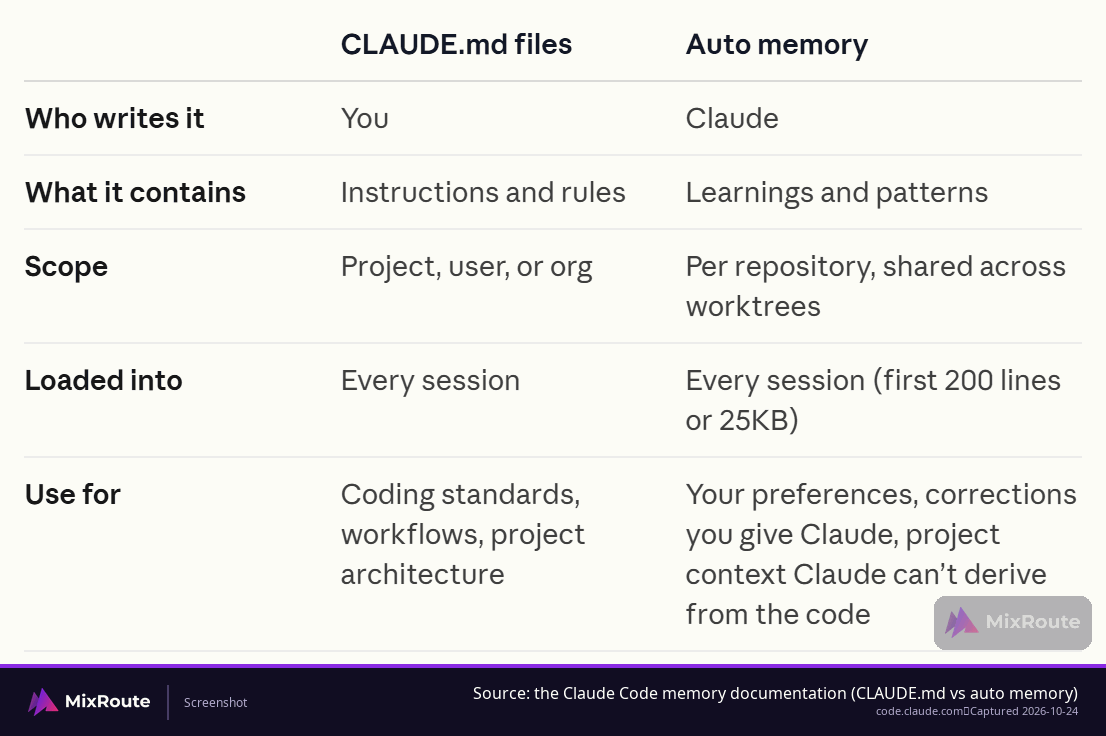
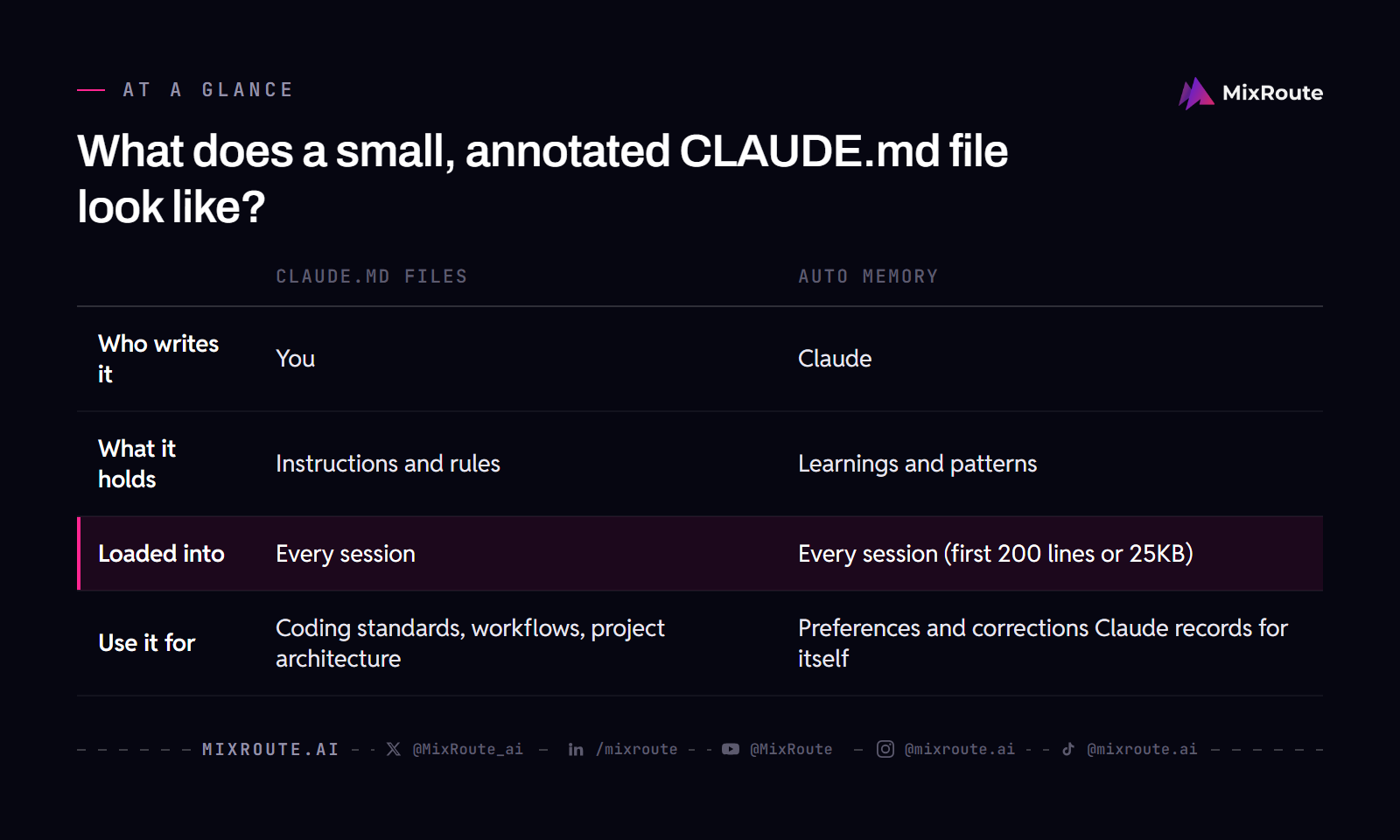
Claude Code keeps two memory surfaces, and which one you edit depends on who wrote what is in it. Auto memory holds notes Claude writes for itself after you correct it. The CLAUDE.md files hold instructions you write and maintain, and that split decides which one belongs in a pull request.
| CLAUDE.md files | Auto memory | |
|---|---|---|
| Who writes it | You | Claude |
| What it holds | Instructions and rules | Learnings and patterns |
| Loaded into | Every session | Every session (first 200 lines or 25KB) |
| Use it for | Coding standards, workflows, project architecture | Preferences and corrections Claude records for itself |
That split also tells you which surface to fix when something goes wrong. A rule the whole team should follow belongs in the file you review and version. How you personally like commit messages phrased can stay where Claude keeps it.
When it loads, and what waits
Loading happens at the start of a session, for the scopes in play. Open Claude Code in a project directory and the project file and your user file arrive together. Before you debug anything else, run /context and check the list under Memory files to see which ones made it into context.
Files in subdirectories wait their turn. A nested CLAUDE.md loads on demand, when Claude works with a file in that directory, which is why a repository with forty folders does not need forty instruction files. One project file carries the repository-wide rules, and a nested file carries what only applies in that corner of the tree.
Where does a CLAUDE.md file live, and which scope wins when several load?
Placement answers a team question before a technical one: who needs this instruction, and should it travel with the repository? Five locations load, and each one reaches a different audience.
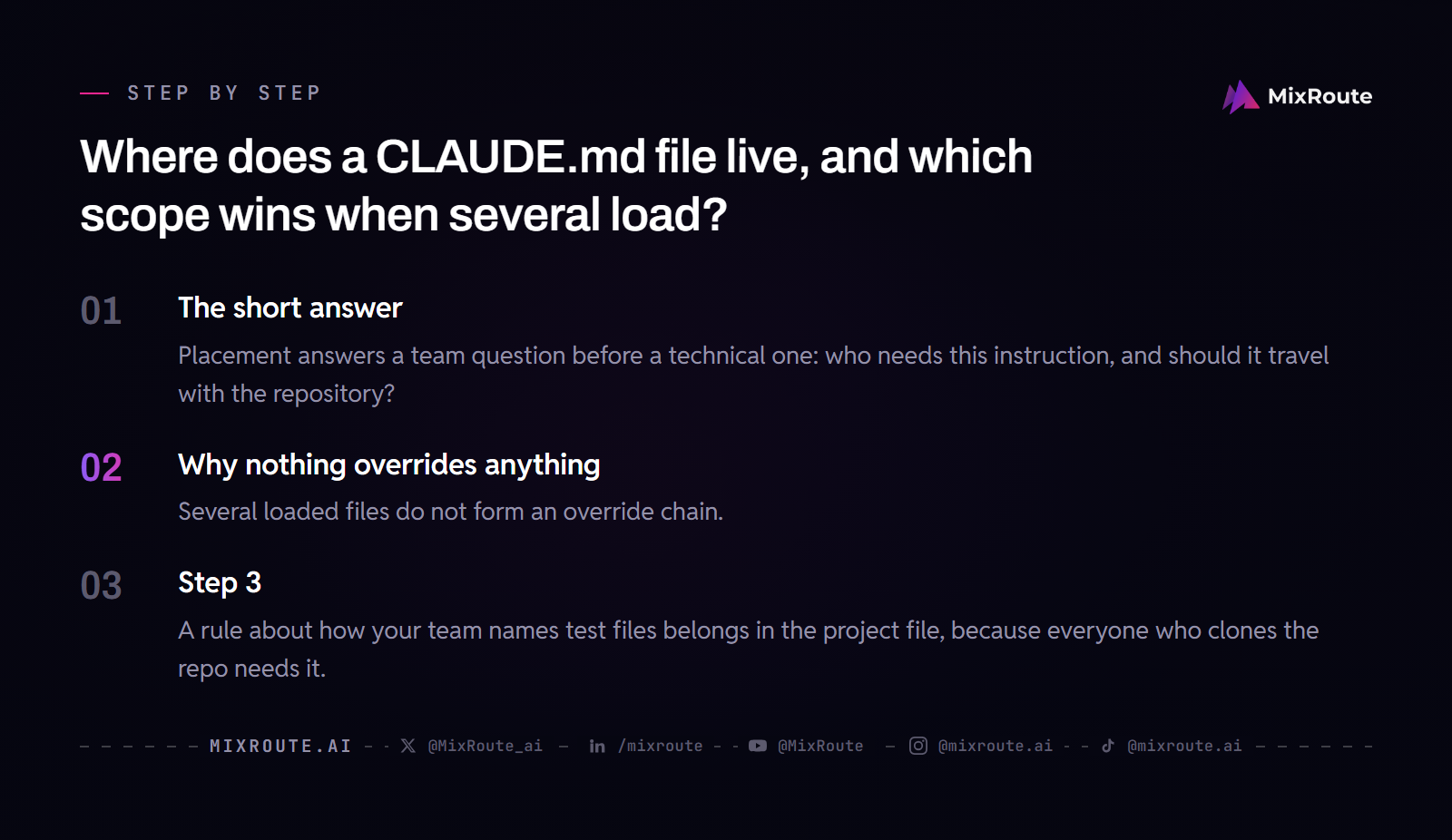
| Scope | Location | Who sees it |
|---|---|---|
| Managed policy | /Library/Application Support/ClaudeCode/CLAUDE.md on macOS, /etc/claude-code/CLAUDE.md on Linux and WSL, C:\Program Files\ClaudeCode\CLAUDE.md on Windows |
Everyone in the organization |
| User | ~/.claude/CLAUDE.md |
You, in every project |
| Project | ./CLAUDE.md or ./.claude/CLAUDE.md |
Teammates, through source control |
| Local | ./CLAUDE.local.md |
You, in this project only |
| Nested | A CLAUDE.md inside a subdirectory | Loads on demand when Claude works with files there |
A rule about how your team names test files belongs in the project file, because everyone who clones the repo needs it. A preference about your own shell shortcuts belongs in the user file. An instruction that only makes sense against your local sandbox belongs in CLAUDE.local.md, which you keep out of version control.
The managed policy file is the layer you cannot switch off, which is why company-wide standards and compliance requirements belong there and personal preferences do not.
Why nothing overrides anything
Several loaded files do not form an override chain. Claude Code concatenates everything that loads into a single context, so no rule engine settles a contradiction. Picture a whiteboard: each file’s lines get copied on in order, both versions of a conflicting line sit there, and the model reads them together.
When two files disagree, Claude may pick either line arbitrarily. Files closer to where you launched Claude are read last, but neither one overrides the other. A deliberate, narrowly scoped override such as a local file that swaps a sandbox URL is the easy case. An accidental disagreement you find three sessions later costs more than cleaning it up now, so delete the losing line instead of trusting load order to referee.
What does a small, annotated CLAUDE.md file look like?
A workable file carries five short blocks. Each line earns its place by preventing a mistake that has already happened at least once, which is also the test for what to leave out.
# acme-api

## Commands
uv sync
uv run pytest -q
uv run pytest tests/test_billing.py

## Conventions
YAML uses 2-space indentation
Use the configured logger; no print() in committed code

## Layout
API handlers: src/api/handlers/
Models: src/db/models/
Migrations: alembic/versions/

## Terms
"ledger" is the append-only billing table, not a bank ledger

## Guardrails
Never run migrations against staging or production
Ask before changing anything under src/billing/
A note on each block
The commands block usually pays for itself first. uv sync and uv run pytest -q are two lines that end a whole category of correction, because an exact command beats a description of your process. A new teammate reads this block before anything else in the file.
Conventions hold the rules a reviewer keeps repeating, so keep each one checkable: an indentation width, a logger instead of a print statement, a required field on a struct. “Write clean code” is not a convention, because two reviewers would grade it differently.
Layout answers the question the agent would otherwise answer by searching. Three directories with a purpose each is enough. A full file tree is not, because the agent can run that command itself and the output will be more current than your copy.
Terms cover words your team uses that mean something else elsewhere, one line per term, in the form “x means y, not z”. When you catch yourself redefining the same word in a prompt for the third time, it has found its home.
Guardrails name the paths where a mistake is expensive. Treat them as a speed bump rather than a fence, and back them with the access controls that actually restrict what the session can touch.
Group related lines under markdown headers and keep them as bullets. Organized sections are easier to follow than dense paragraphs, and the example above is a shape you can take in at a glance.
Vague line, concrete line
Rewriting a soft preference into a checkable instruction is the fastest edit you can make to a file you already have. The pairs below show the difference.
| Instead of | Write | Why it lands |
|---|---|---|
| Format code properly | Use 2-space indentation | Matchable against a diff |
| Test your changes | Run npm test before committing | Names the command and the moment |
| Keep files organized | API handlers live in src/api/handlers/ | Names the destination |
Each rewrite trades a category for a decision. The vague version asks the model to guess your standard; the concrete version lets it copy what you already know.
How do you test whether an instruction actually changed the task?
Two different failures look identical from the outside: a file that never loaded, and a rule that loaded and did nothing. Separate them in that order.
Confirm the file loaded
Run /context and read the list under Memory files. It shows the CLAUDE.md and CLAUDE.local.md files that loaded at launch, and a launch-time file missing from that list is not in context. A nested file in a subdirectory does not appear there, because it loads on demand; a Loaded line with its path shows in the terminal when it does. /memory is for opening and editing the files, and it also lists entries for files that do not exist yet, so it cannot confirm a load. If one is missing, check the filename and the directory before you touch the wording. A file that does appear is available as context for the task, which still does not prove that any single line in it changed an output.
Run the same task twice
Pick the task you actually care about, something like “add a field to the billing handler and run the tests”. Start from the same commit and the same message, with the instruction in place, and note what the run does. Remove that one line, reset to the same state, and run it again. What you compare is the single behavior the line was written for, not a character-by-character match, because a fresh run can differ for reasons that have nothing to do with your edit.
A line that changes nothing across a couple of attempts is a candidate for deletion or for a more concrete rewrite. A line that changes the behavior you wanted stays, and it stays short.
A temporary canary line
Practitioners sometimes add one line they can spot from a distance, such as an instruction to always address them by a particular name, and read a missing greeting as a sign the file stopped being followed. That is a habit for tuning a file, not a measurement of any model, and it spends context like any other line. Keep it while you are checking a new file, then take it out.
Where a CLAUDE.md file fits in an AI-assisted coding workflow
Every correction you type twice is a candidate for the file. The pattern is a loop you run while working: hit a task, notice the correction, decide whether it is a one-off or a standing rule, then add one line. A file built this way stays small, because every line has a mistake behind it.
The triggers for a new line are narrow:
- Claude makes the same mistake a second time.
- A code review catches something the agent should have known about this codebase.
- You type a correction you typed last session.
- A new teammate would need the same context to be productive.
Each of those is a mistake that already reached a real diff, which is what keeps the file from filling up with advice nobody has needed yet.
Turning a repeat correction into one line
The useful content is what the agent cannot reliably infer from the repository: build and test commands, team conventions, domain terms, and risky paths. Anthropic’s memory docs put the target at under 200 lines per CLAUDE.md file, because longer files consume more context and reduce adherence. That target points the same way as the audit habit: when a rule stops preventing mistakes, cut it.
Instructions that matter for only part of the codebase belong in path-scoped rules under .claude/rules/, which load when Claude works with matching files instead of in every session. What buys back context here is the file-type scoping.
The /init command writes a first draft by scanning the project. That draft tends to restate facts the agent can already find in the code, so treat it as raw material and cut it down to the lines only your team knows.
Why imports do not lower the context cost
An @path import such as @docs/api-conventions.md keeps a long file readable, and it does not shrink what reaches the model. Imported files load at launch too, so their lines count against the same context budget. Imports organize a file; path-scoped rules scope it.
When the habit of handing work to an agent is new, the correction loop behind vibe coding walks through the same cycle on a real change, which makes the first few lines of your file easier to choose.
CLAUDE.md, AGENTS.md, and .claude/rules: what goes where
Three instruction surfaces exist, and a team often ends up running two of them on purpose. Other tools read AGENTS.md, and file-type rules do not need to load for every task.
| Surface | What it holds | When it applies |
|---|---|---|
CLAUDE.md |
Instructions you write for Claude Code | Every session, for the scopes that load |
AGENTS.md |
Repository instructions other coding tools also read | Read in place of CLAUDE.md, or through an @AGENTS.md import |
.claude/rules/ |
Topic files of instructions, optionally scoped to file paths | Every session, or only when Claude works with matching files if the rule has paths frontmatter |
AGENTS.md, with version conditions
A repository’s AGENTS.md can serve as the project instructions, so a team that already keeps one does not have to maintain a second file. Support depends on the version you are running: confirm v2.1.277 or later. On Amazon Bedrock, or with telemetry disabled, v2.1.281 or later is the bar. The first session after upgrading from v2.1.276 or earlier may not read AGENTS.md until the next session, which is the kind of thing that looks like a broken file for an afternoon.
The import form @AGENTS.md inside CLAUDE.md works too, and it stays useful when some of your sessions cannot read AGENTS.md directly. Teams that maintain instructions for more than one agent can compare how Claude Code and Codex behave on the same repository before they decide to split the files.
By default Claude reads AGENTS.md only when there is no CLAUDE.md or CLAUDE.local.md in your working directory or above it; with either one present, it reads your CLAUDE.md files only. To load both, run /config and set Project instructions to claude-md-and-agents-md. In the combined mode, each directory’s CLAUDE.md files come first and its AGENTS.md after them, and Claude Code skips an AGENTS.md it has already loaded, so an import or a symlink does not put a second copy in context.
The symlink case, and Windows
Point a CLAUDE.md symlink at AGENTS.md and Claude reads the content through the link. The Edit and Write tools refuse to write through a symlink, and the refusal sends the edit to the link’s target instead. On Windows, creating a symlink needs Administrator privileges or Developer Mode, and Git checks a committed symlink out as a plain text file unless core.symlinks is enabled. A teammate on that platform ends up with a one-line CLAUDE.md where your instructions should be, so use the @AGENTS.md import there. Symlink handling can change between releases, so check the version you are running before you lean on it.
Where CLAUDE.md stops and the model call starts
The instruction file and the request your own application sends are separate hops, with separate keys and separate places to look when something goes wrong.
What the instruction file covers
CLAUDE.md shapes what Claude Code does inside your editing session: the files it opens, the commands it prefers, the conventions it applies in a diff. Those instructions never leave your machine as part of your product’s traffic, and they do not travel with a request your backend makes at runtime.
The request your app sends
That request is its own call, with its own authentication and endpoint. MixRoute serves an Anthropic-compatible Messages endpoint at POST https://api.mixroute.ai/v1/messages, using the native Anthropic request and response format. The required fields are model, messages, and max_tokens, and the call carries an Authorization: Bearer <MixRoute key> header plus anthropic-version: 2023-06-01.
Moving an existing Anthropic SDK client across is a two-value change: keep the same client and the same client.messages.create call, and set the key and the base URL to https://api.mixroute.ai, without /v1 on the end. An OpenAI-compatible client takes a different two-value change: point the base URL at https://api.mixroute.ai/v1 and keep the model name. Your CLAUDE.md file stays exactly where it is, because nothing about the instruction file changes when the endpoint does.
If that call is the part you are reconsidering, compare what the same model and token volume would cost through MixRoute, then send one request through the Messages endpoint with a test key.
FAQ
Do I need a CLAUDE.md file in every folder?
No. The project file covers the repository, and a nested file loads only when Claude works with files in that directory. Add one under a subdirectory when that corner of the tree has rules the rest of the repo would have to skip past, such as a database layer with its own migration rules. Everything the whole repository shares belongs at the root, where it loads once and covers every session.
Which file wins when two CLAUDE.md files contradict each other?
Neither one wins automatically. The files are concatenated into a single context, so there is no rule engine to break the tie, and Claude may pick either line arbitrarily. The practical fix is to decide which line you actually want and delete the other one. A deliberate override, such as a local file that swaps a sandbox URL, is fine to leave in place.
How do I check that Claude Code loaded my file?
Run /context and check the list under Memory files. It shows the CLAUDE.md and CLAUDE.local.md files that loaded at launch, and a launch-time file missing from it is not in context; a nested file in a subdirectory loads on demand and does not appear there. When a file is missing, look at the filename and the directory before you rewrite the contents, because a file in the wrong place never gets a chance to influence anything. Being listed only means the lines are available as context; it does not tell you that any particular line changed an output, which is a separate test.
Should the project CLAUDE.md file be committed?
Yes. The project file is the copy your teammates share through source control, and it is the one a reviewer can comment on. Personal settings for the same project go in CLAUDE.local.md, which you add to .gitignore so a sandbox URL or a test account never lands in a review. If a line feels like a team rule but only makes sense on your machine, it is local, and the next person who clones the repo will not miss it.
Can Codex, Cursor, or another agent read the same instructions?
Yes, through AGENTS.md. Claude Code reads it directly on v2.1.277 or later (v2.1.281 or later on Amazon Bedrock or with telemetry disabled), and by default only when there is no CLAUDE.md or CLAUDE.local.md in your working directory or above it. If you keep both files, add an @AGENTS.md import to CLAUDE.md or set Project instructions to claude-md-and-agents-md. The first session after an upgrade from v2.1.276 or earlier may not read it until the next session, so a file that looks ignored right after an upgrade is worth one more session before you blame the contents. Where the whole team works in one tool, a single CLAUDE.md is simpler.
Does the filename have to be uppercase?
Practitioner reports say yes: only the exact CLAUDE.md spelling loads, and claude.md or Claude.md does not. That case rule comes from practitioner write-ups rather than a documented statement, so treat it as a strong hint. If a file seems to be ignored, run /context, look for it under Memory files, and check the spelling before you rewrite the contents.
If CLAUDE.md is for Claude Code, where does the API call in my app fit?
They are separate hops. The instruction file shapes your editing session; the request your application sends carries its own key and endpoint. MixRoute serves an Anthropic-compatible Messages endpoint at POST https://api.mixroute.ai/v1/messages, where model, messages, and max_tokens are required, so an Anthropic SDK client only changes the key and the base URL. Your CLAUDE.md file stays where it is either way.