Pay for AI API Credits With Crypto: USDT, USDC, BTC, and More
You can pay for AI API credits with crypto by funding a MixRoute balance with USDT, USDC, BTC, ETH or PYUSD, then calling GPT, Claude, Gemini and 250+ other models through one OpenAI-compatible endpoint. Anthropic’s billing help page describes prepaid credits bought in its Console and monthly invoicing arranged through Sales, with no crypto option, and Google bills the Gemini API through a Google billing account. A gateway is the working route. Register at console.mixroute.ai, top up from $10 on the Starter tier, and the full amount arrives as credit that never expires.
Who accepts crypto for AI API access
Neither Anthropic nor Google lists crypto as a payment method (checked 2026-10-19), while MixRoute accepts USDT, USDC, BTC, ETH and PYUSD.
| Provider | Crypto listed | How billing works |
|---|---|---|
| Anthropic | No | Prepaid credits bought in the Console, or monthly invoicing set up through Sales |
| Google (Gemini API) | No | Prepay or postpay through a Google billing account with a payment method on file |
| MixRoute | Yes | USDT, USDC, BTC, ETH, PYUSD, plus Visa, Mastercard and JCB. Business plans: card, crypto or bank transfer. Enterprise: mainly bank wire with an invoice |
Both providers set up billing inside their own consoles, around a payment method on file or an invoice. Someone who holds only stablecoins has no direct route there. The models are open to everyone, and the checkout is what stops people.
OpenAI sets its own billing methods in its platform account, so check the payment page there before assuming. If you want GPT models paid for in crypto, the same MixRoute balance covers them.
Exactly which coins run on which networks
MixRoute takes five coins, and each one runs on a different set of networks. Check the pairing before sending anything, because a transfer on a network the address does not support usually means the funds are gone for good.
| Coin | Supported networks | Options |
|---|---|---|
| USDT (Tether) | Ethereum, Arbitrum One, Polygon, Solana, TON Network, Tron | 6 |
| USDC | Ethereum, Arbitrum One, Polygon, Solana | 4 |
| PYUSD (PayPal USD) | Ethereum, Solana | 2 |
| BTC (Bitcoin) | Bitcoin native, plus Lightning Network | 2 |
| ETH (Ether) | Ethereum mainnet | 1 |
USDT has the widest coverage at six networks, so it gives you the most routes in.
USDC is not available on Tron or TON. A USDC transfer sent on Tron will not arrive. Use Ethereum, Arbitrum One, Polygon or Solana.
Bitcoin includes Lightning. On-chain Bitcoin fees and confirmation times do not scale down well for small top-ups, and Lightning makes small, frequent deposits practical.
ETH runs on mainnet only, so you pay mainnet gas whatever the size of the transfer. That is fine for a large deposit and poor for a small one. If you hold both ETH and a stablecoin, the stablecoin will usually be cheaper to send.
Say your USDT sits on an exchange: the withdrawal form asks you to pick a network, and that choice has to match the network of the MixRoute address you pasted. The deposit screen warns that sending funds on the wrong network results in a loss of funds.
For the USDT path in detail, see pay for AI APIs with USDT across six networks.
The cheapest route for each coin
Once you know what is available, the choice is transfer cost, and the cheapest route is usually the network where your coins already sit. Fees fluctuate, so treat the table as relative guidance.
| If you hold | Send on | Avoid |
|---|---|---|
| USDT | Tron or Solana | Ethereum, unless your funds are already there |
| USDC | Solana or Polygon | Ethereum, and note Tron is not an option at all |
| PYUSD | Solana | Ethereum, unless your funds are already there |
| BTC | Lightning for small amounts | On-chain for small amounts, where fees dominate |
| ETH | Ethereum, the only option | Nothing to avoid, but expect mainnet gas |
Ethereum mainnet gas is the highest on this list and does not shrink with transfer size, so it hurts most on small deposits. Use it when that is where your funds sit and bridging would cost more than sending directly. Solana is the cheap rail that covers all three stablecoins.
The network fee goes to the chain, not to MixRoute, which charges a 0% platform fee on top-ups. Three habits prevent almost every deposit problem:
- Send only on a network the deposit screen lists for that coin.
- Send the coin the screen names, not a wrapped or bridged version of it.
- Allow for the sender fee. If you send exactly the amount you want credited, some wallets take the network fee out of it.
How an AI API gateway solves it
An AI API gateway lets you pay one party and call many providers. You hold one balance and one API key, and the gateway settles with each underlying provider behind the scenes.
Because you pay the gateway rather than the model provider, the gateway decides which payment methods it takes. If it accepts USDT, USDC or another coin, your balance reaches every model it routes to, including models from providers that do not offer crypto billing themselves.
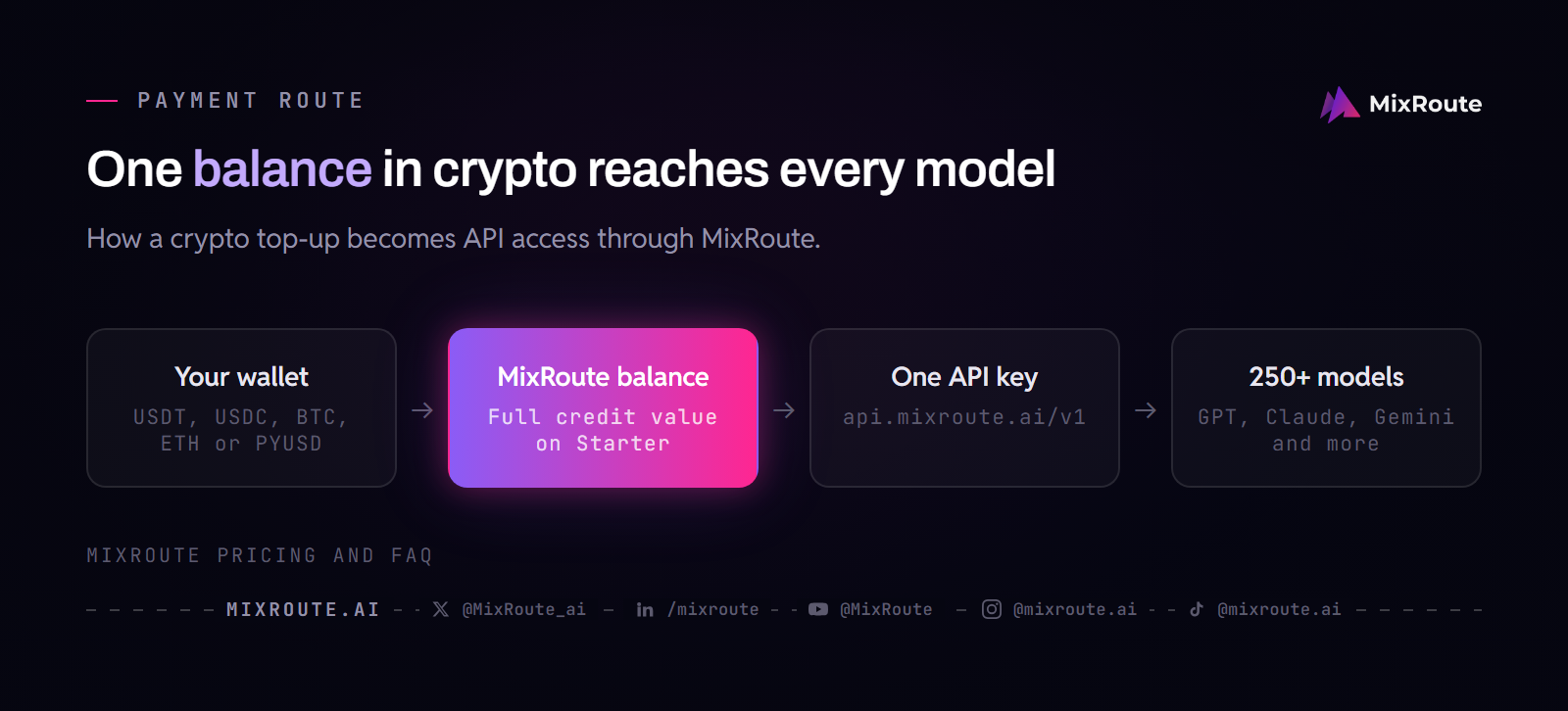
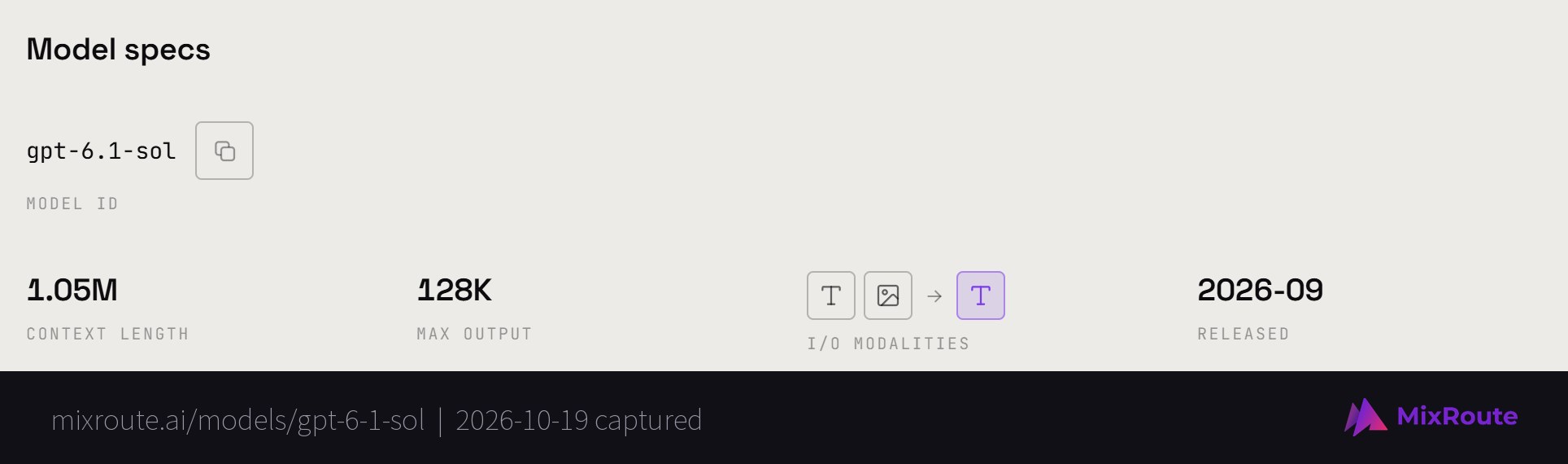
MixRoute speaks the OpenAI-compatible format, so moving an existing app over means changing a base URL and a model string. The model ID is not always the page slug: GPT-6.1 Sol lives at /models/gpt-6-1-sol/ and its ID is gpt-6.1-sol, so copy the ID from the model page.
from openai import OpenAI

client = OpenAI(
    api_key="sk-your-mixroute-key",
    base_url="https://api.mixroute.ai/v1",
)

# Call a GPT model
response = client.chat.completions.create(
    model="gpt-6.1-sol",
    messages=[{"role": "user", "content": "Hello"}],
)

# Switch to Claude by changing only the model name
response = client.chat.completions.create(
    model="claude-sonnet-5-5",
    messages=[{"role": "user", "content": "Hello"}],
)
Same client library, same request shape. Only the way the balance got funded is different. Each request is deducted from that balance right after it completes, with no minimum spend, so paying per call is the default behavior.
If the next step is to manage several providers through one route, see choose an AI API gateway for crypto payments.
How to pay for AI API credits with crypto: step by step
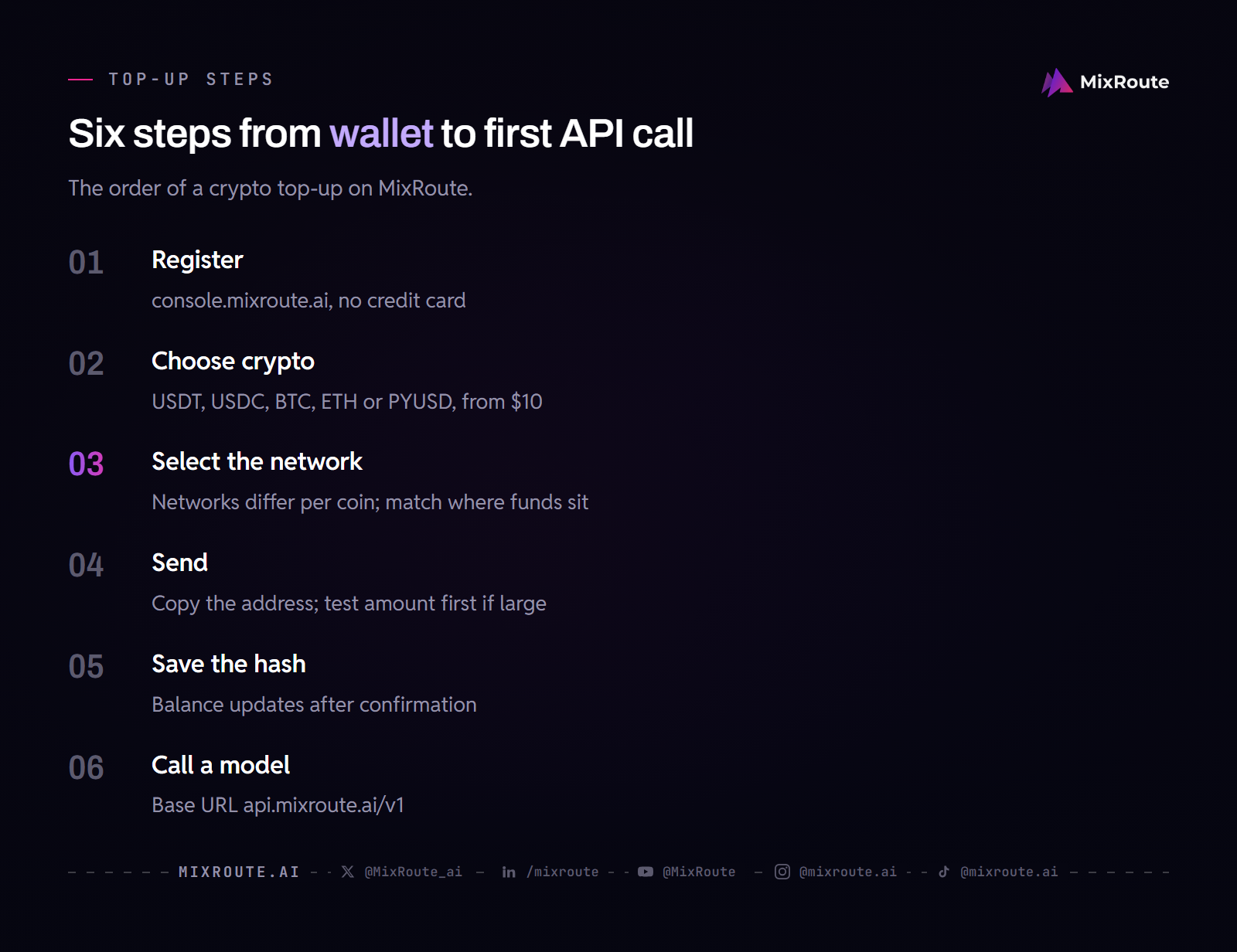
- Register and get a key. Sign up at console.mixroute.ai. No credit card is needed, and you get one API key for all models.
- Start a top-up and choose crypto. Pick an amount (the Starter tier covers $10 to $999), then choose USDT, USDC, BTC, ETH or PYUSD.
- Select the network. The screen shows the networks available for the coin you picked, and availability differs per coin. Match it to where your funds sit. This is where deposits go wrong, so check it before copying anything.
- Send to the deposit address. Copy the address instead of typing it. For a large first deposit, send a small test amount first.
- Save the transaction hash. The balance updates once the network confirms the transfer, not when you press send. Until then the hash is your receipt.
- Call a model. Point your client at
https://api.mixroute.ai/v1with your key. The credit never expires.
Why developers pay with crypto
Card access, income that already arrives in crypto, treasury habits and agent workloads account for most crypto top-ups.
Card access. A developer in a region where internationally accepted cards are hard to get, or whose card keeps getting declined by US billing systems, can be ready to pay and still blocked at checkout.
Getting paid in crypto already. A freelancer paid in USDT or USDC would otherwise convert to fiat, move the money through a bank and then pay by card. Paying from the stablecoin balance skips those steps and their fees.
Treasury preference. Some businesses hold operating funds in stablecoins and prefer to pay vendors from that balance instead of keeping a separate fiat float.
Agent workloads. An agent job can burn through credit faster than expected. A prepaid balance you can refill in one transfer is easier to manage than a card authorization.
What platform fees actually cost you
On MixRoute a top-up has a 0% platform fee and provider pricing has no markup, so a Starter top-up arrives at full credit value. Larger top-ups earn bonus credit on top of that.
| Tier | Top-up | Bonus credit | Bonus cap |
|---|---|---|---|
| Starter | $10 to $999 | None, full credit value | None |
| Growth | $1,000 to $4,999 | 2% | $100 |
| Pro | $5,000 to $14,999 | 3% | $450 |
| Scale | $15,000 to $29,999 | 5% | $1,500 |

Business plans are prepaid at $1,000 to $20,000 a month with per-model pricing, and they do not stack with top-up bonuses. A monthly spend of $20,000 or a single top-up of $30,000 unlocks enterprise onboarding, which settles mainly by bank wire with an invoice. The first top-up also earns a first-deposit bonus that stacks with the tier bonus.
Some aggregation platforms add a percentage fee when you buy credits, and MixRoute’s FAQ puts the typical range at 5% to 10%. At 5%, a team that funds $10,000 a year pays about $500 before generating a single token. The network fee for the transfer itself is separate and goes to the chain whichever platform you pay.
What to check before choosing a crypto friendly gateway
- Total cost, not headline markup. A gateway advertising no markup on tokens may still take a percentage at funding time. Add the two together.
- Which coins and which networks. They are separate questions. A gateway may accept USDC but not on the chain where you hold it, so check the deposit screen as well as the coin list.
- Whether credits expire. Some balances have a validity window. MixRoute credits are valid forever.
- Model coverage. The point of paying a gateway is reaching many models on one balance, so confirm the catalog has the ones you use.
- Failover. If a provider goes down, find out whether the gateway reroutes or your application fails with it.
- How enterprise settles. Self-serve and enterprise are different paths. On MixRoute, enterprise accounts pay by bank wire with an invoice and flexible terms, and they become eligible for Reserved Capacity.
Where MixRoute fits
MixRoute is an AI API gateway that takes USDT, USDC, BTC, ETH and PYUSD alongside Visa, Mastercard and JCB, and it routes to 250+ models through one OpenAI-compatible API. Provider prices are passed through with 0% markup, credits never expire, and you do not need a credit card to sign up. The pricing page lists the tiers and payment methods.
A developer who holds stablecoins and no usable card ends up with the same model access as a team on a corporate card, through the same endpoint. Start building on MixRoute
FAQ
Can I pay for the OpenAI API with crypto? Check OpenAI’s billing settings for the methods it offers; the route that works with crypto is a gateway. Fund a MixRoute balance with USDT, USDC, BTC, ETH or PYUSD and call GPT models such as gpt-6.1-sol through the OpenAI-compatible endpoint with one MixRoute key. The gateway handles the provider side, and you never add a card to OpenAI.
Can I pay for the Anthropic or Claude API with crypto? Not directly. Anthropic’s billing help page describes prepaid credits bought in the Console and monthly invoicing through Sales, with no crypto option. Deposit crypto with MixRoute instead and call Claude models such as claude-sonnet-5-5 through the same endpoint and key as every other model.
Which networks does MixRoute support for USDT? Six: Ethereum, Arbitrum One, Polygon, Solana, TON Network and Tron. That is the widest network coverage of any coin on the platform, so USDT is the most flexible option if you want a choice of transfer cost. The USDT guide covers that path.
Which networks does MixRoute support for USDC? Four: Ethereum, Arbitrum One, Polygon and Solana. USDC is not available on Tron or TON Network. If you hold USDC on Tron, bridge or swap before depositing.
Can I deposit PYUSD, and on which networks? Yes. PYUSD is supported on Ethereum and Solana. Solana is the cheaper of the two for transfer fees, so use it unless your PYUSD already sits on Ethereum.
Can I pay for AI API access with Bitcoin? Yes, on the native Bitcoin network and over Lightning. Lightning is the better choice for smaller deposits, since on-chain fees and confirmation times make small Bitcoin transfers impractical.
Can I deposit ETH? Yes, as native ETH on the Ethereum mainnet. That is the only option for ETH, so you pay Ethereum mainnet gas regardless of transfer size. For a small deposit, a stablecoin on a cheaper chain will usually cost less to send.
Is USDC or USDT better for paying API credits? USDT has broader network coverage on MixRoute, six chains against four, including Tron and TON which USDC does not support. If you already hold one, use that. If you are choosing, USDT gives more routing options and access to the cheapest rails.
Which network is cheapest for depositing? For USDT, Tron or Solana. For USDC, Solana or Polygon. For PYUSD, Solana. For Bitcoin, Lightning. Ethereum mainnet is usually the most expensive because gas does not shrink with transfer size. Fees change with network load, so check right before a large transfer.
What happens if I send on the wrong network? The funds can be lost, because blockchain transfers cannot be reversed and the address may not exist on the network you used. Confirm the network on the deposit screen before sending, and send a small test amount first on a large deposit. If something already went wrong, keep the transaction hash and write to service@mixroute.ai with it.
Can I pay for AI APIs without a credit card? Yes. MixRoute does not need a credit card to sign up, and you can top up with USDT, USDC, BTC, ETH or PYUSD. You register, get an API key and deposit crypto, then call any model in the catalog with that key.
Do crypto deposits cost more than paying by card? No on MixRoute, where the platform fee is 0% for card and crypto alike and Starter top-ups arrive at full credit value. The only extra cost is the network fee your wallet charges for the transfer, which goes to the chain. Some platforms add 5% to 10% when you buy credits.
How long does a crypto deposit take to credit? The balance updates after the network confirms the transfer, and confirmation time depends on the network you used. Keep the transaction hash until the balance shows the credit. If it does not appear, write to service@mixroute.ai with the hash.
Do AI API credits expire? Not on MixRoute. All credits are valid forever, whether you top up through self-serve or an enterprise plan, and that includes crypto top-ups. You can spend the balance at your own pace.
How do enterprise accounts pay? Enterprise plans mainly settle by bank wire with an invoice and flexible payment terms. A monthly spend of $20,000 or a single top-up of $30,000 qualifies, and the Sales team replies within 24 hours with a per-model quote and a contract. The enterprise package includes eligibility for Reserved Capacity.
Can I pay per API call with crypto? Effectively yes, through a prepaid balance. You fund it once with crypto, and every API request deducts its cost from that balance right after it completes. There is no minimum spend, and each request appears in your usage logs in the console.
The bottom line
Anthropic and Google do not list crypto in their billing, so the working route is a gateway that takes it. MixRoute accepts USDT, USDC, BTC, ETH and PYUSD, needs no credit card to sign up, adds no markup to provider pricing and credits never expire.
Get the coin and network pairing right before you send: USDT runs on six networks, USDC on four and not on Tron or TON, PYUSD on Ethereum and Solana, Bitcoin adds Lightning and ETH is mainnet only. Start building on MixRoute