How to Fix 429 Rate Limit Errors When Using AI APIs
A 429 rate limit error means the provider rejected your request because a limit was exceeded, and the fix depends on which limit. Read the response body first. If it names a per-minute rate limit and a Retry-After header is present, wait at least that many seconds, then retry. If it names credit, spend or usage, retrying never works: add credit or raise the limit. If neither applies, back off with jitter, cap the attempts and lower your request rate. When production traffic keeps hitting the ceiling, a higher limit is the lasting fix.
What a 429 Rate Limit Error Actually Means
HTTP status 429 Too Many Requests means the client sent too many requests in a given amount of time. The server returns it instead of a completion, and the response may include a Retry-After header that says how long to wait.
The limits differ by provider. OpenAI sets limits by usage tier and counts requests per minute, tokens per minute and per-day limits, and whichever you reach first triggers the error. Anthropic sets tiered limits per organization and refills capacity continuously, so your headroom comes back gradually instead of resetting on the clock. Google applies Gemini limits per project, not per API key, and its daily request quotas reset at midnight Pacific time. A new organization can start below the standard limits until its usage history builds.
A gateway adds its own layer. On MixRoute, the Starter plan allows 50 requests per minute for new accounts and 100 after your first top-up. MixRoute’s error reference describes a 429 as the model reaching its traffic limit, with tokens per minute saturated by high usage, and says to retry after a short wait.
These errors tend to arrive after launch. In testing you send 10 requests per minute and everything passes. Then traffic spikes, every third request fails with a 429, users see errors and you are reading logs at 2 AM.
If the symptom is slow responses or provider queueing, see diagnose LLM API latency and provider queueing.
To distinguish provider throttles from gateway or client failures, use the LLM API failure taxonomy by origin and retry safety.
Which Kind of 429 You Are Seeing
A 429 comes in four kinds, and waiting fixes only the first two. The status code is identical each time, so read the error code and message in the response body before you write retry logic.
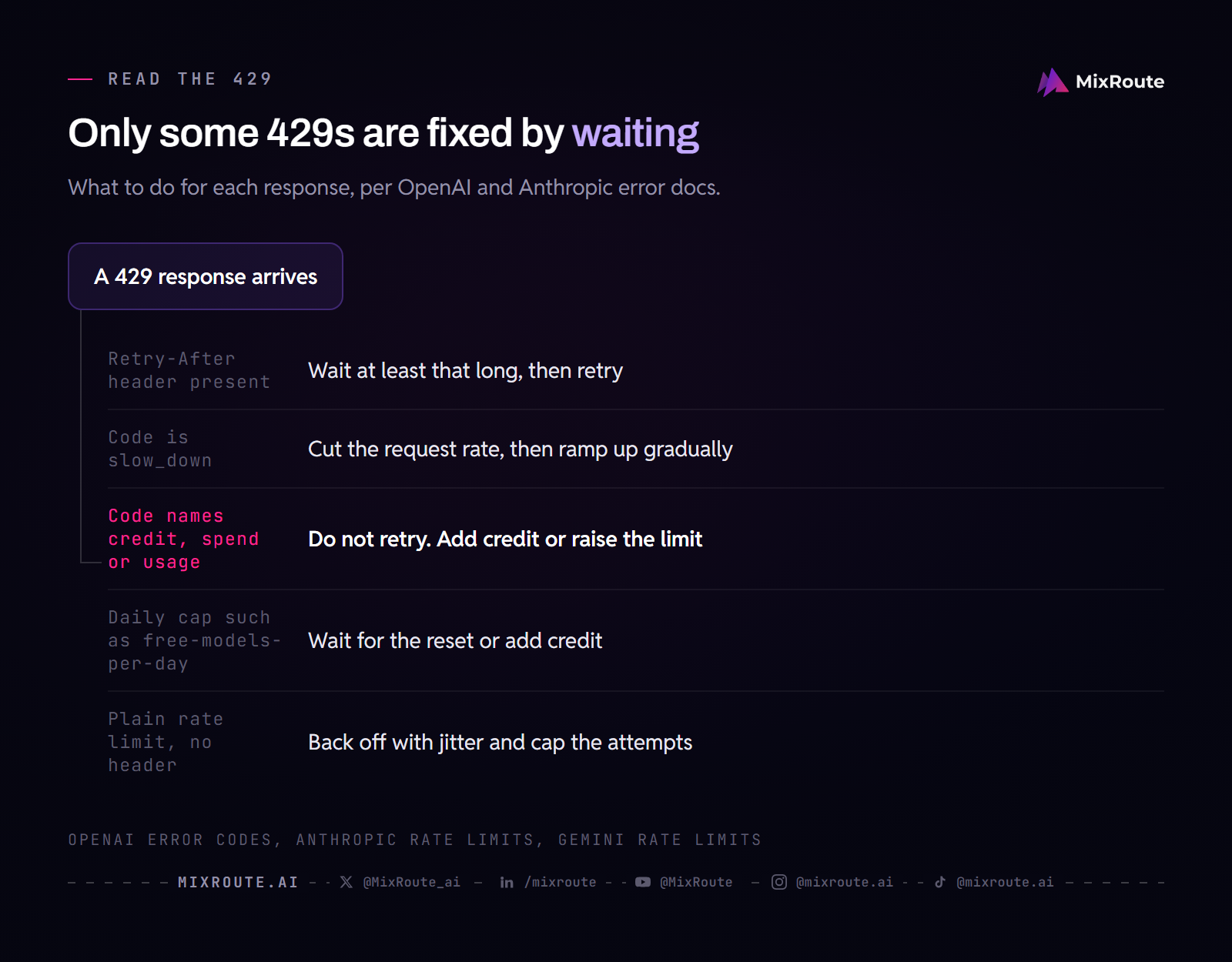
- Rate limit reached. You passed a request or token limit for the current window. Wait at least the
Retry-Aftervalue when the header is present, then retry. This is the case backoff was built for. - Slow down. OpenAI returns type
rate_limit_errorwith codeslow_downwhen your request rate climbed faster than the service can absorb, even if you are inside your per-minute limits. Anthropic documents the same pattern as acceleration limits. Ramp traffic up gradually. OpenAI’s rule of thumb is to raise it by no more than 50% every 15 minutes once you reach 1 million input tokens per minute. - Credit, spend or usage limit. OpenAI uses codes such as
credit_balance_exhausted,organization_spend_limit_exceeded,project_spend_limit_exceededandorganization_usage_limit_exceeded, and states that retrying will not restore access. Anthropic’s monthly spend cap also returns a 429 with typerate_limit_error, but with noretry-afterheader, and access returns at 00:00 UTC on the first day of the next month. Add credit or raise the limit. - A daily allowance. Requests-per-day limits reset on a schedule, for example midnight Pacific time for the Gemini API. A message such as
rate limit exceeded: free-models-per-dayis this kind: the cap counts requests per day, so waiting a minute changes nothing. Wait for the reset or add credit if the message offers it.
Tools that wrap an API need one more step. A line such as The AI provider is busy or rate-limited. Please try again shortly. (429) is not one of the messages OpenAI or Anthropic document, so it is most likely a summary written by the app or proxy between you and the provider. Find the raw response in that tool’s log and read the body. A line about insufficient credit or a plan usage limit points to the third kind and will not clear on its own.
If you see 429s while your numbers look fine, check three things. Limits apply to the organization on OpenAI and to the project on Gemini, so teammates, other services and extra keys draw from the same pool. Requests per minute and tokens per minute are counted separately, and the first one you reach triggers the error. Some OpenAI model families also share one limit. A 503 with code server_is_overloaded is a different case: the model is overloaded, and your own limit is not the cause. For who sends each code and when to retry, see LLM API error codes.
Why Rate Limit Errors Are Getting Worse
Limits stay fixed while the number of calls per user keeps growing. Three things push the count up:
Applications are becoming more complex. A simple chatbot makes one API call per user message. An AI agent might make 5, 10, or 20 calls per task. A RAG pipeline with several retrieval and generation steps can send dozens of requests for a single user interaction.
Retries add to the load. The official OpenAI SDKs retry eligible 429 and 503 responses on their own, so an application-level retry loop on top of them multiplies the requests. OpenAI’s guide says to disable SDK retries or count them in your own limits.
New accounts start low. An account sits on the lowest tier until its credit purchases or usage history lift it, so a launch can land on the lowest ceiling the account will ever have.
Standard Rate Limit Fixes (and Why They Only Go So Far)
Five standard fixes handle most 429 errors: backoff, queuing, spreading load, caching and a higher provider tier. Each one works to a degree, and each has a ceiling.
Exponential Backoff with Retry Logic
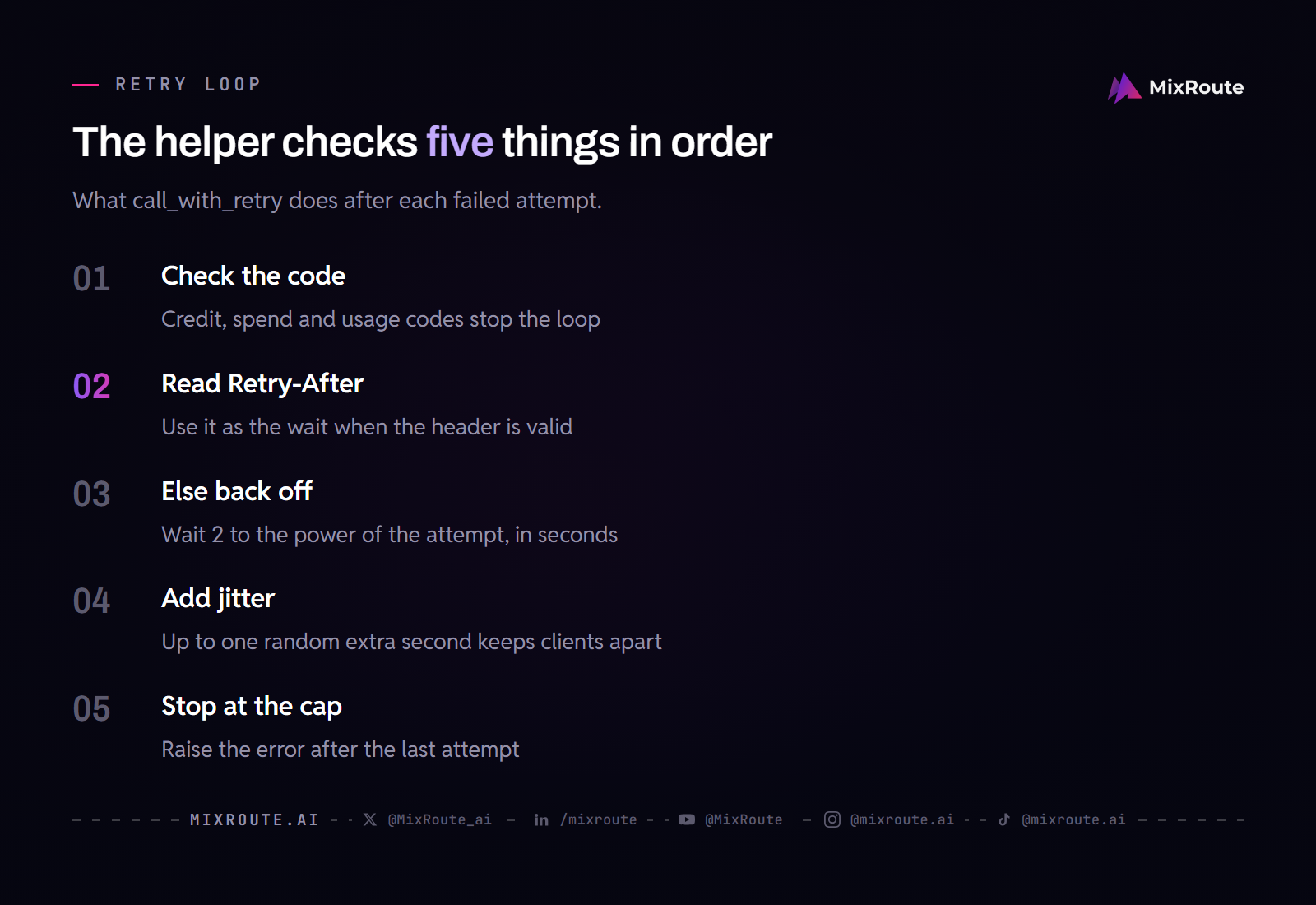
When you get a 429 for a rate limit, wait, then try again. Use the Retry-After value as the minimum wait when it is present. When it is missing, wait longer after each failure and add a random delay so parallel clients do not retry in the same instant. Stop retrying the credit and spend errors from the previous section, because no wait fixes them.
import random
import time

from openai import OpenAI, RateLimitError

client = OpenAI(max_retries=0)  # this helper owns the retries

NO_RETRY = {
    "credit_balance_exhausted",
    "insufficient_quota",
    "organization_spend_limit_exceeded",
    "project_spend_limit_exceeded",
    "organization_usage_limit_exceeded",
}

def out_of_quota(e):
    return e.code in NO_RETRY or e.type in NO_RETRY

def call_with_retry(make_request, max_retries=5):
    for attempt in range(max_retries):
        try:
            return make_request()
        except RateLimitError as e:
            if out_of_quota(e) or attempt == max_retries - 1:
                raise
            try:
                delay = float(e.response.headers.get("retry-after"))
            except (TypeError, ValueError):
                delay = 2 ** attempt
            time.sleep(delay + random.uniform(0, 1))
Setting max_retries=0 turns off the SDK’s own retries, so the two loops do not multiply each other.
This works for occasional rate limit hits. It does not work when your application consistently exceeds the limit, because every retry adds latency. If each attempt takes 2 seconds and the request succeeds on the fourth try, the waits of 1, 2 and 4 seconds add 7 seconds and the four attempts add 8 more, so the user waits about 15 seconds. That is a worse experience than the error itself.
Automatic retries are safest when the operation is idempotent. An ordinary 429 that arrives instead of a response means your request was rejected rather than processed, so re-sending it is the case the loop above already handles. A dropped stream or an ambiguous 5xx is different: the provider accepted the request, and the client cannot tell whether output or side effects already happened. For a side-effecting POST, enable automatic retries only when the provider accepts an idempotency key for that request, generated once per logical operation and reused on every retry of that operation. Without that key, hold the retry until you resolve the ambiguity, or make the operation idempotent first.
For retry budgets, jitter, and the limits of backoff, see LLM API retry strategies with backoff, jitter, and retry budgets.
Request Queuing and Throttling
A queue holds requests and releases them at a rate under the limit. That smooths traffic spikes, and it matters because a burst can trigger a 429 even when your average rate is fine. Anthropic’s limits work as a token bucket, which refills continuously, so an even request rate uses your headroom better than bursts do.
Queuing works well for batch processing and background jobs. It does not work for real-time features where a user is waiting. With 100 concurrent users and a limit of 60 requests per minute, 40 of those users sit in the queue every minute, and the math does not improve as you scale. If the work can wait, OpenAI’s Batch API runs large collections of requests without using your synchronous rate limits.
Multiple API Keys and Account Rotation
More keys inside one organization or project add nothing, because the limit sits on the organization (OpenAI) or the project (Gemini), not on the key. Rotating across separate accounts does multiply the pools, but you then juggle several billing relationships, keys and custom logic that decides which account takes each request.
Caching Responses
If the same prompt arrives repeatedly, serve the stored response instead of calling the API. That lowers your request volume and keeps you further from the ceiling.
Caching helps only with repeated prompts. If users ask unique questions or your prompts are generated dynamically, the hit rate is low and the remaining requests still run into the limit. Implement it anyway, because it costs little.
Upgrading Your Provider Tier
Paying more raises the limit. OpenAI’s tier rises automatically as total credit purchases reach $5, $100 and $500. Anthropic lets you request a tier increase from the Rate limits page in its Console. Gemini upgrades a project as cumulative spending grows.
This works until it does not. Every tier has a ceiling. Anthropic, for example, sends requests for limits above its Scale tier to its sales team.
Switching Models When One Provider Returns 429
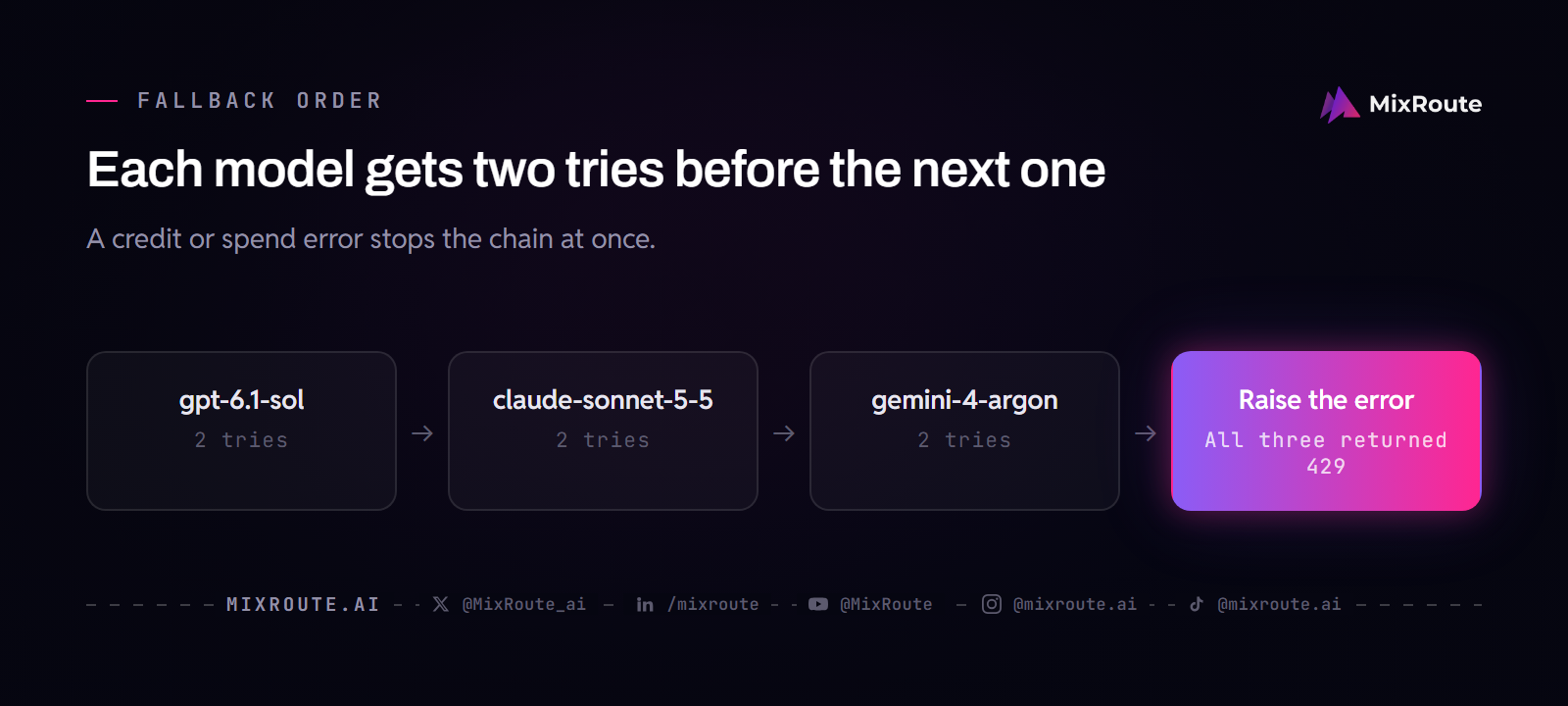
If the task can run on another model, send it there after two failed retries. Limits belong to the provider account and the model, so a model from another vendor counts against a separate limit, and one saturated model no longer stops the request.
MODELS = ["gpt-6.1-sol", "claude-sonnet-5-5", "gemini-4-argon"]

def ask(messages):
    for model in MODELS:
        try:
            return call_with_retry(
                lambda: client.chat.completions.create(model=model, messages=messages),
                max_retries=2,
            )
        except RateLimitError as e:
            if out_of_quota(e):
                raise  # another model cannot fix an empty balance
    raise RuntimeError("Every model in the list returned 429")
This reuses client, call_with_retry and out_of_quota from the backoff section. Each model answers differently, so list only models that pass your own quality check for the task. A fallback cannot help when the limit sits on your account as a whole, such as an empty balance or a plan’s requests-per-minute cap, which is why the code re-raises the credit errors. Through one MixRoute base URL and key, the three IDs above need no extra client setup, because you only change the model string. For which failures deserve a reroute, see which failures should reroute a request.
The Infrastructure Level Fix: Reserved Capacity
Reserved capacity replaces the shared queue with throughput set aside for your traffic. It is a contract rather than a setting. Every standard fix above accepts that you compete for shared capacity with other users and tries to compete more cleverly. Reserved capacity removes the competition, so the limit becomes the throughput figure you agreed on, not a shared pool.
The idea matches reserved instances in cloud computing: you commit to capacity ahead of time instead of taking whatever is free when you need it.
How Reserved Capacity Works in Practice
MixRoute pre-commits large-scale reserved capacity with upstream providers and pools it across its enterprise customers. Enterprise requests run on a dedicated pool isolated from public traffic, with a contracted tokens-per-minute floor, instead of in the shared rate-limit pools. MixRoute states that this comes without a multi-year commitment or quota negotiation.
Reserved Capacity is part of the Enterprise plan. The pricing page sets eligibility at $20,000 or more of monthly usage, or a single top-up of $30,000 or more. Which models are covered and how many tokens per minute you get are quoted per customer through the Reserved Capacity page and sales, so confirm that your model is covered before you plan around it.
What Raises the Ceiling Before Enterprise
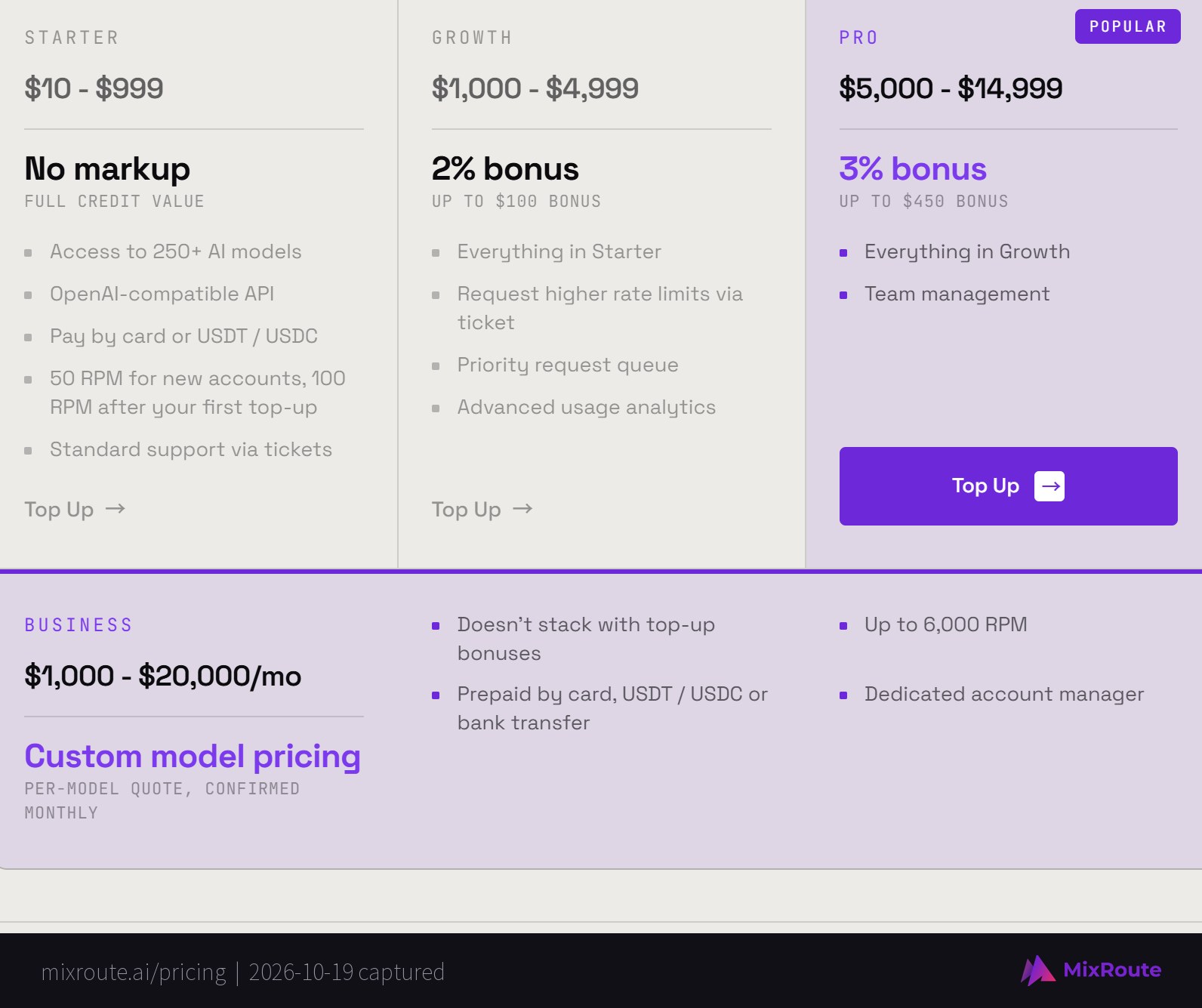
Most teams are nowhere near $20,000 a month, and the plan ladder is how limits grow until then. Starter accounts are capped at 50 requests per minute when new and 100 after the first top-up. Growth ($1,000 to $4,999 per top-up) lets you request higher limits by ticket and adds a priority request queue. Business ($1,000 to $20,000 per month, quoted per model, prepaid) lists up to 6,000 requests per minute.
When Higher Rate Limits Make Sense
Prototypes, side projects and low-traffic apps do fine on the standard fixes. Higher rate limits become the right call when any of these is true:
Your application serves production traffic where a 429 means a customer sees an error page. If that customer might churn, the cost of a higher limit is lower than the cost of the lost customer.
Your request volume regularly pushes against the limit. If you run retry logic and queues because you hit the ceiling every day, you are spending engineering time on a problem a higher limit removes.
You have promised customers a response time or an uptime percentage. Shared limits make your latency depend on what everyone else is doing, which is hard to promise against.
Your workload calls several vendors in sequence. If one user request calls GPT-6.1 Sol, Claude Sonnet 5.5 and Gemini 4 Argon directly, each vendor’s limit applies at once, and one 429 from any of them breaks the chain.
If the next step is to manage several providers through one route, see higher rate limits in an AI API gateway.
A Practical Decision Framework
Match the fix to how often the 429 happens and what it costs you:
You get occasional 429 rate limit errors during traffic spikes. Add backoff that honors Retry-After, and add response caching. It takes a few hours and costs nothing extra.
You consistently hit rate limits and retries add noticeable latency. Queue the work that does not need an instant answer, upgrade your provider tier for the work that does, and fall back to a second model when one is saturated. Expect a day or two of work plus your higher tier pricing.
Rate limit errors are causing production incidents or SLA violations. Move up the limit ladder: a plan with higher limits first, Reserved Capacity if you reach enterprise volume. Pointing the OpenAI SDK at MixRoute is a change of base URL and key, and the limit you get depends on your plan.
You are managing multiple API accounts to work around limits. Stop. Extra accounts do not scale and they complicate billing. One MixRoute account gives you one key and one balance across providers, and migrating to a multi-provider API covers the move without breaking production.
Setting Up the Fix
Retries plus a cache fit in about 30 lines. This class builds on call_with_retry from the backoff section:
import hashlib
import time

class AIClient:
    def __init__(self, cache_ttl=3600):
        self.cache = {}
        self.cache_ttl = cache_ttl

    def cache_key(self, prompt, model):
        return hashlib.sha256(f"{model}:{prompt}".encode()).hexdigest()

    def call(self, prompt, model="gpt-6.1-sol", max_retries=5):
        key = self.cache_key(prompt, model)
        entry = self.cache.get(key)
        if entry and time.time() - entry["time"] < self.cache_ttl:
            return entry["response"]

        response = call_with_retry(
            lambda: client.chat.completions.create(
                model=model,
                messages=[{"role": "user", "content": prompt}],
            ),
            max_retries=max_retries,
        )
        self.cache[key] = {"response": response, "time": time.time()}
        return response
If you decide higher limits are what you need, MixRoute works with the OpenAI SDK, so you change the base URL and the API key and keep the rest. MixRoute charges the providers’ list prices with no markup, and the exact model ID is on each model’s page in the model catalog:
from openai import OpenAI

client = OpenAI(
    api_key="your-mixroute-key",
    base_url="https://api.mixroute.ai/v1",
    max_retries=0,
)

response = client.chat.completions.create(
    model="gpt-6.1-sol",
    messages=[{"role": "user", "content": "Hello"}],
)
Your prompts and error handling keep working as they are. Keep the retry helper: a higher limit moves the ceiling, and it does not remove it.
What to Monitor After Fixing Rate Limit Errors
Set up monitoring so you know when the problem comes back:
Track your 429 error rate over time. A dashboard of 429 errors per hour shows whether your fix works and warns you when traffic growth pushes you toward the limit again. Split it by error code, so credit and spend errors do not hide inside the rate limit count.
Log the remaining-limit headers. OpenAI sends x-ratelimit-remaining-requests and x-ratelimit-remaining-tokens, and Anthropic sends anthropic-ratelimit-requests-remaining and its token counterparts. Alert when the remaining value trends toward zero, before the first 429 arrives.
Monitor request latency percentiles. Rising p95 or p99 latency can mean you are nearing a limit while the provider starts to throttle. That is the early warning before hard 429 failures.
Watch your retry rate. If retries become routine instead of rare, the underlying limit is too low for your traffic. Pick an alert threshold that fits your volume and treat a rising trend as the cue for a permanent fix.
Monitor by provider and model separately. With several models in play, a limit on one can cascade through your application, and per-provider numbers show which one is the bottleneck.
The Bottom Line on Rate Limit Errors
A 429 rate limit error is the provider telling you what it refused and why, and the body usually says which of the four kinds it is. Start there. Wait for rate limits, add credit for quota errors, and fall back to another model when one is saturated. If you still hit the ceiling every day, move up a plan with higher limits, and consider Reserved Capacity only if your volume reaches the enterprise threshold.