GitHub Copilot vs Claude Code: A Surface-by-Surface Comparison
What Is the Difference Between Claude Code and GitHub Copilot?
“I write code in an IDE all day, but my refactors keep spilling across forty files, so which one do I actually pay for?” If most of your day is typing code inside an editor, GitHub Copilot is the default pick: an IDE-first assistant that grew into a multi-surface platform, with inline completion still its most used surface. If your week is mostly handing off whole jobs, a migration, a failing suite, a bug that crosses module boundaries, Claude Code is the default pick: a terminal-first agent you point at a goal and review afterward. Many developers run both, Copilot in the editor and Claude Code in a terminal for the heavy jobs.
GitHub Copilot Is an IDE Assistant That Grew a Platform
Copilot started as inline code completion. It now spans IDE extensions, a terminal CLI, a cloud agent, a code review tool, and Copilot Spaces for persistent project context. That history matters at purchase time, because you are buying a set of surfaces with different behavior and different billing. Completions fire as you type. Chat answers a question in a side panel without touching the file. The cloud agent runs on GitHub itself, and Spaces collects the repositories and documentation you want the assistant to keep in view.
Claude Code Is a Terminal Agent You Hand a Task To
Claude Code is Anthropic’s terminal-first agentic coding tool. You install it, navigate to your project, start a session, and describe what you want. It reads files, writes code, runs shell commands, checks the output, and keeps going until the work finishes or it hits a blocker. Around that core sit a VS Code extension, a JetBrains plugin still in beta, and a rebuilt desktop app; Visual Studio 2026 was still unsupported in April 2026. The terminal stays the most complete surface, which is the expectation to set before you buy rather than after.
If the pairing on your screen is actually Codex against Claude Code, the Codex vs Claude Code comparison covers that decision instead.
Which One Helps More While You Are Writing Code?
Copilot, by default. Inline completion is the one surface where these two do not compete, because only one of them has it. Copilot streams suggestions as you type, and you accept them with Tab or ignore them. Claude Code has no inline completion at all, so there is nothing to compare in a tab-to-accept flow. The delivery shapes differ too: Copilot refines ghost text in place while you keep typing, and Claude Code returns a complete response once it has finished processing.

Copilot Owns the Tab-to-Accept Loop
The completions are why Copilot is hard to beat for boilerplate, tests, and the patterns you would otherwise type by hand. One measured session in a controlled VS Code environment during the first quarter of 2026 put average first-suggestion latency at 320 milliseconds for Copilot against 1.8 seconds for Claude Code, with accept rates of 38% and 44% across 50 sessions. That is one team’s setup, not a specification, because models, tasks and dates all move the result. The shape is what holds: Copilot lands suggestions while you write, and Claude Code answers after you ask.
Which Editors Each Tool Actually Reaches
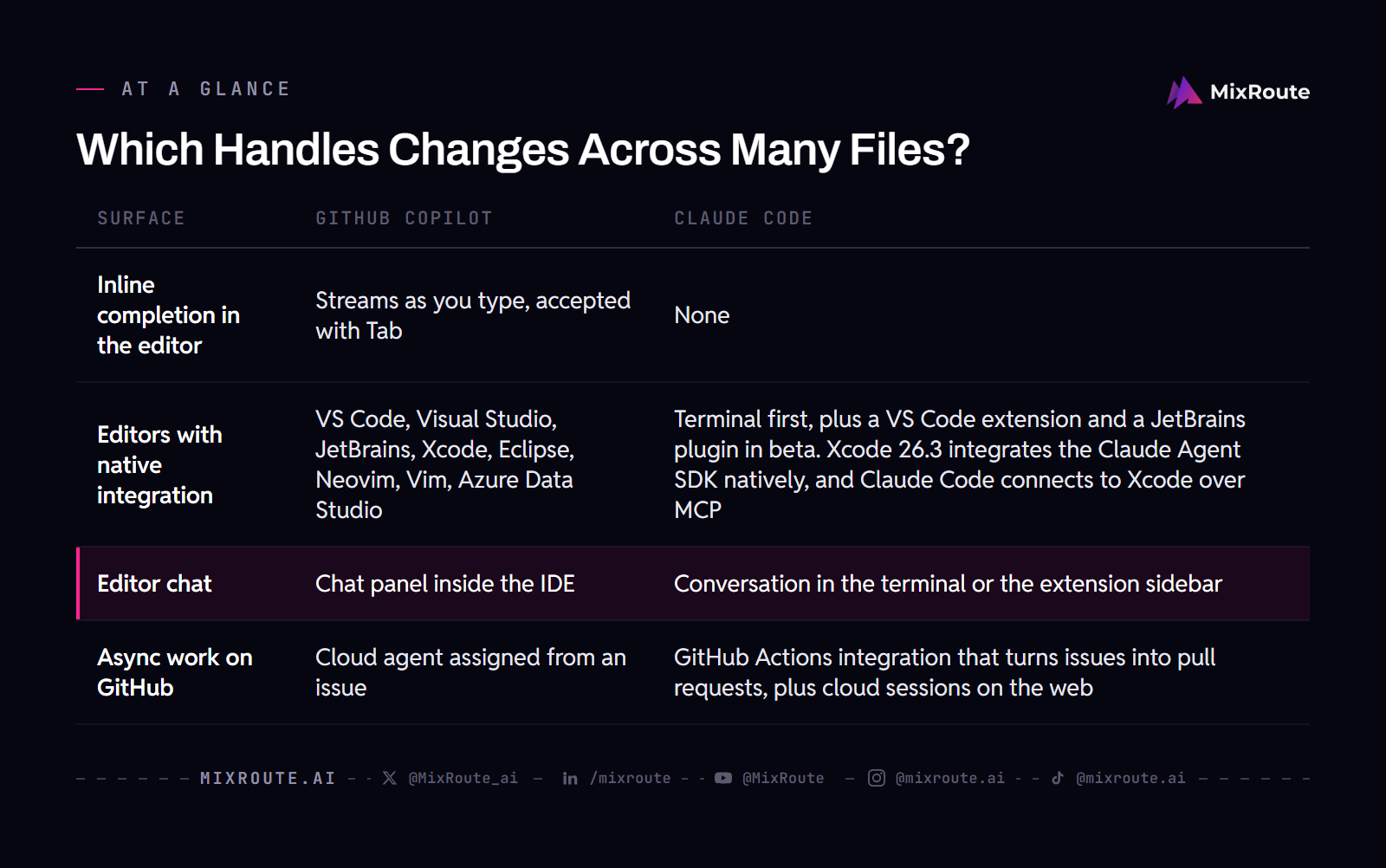
Editor coverage is where Copilot’s platform history shows. Copilot runs in VS Code, Visual Studio, JetBrains, Xcode, Eclipse, Neovim, Vim and Azure Data Studio, plus GitHub Mobile and the web. Claude Code is terminal-first, with a VS Code extension, a JetBrains plugin in beta, a desktop app and a web interface. Xcode 26.3 added a native integration with the Claude Agent SDK in February 2026, and Claude Code itself connects to Xcode over MCP. If your team lives in Eclipse, Visual Studio or Vim, Claude Code had no native integration there in June 2026, and using it means running terminal sessions alongside the editor.
| Surface | GitHub Copilot | Claude Code |
|---|---|---|
| Inline completion in the editor | Streams as you type, accepted with Tab | None |
| Editors with native integration | VS Code, Visual Studio, JetBrains, Xcode, Eclipse, Neovim, Vim, Azure Data Studio | Terminal first, plus a VS Code extension and a JetBrains plugin in beta. Xcode 26.3 integrates the Claude Agent SDK natively, and Claude Code connects to Xcode over MCP |
| Editor chat | Chat panel inside the IDE | Conversation in the terminal or the extension sidebar |
| Async work on GitHub | Cloud agent assigned from an issue | GitHub Actions integration that turns issues into pull requests, plus cloud sessions on the web |
Which Handles Changes Across Many Files?
Claude Code, on long refactors, and the reason is how each tool assembles the codebase. Claude Code loads your project directory, session history and project instructions into a single context window that runs up to 1 million tokens by default on current models, and Anthropic removed the long-context pricing premium in March 2026. Copilot assembles context by retrieval instead, through workspace indexing, Copilot Spaces and repository instructions, and spreads the same multi-file job across its surfaces.
One Big Context Window Versus Retrieval
Neither approach escapes limits. Long sessions degrade on both tools, which is why experienced Claude Code users start a fresh session for a new task and use /compact to compress history. On the Copilot side, several catalog models support 1M tokens, but the default setup does not load an entire codebase, and the effective window varies by surface and model. In a large monorepo, the bigger window matters less than which tool keeps track of what it already changed. A 30-file migration runs as one session on Claude Code; the same job on Copilot splits into completions in one editor, agent tasks in another, and async pull requests from issues.
Where Your Project Rules Actually Get Enforced
Both tools read a rule file, and they differ in how hard the rules bind. Claude Code uses CLAUDE.md at the project root, loaded at the start of every session, and the guidance around it is to keep the file short because every line is a recurring input cost: Anthropic suggests staying under 200 lines per file, since longer files consume more context and reduce adherence. For rules the model cannot be trusted to follow, hooks give hard enforcement, and a PreToolUse hook blocks an operation through exit code 2. Copilot layers instead, with repository rules in .github/copilot-instructions.md, path-specific rules in glob-matched files under .github/instructions/, and custom agents in .agent.md files. It reads CLAUDE.md too, so a team running several AI tools can share one set of conventions. Pick enforcement if a rule has to be absolute, and portability if your team already mixes tools.
How Do the Agent Modes Compare?
Claude Code goes deeper inside a single task, and Copilot covers more ground because it has more places to work. Both claim agentic behavior now, and the implementations differ enough that the word barely describes the same thing. Claude Code’s loop is the product: gather context, take action, verify the result, repeat, all against your local filesystem, where you can watch the work and interrupt it. Copilot splits the same ambition across an editor agent mode and a cloud agent that runs on GitHub.
Depth Inside a Single Task
Task depth is what people notice first. Claude Code runs a multi-file refactor or migration as a single session, with subagents handling verbose work in isolated context and returning only the result, plus Agent Teams as an experimental parallel mode in April 2026. Copilot’s agent mode works best on well-scoped tasks, and open-ended refactoring still needs a person steering it. Whether the gap matters depends on your task list: a scoped bug fix inside one module feels similar on both tools.
Breadth Across Surfaces
The cloud agent is built into GitHub itself, where Claude Code covers similar ground through a GitHub Actions integration that turns issues into pull requests and through cloud sessions on the web. Assign a GitHub issue to Copilot and the cloud agent spins up a cloud environment, writes code, runs tests, reviews its own output, then opens a draft pull request while you are elsewhere. The trade is latency: one comparison timed spin-up at 90 seconds or more, which is part of why some teams describe the pair as complementary rather than competing.
What Do You Get on Each Plan?
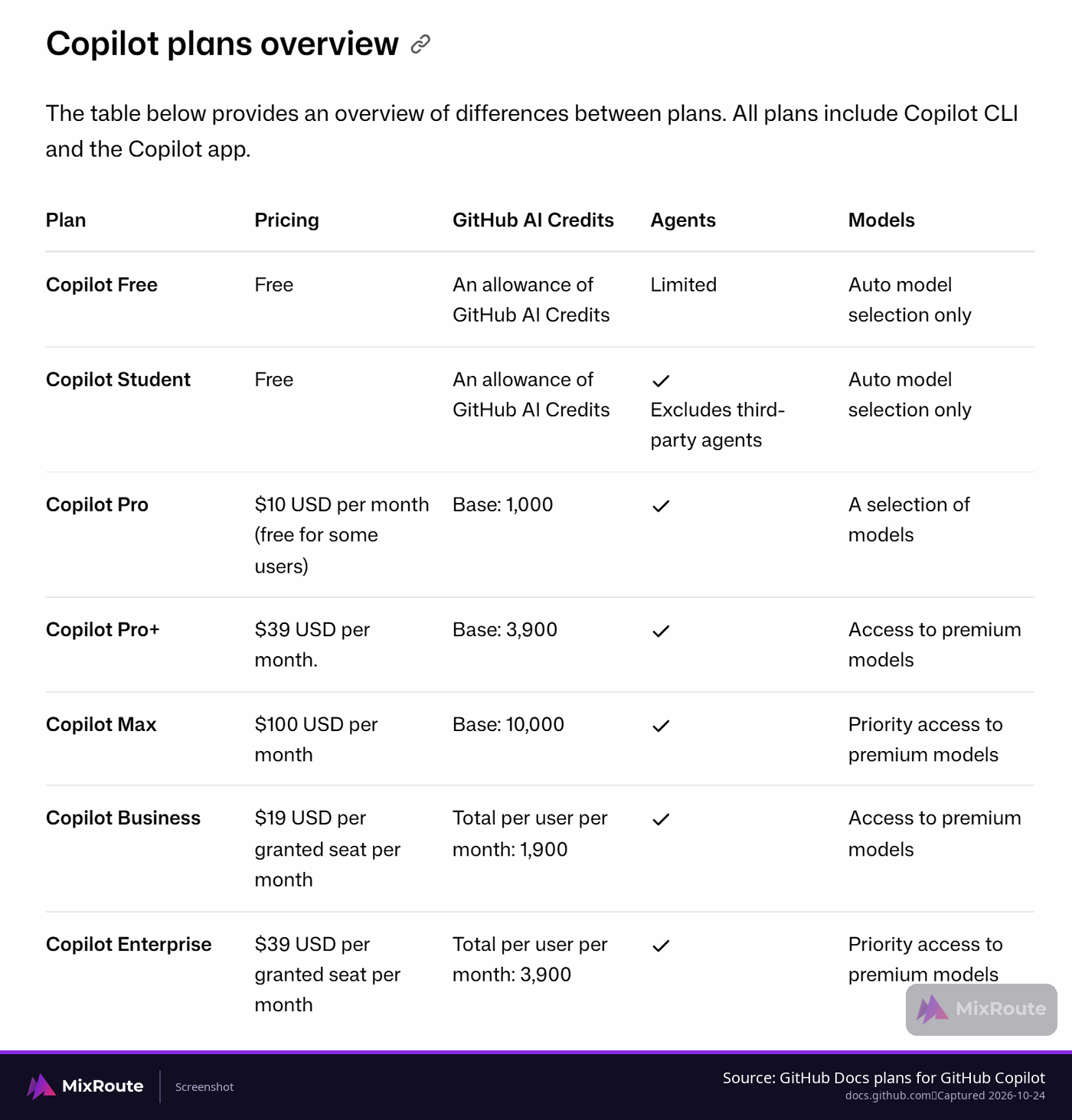
Copilot gives you something to try before you pay, and Claude Code starts at a paid tier. Copilot has a free tier with limited completions and chat requests, a model picker on paid plans that includes models from several vendors, and admin controls at the Business and Enterprise levels. Claude Code has no free tier; its entry point is the Pro plan, and its team plans cover shared billing and single sign-on while the organizational controls are thinner.
What You Can Try Before You Pay
A free tier is the cheapest way to answer the inline-completion question for yourself. Copilot’s free tier includes 2,000 completions a month plus an allowance of GitHub AI Credits, enough to find out whether ghost text fits how you type. For a team evaluation, the admin surfaces matter more than the free tier, because seat management, policy management and audit logs are what let a platform team approve a tool at all.
Who Can Administer the Seats
Copilot’s Business tier adds IP indemnity, and its Business and Enterprise tiers add policy management, audit logs and seat management, which is the admin tooling behind Copilot’s edge on team plans. Claude Code’s team plans cover shared billing and single sign-on, with thinner organizational controls.
| Plan element | GitHub Copilot | Claude Code |
|---|---|---|
| Free tier | Limited completions and chat requests | None |
| Paid entry point | Pro | Pro |
| Model choice | Picker holding models from several vendors | Claude models only |
| Team controls | Business and Enterprise add policy management, audit logs and seat management | Shared billing and single sign-on, with thinner organizational controls |
What Does Each Really Cost Once You Use It Heavily?
Both get more expensive than the sticker once agents do the work, and the two bills are shaped differently: Copilot sells seats with a credit allowance, Claude Code sells subscription tiers with session limits inside the plan. Copilot lists $10 a month for Pro with $15 in credits, $39 for Pro+ and $100 for Max, with Business at $19 and Enterprise at $39 per seat. Claude Code appears in two shapes as well: a Pro subscription at $20 a month with Max tiers at $100 and $200, or metered use through the Anthropic API.
Two Different Billing Shapes
The shape of the bill decides what a heavy month feels like. Copilot’s June 2026 billing change kept prices the same and moved the accounting to token-based credits, so a complex agent run on a frontier model consumes credits several times faster than a chat question. A Pro user’s $15 monthly credit allowance has been reported to stretch one to three days of heavy agent use. Completions and next-edit suggestions do not consume credits at all. Claude Code’s subscription tiers carry no per-token charges inside the plan, and session limits apply instead.
What Happens When the Limit Runs Out
Claude Code enforces two independent ceilings inside a pool shared with other Claude surfaces: a rolling five-hour window and a weekly cap. Hit either one and you wait, unless you have enabled usage credits to keep working at extra cost, and a heavy morning leaves less capacity for chat later in the day. The Max tiers raise the ceiling without removing it. Copilot counts AI credits, and usage beyond the monthly allowance is billed at $0.01 per credit once you set a budget for it. The complaints that come up most often are peak-hour throttling on the Claude side and a release that inflated token consumption by roughly 40%, so budget for variance instead of a clean monthly number.
Where a Direct Model Bill Changes the Math
If your own application calls models directly rather than through a coding-tool subscription, the per-token bill is a separate line, and that is where MixRoute belongs in this comparison. MixRoute publishes one OpenAI-compatible endpoint at https://api.mixroute.ai/v1 with a 0% platform fee on token usage, against hosted aggregation platforms that commonly add 5% to 10%. That does not change which editor assistant you type into: Copilot and Claude Code stay the tools in your editor, and MixRoute is a gateway your application points its model calls at. MixRoute publishes its current per-token fee and plan terms, which is where a direct model bill gets priced, because token terms move more often than seat prices do.
| Billing detail | GitHub Copilot | Claude Code |
|---|---|---|
| Starting price in 2026 tables | $10 a month on Pro with $15 in credits; Pro+ is $39, Max is $100, and Business is $19 a seat | $20 a month on Pro, with Max tiers at $100 and $200, or metered API use |
| Billing unit | Premium requests on older plans, token-based credits after the June 2026 change | Subscription with session limits inside the plan |
| At the limit | Usage past the monthly allowance at $0.01 per AI credit, if you set a budget for it | Session limits on a shared pool; Max tiers raise the ceiling |
| Inline completions | Cost nothing extra on paid plans | No inline completion exists |
Which One Should You Start With?
Start with Copilot if most of your work is single-file edits in an IDE your team already uses. Start with Claude Code if your week is multi-file refactors, cross-module debugging, or terminal work over SSH. Running both is common rather than unusual: Copilot in the editor for day-to-day work and Claude Code in a terminal for the heavier jobs. Neither tool wins outright, so the tiebreaker is your task mix.
Start With Copilot If Your Work Is In-File
The friction argument holds up here. Copilot installs as an extension, starts suggesting within minutes, and asks nothing of your workflow: no context to manage, no commands to learn, no project file to write. If you want to see every change before it lands, the inline loop keeps you in the editor accepting or rejecting one suggestion at a time, and completions stay available on every paid plan. For boilerplate, tests and repeated patterns, suggestions land close to what you were going to type.
Start With Claude Code If Your Work Is Multi-File
Claude Code earns its place on the messy jobs: a refactor that touches a dozen files, a bug that crosses module boundaries, a failing suite you want fixed and re-run. You describe the goal, the agent runs commands and tests, and you review a diff instead of approving each line. The price of that power is a steeper on-ramp. You need comfort in a terminal, and results depend on writing a CLAUDE.md that tells the tool what kind of project it is working in. Developers who would rather review a finished change than accept suggestions one at a time lean this way.
Running Both Is the Common Setup
Nothing forces a single choice. The standard combination is Copilot for daily editing and Claude Code for larger autonomous tasks, and the two do not conflict in the same session. A practical start is one paid month of each, pointed at a real task from your backlog, then keep the one you reached for without thinking. If you are still building the habit of handing a whole job to a tool, the vibe coding walkthrough shows how that loop works before you pay for either one.
FAQ
Does Claude Code work in VS Code and JetBrains, or is it terminal-only?
It runs in both editors now, and the terminal is still the most complete surface. The VS Code extension handles inline diffs and plan review, which suits shorter tasks. The JetBrains plugin was in beta in April 2026, so expect rough edges there.
Can GitHub Copilot use Claude models?
Yes. Copilot’s plan tables list Claude models on every paid plan, among them Claude Sonnet 5.5 and Claude Haiku 5.5, next to GPT, Gemini and Grok models, and Claude Opus 5.5 is included from Pro+ upward and on Business and Enterprise. Copilot Free and Copilot Student get auto model selection only, so you cannot pick a specific model there. Older Claude versions leave the picker as they retire, and because Copilot bills in token-based credits, a frontier model draws down the monthly allowance faster than a lightweight one.
Which is cheaper, GitHub Copilot or Claude Code?
Neither wins by default, because one sells seats and the other starts at a paid subscription or metered API use. Copilot’s completions cost nothing extra on paid plans, so completion-heavy work stays cheap, while long agent runs on frontier models burn credits fast on both sides.
Can I run both tools at the same time?
Yes, and April 2026 comparisons describe that as the common setup. Copilot handles day-to-day editing and pull request work, Claude Code takes the larger autonomous jobs from the terminal, and the two did not conflict in the tested configuration. The tools can share one editor, and mismatched extension versions are what cause conflict.
Which one is better if I am new to AI coding tools?
Copilot, if new means you want suggestions inside the editor you already use. The interaction model is autocomplete plus chat, and there is nothing to configure before you start. Claude Code assumes comfort with a terminal and with delegating a whole task rather than writing each line yourself.
Do the benchmark numbers settle which tool is better?
No, because the numbers come from different harnesses, models and dates. One wide gap comes from comparing Claude Code on an Opus model against Copilot agent mode on an older model, and Copilot’s own results move with whichever model you select. Compare the same model on both tools if scaffolding is what you care about.
What happens when a plan limit runs out?
You wait or you pay, and which one depends on the tool and the plan you are on. On Claude Code the ceilings are a rolling five-hour window and a weekly cap, so hitting either one means waiting until the window moves, and Max tiers raise the ceiling without removing it. Copilot counts AI credits, with usage past the monthly allowance billed at $0.01 per credit. Billing settings decide how far Copilot keeps serving past that line.