How to Pay for AI APIs With Bitcoin, On Chain or Over Lightning
You can pay for AI API credits with Bitcoin by topping up a MixRoute balance with BTC, on the native Bitcoin network or over Lightning, and then calling 250+ models with one OpenAI-compatible key. Anthropic and Google do not list crypto among their billing methods (checked 2026-10-19), and OpenAI sets its payment methods inside its own platform account, so a gateway is the route that works with BTC. Lightning suits small or frequent top-ups, and on chain Bitcoin suits large deposits. The credit never expires.
Quick answer
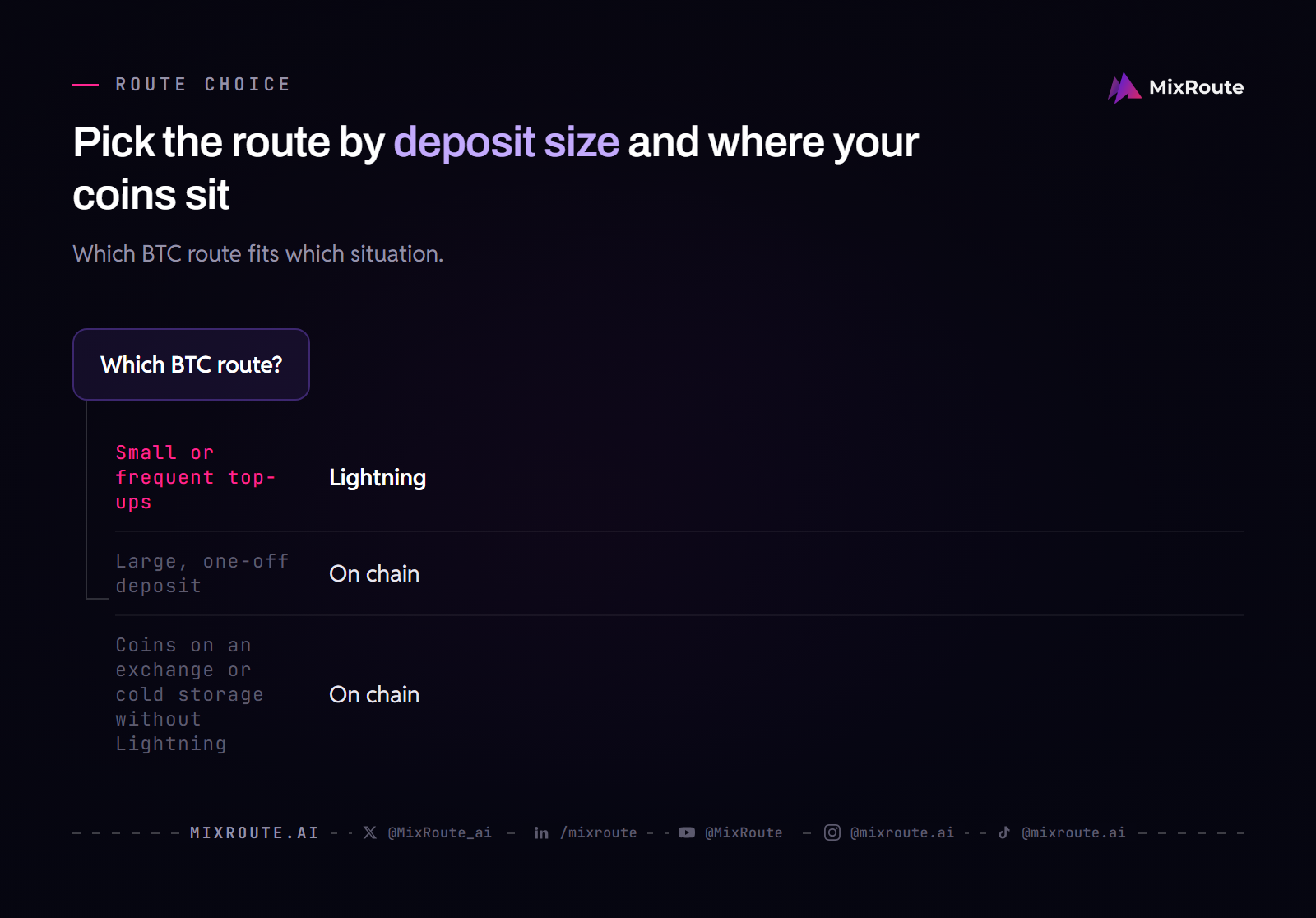
Pick Lightning when the deposit is small or you will top up again. Pick on chain when the deposit is large, or when your Bitcoin sits on an exchange or in cold storage without Lightning support. Either way the credit lands in the same MixRoute balance and works with the same API key.
The two ways to send Bitcoin
| Route | Fee | Speed | Best for |
|---|---|---|---|
| Lightning Network | Exceptionally low, because payments settle off chain | Milliseconds to seconds | Small and frequent top ups |
| Bitcoin on chain | Varies with network usage, not with the amount | A new block about every 10 minutes on average; a low fee can wait longer | Larger deposits |
Bitcoin on chain is the base layer. Your transaction goes into a block, and bitcoin.org puts block production at about one every 10 minutes on average. An individual confirmation can arrive much sooner or much later, and a transaction that pays less than the network is currently prioritizing may wait considerably longer for its first one. The fee follows network usage rather than the amount you send.
Lightning is a payment layer built on top of Bitcoin. Payments settle off chain instead of being written one by one into blocks, which the Lightning Network site describes as milliseconds to seconds with exceptionally low fees. That fits an API top up, which is usually a modest amount sent more than once.
Why Lightning changes the maths for Bitcoin
On chain Bitcoin charges a fee that is unrelated to the amount transferred, so sending 1 bitcoin costs the same as sending 100,000. That is fine for a large deposit and awkward for a small one.
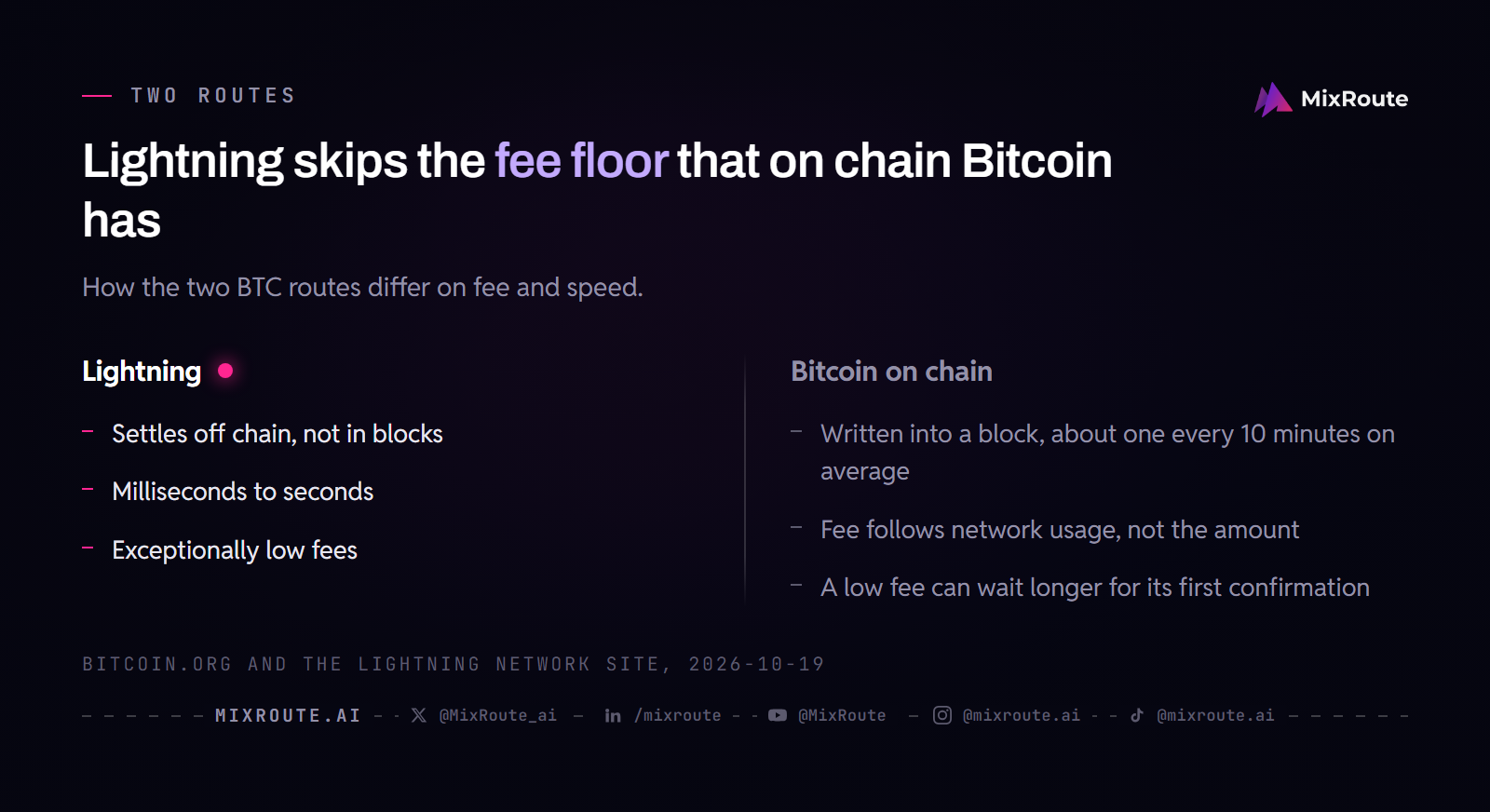
Picture a developer who adds a little credit every few weeks. On chain, every one of those top ups pays a full transaction fee, the same one a large deposit would pay. Over Lightning the payment settles off chain, so that fee floor does not apply.
The practical consequence. If you hold Bitcoin and want to fund an API balance, Lightning is the better route unless the deposit is large.
Choosing between them
Use Lightning when:
- The deposit is small or moderate
- You top up regularly rather than once
- You want the payment itself to settle in seconds
- You already have a Lightning enabled wallet
Use the on chain network when:
- The deposit is large enough that the fee is a rounding error
- Your Bitcoin sits somewhere without Lightning support, such as certain exchanges or cold storage
- You would rather not set up a Lightning wallet for a one off transfer
Before you send: the volatility question
Bitcoin is not a stablecoin. Unlike USDT, USDC, and PYUSD, it has no dollar peg, so depositing it converts a price exposed asset into fixed dollar credit at the rate when it credits. If Bitcoin rises afterward your balance does not rise with it, and if it falls your balance is unaffected.
If you hold Bitcoin deliberately for the long term, spending it on API costs means giving up that position, and paying from a stablecoin instead is a reasonable choice. Nothing about using MixRoute requires you to spend Bitcoin you would rather keep. If Bitcoin is simply what you have, or you were converting some to cover costs anyway, depositing it directly saves a conversion step and its fees.
Tax treatment depends on where you live, and bitcoin.org notes that tax liability often accrues regardless of the medium used. If the payment runs through a business, ask an accountant familiar with your situation.
How to pay for AI APIs with Bitcoin, step by step
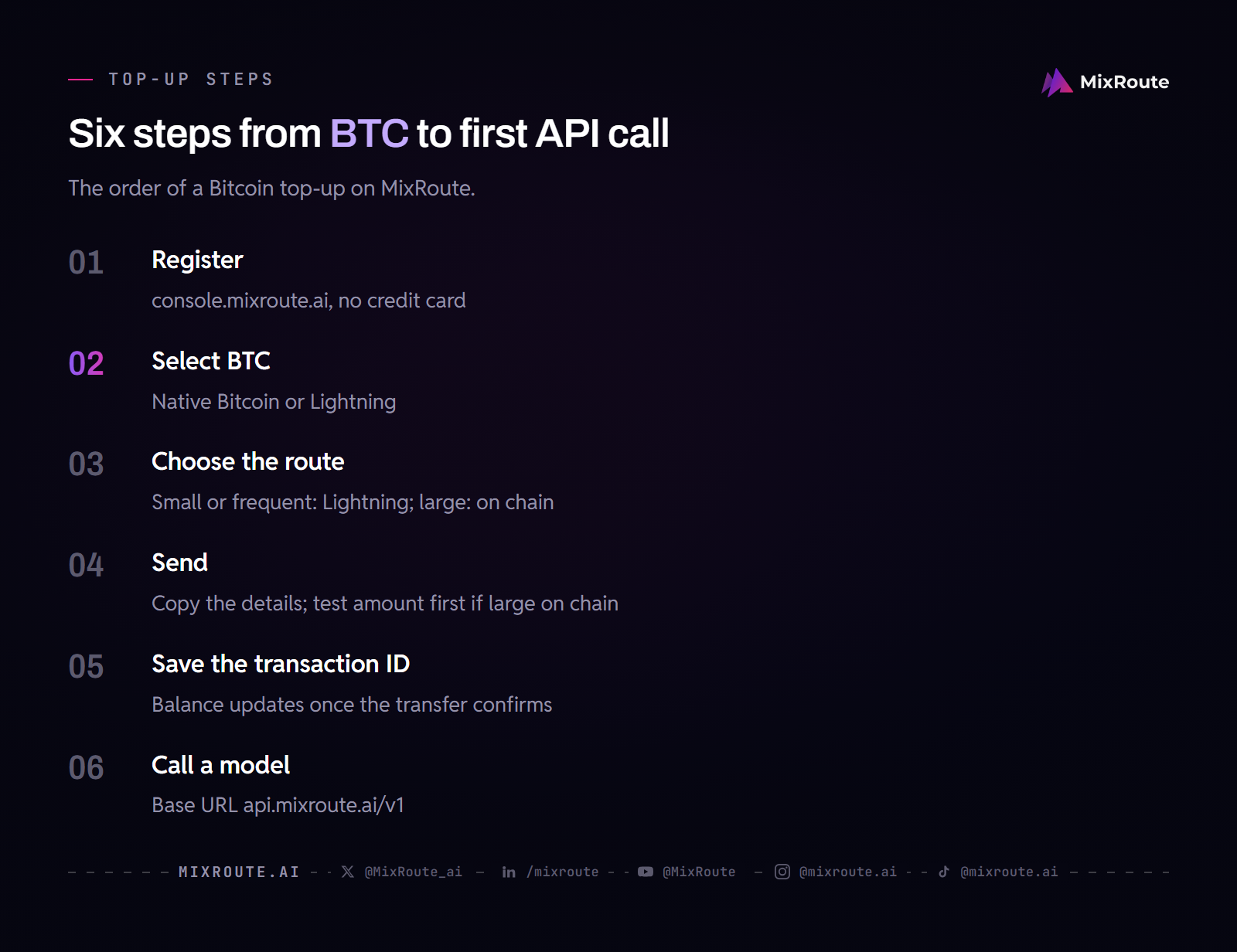
Step 1: Create your account
Register at console.mixroute.ai. No credit card is needed to sign up, and you get one API key for all models.
Step 2: Select BTC on the deposit screen
Choose BTC (Bitcoin) from the coin list. The deposit screen offers the native Bitcoin network and the Lightning Network for BTC.
Step 3: Choose Lightning or on chain
Decide using the guidance above: small or frequent, Lightning; large or single, on chain. Follow what the deposit screen shows for the route you pick, since the two work differently.
Step 4: Send from your wallet
Copy whatever the deposit screen gives you instead of typing it by hand. For a large on chain deposit, send a small test amount first and confirm it credits before sending the rest. That costs a second fee, so weigh it against the size of the transfer.
Step 5: Wait for confirmation
A Lightning payment settles in milliseconds to seconds. An on chain transfer waits for the network: a block arrives about every 10 minutes on average, and your balance updates once the network confirms the transfer. Save the transaction ID, because until the balance updates it is your proof that the transfer happened.
Step 6: Generate your API key and make a call
Create a key in the console and copy it once. Store it in an environment variable, never in client side code, and never commit it to a repository. The model ID comes from the model’s page in the catalog: Claude Sonnet 5.5 is claude-sonnet-5-5, and GPT-6.1 Sol, listed at /models/gpt-6-1-sol/, is gpt-6.1-sol.
from openai import OpenAI
client = OpenAI(
    base_url="https://api.mixroute.ai/v1",
    api_key="YOUR_MIXROUTE_KEY",
)
response = client.chat.completions.create(
    model="claude-sonnet-5-5",
    messages=[{"role": "user", "content": "Say hello in one sentence."}],
)
print(response.choices[0].message.content)

# Switch to a GPT model by changing only the model ID
response = client.chat.completions.create(
    model="gpt-6.1-sol",
    messages=[{"role": "user", "content": "Say hello in one sentence."}],
)
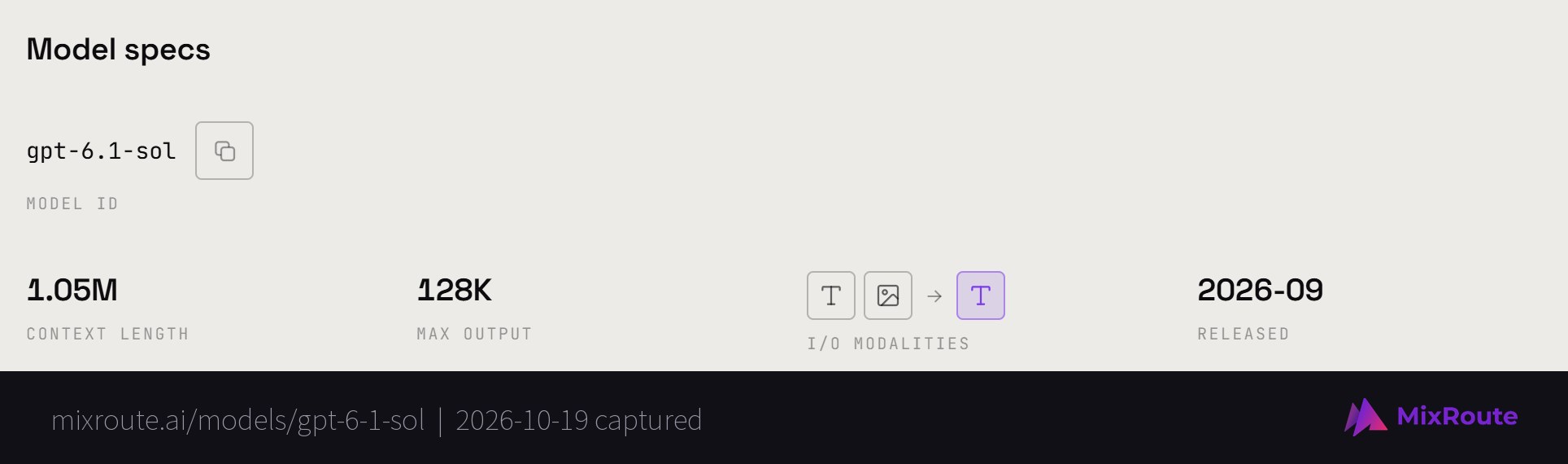
The base URL ends in /v1, which tells the SDK it is talking to an OpenAI compatible server. Switching models is a one string change: same key, same base URL, different model ID from the catalog.
If your Bitcoin deposit does not arrive
On chain, check the transaction ID on a Bitcoin block explorer. If it shows as unconfirmed, it may simply need more time, particularly if the fee was below what the network was prioritizing. If it shows confirmed and the funds reached the deposit address, write to service@mixroute.ai with the transaction ID.
On Lightning, look at the payment status in your wallet. If it shows as failed, send it again, or send the deposit on chain instead.
If you sent funds on the wrong network or to an address for a different asset, the deposit screen warns that the funds can be lost. Write to service@mixroute.ai with the transaction ID anyway, but treat recovery as unlikely.
The USDT deposit guide has a fuller troubleshooting walkthrough that applies to crypto deposits generally.
Other ways to pay
Bitcoin is one of several options. MixRoute also accepts:
- USDT on Ethereum, Arbitrum One, Polygon, Solana, TON Network, and Tron
- USDC on Ethereum, Arbitrum One, Polygon, and Solana
- PYUSD (PayPal USD) on Ethereum and Solana
- ETH on Ethereum mainnet
- Cards via Visa, Mastercard, and JCB
The full crypto payment guide covers every coin with its supported networks.
How the options compare
| Option | Bitcoin | Lightning | How billing works |
|---|---|---|---|
| Anthropic direct | Crypto not listed | Not listed | Prepaid credits bought in the Console, or monthly invoicing set up through Sales |
| Google (Gemini API) | Crypto not listed | Not listed | Prepay or postpay through a Google billing account with a payment method on file |
| MixRoute | Yes | Yes | Top up a balance, then each request is deducted from it right after it completes |
MixRoute charges a 0% platform fee on top ups and passes provider prices through with no markup, so the only extra cost of a Bitcoin deposit is the network fee your wallet pays for the transfer. That fee goes to the network, not to MixRoute. OpenAI sets its own billing methods in its platform account, so check the payment page there before assuming.
FAQ
Can I pay for AI API access with Bitcoin?
Yes, through a gateway. Anthropic and Google do not list crypto among their billing methods, so you fund a MixRoute balance with BTC instead, on the native Bitcoin network or over Lightning. The balance works with one API key across 250+ models, including GPT and Claude models.
Does MixRoute support the Lightning Network?
Yes. Lightning is one of the two BTC options, next to the native Bitcoin network. Lightning payments settle off chain with fees that the Lightning Network site describes as exceptionally low, which is what makes small Bitcoin top-ups practical.
Should I use Lightning or the on chain Bitcoin network?
Use Lightning for small or frequent deposits and on chain for large ones. On chain fees do not depend on the amount, so they weigh most on small deposits and are easy to absorb on a large one. If your coins sit on an exchange or in cold storage without Lightning support, send on chain.
Why is Lightning cheaper than on chain Bitcoin?
Lightning payments settle off chain instead of being written individually into blocks. An on chain fee is unrelated to the amount sent, so a small transfer pays about the same as a large one. Lightning has no such floor, which is why it suits modest top-ups.
How long does a Bitcoin deposit take?
Lightning payments settle in milliseconds to seconds. On chain, Bitcoin adds a block about every 10 minutes on average, and your balance updates once the network confirms the transfer. A transaction that pays less than the network is prioritizing can wait considerably longer for its first confirmation.
Does depositing Bitcoin lock in the price?
Yes. Your BTC converts to dollar-denominated API credit at the rate when it credits. If Bitcoin rises afterward your balance does not rise with it, and if it falls your balance is unaffected. A stablecoin deposit is a transfer rather than a conversion, which is the main difference.
Does paying with Bitcoin require KYC?
MixRoute does not need a credit card to sign up, and you fund the balance from your own wallet. The sign-up and billing pages do not describe an identity-document step for top-ups. For a question about verification on your account, write to service@mixroute.ai.
Do I pay a markup on models versus going direct?
No. MixRoute bills at each provider’s official price with 0% markup. You get one key and one bill instead of several separate accounts.
Do my credits expire?
No. MixRoute credits are valid forever, whether you fund them with Bitcoin, a stablecoin or a card, and whether you top up through self-serve or an enterprise plan.
The bottom line
You can fund AI API credits with Bitcoin on the native network or over Lightning. Use Lightning for small and frequent deposits and the on chain network for large ones, and remember that Bitcoin is not a stablecoin: depositing it converts it to dollar credit at that moment’s rate.
MixRoute accepts Bitcoin both ways, alongside USDT, USDC, PYUSD, ETH, and cards. One OpenAI compatible API, 250+ models, credits that never expire. Start building on MixRoute