How to Pay for AI APIs With USDT: All Six Networks Explained
You pay for AI APIs with USDT by topping up a gateway that takes it, because the vendors’ own billing pages, such as those of Anthropic and Google, do not list USDT. On MixRoute, self-serve top-ups accept USDT and USDC next to Visa, Mastercard and JCB, start at $10, and never expire. MixRoute takes USDT on six networks: Ethereum, Arbitrum One, Polygon, Solana, TON Network and Tron. Send the USDT on the network your funds already sit on, wait for the checkout to confirm it, then call 250+ models with one key. Choose the network before you send, because a transfer on the wrong one is usually lost.
Quick answer
Fund an OpenAI-compatible gateway with USDT, create one API key, and reach every model in its catalog through one endpoint. MixRoute’s FAQ says you do not need a credit card to sign up, and new users get $5 in free credits. USDT suits this better than most coins because Tether issues it on many blockchains and treats a token on one chain as equal to a token on another, so you can usually start from wherever your funds already are. The pricing page has the tiers and the payment methods.
Why the major AI labs do not take USDT
The labs sell API access through their own accounts, and their billing pages describe a payment method on file and invoicing. Anthropic’s billing help covers updating a console payment method and a monthly invoice. Google’s Gemini billing page covers prepay, postpay and invoiced plans. Neither lists USDT or any stablecoin.
That works if you hold a card the vendor accepts. Developers in regions where cards get declined, agents that top themselves up with no human around, and anyone paid in stablecoin all hit the same wall: the models are open to the world over an API, and the payment rail is not.
All six USDT networks, compared
The network decides what the transfer costs you and whether it arrives at all. MixRoute accepts USDT on six: Tron, Solana, Polygon, TON Network, Arbitrum One and Ethereum. Tether issues USDT on many more chains, so the token existing on a chain does not mean a platform accepts it there. Send only on one of these six.
| Network | Transfer cost | Best for |
|---|---|---|
| Tron | Lowest | The default when you are buying USDT to fund an API balance |
| Solana | Very low | Funds already on Solana, and a fast confirmation |
| Polygon | Very low | Cheap and common for DeFi users |
| TON Network | Low | USDT held in a Telegram-based wallet |
| Arbitrum One | Low | Ethereum security at layer 2 prices |
| Ethereum | Highest | Only when your USDT already sits on mainnet |
Fee levels move with congestion, so read the transfer fee your wallet or exchange shows before you confirm.
Tron is the default pick. Fees are small. If you are buying USDT to fund an API balance and can choose the chain at purchase, buy it on Tron.
Solana is the speed pick. Fees are tiny, and if you already operate on Solana there is no reason to bridge somewhere else.
Ethereum is the one to avoid unless your USDT is already there. Gas on mainnet does not shrink with the transfer size, so it hurts most on a small deposit. A $10 top-up can lose a visible share of its value to gas during congestion.
Arbitrum One is the middle ground. It settles to Ethereum at layer 2 costs, which suits you if you want Ethereum’s security model without mainnet gas.
TON Network is worth a look when your USDT sits in a Telegram-based wallet, since sending from there skips a bridging step.
Which network should you actually pick
Send from the chain your USDT is on, as long as it is one of the six. Picture two people with the same $50: one holds it on Tron and one on Ethereum. The Tron holder sends it as it is. The Ethereum holder should compare the mainnet fee against the cost of moving the funds first, and bridging to save a few cents usually costs more than it saves.
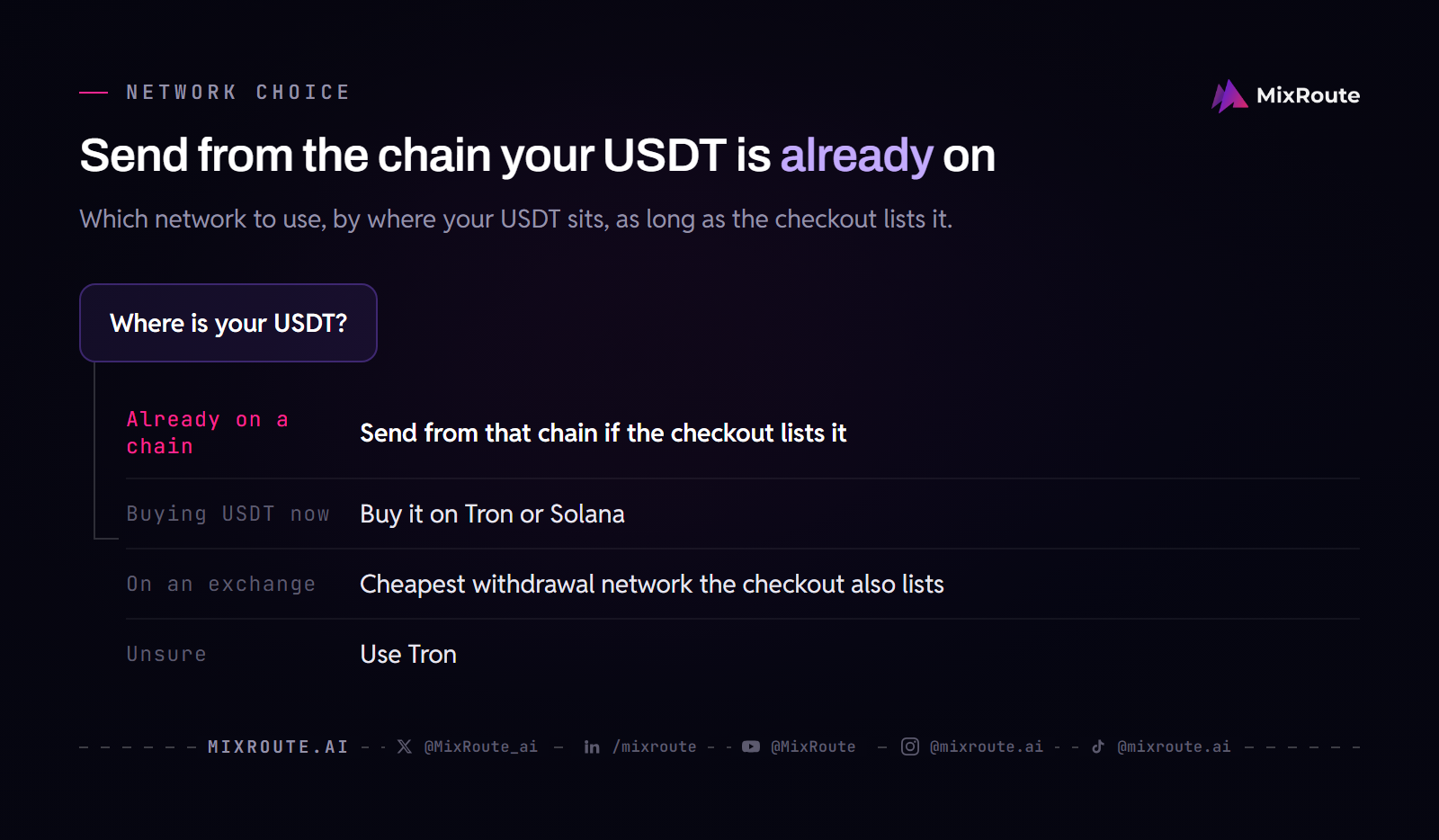
If your USDT is already on a chain, send from that chain, assuming it is one of the six.
If you are buying USDT now and can choose the chain, buy on Tron or Solana.
If you are withdrawing from an exchange, compare the withdrawal fee for each network the exchange offers and pick the cheapest one that also appears among the six. The network in the exchange’s withdrawal screen has to match the network you chose at checkout.
If you are unsure, use Tron.
How to pay for AI APIs with USDT, step by step
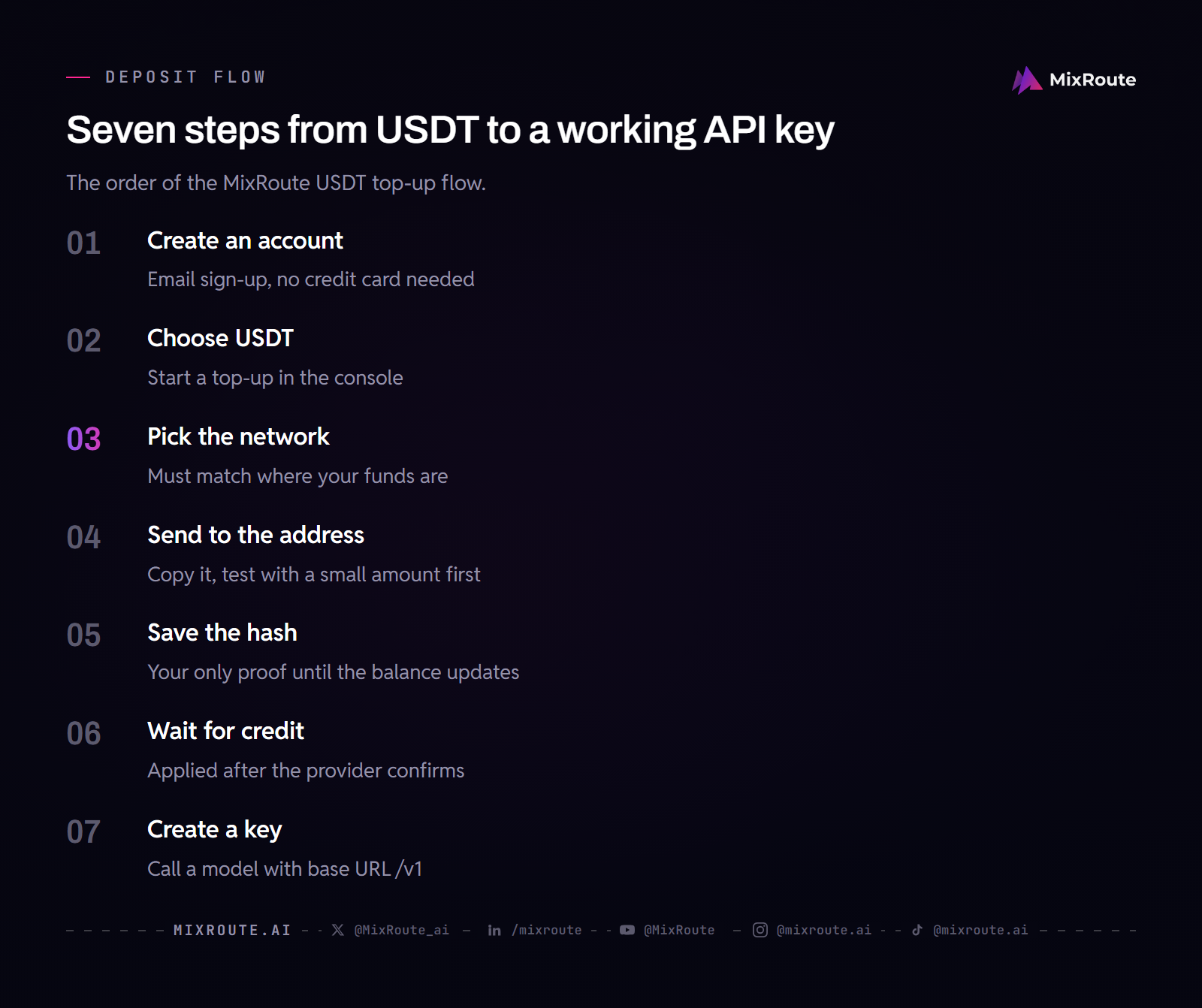
Step 1: Create your account
Sign up with an email address. The FAQ states that no credit card is needed. New users get $5 in free credits, enough to test a model and confirm the whole flow before you deposit anything of your own.
Step 2: Open the deposit screen and select USDT
Start a top-up in the console and choose USDT (Tether) as the payment method. The network selection screen then shows the six supported networks. The Starter tier begins at $10, and larger top-ups earn the bonus credit listed on the pricing page.
Step 3: Select your network carefully
This is the step where money gets lost. A deposit address belongs to one network. USDT on Tron and USDT on Ethereum travel on different chains, and a transfer on the wrong chain does not reach the address you copied.
Match the network to where your funds are. When you withdraw from an exchange, the network on the exchange’s withdrawal screen must be the one you selected here.
Step 4: Send to the deposit address
Copy the address and paste it. A hand-typed crypto address is one wrong character away from a lost transfer.
On a first deposit of any size, send the smallest amount the checkout accepts first, confirm that it credits, then send the rest. The extra network fee is cheap insurance.
Step 5: Save the transaction hash
Your wallet or exchange shows a transaction hash, also called a TXID, as soon as the transfer is broadcast. Copy it. Until the balance updates, the hash is your proof that the transfer happened and the only thing support can use to trace it.
Step 6: Wait for confirmation
Credit lands after the payment provider confirms the transaction, not when you press send. MixRoute’s billing documentation says the same about payment links: receiving a link does not mean the wallet has been credited. Confirmation time depends on the network, and Ethereum can be slow when it is congested.
Step 7: Generate your API key and make a call
Create a key in the console and copy it once. Store it in an environment variable, keep it out of client-side code and repositories, and revoke it and generate a new one if it leaks.
from openai import OpenAI

client = OpenAI(
    base_url="https://api.mixroute.ai/v1",
    api_key="YOUR_MIXROUTE_KEY",
)

response = client.chat.completions.create(
    model="claude-sonnet-5-5",
    messages=[{"role": "user", "content": "Say hello in one sentence."}],
)

print(response.choices[0].message.content)
Keep /v1 at the end of the base URL, because the OpenAI SDK adds paths such as /chat/completions to it. To use another model, change one string. Replace claude-sonnet-5-5 with gpt-6.1-sol and the same key and base URL call GPT-6.1 Sol. Copy the exact ID from the model catalog, since some IDs use a dot where the page URL uses a hyphen.
Create a USDT payment link through the API
You can start a USDT top-up from code: MixRoute’s billing API takes usdt as a payment_method and returns a payment link. It creates a checkout for your own balance, and it is a different thing from Tether’s own authenticated API, which only reads limited data from a Tether.to account.
The request sends an integer USD amount and the payment method, and the response carries pay_link:
curl -fsS -X POST "$BASE_URL/api/user/topup/pay" \
  -H "Authorization: Bearer $ACCESS_TOKEN" \
  -H "New-Api-User: $USER_ID" \
  -H "Content-Type: application/json" \
  -d '{"amount": 50, "payment_method": "usdt"}'
Send the user to pay_link in a browser, then read the recharge history and the balance after checkout finishes. The docs tell you to call these endpoints only from a trusted backend after the user confirms, and to read the recharge configuration first, because the minimum amount and the enabled payment methods are configuration values. The billing and auto-recharge reference has the full list.
When a deposit does not arrive
Most missing deposits come down to four causes, and three of them are recoverable.
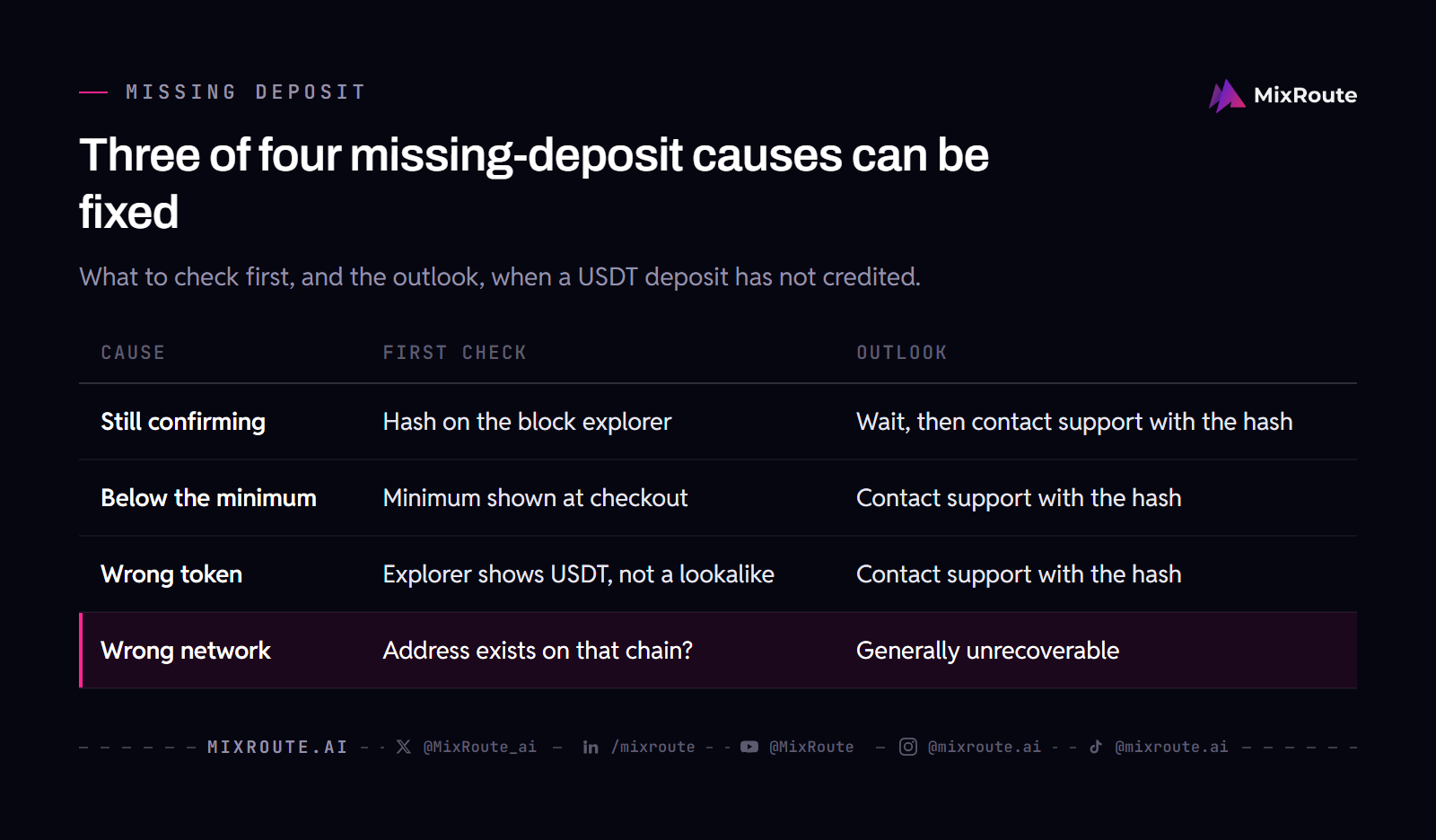
The transaction is still confirming
This is the most common cause and not a fault. Paste your transaction hash into the block explorer for the network you used and read the confirmation count.
| Network | Block explorer |
|---|---|
| Tron | Tronscan |
| Ethereum | Etherscan |
| Arbitrum One | Arbiscan |
| Polygon | Polygonscan |
| Solana | Solscan or Solana Explorer |
| TON Network | Tonscan or Tonviewer |
If the explorer shows the transaction as confirmed and the funds reached the deposit address, the transfer worked and crediting is a matter of processing time. Contact support with the hash.
You sent below the minimum
A deposit below the minimum may not credit. The Starter tier starts at $10, so a token amount of a dollar or two is the usual way to fall under it. Read the minimum the checkout shows before you send.
You sent the wrong token
USDT and USDC are different stablecoins from different issuers, and a page that accepts one has not accepted the other. Lookalike and wrapped tokens exist on the same chains too. Confirm on the explorer that what moved was USDT.
You sent on the wrong network
This is the serious one. If you sent USDT on a network the deposit address does not exist on, the funds are generally unrecoverable, because nobody may control that address on that chain.
Contact support with the transaction hash regardless. Recovery is sometimes possible, depending on the chains involved and whether the address exists on both, but treat it as unlikely. This is why the test transaction in step 4 is worth its fee.
Beyond USDT: the other options
USDT was the first crypto option and has the widest network coverage, but it is not the only one. MixRoute also accepts:
- USDC on Ethereum, Arbitrum One, Polygon and Solana. It is not available on Tron or TON. USDC cannot pay a USDT checkout, so hold the coin you choose at checkout.
- PYUSD (PayPal USD) on Ethereum and Solana.
- BTC on the native Bitcoin network, with Lightning Network support for smaller deposits.
- ETH on Ethereum mainnet.
- Cards, through Visa, Mastercard and JCB.
Business plans ($1,000 to $20,000 a month) are prepaid by card, USDT or USDC, or bank transfer. Enterprise plans mainly use bank wire with an invoice. If you hold a different coin, the pay for AI API credits with crypto guide covers the coin-by-coin picture. Six networks for USDT against four for USDC and two for PYUSD means you can nearly always find a cheap route in without bridging first.
How the options compare
| Option | Takes USDT | Sign-up | Markup on credit | Models on one key |
|---|---|---|---|---|
| OpenAI, Anthropic, Google direct | Not listed on the Anthropic or Google billing pages | Account plus a payment method | Not applicable | One vendor each |
| MixRoute | Yes, on self-serve and Business plans | Email, no credit card needed | None on Starter, full credit value | 250+ |
Your deposit and your credit match on the Starter tier, and the only cost on top is the network fee for moving the USDT, which is small on a cheap chain. Bigger top-ups earn a bonus: 2% on Growth ($1,000 to $4,999, up to $100), 3% on Pro ($5,000 to $14,999, up to $450) and 5% on Scale ($15,000 to $29,999, up to $1,500). The first-top-up bonus stacks with the tier bonus, and credits never expire.
FAQ
Which USDT network should I use? Use the one your USDT already sits on, as long as it is one of the six. If you are buying USDT now and can choose, pick Tron or Solana, where fees are small. Avoid Ethereum mainnet unless your USDT is already there, since gas does not shrink with the transfer size and hurts most on small deposits.
Which networks does MixRoute support for USDT? Six: Ethereum, Arbitrum One, Polygon, Solana, TON Network and Tron. That is broader coverage than any other coin on the platform. Send only on one of those six.
Can I pay OpenAI or Anthropic with USDT directly? Not through anything their billing pages describe. Anthropic’s and Google’s billing documentation covers a payment method on file and invoicing, and neither lists USDT. A gateway that accepts USDT is the practical way to reach their models with crypto.
Does paying with USDT require KYC? The pricing and FAQ pages describe no identity check for self-serve top-ups, and the FAQ says you do not need a credit card to sign up. They do not rule one out either, and the exchange you withdraw USDT from applies its own rules. Enterprise onboarding, which starts at $20,000 a month in usage or a single $30,000 top-up, runs through sales with a contract.
What happens if I send USDT on the wrong network? The funds are usually unrecoverable, because the deposit address may not exist on the chain you sent to. Contact support with your transaction hash, since recovery is occasionally possible, but do not count on it. A small test transfer first is the cheap way to avoid the problem.
My USDT deposit has not arrived, what do I do? Check the transaction hash on the block explorer for the network you used: Tronscan for Tron, Etherscan for Ethereum, Solscan for Solana, and so on. If it shows as confirmed and the funds reached the deposit address, contact support with the hash. If it is still pending, wait. If you sent on a network the checkout did not list, that is the wrong-network case above.
Is USDT cheaper than paying by card? It depends on your side of the payment. MixRoute adds no markup on Starter top-ups for either method, so the difference is an on-chain fee for USDT, small on Tron or Solana, against whatever your card issuer charges, such as foreign transaction fees. Compare those two numbers for your own amount.
Can I still use USDC, Bitcoin, or a card instead? Yes. MixRoute accepts USDC on four networks, PYUSD on two, Bitcoin including Lightning, ETH on mainnet, and Visa, Mastercard and JCB. USDT has the widest network coverage of the crypto options. Business plans can also pay by bank transfer.
Do I pay a markup on models versus going direct? The pricing page lists no markup on Starter top-ups, and each model page shows its per-token price. As of 2026-10-19, claude-sonnet-5-5 costs $2.00 per million input tokens and $10.00 per million output tokens, and gpt-6.1-sol costs $2.00 and $10.00 up to a 272K context. What a gateway changes is one key and one balance across vendors.
Do my credits expire? No. MixRoute credits are valid forever, whether you top up through self-serve or an enterprise plan.
Should I fund with USDT or USDC? Fund with whichever you already hold, because both are accepted on self-serve tiers and the checkout only takes the coin you pick. Then match the network for that coin to the one your wallet or exchange sends from. Converting one into the other first costs a trade fee for no benefit.
Can I automate USDT top-ups? You can create the USDT payment link from code, as shown above, and the billing API also covers recharge history and automatic recharge settings. The payment itself still happens at the link, in a browser, where the provider confirms it.
The bottom line
A gateway that accepts stablecoin is how you pay for AI API access with USDT. Use Tron unless your funds already sit elsewhere, match the network to where they are, send a small test first, and save the transaction hash, because it is your only recourse if something goes wrong.
MixRoute takes USDT on all six of those networks, plus USDC, PYUSD, Bitcoin, ETH and cards, behind one OpenAI-compatible API for 250+ models, with credits that never expire. Start building on MixRoute