LLM API Error Codes: Who Sent It and When to Retry
Read two things in order: the status code and the JSON body sitting next to it. The body names the actor that rejected the call, which is your client SDK, the gateway you call through, or the model provider upstream. The status carries the retry verdict. A 400, 401, 403, 404, 413, or 422 fails the same way on every attempt, so fix the request. A 429, 500, 502, 503, 504, or a transport timeout is worth a bounded retry with backoff. Whether the failed call is potentially billable is a separate question, and it turns on the provider’s policy rather than the status.
When an LLM API call fails, which layer sent the error?
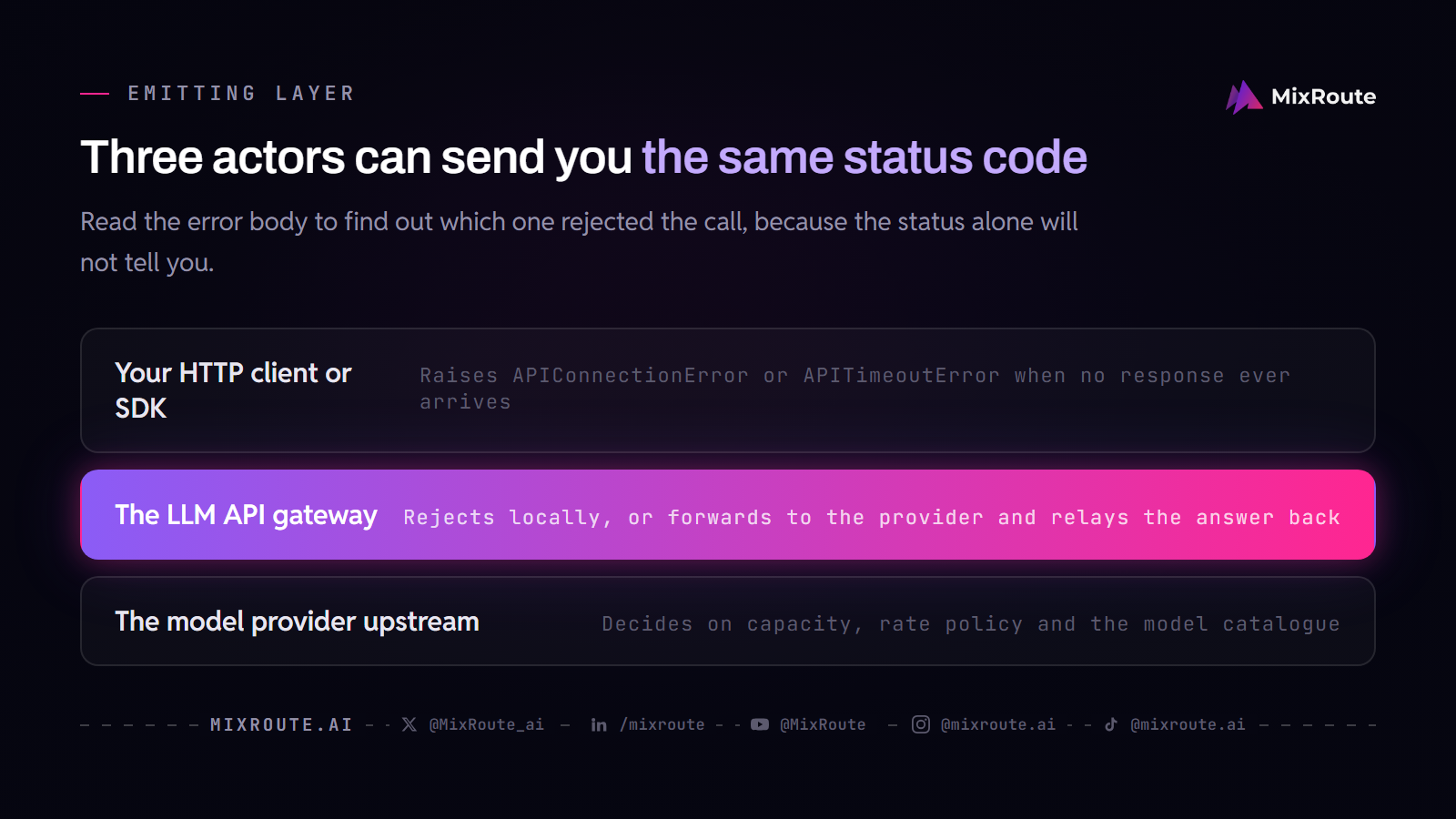
The status alone will not tell you, because the same 503 can mean the upstream provider is overloaded or that a gateway cannot reach the model name you sent. Read the status together with the error body, and the failure lands in one of three layers:
- your HTTP client or SDK, which never received a response
- the LLM API gateway you call through, which rejected the call before touching a provider
- the model provider upstream, whose status the gateway often relays
The actors in the request chain
A request to a token API moves through a short chain. Your application builds the call and hands it to an HTTP client or an SDK such as the OpenAI Python library. If a gateway such as MixRoute sits in the path, that client talks to the gateway, and the gateway either rejects the call locally or forwards it to a provider and relays the provider’s answer back to you.
Error bodies carry the fields that identify the origin: message, error.type, error.code, and request_id. Some gateways add a source field holding client, gateway, or upstream. In the TokenHub API, source appears on handler-layer errors, and upstream_status plus upstream_code appear when the upstream model service failed. A body shaped like that tells you the gateway is only reporting what it received.
Once you can separate the three layers, naming every failure class gets easier. For a catalog that walks transport exceptions, gateway rejections, and provider statuses across the same chain, read the LLM API failure taxonomy before you design your handler map.
Exceptions that arrive before any HTTP status
Some failures never come with a status code to look up. A refused connection, a failed TLS handshake, or a response that misses your timeout makes the HTTP client raise an exception such as APIConnectionError or APITimeoutError, and no server sent that. Retrying a failed connection can make sense, but it is a different decision from retrying a 503, because the first request may have reached the model and the answer may have been lost on the way back. Treat any attempt that could have started model processing as potentially billable, and keep transport retries in their own branch of your logic.
Contrast those client exceptions with a returned 408 or 504. A 408 means an endpoint told you the request timed out. A 504 from a gateway means the gateway waited on the upstream provider and the provider did not answer in time. Both statuses exist because a response did come back. The client-side exception exists because none did.
LLM API status code lookup from 400 to 529
The table answers one question per row: would the same request body succeed on a second attempt. Billing is separate, and a status code alone does not establish a charge. MixRoute documents its own status meanings in the same error-code guide, and a provider’s body can add a more precise cause.
| Status | Typical meaning | Emitting layer | Retry this request unchanged? | Next step |
|---|---|---|---|---|
| 400 | Request body or a parameter does not match what the API expects | Gateway or model provider | No | Read the message, fix the named parameter, test the body alone |
| 401 | API key is missing, invalid, or paired with the wrong endpoint URL | Gateway or model provider | No | Replace the key or align it with the endpoint URL |
| 402 | Payment is required: the account has no usable credits or a payment action is pending | Model provider or gateway | No | Add credits or resolve the payment method |
| 403 | Permission is missing: token group disabled, token quota exhausted, IP not allowed, or region blocked | Gateway or model provider | No | Enable permissions or quota, allow the IP, or check the region policy |
| 404 | Endpoint path or model name does not exist | Gateway or model provider | No | Verify the URL and the model name, including case |
| 408 | A party that received the request did not answer within the timeout window | Client, gateway, or provider | Yes, bounded | Raise the timeout, and only retry when a duplicate generation is acceptable |
| 409 | The request conflicts with the current state of a resource, for example a concurrent modification or a value that must be unique; Anthropic documents it as conflict_error. |
Gateway or model provider | Not until the conflict is resolved | Read the response body to find which resource conflicts, resolve the conflict, then retry the request. |
| 413 | Request payload or message size exceeds the API limit | Gateway or model provider | No | Trim context, lower max_tokens, or split the input |
| 422 | The request was understood but contains a semantic or parameter validation error | Model provider or gateway | No | Read the failed field and revise the request or prompt |
| 429 | A traffic limit or a credit, spend, or usage limit was reached | Gateway or model provider | Only the rate-limit subtype | Read error.code if sent; Anthropic error bodies omit it, so a 429 with no retry-after may be a spend cap retries cannot clear. Apply the 429 section below. |
| 500 | The server had an error while processing the request | Model provider, or gateway for its own internal failure | Yes, bounded | Wait briefly, retry, and if it persists report the request ID and model name |
| 502 | The upstream model service was abnormal or unreachable | Gateway forwarding to an upstream provider | Yes, bounded | Retry with backoff and keep the request ID for a support ticket |
| 503 | The model is temporarily unavailable or overloaded | Model provider, often relayed by the gateway | Yes, after Retry-After |
Retry after the stated delay, then check the provider status page and the model name |
| 504 | The upstream server failed to respond in time | Gateway waiting on the upstream provider | Yes, bounded | Retry later and include the request ID if the error repeats |
| 529 | The API is temporarily overloaded; Anthropic documents it as overloaded_error and says it can occur under high traffic across all users. |
Model provider | Yes, with backoff | Retry with exponential backoff and honor retry-after when present, as Anthropic’s official SDKs do for 5xx errors. |
Take 404 as the template for reading any row. Whichever layer returns it, the error says the endpoint path you called or the model name you sent does not exist. Retrying the same body fails the same way on every attempt, so the fix is to check the URL and the model name against the API reference and send the corrected request. Do not spend retry budget there.
Named error types from OpenAI and Anthropic-compatible APIs
Providers usually put a richer identifier in the body than the status alone carries. OpenAI documents error.type and error.code next to the status. Anthropic uses a similar type list, but its body carries a type, a message, and a request_id, with no error.code. The exact set varies by provider, so check the provider’s guide before you write a switch statement that depends on one name. When code and type are both present, read the code for the specific cause, because the broader type can be too general to pick the right fix.
| Type or code | Meaning | Usual HTTP status | Emitting layer | Retry this request unchanged? |
|---|---|---|---|---|
invalid_request_error |
Request or parameter is invalid | 400 | Model provider or gateway | No |
authentication_error |
API key is wrong, expired, or rejected | 401 | Model provider or gateway | No |
permission_error |
The key lacks permission for the requested model or capability | 403 | Model provider or gateway | No |
not_found_error |
The model, endpoint, or resource does not exist | 404 | Model provider or gateway | No |
rate_limit_error |
A rate limit was hit; on Anthropic the same type also covers a usage tier’s monthly spend cap or a Claude Code workspace spend limit. | 429 | Model provider or gateway | Yes with backoff for a rate limit, but not for a spend-cap 429, which has no retry-after header and keeps failing until access resumes. |
slow_down |
Request rate increased faster than the service can safely handle, even inside normal RPM and TPM limits | 429 | Model provider or gateway | Yes after Retry-After, then ramp gradually |
credit_balance_exhausted |
The organization has no prepaid credits remaining | 429 | Model provider | No |
organization_spend_limit_exceeded |
An enforced monthly spend limit for the organization was reached | 429 | Model provider | No |
project_spend_limit_exceeded |
An enforced monthly spend limit for the project was reached | 429 | Model provider | No |
organization_usage_limit_exceeded |
A provider-assigned usage ceiling was reached | 429 | Model provider | No |
overloaded_error |
The service is overloaded and cannot take the request now | 529 | Model provider | Yes, with backoff |
api_error |
An internal server error occurred on the provider side | 500 | Model provider | Yes, briefly |
service_unavailable_error |
The service is temporarily unavailable | 503 | Model provider or gateway | Yes after Retry-After |
server_is_overloaded (code under service_unavailable_error) |
The requested model does not have enough capacity right now | 503 | Model provider | Yes after Retry-After, then check the status page |
One parsing detail: a 429 error.code is not always a string. Some gateways return an integer such as 429001 in rate-limit responses and include a Retry-After header in seconds. Parse the code defensively and treat the header as the authority for when to send the next request.
Why can a 429 mean five different problems?
A 429 says that something is full. It does not say what is full. The same status covers a request-rate limit, an exhausted credit balance, an enforced spend limit, and a provider-assigned usage ceiling. Only the first of those clears with a wait. The rest need a change to the account, so read the body before you read the clock.
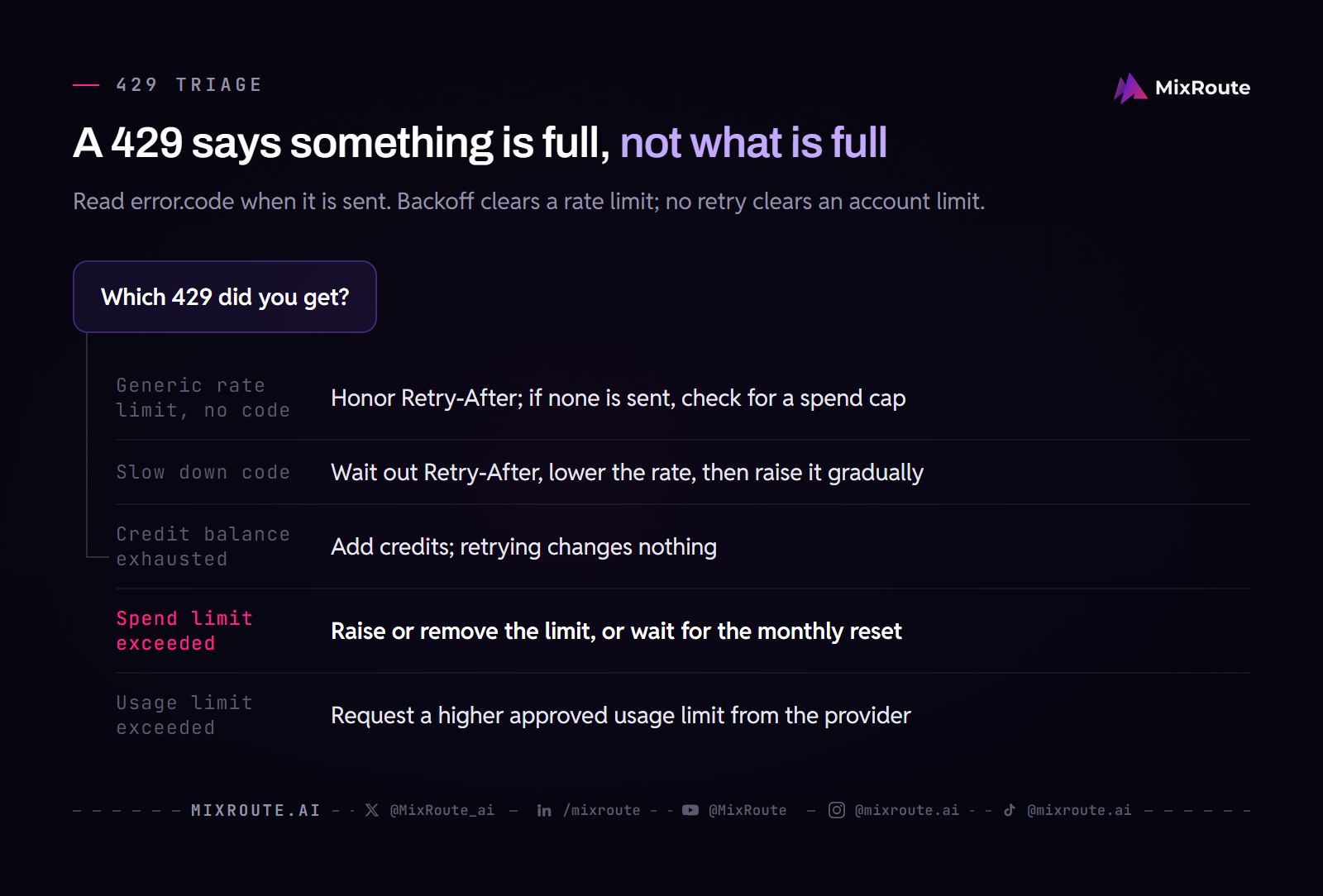
Five common 429 bodies and the fix each needs
| Body you may see | What it means | What clears it | Does blind retry help? |
|---|---|---|---|
| Generic rate limit, no code | Requests or tokens per minute exceeded the assigned limit; on Anthropic a 429 with no retry-after header can instead be a tier spend cap. |
Pace requests and honor Retry-After when present; a spend-cap 429 clears only when access resumes. |
Temporarily, then only with backoff, and not for a spend cap |
slow_down |
The request rate ramped up faster than the service allows | Wait out Retry-After, lower the rate, then increase it gradually |
Yes, but only after the specified delay |
credit_balance_exhausted |
Prepaid credit is gone | Add credits to the account | No |
organization_spend_limit_exceeded or project_spend_limit_exceeded |
An enforced monthly spend limit was reached | Raise or remove the limit, or wait for the monthly reset | No |
organization_usage_limit_exceeded |
A provider-assigned usage ceiling was reached | Request a higher approved usage limit from the provider | No |
Retrying a billing, spend, or quota error does not restore access. The request is rejected because an account-level condition is wrong, and no number of attempts changes that condition, so the correct move is to update credits or limits before you send anything else. Blind retries on those subtypes add latency and log noise without a path to success.
Some of you will see a 429 arrive with no retry-after header and assume the provider is throttling, when the account has actually run out of credits or hit a spend ceiling. Waiting will not fix that one. In MixRoute, a key can also hold a remaining spend budget separate from the account balance. If a rejection looks quota-related, check the account balance and that key’s budget in Token Management, and raise the key budget only if you intend the extra spend. Unlimited Quota removes the key-level ceiling; use it only when that matches your budget policy. Retrying the request does not replenish the budget.
When the 429 is a real rate limit, the fix lives in your caller rather than in the account. Work through the header handling, backoff math, and code examples in the 429 rate limit fix guide.
Which LLM API errors are safe to retry?
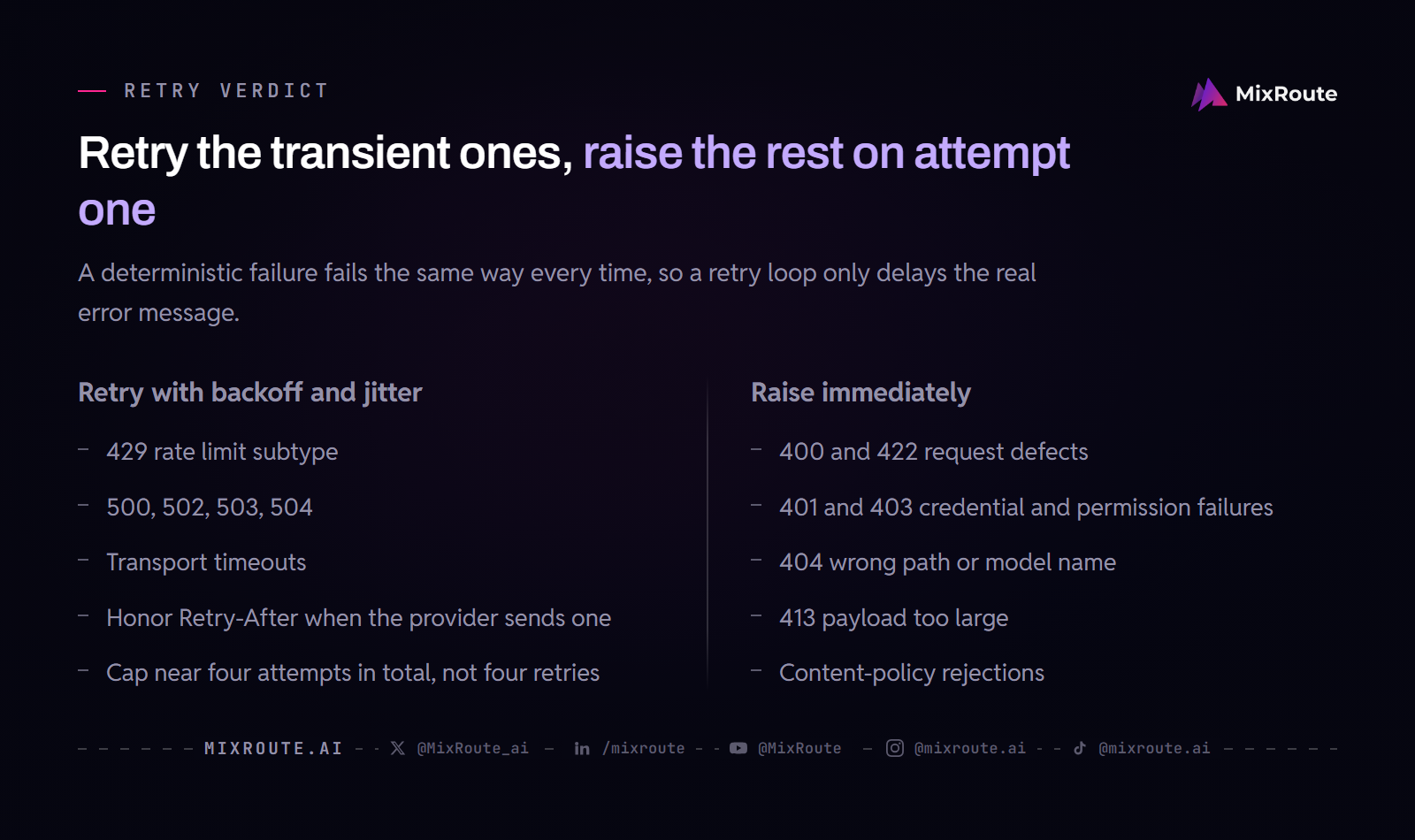
The transient ones are safe: 429 rate limits, 500, 502, 503, 504, and transport timeouts. The deterministic ones are not: 400, 401, 403, 404, 413, 422, and content-policy rejections. A deterministic failure is a defect in the request itself, so the same body fails the same way on every attempt and a retry only burns time. If you write the verdict down as one predicate over the status code, the rest of your retry loop gets simpler.
Retryable failures: bounded, with backoff and jitter
For the transient classes, retry with a small finite cap and an increasing delay. When the provider sends a Retry-After header, honor it, because the header says how long to wait before the next attempt. With no header, use exponential backoff with jitter. Jitter matters because without it, 200 agents that hit a rate limit in the same moment retry in the same moment and rebuild the spike they are trying to escape. A common shape caps the whole sequence near four attempts in total, not four retries after the first call, and lets the original exception propagate when the cap is reached.
Transport timeouts deserve one extra caution. If the request reached the model and only the response was lost, a retry sends a second generation request that may duplicate the first. Keep timeouts and connection retries bounded, and treat a timeout retry as a possibly duplicate, potentially billable call.
Deterministic failures: raise them immediately
Let 400, 401, 403, 404, 413, 422, and content-policy rejections escape the retry loop on the first attempt. A malformed parameter fails on attempt four exactly as it failed on attempt one, a wrong API key fails until the key is replaced, and a content-policy rejection fails until the prompt changes. Sending a rewritten prompt is a new code path, not a retry of the old one. Raise these to the caller, so the user gets the real error on the first call.
For working code that applies these verdicts, including the retryable check, jittered waits, and Retry-After handling, follow the per-layer retry strategy patterns and adapt them to the SDK you call.
When a 200 response still means a failed generation
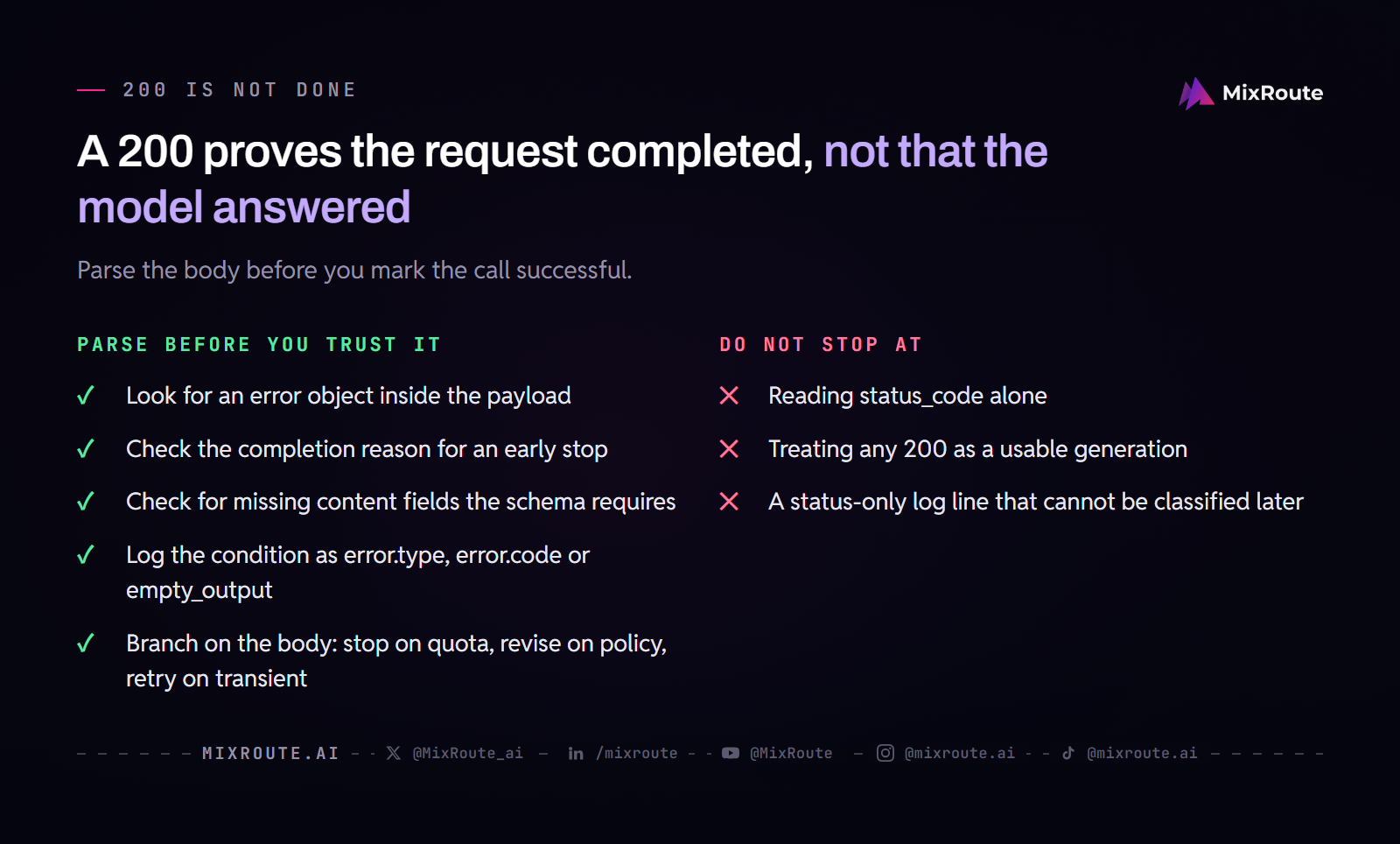
A 200 OK proves the HTTP request completed. It says nothing about whether the model produced a usable answer. Some APIs report business errors inside a successful body, and others return a completion that stopped early or carries no content, so a check on status_code alone misses real failures.
What to parse before you trust a 200
Parse the JSON body even when the status is 200. Look for an error object inside the payload, for a completion reason that says the output stopped early, and for missing content fields where the response schema says content should exist. Providers put the specific error type in the body so your application can branch on it: stop when a quota is exhausted, revise the prompt when a content policy was triggered, and retry only when the body reports a transient state.
Name the condition in your logs and metrics as error.type, error.code, or a custom label such as empty_output. A status-only log line cannot tell you later whether the failure was a quota stop, a policy rejection, or an upstream glitch. For the handler logic that runs after a successful-looking response, read the LLM API failure handling guide and model your branching on the body fields it walks through.
How do you act once you know which layer failed?
Apply the smallest fix that addresses the actor you named. Correct the parameter for a 400, repair the credential for a 401 or 403, confirm the URL and model name for a 404, add credits or raise a limit for a financial 429, and retry with bounded backoff only for the transient 429 and 5xx cases. Every row above ends in one of those five actions, so start there before you redesign anything.
Apply the shortest fix that matches the emitter
A 400 sends you to the request body. The message names the parameter that is wrong, sometimes with the format it expected, so fix that field and test the request on its own. A 401 or 403 sends you to the key and permission store: check that the token belongs to the endpoint you called, that the token group is enabled, and that the model is in the key’s allowed set. A 404 sends you to the model catalog and the path documentation, and many providers treat the model name as case-sensitive. A 413 or 422 sends you back to prompt construction: shorten the context, lower max_tokens, or correct the parameter types.
When MixRoute itself returns 503, the same gateway documentation asks you to verify the model name before anything else. Check that the name is currently listed on the MixRoute model catalog, because an unavailable or misspelled model name needs a configuration change before any retry can work. If the name is right and the error persists, send the full model name to the support team.
Log the fields that shorten the next incident: the status code, error.type, error.code, the model name, the request ID, and the attempt count for every failure. Keep the full request body out of your logs on every retry, since that is how secrets leak into log aggregators; store the request ID and look the details up in your own storage when you need them. Those fields turn a vague “we get 503s sometimes” into a classification you can act on.
Report persistent failures with the full chain
When an error survives the correct fix and bounded retries, report it to the platform that emitted it. For a provider-side 500 or an overloaded model, open a ticket with the provider and include the provider request ID, the exact error message and code, the model name, and the timestamp. For an error MixRoute emitted, the docs say to contact support with the full model name and the exact scenario so the team can check the upstream route. Keep the request body out of the ticket; the request ID lets the platform correlate the failure on its side.
Some repeated failures point at architecture, and retrying harder will not clear them. When one provider stays overloaded or one key keeps exhausting its limits, take the pattern and the request IDs to that provider and ask about its limits. MixRoute Smart Routing answers a different question: it reads each request’s complexity and task type and sends it to the best-suited model in the pool you authorize, which is a cost decision, not a way around a 429 or an overloaded provider. If model cost is the question, decide whether complexity-based model selection fits your workload.
FAQ
Which LLM API errors are safe to retry?
Yes, for anything transient: 429 rate limits, 500, 502, 503, and 504, and transport timeouts. Two conditions ride along with that answer. Honor Retry-After when the provider sends it, and cap the count low, near four tries in total rather than four retries after the first call. Retrying only pays off when a duplicate generation is acceptable to your caller, and that judgement belongs to your own code rather than the SDK.
Which LLM API errors should never be retried automatically?
The deterministic ones: 400, 401, 403, 404, 413, 422, and content-policy rejections. The same body produces the same result on attempt four as on attempt one, so a retry loop buys you nothing except a slower error line and a longer log. Raise them on the first attempt, and check that no wrapper above your code catches the exception and quietly puts the call back in the queue.
Why is a 429 not always a rate limit?
Because 429 records that a limit is full, and several limits share the status: the request rate, the credit balance, an enforced monthly spend limit, and a provider-assigned usage ceiling. Only the rate-limit case clears with a wait. Read error.code and the headers before you decide backoff is the fix. On Anthropic the body carries no error.code at all, and rate_limit_error also covers spend caps, so a 429 with no retry-after header may be one that no amount of retrying clears.
What does error.type tell you when error.code is also present?
It gives you the family; error.code gives you the cause. One type can cover more than one situation. On Anthropic, rate_limit_error stands for both a rate limit and a spend cap, and the two need opposite responses, which is why the code is the field to branch on. Read the code, the type, and the message together, then ask whether another attempt with the same body could produce a different result. If the answer is no, the next stop is the billing page or the key budget.
Can a 200 OK response still mean the LLM call failed?
Yes. The 200 covers the HTTP exchange, and some APIs report business failures inside that successful body: an error object, a completion reason showing the output stopped early, or content fields that are simply missing. Parse the body before you treat the call as done, and log the outcome under a name you can query later, such as error.type or a label like empty_output. A log line that records only 200 tells you nothing about why a generation came back empty, which is the question you will be asking a week later.
Is a failed LLM API request still billed?
It depends on the provider and on whether the model started processing, and the status code alone does not settle it. A retryable 503 can still be a charged request if the model already began generating before the failure. A response that never came back is a case your own code cannot see, which is why the retry verdict and the billing verdict sit in separate columns. Track failed attempts as potentially billable until the provider’s billing documentation says otherwise.
What should I include when I report a persistent LLM API error?
The request ID first, because that is what lets the platform pull the same call on its side. Add the timestamp, the model name exactly as you sent it, the error body, the attempt count, and any non-secret headers such as Retry-After. Note the backoff you used, so support can see that the error survived a reasonable delay. Leave out API keys, Authorization values, cookies, and customer data; if the team needs the payload shape, describe the failing field rather than pasting the whole request.