Prompt Caching in 2026: The Cross-Provider Guide (With the Numbers Everyone Gets Wrong)
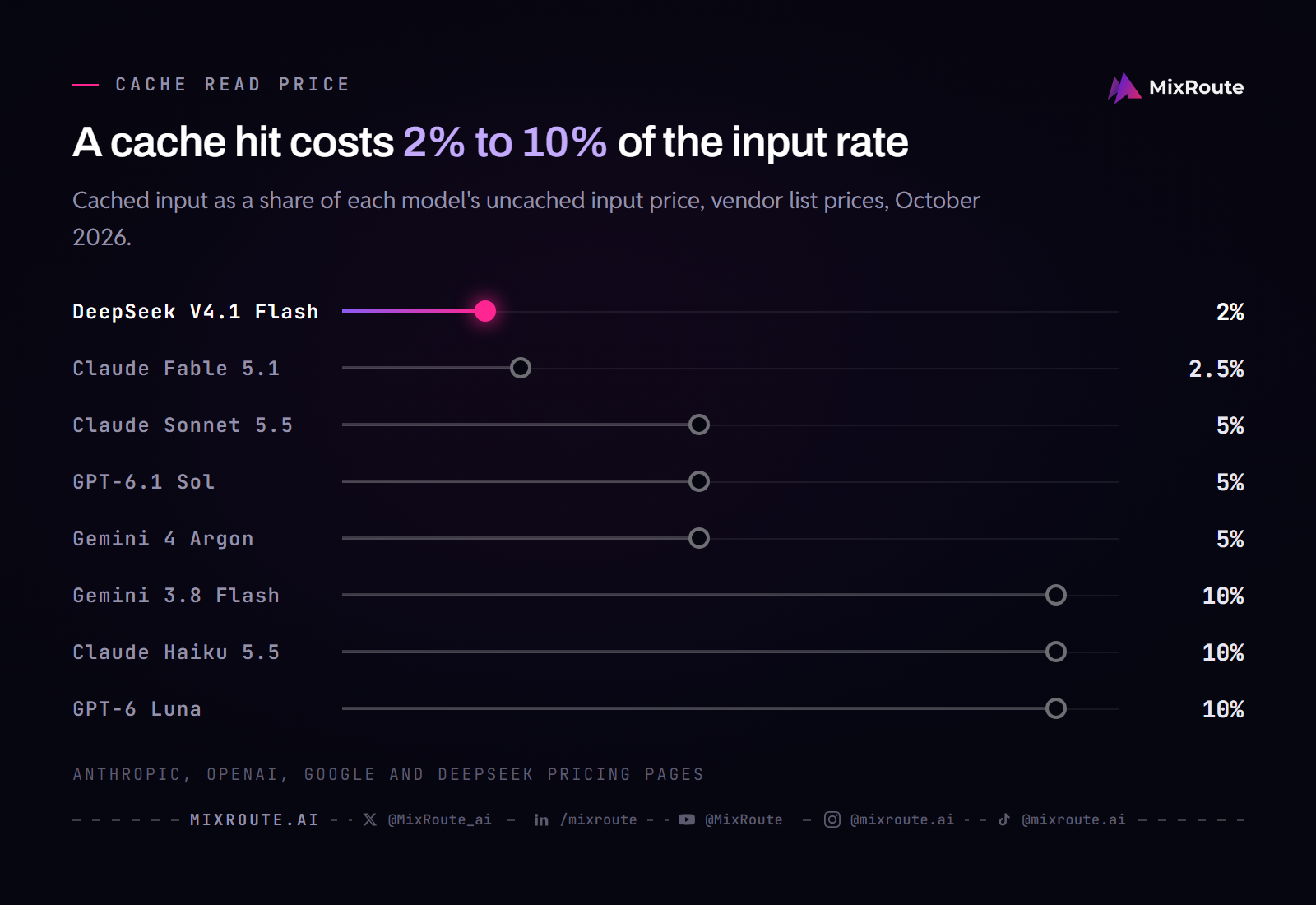
Prompt caching bills the repeated start of your prompt at 2% to 10% of the normal input rate: 2.5% on Claude Fable 5.1, 5% on Claude Sonnet 5.5, Claude Opus 5.5 and GPT-6.1 Sol, 10% on most other models, and 2% on DeepSeek. The minimum prompt that can be cached depends on the model: 512 tokens on current Claude models, 1,024 on GPT-5.6 and later, 4,096 on Gemini 4 Argon and the Gemini Flash line. Shorter prompts run without caching and no error is returned. OpenAI now charges for cache writes, and caching never discounts output.
The rest of this page gives each provider’s rules as of October 2026, what caching saves on a real workload, and the one prompt rule that works everywhere.
What prompt caching actually is
When a model processes your prompt, it computes attention key and value tensors for every token. Prompt caching stores those computed tensors server side. If your next request starts with the same prefix, the model loads the cached state instead of recomputing it, and the provider bills those tokens at a steep discount.
Two consequences follow from that mechanism, and both matter more than the pricing.
It is a prefix match, not a fuzzy match. The cache works from the first token forward. A shared block in the middle of two different prompts does not hit. Change one character near the top and the whole thing misses.
It only touches input. Output is generated fresh every time and billed in full. Any estimate that applies the caching discount to your total bill is wrong, and this is the single most common error in caching math.
How the four major providers differ
Each provider documents only its own design, so the differences are easy to miss. The table puts the enablement method, read discount, write charge and minimum prompt side by side.
| Provider | How you enable it | Cache read | Cache write | Minimum prompt |
|---|---|---|---|---|
| Anthropic | Explicit: a top-level cache_control field or cache_control breakpoints on blocks | 0.025x base input on Fable 5.1, 0.05x on Opus 5.5 and Sonnet 5.5, 0.1x on other models | 1.25x (5 min), 2x (1 hour) | 512 on Claude 5 models, up to 4,096 on older ones |
| OpenAI | Automatic; explicit breakpoints on GPT-5.6 and later | 0.05x on GPT-6.1 Sol, 0.1x on other GPT-6 and GPT-5.6 models | 1.25x on GPT-5.6 and later, no charge on GPT-5.5 and earlier | 1,024 tokens on GPT-5.6 and later |
| Google Gemini | Implicit by default; explicit only on Gemini 3 and 2.5 models | 0.1x on Gemini 3.8 Flash, 0.05x on Gemini 4 Argon | No write line on implicit; explicit charges hourly storage | 4,096 on Gemini 4 Argon, 3.8 Flash and 3.6 Flash |
| DeepSeek | Automatic, always on | $0.006 vs $0.30 on V4.1 Flash at peak rates, a 50x cut | No separate write line | No minimum listed in the docs |
Rates are from each provider’s own documentation, checked on October 19, 2026.
Three things stand out.
The size of the read discount now depends on the model. Most models sit at 10x off the input rate, including Claude Haiku 5.5, GPT-6 Luna and Gemini 3.8 Flash. GPT-6.1 Sol, Claude Sonnet 5.5, Claude Opus 5.5 and Gemini 4 Argon go to 20x. Claude Fable 5.1 goes to 40x, a hit costing $0.25 per million tokens against a $10 base. DeepSeek V4.1 Flash drops from $0.30 to $0.006 per million tokens at peak rates, and from $0.15 to $0.003 off peak, which is 50x either way.
Anthropic is the only one that requires you to ask. OpenAI, Google, and DeepSeek cache automatically. Anthropic caches nothing unless you add cache_control, either as one top-level field that moves the breakpoint forward as the conversation grows, or on individual content blocks. If you are on Claude and have never touched that field, you have never had a cache hit.
Google is the only one charging rent, and only on older models. Implicit caching is free and opportunistic. Explicit caching guarantees the discount but bills hourly storage on top of the reduced read rate, and the default lifetime is 1 hour, so it only pays back if the content is read enough times inside that window. Gemini 4 Argon and later support implicit caching only.
What it actually saves
Take a concrete workload: 300,000 calls a month, a 5,000 token stable prefix, 500 tokens of variable input, and a 300 token response.
| Model | Monthly, uncached | Monthly, cached | Total saving |
|---|---|---|---|
| DeepSeek V4.1 Flash | $603 | $162 | 73% |
| Claude Haiku 5.5 | $210 | $75 | 64% |
| GPT-6 Luna | $210 | $75 | 64% |
| Gemini 3.8 Flash | $1,575 | $562 | 64% |
| Claude Sonnet 5.5 | $4,200 | $1,350 | 68% |
| GPT-6.1 Sol | $4,200 | $1,350 | 68% |
| Claude Fable 5.1 | $21,000 | $6,375 | 70% |
Methodology: list prices on October 19, 2026, assuming a warm cache with write costs amortized across high volume. Gemini 3.8 Flash is at its current rate through December 31, 2026, and DeepSeek V4.1 Flash at its peak rate of $0.30 input, $0.006 cache hit and $1.20 output; off-peak rates are half.
On the input side alone, the reduction is 5.5x for the 10x-discount models, 7.3x for the 20x models, 8.8x for Fable 5.1 and 9.2x for DeepSeek. The total bill falls by less, 64% to 73%, because output is untouched. On the Sonnet 5.5 row, output alone is $900 a month and no amount of caching moves it.
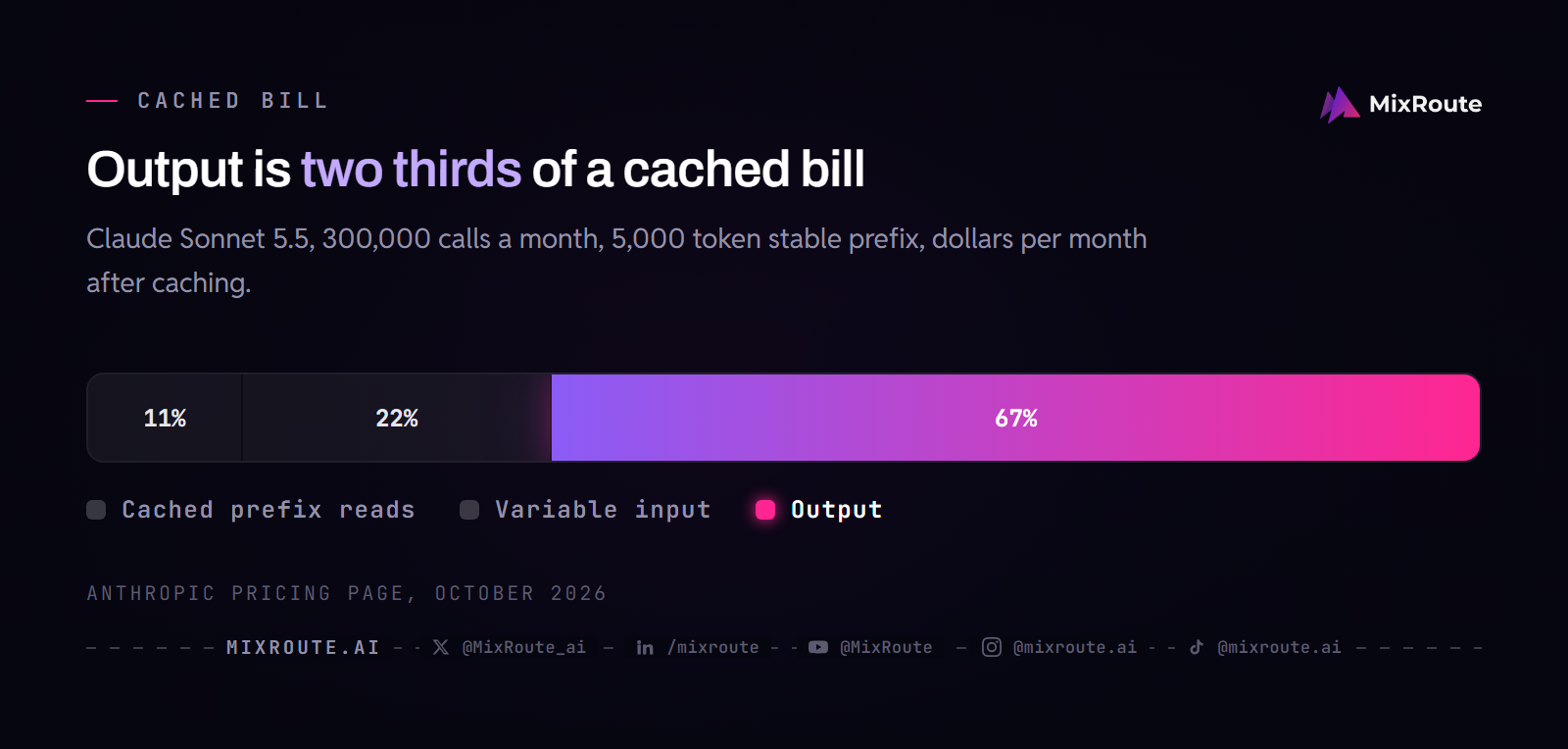
That gap is the practical takeaway. If your workload is generation heavy, short prompts and long outputs, caching will barely register. A team that turns a 300 token ticket into a 2,000 token report has almost nothing to cache. Before you invest in it, sum a week of input tokens against output tokens. Caching is a lever on the input side only, and its value to you is proportional to how much of your bill lives there.
To review the token unit behind this cost, see how cached tokens affect an AI API bill.
Correction one: the minimums are not what you have read
There is no single minimum. Courses and quizzes usually give 1,024 tokens, which is right for OpenAI’s GPT-5.6 and later, Claude Opus 4.8 and Claude Sonnet 5, and wrong for most other current models. Nothing else is required to start: no minimum request count and no extended thinking. The first request writes the cache and a later request with the same prefix reads it.
| Model | Minimum cacheable prompt |
|---|---|
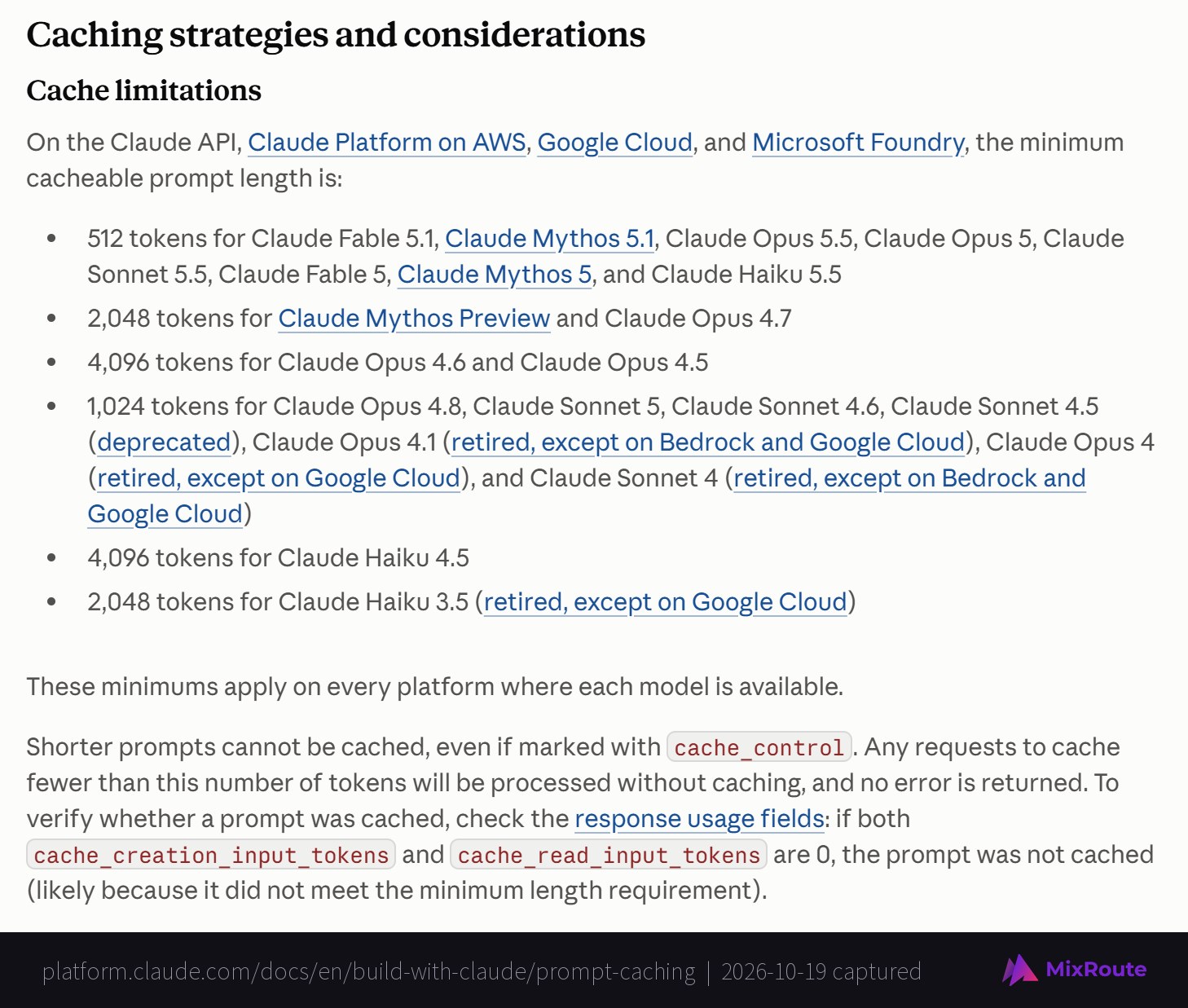
| Claude Fable 5.1, Fable 5, Opus 5.5, Opus 5, Sonnet 5.5, Haiku 5.5 | 512 tokens |
| Claude Opus 4.8, Sonnet 5, Sonnet 4.6, Sonnet 4.5 | 1,024 tokens |
| Claude Opus 4.7 | 2,048 tokens |
| Claude Opus 4.6, Opus 4.5, Haiku 4.5 | 4,096 tokens |
| GPT-5.6 and later, including GPT-6.1 Sol, GPT-6 Astra and GPT-6 Luna | 1,024 tokens |
| Gemini 4 Argon, Gemini 3.8 Flash, Gemini 3.6 Flash, Gemini 3.1 Pro Preview | 4,096 tokens |
| Gemini 2.5 Flash and 2.5 Pro | 2,048 tokens |
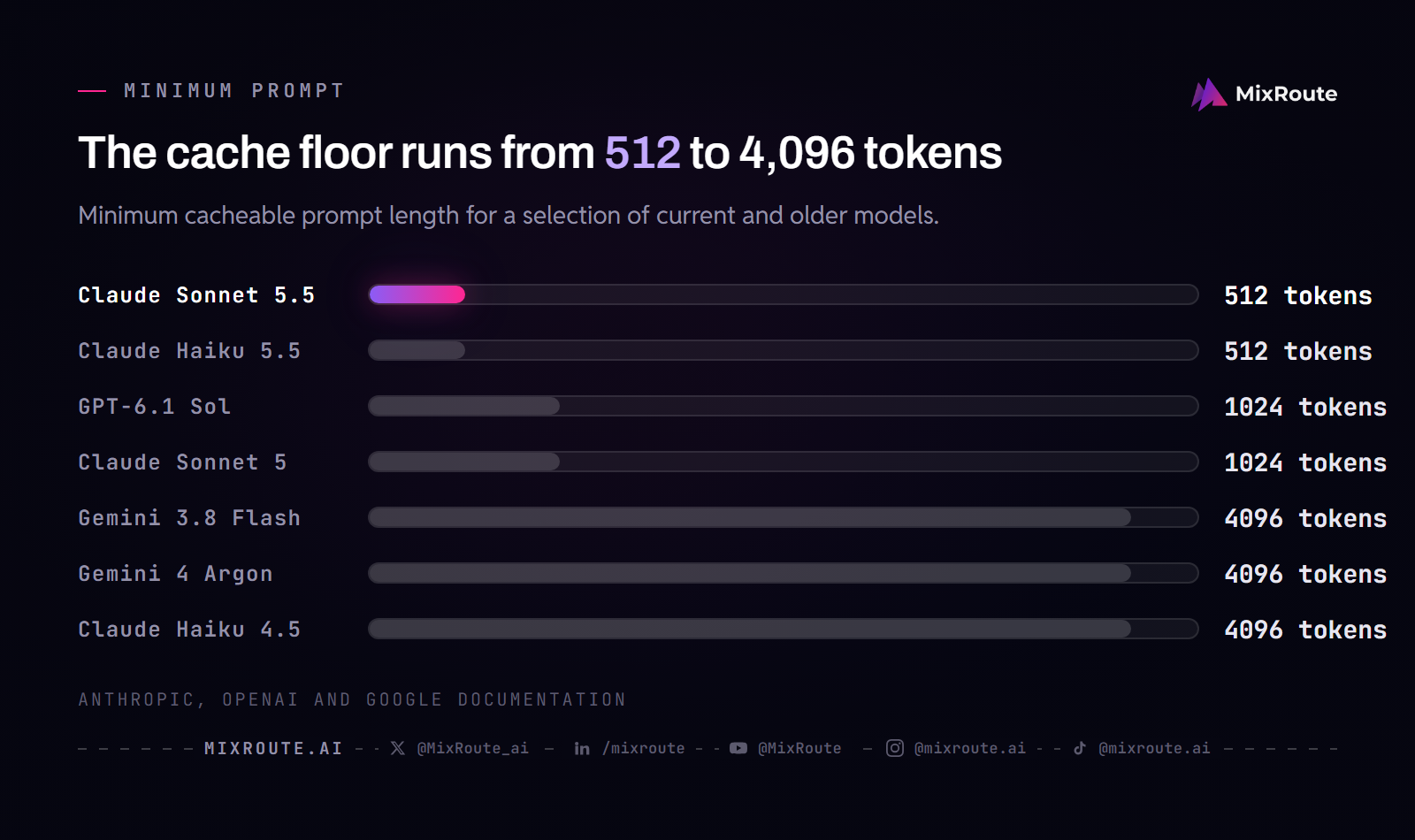
The Claude 5 family is the easy case, with 512 tokens on every current model. The expensive surprise is Google: a 3,000 token system prompt caches on Claude Sonnet 5.5 and GPT-6.1 Sol and does not cache at all on Gemini 3.8 Flash. Claude Haiku 4.5 has the same trap at 4,096 tokens, so a prompt that caches after a move to Haiku 5.5 may have been silently uncached on Haiku 4.5.
Prompts below the minimum fail silently. Anthropic’s documentation says shorter prompts are processed without caching and no error is returned. You will not find out from your logs. You will find out from your invoice, eventually, if you notice at all. For OpenAI models before GPT-5.6 the minimum varies with request settings such as tools, images, output schemas and reasoning effort, so measure it on your own request.
Correction two: OpenAI cache writes are not free anymore
The received wisdom is that OpenAI caching is automatic, free to write, and requires nothing from you. That was true, and it is now out of date in two ways.
Writes are billed on GPT-5.6 and later. Models up to GPT-5.5 charge nothing to write to the cache. GPT-5.6 and every GPT-6 model bill cache writes at 1.25x the uncached input rate. On GPT-6.1 Sol that is $2.50 per million against a $2 base, with cached input at $0.10, 5% of the base. This applies even though caching stays automatic by default, so if you migrated from GPT-5.5 you picked up a write premium you never enabled. GPT-5.6 and later also accept explicit breakpoints, up to four cache writes per request, so you can stop paying to write a changing suffix that will never be reused.
Retention changed too. Earlier OpenAI caches typically expired after 5 to 10 minutes of inactivity, or lasted up to 24 hours with extended retention. On GPT-5.6 and later, an entry stays eligible for at least 30 minutes after its latest write or reuse, and each reuse refreshes it without another write charge. A longer-lived cache makes intermittent and low-traffic workloads cacheable in a way they were not before.
The practical upshot is that OpenAI and Anthropic have converged. Both now have a write premium and a read discount, and on both the question is the same: does this prefix get reused enough to earn back the write?
The breakeven is lower than you think
Run the Anthropic multipliers and the answer is almost absurd.
A 5-minute cache costs 1.25x to write and 0.1x to read. Write it once and read it once and you have spent 1.35x. Sending the same content uncached twice costs 2.0x. The 5-minute cache is profitable on the first hit. On Fable 5.1, Opus 5.5 and Sonnet 5.5 the read is cheaper still, so the same two requests cost 1.275x to 1.3x.
The 1-hour cache costs 2x to write, so with two reads you are at 2.2x against 3.0x uncached. It breaks even on the second hit.
OpenAI’s GPT-5.6 and later work the same way at the 0.1x read rate: one write and nine full reads cost 2.15x against 10x without caching.
There is one more detail that makes this better: on Anthropic the default 5-minute cache refreshes at no additional cost each time it is used. Steady traffic keeps it warm indefinitely without repaying the write. The 1-hour TTL is only worth its higher write premium when your traffic is intermittent enough that a 5-minute window would lapse between requests.
The one rule that works everywhere
Every provider, every model, one rule: static content first, dynamic content last.
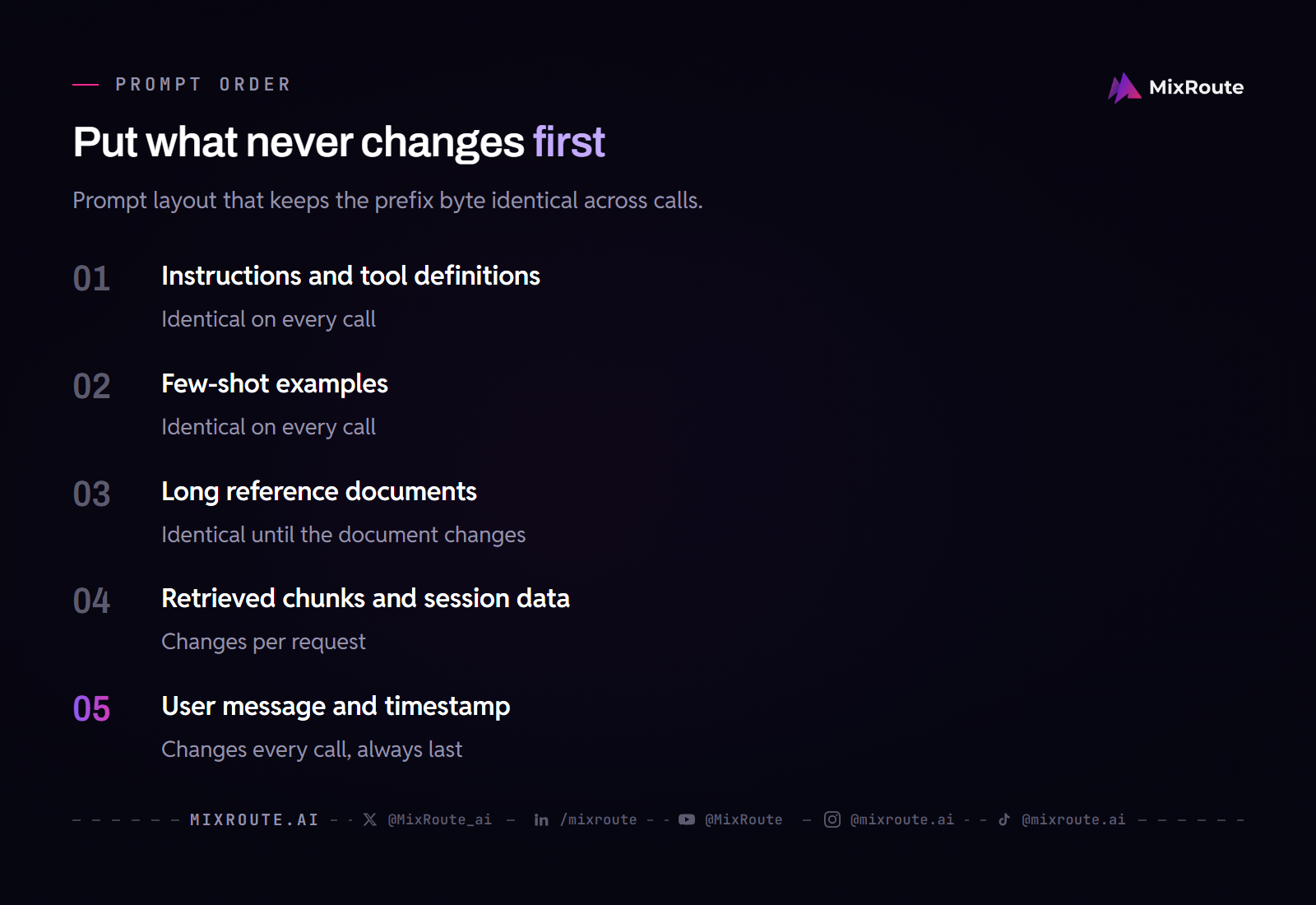
Instructions, tool definitions, few-shot examples, and long reference documents go at the top, byte identical on every call. The user message, timestamp, session ID, and retrieved chunk go at the bottom. If a piece of content changes between calls, it must never sit above something that does not.
This is where most caching failures actually live. A single timestamp or user name near the top of a system prompt means the prefix never matches, so you pay a fresh write on every request and never get a read. It costs you more than not caching at all, and nothing in your logs says so.
Beyond ordering, know what else resets a cache. On Anthropic, changing tool definitions invalidates the whole cache, adding or removing images invalidates the message blocks, and changing the thinking configuration or the output_config.effort value invalidates cached messages. That matters if you are tuning effort down for cost, because that saving comes with a cache reset attached. On DeepSeek, a request hits only when it fully reuses a prefix the system has already persisted, so a prompt that diverges in the middle falls back to the shared start at best.
Verify it, do not assume it
Because caching fails silently on every provider, the only responsible approach is to check the usage fields on real responses.
| Provider | Fields to log |
|---|---|
| Anthropic | cache_creation_input_tokens, cache_read_input_tokens |
| OpenAI | usage.input_tokens_details.cached_tokens, and cache_write_tokens on GPT-5.6+ |
usage.total_cached_tokens (Interactions API) | |
| DeepSeek | prompt_cache_hit_tokens, prompt_cache_miss_tokens |
If the read field is zero across a run of requests that share a prefix, nothing is caching. On Anthropic, both fields at zero means the prompt was not cached at all, most often because it fell under the minimum. On a stable-prefix workload you want a 60 to 80% hit rate. Log this per task, not globally, because one broken prompt can hide inside a healthy average.
Two bonuses worth knowing. On Anthropic, cache hits are not deducted against your rate limits, so good caching buys you throughput headroom as well as savings. And caching improves time to first token, most visibly on long documents, which means it is a latency optimization as much as a cost one.
To verify the billing details behind this issue, see hidden token and thinking costs.
Caching when you route across providers
If you run more than one provider, caching gets more complicated in one specific way: the discount structures differ, so the same prompt has different caching economics depending on where it lands.
The good news is that the fix is universal. A prompt ordered static-first is correctly structured for all four providers at once. You do not need a per-provider prompt layout, only per-provider verification.
The thing to actually watch is that a cache lives with the provider that holds it. Route the same request somewhere else and you start cold. This is worth knowing when you combine caching with per-task routing: the cheapest model on paper may not be cheapest in practice if switching to it abandons a warm cache you were about to hit. Measure cost per completed task rather than per token, because that is the number that captures this.
MixRoute gives you every major model behind one OpenAI compatible endpoint, https://api.mixroute.ai/v1, with 0% markup on provider pricing, so you can compare cached and uncached economics across providers by changing the model ID instead of maintaining four integrations. The LLM API cost levers puts caching in context: routing per task is the larger lever, and caching is the one that compounds on top of it.
When cache reuse competes with provider choice, compare LLM routing strategies for cost, latency, and fallback.
FAQ
What is prompt caching? Storing the computed attention state for a repeated prompt prefix so the model does not recompute it, and billing those tokens at a steep discount. Cached input costs 2% to 10% of the normal rate depending on the model: 10% on most, 5% on GPT-6.1 Sol and the Sonnet and Opus 5.5 models, 2.5% on Claude Fable 5.1, and 2% on DeepSeek. It only applies to input tokens, never output.
How much does prompt caching save? On the input side, between 5.5x on models with a 10x read discount and 9.2x on DeepSeek, for a workload with a large stable prefix. Total bill savings are lower: 64% to 73% on the 300,000-call example above, because output is billed in full regardless. If your prompts are short and your outputs long, caching will save you very little.
What is the minimum prompt size for caching? It depends on the model. Anthropic needs 512 tokens on Fable 5.1, Opus 5.5, Sonnet 5.5 and Haiku 5.5, 1,024 on Opus 4.8 and Sonnet 5, and up to 4,096 on Haiku 4.5, Opus 4.6 and Opus 4.5. OpenAI needs 1,024 on GPT-5.6 and later. Gemini needs 4,096 on Gemini 4 Argon, Gemini 3.8 Flash and Gemini 3.6 Flash. Prompts below the threshold are processed without caching and no error is raised.
Is OpenAI prompt caching free? Not entirely, not anymore. Caching is still automatic with no configuration, but GPT-5.6 and every GPT-6 model bill cache writes at 1.25x the uncached input rate. On GPT-6.1 Sol that is $2.50 per million against a $2 base. Models up to GPT-5.5 write to cache for free. Reads keep the discount, 90% on most models and 95% on GPT-6.1 Sol, and GPT-5.6 and later keep entries for at least 30 minutes after the latest use.
Why is my prompt cache not working? The three usual causes: your prompt is below the model’s minimum cacheable length, something dynamic like a timestamp or session ID sits near the top of your prefix and breaks the byte-identical match, or your traffic is sparse enough that entries expire before reuse. Changing tools, images, or reasoning effort settings also invalidates a cache. Check the usage fields on your responses, because all of these fail silently.
Does prompt caching reduce output costs? No. Caching only discounts input tokens. Output is generated fresh on every request and billed at full rate on every provider. Any savings estimate that applies the caching discount to your whole bill is overstating it, sometimes by a lot.
The bottom line
Prompt caching is the second largest lever on an AI bill after routing, and it is close to free to implement. Order your prompt static first and dynamic last, add cache_control if you are on Anthropic, and check the usage fields to confirm it actually happened.
Then correct for the three things most guides get wrong. The minimums are model-specific, from 512 tokens on current Claude models to 4,096 on Gemini. OpenAI writes are no longer free on GPT-5.6 and later. And caching never touches output, so measure your input to output ratio before you expect much from it.
MixRoute puts every major model behind one OpenAI compatible endpoint with 0% markup, so you can compare these economics across providers with one integration instead of four. Start building on MixRoute