LLM Routing Strategies: Rules, Fallbacks, and Dynamic Policies
An application’s routing strategy determines which LLM provider handles each request. The choice among static, fallback, cost-aware, latency-aware, and task-aware routing shapes your application’s cost profile, response speed, and uptime. The right strategy depends on which of those three goals matters most for a given workload, and most production applications combine multiple approaches into a single policy.
The LLM Routing Landscape: A Taxonomy of Strategies
LLM routing policies fall into five categories, each with a distinct objective. Understanding the taxonomy before implementation prevents mixing incompatible goals in a single rule.
What Is LLM Routing?
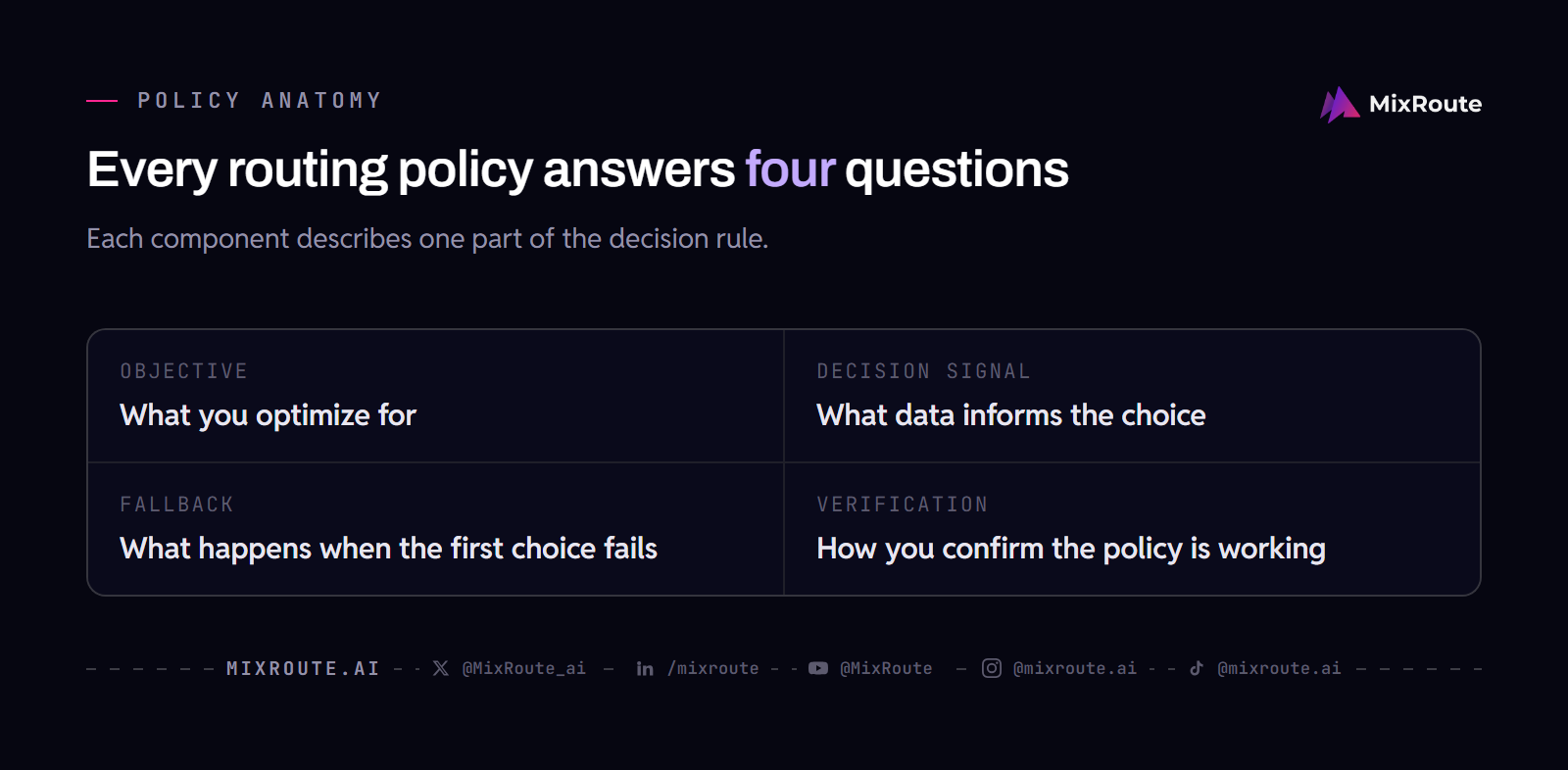
LLM routing is the logic that decides which model provider receives an inference request. Every application that calls an LLM API already routes, even if the “policy” is a hardcoded URL. Formalizing that decision into a policy gives you control over cost, latency, and reliability. A routing policy has four components: the objective (what you optimize for), the decision signal (what data informs the choice), the fallback (what happens when the first choice fails), and verification (how you confirm the policy is working).
Static Routing
Static routing sends every request to a single provider and model. There is no decision at runtime. The objective is simplicity, the decision signal is absent, and the fallback is whatever the client’s HTTP library does on failure, which is usually nothing useful. Static routing works for prototypes and low-stakes internal tools. It breaks when the provider has an outage or when usage grows and the bill surprises you.
Fallback Routing
Fallback routing adds a sequence: try provider A, and if that fails, try provider B, then provider C. The objective is reliability. The decision signal is provider availability, measured by error responses or timeouts. The fallback cascade is the policy itself. OpenRouter documents provider routing controls including order (providers to try in order), only (allowlist), ignore (skip list), and allow_fallbacks (backup providers when the primary is unavailable, default true), as of 2026-08-12. These controls let you specify the exact cascade.
Dynamic Routing (Cost, Latency, Task)
Dynamic routing makes a per-request decision using real-time signals. Cost-aware routing checks current pricing and picks the cheapest provider that meets a quality bar. Latency-aware routing monitors response times and avoids slow providers. Task-aware routing classifies the request first, then routes simple tasks to cheaper models and complex tasks to premium ones. Each of these strategies adds a small decision overhead. Smart Routing is one implementation of dynamic routing that combines task awareness with provider selection, adding one triage step of latency. Before adopting it, check whether tiered routing fits your authorized model pool.
Static Routing: When Simplicity Wins
Static routing directs all requests to a single provider and model, offering zero decision overhead and straightforward debugging at the cost of any resilience or cost optimization.
How Static Routing Works
You configure one base URL and one model name in your application. Every request goes to that endpoint. There is no routing logic, no additional latency, and no dependency on external data sources. The application code is shorter and the failure surface is exactly one integration. If you pin a model version, you also avoid silent model swaps between deploys.
When to Choose Static Routing
Static routing fits three scenarios. First, during early development when you are testing prompt behavior and do not want routing variables in the loop. Second, when your application uses a single model with specific fine-tuning or system prompt behavior that other providers cannot replicate. Third, when you have a committed-use discount with one cloud provider that makes switching uneconomical. In each case, the cost of adding routing complexity exceeds the benefit.
Limitations and Risks
A single-provider dependency creates a single point of failure. Provider outages, quota exhaustion, or rate limiting will stop your application cold. Static routing also leaves money on the table: you pay whatever that provider charges, with no mechanism to use a cheaper model for simpler requests. As traffic grows, the absence of cost controls becomes the largest risk. The fix is to add at minimum a fallback provider, which moves you into the next strategy category.
Fallback Routing: Building Resilient Pipelines
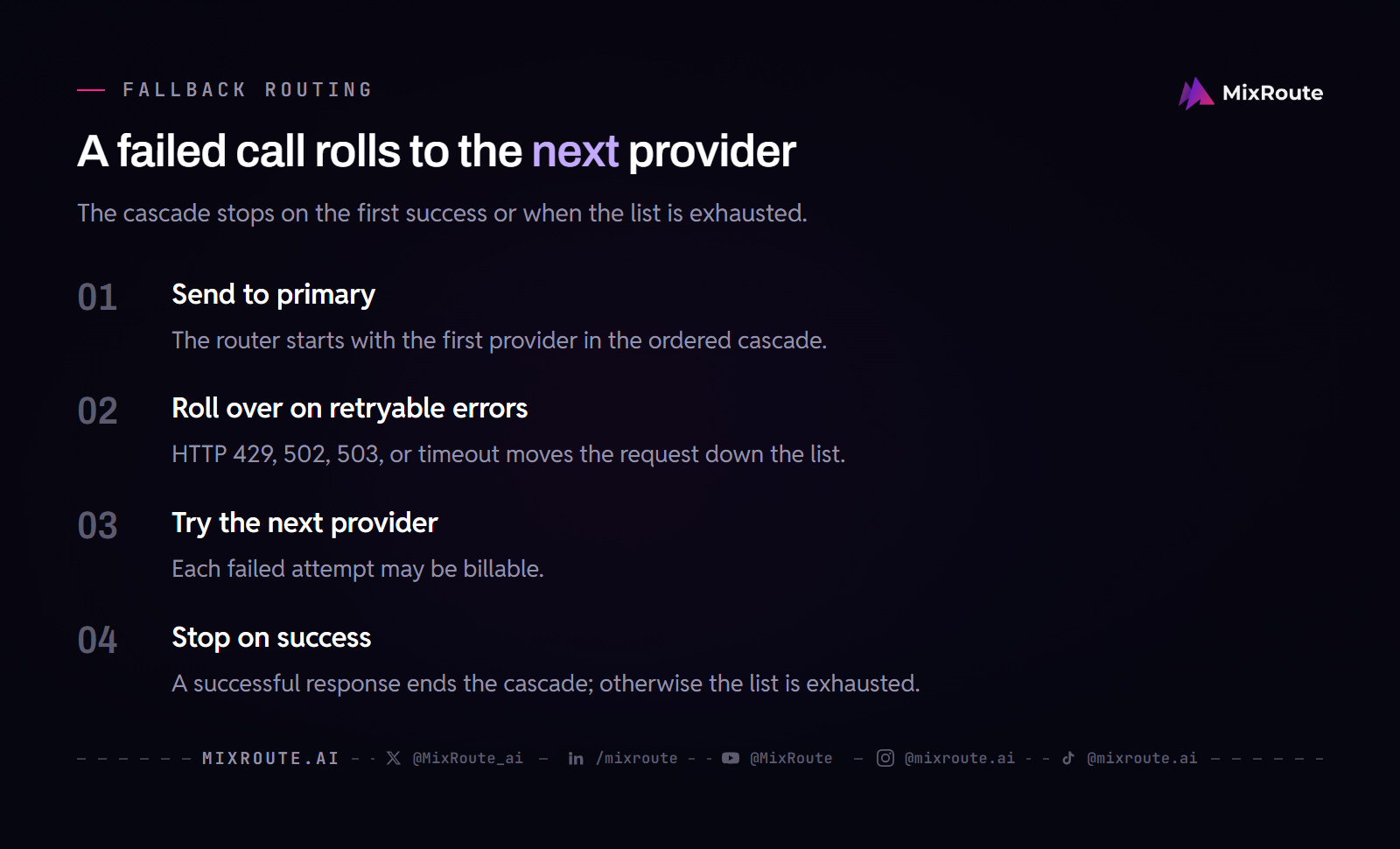
Fallback routing improves reliability by specifying a sequence of providers; if the primary fails, requests roll over to the next provider in the cascade.
Designing a Fallback Cascade
A fallback cascade is an ordered list of providers. The router sends the request to the first provider. If that call returns a retryable error (typically HTTP 429, 502, 503, or a timeout), the router tries the second provider, and so on. The cascade ends when a provider returns a successful response or the list is exhausted. Each retry is a potentially billable call: you might pay for failed attempts depending on the provider’s billing policy for incomplete requests.
Provider Ordering Strategies
The order of providers in a cascade determines cost and latency during normal operation. The table below summarizes common ordering approaches.
| Ordering Strategy | How It Works | Best For |
|---|---|---|
| Cost-first | Cheapest provider first, premium providers later in the cascade | Cost-sensitive batch processing where occasional retry latency is acceptable |
| Latency-first | Fastest provider first, based on historical p50 or p95 response times | User-facing applications where low latency is critical |
| Capacity-first | Provider with the largest quota or reserved capacity first | High-throughput applications that risk exhausting rate limits |
| Geography-first | Provider in the closest region first to minimize network latency | Applications serving users in a specific region |
OpenRouter’s order parameter implements this directly, letting you specify the provider sequence. Its load balancing example states: “If Provider A fails, then Provider C will be tried next,” as of 2026-08-12. MixRoute’s Smart Routing keeps fallback inside the model pool you authorize.
Testing Fallback Behavior
Testing a fallback cascade requires simulating provider failures. You need to verify that the router correctly identifies retryable errors, moves to the next provider without dropping the request, and stops after a successful response. Test each provider in the cascade by temporarily causing it to return errors (through an invalid API key, a revoked model access, or a network partition in a staging environment). Measure the total request latency when the primary fails and a fallback handles the request. Document the worst-case latency as the sum of all timeouts in the cascade. A separate guide on testing routing policy covers methodology in detail.
Cost-Aware Routing: Optimizing Spend Without Sacrificing Quality
Cost-aware routing dynamically selects the cheapest provider that meets a quality threshold, using real-time pricing data and quality monitoring to balance spend against output quality.
How Cost-Aware Routing Works
The router maintains a current price list for each provider and model combination. When a request arrives, the router filters the available providers to those that meet a predefined quality threshold, then selects the one with the lowest per-token price. The quality threshold can be based on benchmark scores, user feedback, or automated evaluation of prior responses. The decision adds latency proportional to the pricing lookup and filtering step, typically negligible when the price data is cached locally.
Setting Quality Thresholds
A quality threshold prevents cost-aware routing from selecting the cheapest possible model regardless of output quality. The threshold should be specific and measurable. Common approaches include setting a minimum score on a benchmark relevant to your task (such as MMLU for general reasoning or HumanEval for code generation), requiring a minimum user satisfaction rating from prior responses, or excluding providers whose error rate exceeds a set percentage over a rolling window. The threshold must be revisited as models improve and new providers enter the market. A model selection framework can help define these thresholds systematically.
Pricing Data Sources
Accurate cost-aware routing depends on current pricing data. Provider prices change when new models launch, when usage tiers adjust, and when fine-tuning or inference endpoints get separate pricing. The router must refresh its price cache frequently. MixRoute charges no platform fee on top-ups. Bonus tiers are set by the size of a single top-up: 2% (GROWTH, $1,000-$4,999 per top-up, capped at $100), 3% (PRO, $5,000-$14,999, capped at $450) and 5% (SCALE, $15,000-$29,999, capped at $1,500). Credits never expire. Smart Routing is optional and completely free, with no routing service fee. You only pay for actual usage of the selected model. For broader strategies on controlling spend, see the post on reducing API costs.
Latency-Aware Routing: Meeting User Experience SLAs
Latency-aware routing picks providers based on real-time latency metrics, routing around slow providers to keep response times under a target threshold.
Measuring and Tracking Latency
Latency data must cover the full request lifecycle: time to first token (TTFT) and total response time. Measure both at the application level, not from provider-reported metrics, because network transit time varies by region and client. Track latency per provider, per model, and per region in a rolling window (a 5-minute or 15-minute window is typical). Store the p50, p95, and p99 values. A single slow response should not blacklist a provider; use the p95 over the window as the decision signal to avoid overreacting to outliers.
Routing Based on Latency
The router checks current latency metrics for each candidate provider. Providers whose p95 latency exceeds the SLA threshold are temporarily deprioritized or excluded. Among the remaining providers, the router can pick the fastest, the cheapest that still meets the latency bar, or the one preferred for other reasons. The latency threshold should be set below your application’s SLA to leave headroom for the routing decision itself and for occasional spikes. If your SLA is 2 seconds end-to-end, set the provider latency threshold at 1.5 seconds or lower.
Combining Latency and Fallback
Latency-aware routing and fallback routing combine naturally. The router selects the fastest available provider. If that provider returns an error or exceeds the latency threshold mid-request, the router falls back to the next fastest. This approach handles both slow providers and outright failures. The combined strategy adds a retry multiplier: if the primary call is abandoned at the 1.5-second threshold and the fallback succeeds after 1.5 seconds, the user waits 3 seconds total. Each retry is a potentially billable call. For techniques to handle provider failures beyond latency, see the guide on handling API failures.
Task-Aware Routing: Matching the Model to the Job
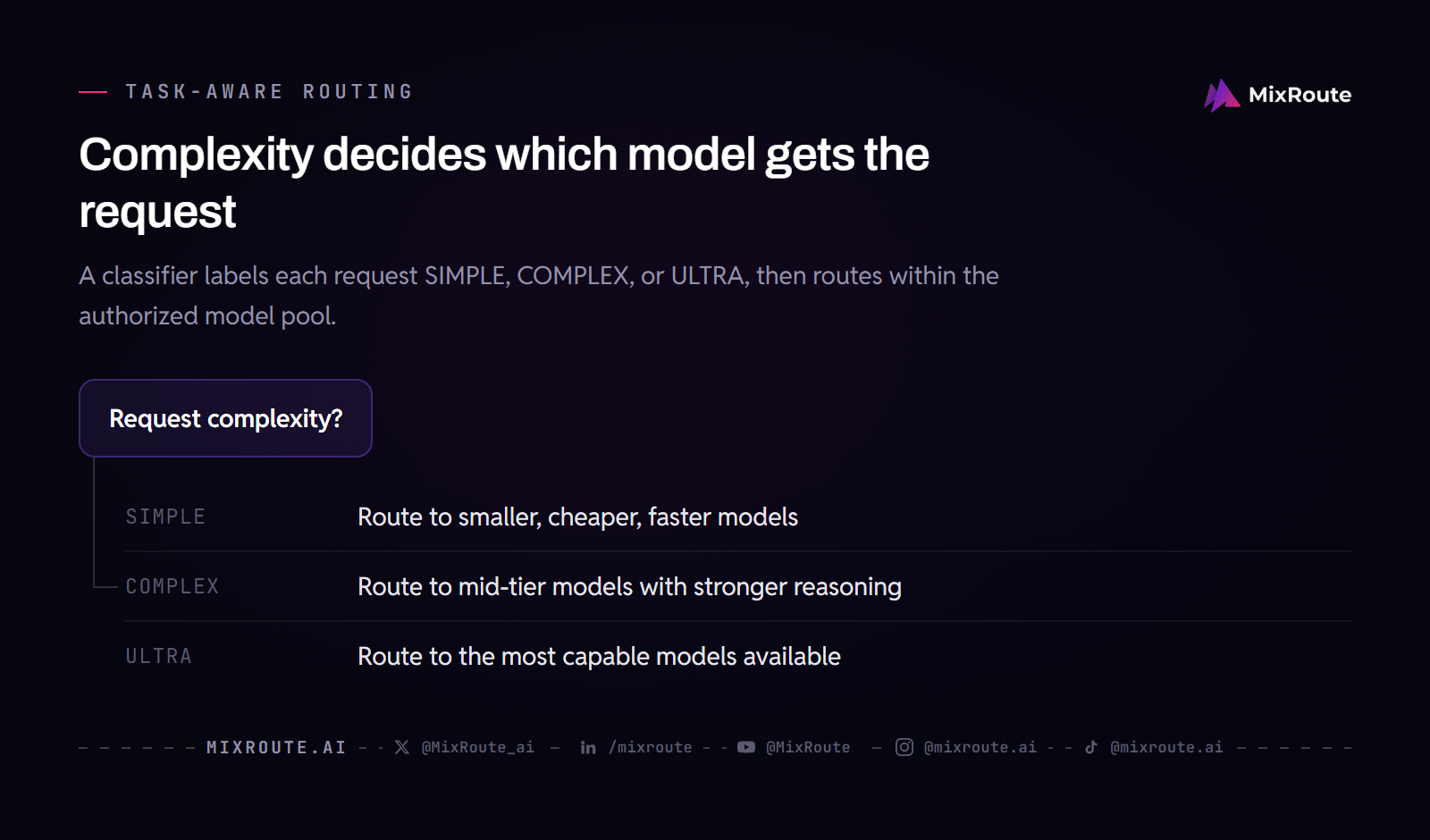
Task-aware routing classifies each request by complexity and routes it to a model optimized for that complexity level, balancing cost and performance without manual triage.
Task Classification Approaches
Classification can use a fast, cheap classifier model, keyword or pattern matching on the prompt, or metadata from the application context. A classifier model examines the request and outputs a label such as SIMPLE, COMPLEX, or ULTRA. Keyword matching checks for indicators of complexity (code generation, multi-step reasoning, long context). Application metadata, such as the feature or user role making the request, provides a zero-latency signal when available. The classifier must be fast enough that its overhead does not negate the routing benefit.
Model Pool Selection
Each complexity tier maps to a pool of authorized models. SIMPLE requests go to smaller, cheaper, faster models. COMPLEX requests go to mid-tier models with stronger reasoning. ULTRA requests go to the most capable models available. The model pool is under your control: you authorize which models are eligible for each tier. Smart Routing implements this pattern, classifying requests as SIMPLE, COMPLEX, or ULTRA and selecting only within the model pool you authorize. It adds one triage step of latency. The Smart Routing blog post explains the classification and selection logic in detail.
Integrating with Smart Routing
Task-aware routing through Smart Routing requires configuring your authorized model pool per tier and enabling the feature. The classification and provider selection happen automatically. You retain control over which models are eligible, and the routing never selects a model outside your authorized pool. For applications with custom routing needs beyond the standard tiers, MixRoute’s SCALE tier (a single top-up of $15,000-$29,999) includes custom routing strategies and early access to new models. The ENTERPRISE tier (single top-ups of $30,000+) adds a service contract, reserved capacity, and a dedicated manager. What is not available at any tier is customer-written middleware running inside MixRoute.
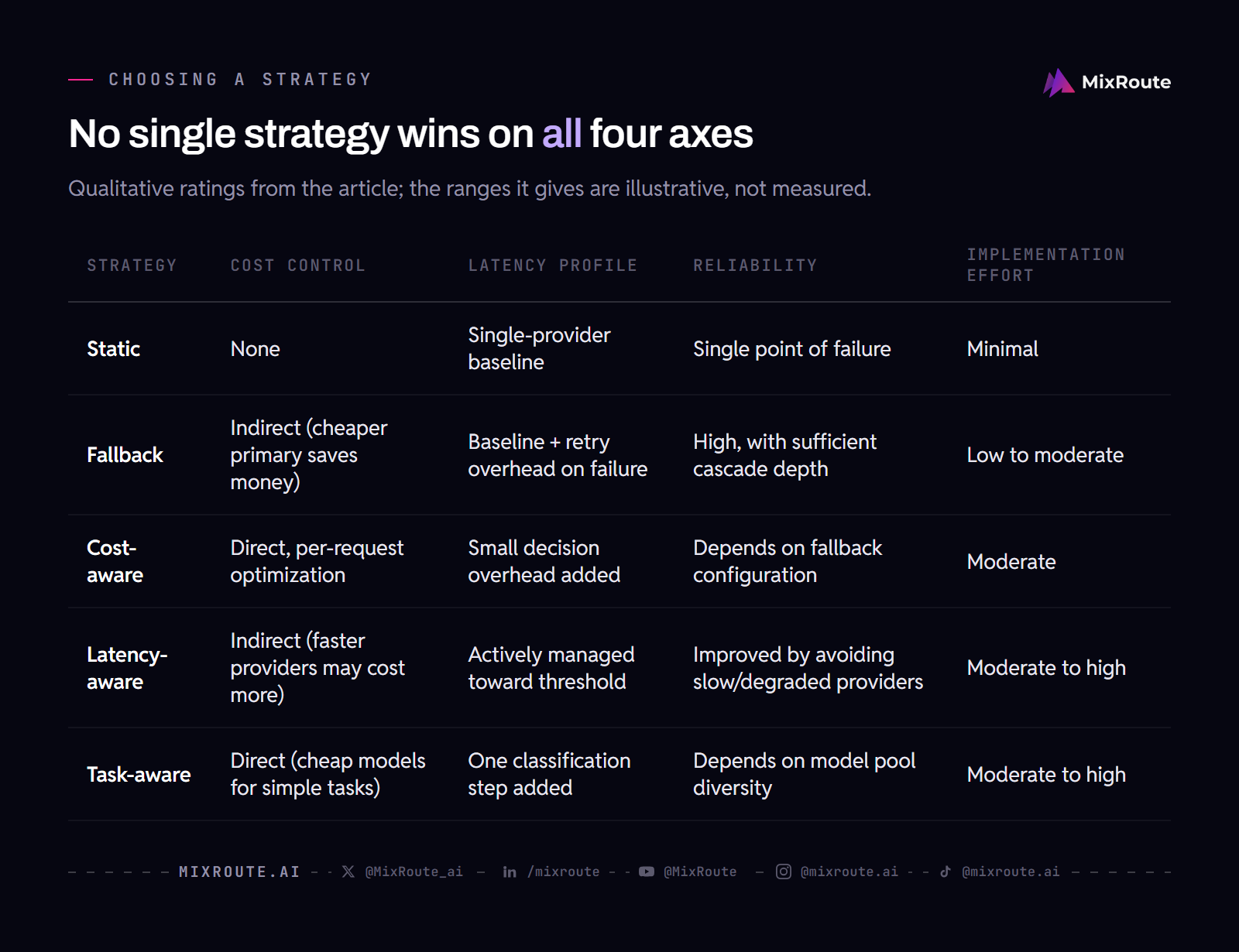
Choosing the Right Strategy: A Decision Matrix
A decision matrix helps evaluate each strategy across cost, latency, reliability, and implementation effort, and most production applications end up with a hybrid policy that layers multiple strategies.
Decision Factors
Four factors drive the strategy choice. Cost sensitivity: how much does your margin depend on inference spend? Latency sensitivity: is your application synchronous and user-facing, or asynchronous and batch-oriented? Reliability requirement: what is the cost of a failed or dropped request? Engineering capacity: how much time can your team invest in building and maintaining routing logic? Rank these factors for your application before comparing strategies.
Strategy Comparison Table
| Strategy | Cost Control | Latency Profile | Reliability | Implementation Effort |
|---|---|---|---|---|
| Static | None | Single-provider baseline | Single point of failure | Minimal |
| Fallback | Indirect (cheaper primary saves money) | Baseline + retry overhead on failure | High, with sufficient cascade depth | Low to moderate |
| Cost-aware | Direct, per-request optimization | Small decision overhead added | Depends on fallback configuration | Moderate |
| Latency-aware | Indirect (faster providers may cost more) | Actively managed toward threshold | Improved by avoiding slow/degraded providers | Moderate to high |
| Task-aware | Direct (cheap models for simple tasks) | One classification step added | Depends on model pool diversity | Moderate to high |
Ranges are illustrative estimates, not measured data.
Hybrid Policies
Hybrid policies combine strategies to cover the weaknesses of any single approach. A common pattern layers task-aware routing for cost control, latency-aware selection within each tier for user experience, and a fallback cascade for reliability. Another pattern uses cost-aware routing as the primary strategy with a latency ceiling that triggers fallback. The combination you choose should reflect your ranked decision factors. Start with the strategy that addresses your top factor, then layer in the next. Test each layer independently before combining them.
FAQ
How do I design a static routing policy for a SaaS application?
Static routing for a SaaS application means pointing your API client at a single provider URL and model name. Pin the model version to avoid surprise behavior changes when the provider updates. Plan a migration path to fallback routing before you need it. Using MixRoute’s single endpoint as your base URL lets you switch from static to dynamic routing later by changing configuration rather than application code.
What cost savings can I expect from cost-aware routing?
Savings vary by workload. Routing simple requests to cheaper models can reduce inference spend, but the exact percentage depends on your task mix and the price spread among your authorized providers. Use a savings calculator with your own request distribution for an estimate rather than relying on broad percentages.
How do I implement fallback routing in a Kubernetes-based environment?
MixRoute is a hosted service, so you do not manage fallback at the infrastructure level. Point your application’s base URL to https://api.mixroute.ai/v1. If you are not using a hosted routing layer, you would implement fallback in your application code or via a sidecar that intercepts LLM API calls and manages the retry logic.
What are the latency benchmarks for different routing strategies?
Latency depends on providers and task types. Static routing latency equals the chosen provider’s response time. Fallback routing adds retry delays, up to the sum of all timeouts in the cascade in the worst case. Cost-aware and latency-aware routing add a small decision overhead from the pricing or metrics lookup. Task-aware routing through Smart Routing adds one triage step. Measure your specific providers and workloads to get accurate numbers.
How do I balance quality and cost in task-aware routing?
Task-aware routing balances quality and cost by using a classifier to separate simple requests from complex ones. Simple requests go to cheaper models, complex requests go to premium models. You control the split by configuring the model pool for each tier and by monitoring output quality per tier. Add a quality check step if your application cannot tolerate occasional misclassifications.
What are the best practices for monitoring and updating routing policies?
Monitor latency, cost per request, error rates, and fallback frequency. Set alerts for when fallback triggers exceed a threshold or when cost per request trends upward. Update policies when provider performance changes, when new models become available, or when your application’s request mix shifts.
Can I use multiple routing strategies at the same time?
Yes. Hybrid policies combine strategies in layers. A common configuration uses task-aware routing as the primary decision, cost-aware or latency-aware selection within each task tier, and a fallback cascade as the safety net. The strategies do not conflict as long as each layer has a clear objective and the fallback order is consistent across layers.