Meta Llama Models: Family, Sizes, and Deployment Routes
What is Meta Llama?
Meta Llama is Meta’s family of open-weight language models, so there are two routes and not one product: download the weights and run them on hardware you control, or call a provider that already runs them and pay per token. Three conditions decide which one fits. Can your data leave the machine it sits on? Do you already own an idle GPU? Would you rather pay for tokens or for compute? If you came to the name expecting a single account you can sign into, there isn’t one.
The family is not one model either. It spans several generations and sizes, from small text models that fit on a laptop to mixture-of-experts models that want a rack of GPUs. Meta’s Hugging Face organization lists the generations from Llama 2 through Llama 4, and it keeps Llama Guard 3 and Prompt Guard on the same shelf. Those two are safety models that classify traffic, not chat models you talk to.
What open weights actually change
With a closed model, the vendor keeps the weights and you hold an API key. With Llama, the weights are files you can put wherever you like, and that control is what lets you fine-tune on your own data, keep inference inside your own network, and pay for compute instead of tokens. Managed hosting sells fine-tuning too, so the difference is not the capability but who holds the weights and whose machines run them. None of that is free in the everyday sense. The machine, the power, and the person who keeps it running are yours to cover, and getting that number right is most of the deployment decision.
Ollama is a separate product
Ollama, a desktop app with a similar name, runs open models on a Mac or Windows machine and serves them from localhost. It is a different product from the model family Meta publishes, with its own release cadence and its own supported models, so the name alone does not tell you whether a page means the downloadable weights or that app.
Which Llama generations and sizes exist?
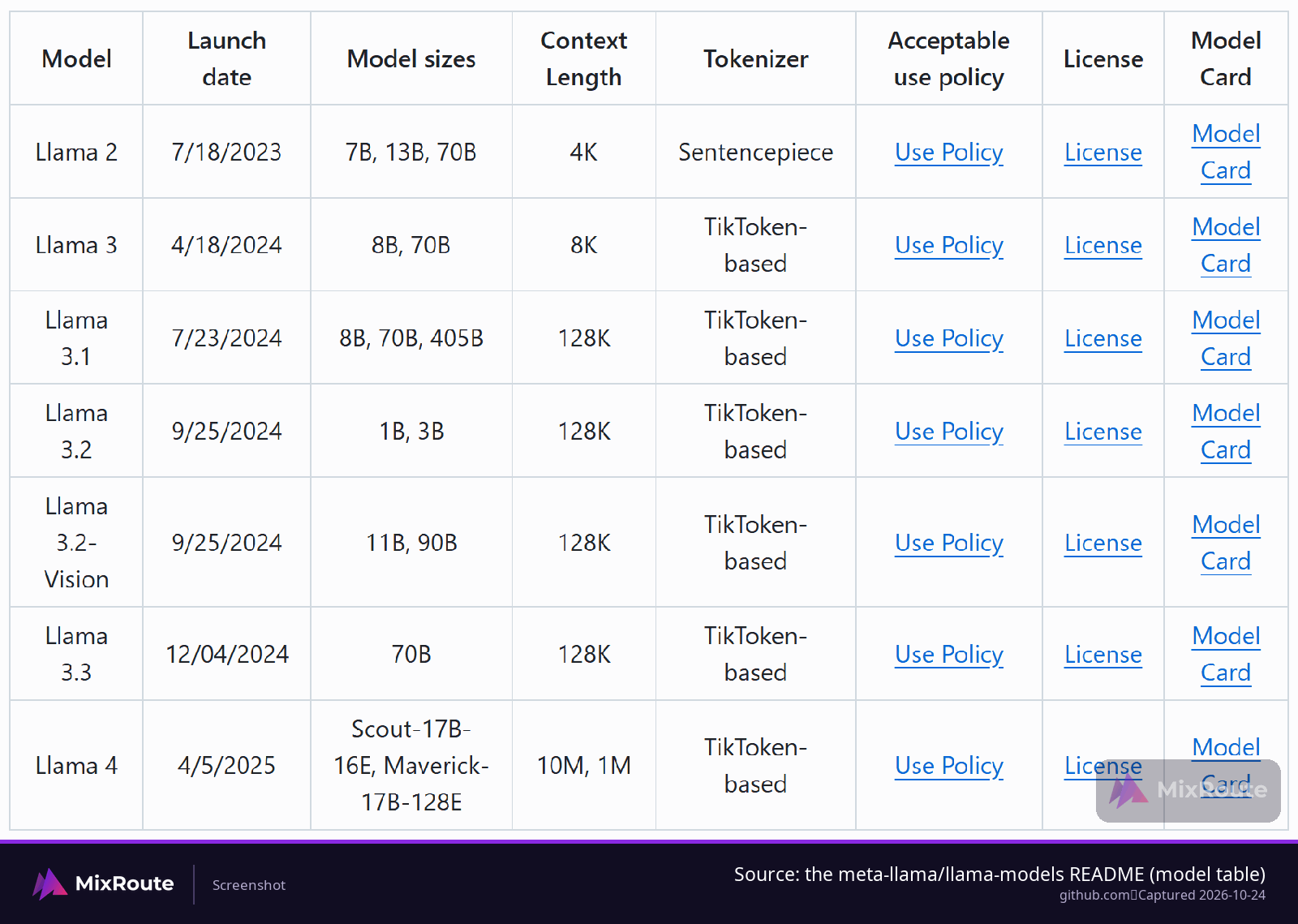
Two numbers decide which Llama model you pick: how large it is and how much text it can hold at once. Llama 3.1 answers both cleanly, shipping in 8B, 70B and 405B sizes with a 128K context window. Meta’s hub entry describes the 3.1 collection as text models from 8 billion to 405 billion parameters, pre-trained on roughly 15 trillion tokens. Llama 4 changes the shape of the answer: it is a mixture-of-experts design with Scout and Maverick as the two named variants, and Meta lists both an active and a total parameter count for each of them.
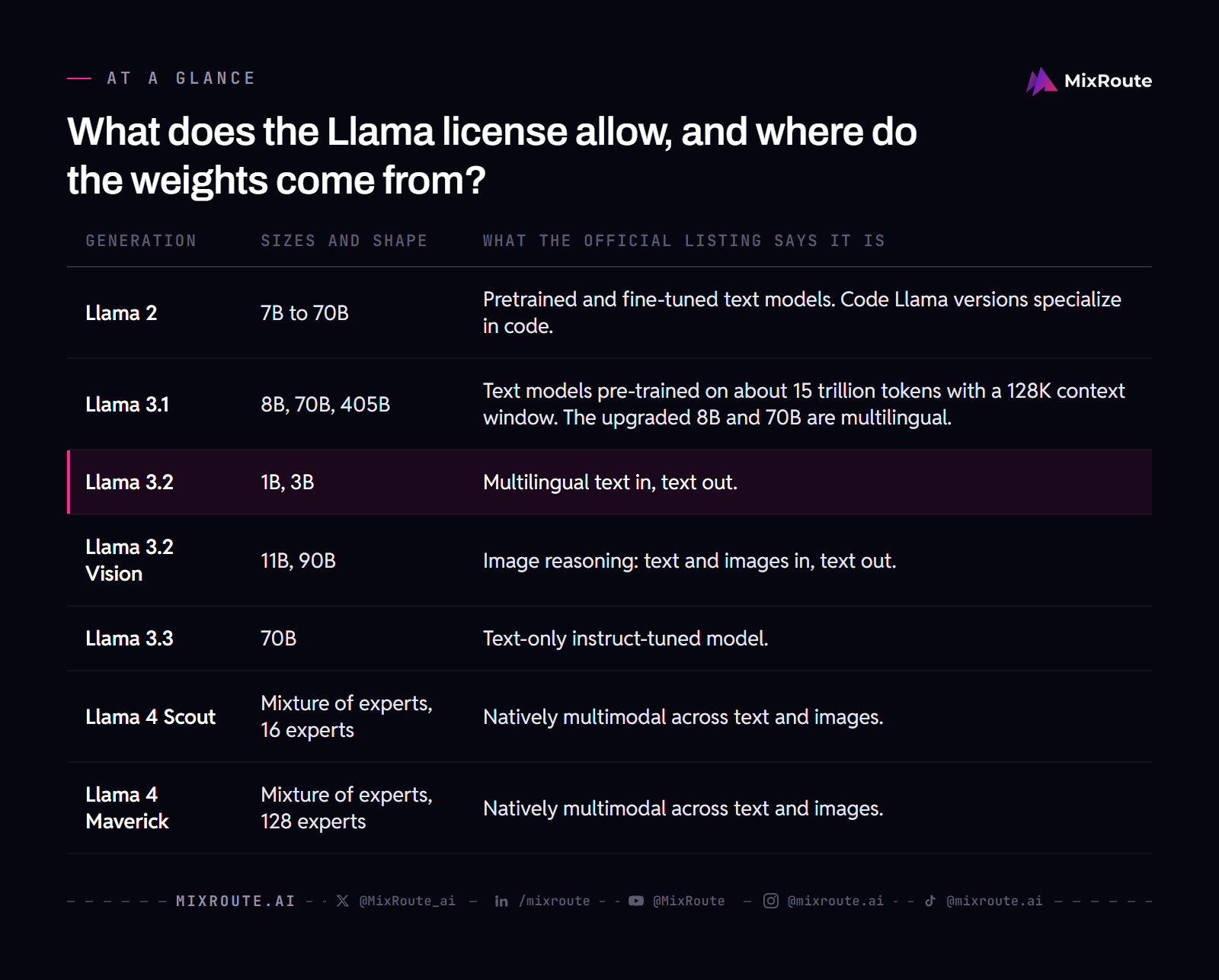
| Generation | Sizes and shape | What the official listing says it is |
|---|---|---|
| Llama 2 | 7B to 70B | Pretrained and fine-tuned text models. Code Llama versions specialize in code. |
| Llama 3.1 | 8B, 70B, 405B | Text models pre-trained on about 15 trillion tokens with a 128K context window. The upgraded 8B and 70B are multilingual. |
| Llama 3.2 | 1B, 3B | Multilingual text in, text out. |
| Llama 3.2 Vision | 11B, 90B | Image reasoning: text and images in, text out. |
| Llama 3.3 | 70B | Text-only instruct-tuned model. |
| Llama 4 Scout | Mixture of experts, 16 experts | Natively multimodal across text and images. |
| Llama 4 Maverick | Mixture of experts, 128 experts | Natively multimodal across text and images. |
Reading the Llama 4 parameter numbers
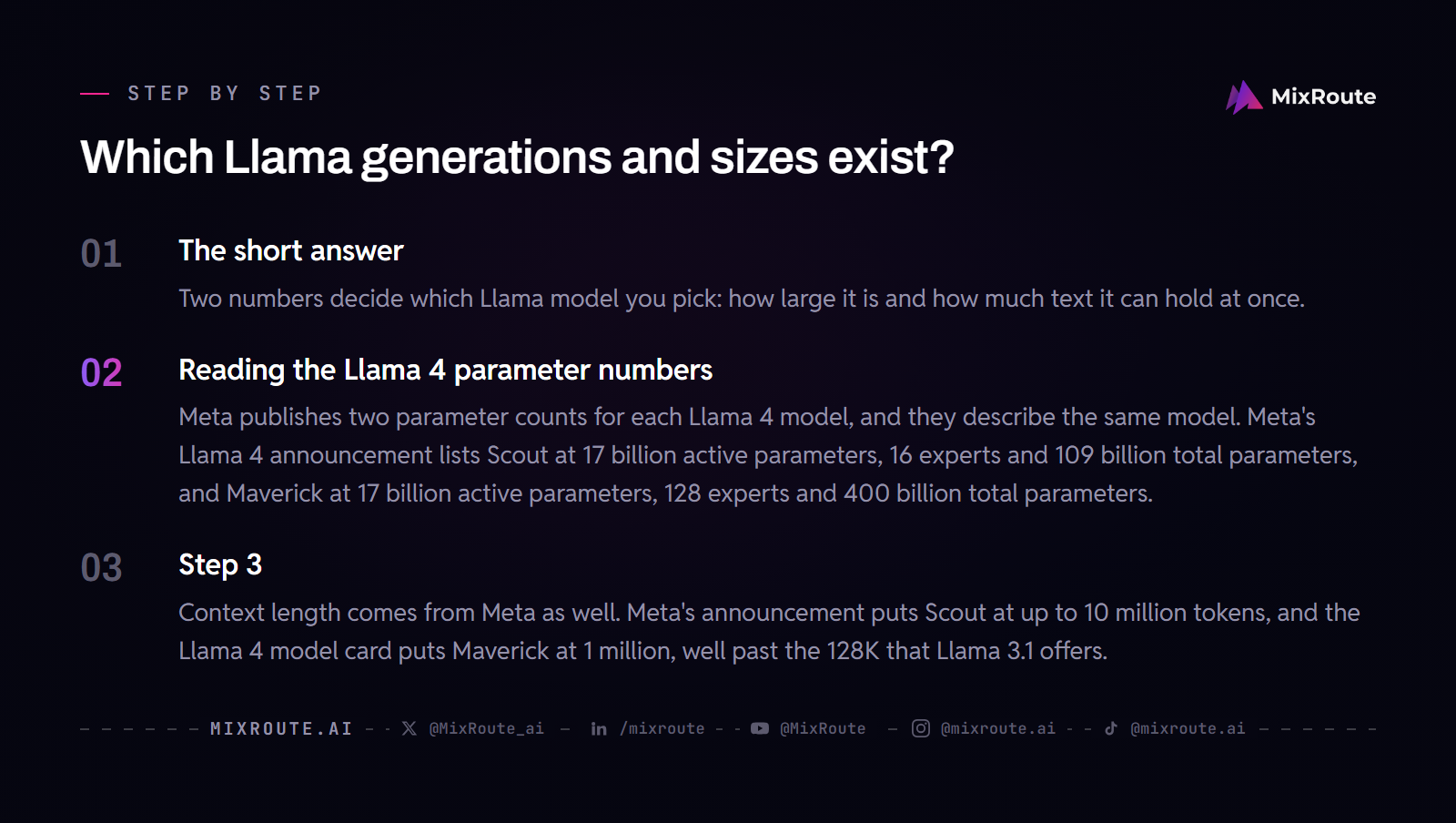
Meta publishes two parameter counts for each Llama 4 model, and they describe the same model. Meta’s Llama 4 announcement lists Scout at 17 billion active parameters, 16 experts and 109 billion total parameters, and Maverick at 17 billion active parameters, 128 experts and 400 billion total parameters. The 17 billion in Meta’s hub entry is the active count. Match your VRAM estimate to the checkpoint and runtime you actually plan to load.
Context length comes from Meta as well. Meta’s announcement puts Scout at up to 10 million tokens, and the Llama 4 model card puts Maverick at 1 million, well past the 128K that Llama 3.1 offers. A window that large changes what fits in a single request: a whole codebase, a stack of contracts, a conversation that runs all day.
What does the Llama license allow, and where do the weights come from?
You accept the license and the acceptable use policy before the weights open up, and Hugging Face processes those requests hourly. That gate sits between you and the download rather than after it, so it belongs in your schedule if you have a deadline. Meta’s Getting the models documentation lists three places to get the files: Meta, the meta-llama organization on Hugging Face, which hosts models in Meta’s original format and in the Hugging Face transformers format, and Kaggle.
What you agree to before the files arrive
On Hugging Face you open a repository from one of the three families, accept the license terms and the acceptable use policy, and wait for approval. One approval covers the Llama 3.1 models and previous versions, so you do not repeat the process for every size you want to try. If you would rather stay on the command line, Meta’s repository ships a llama-model tool that downloads weights from Meta or Hugging Face, verifies their integrity, and prints the prompt format for a given model.
The output-use permission the 3.1 license added
The Llama 3.1 license lets you use model outputs, including outputs from the 405B model, to improve other models. Meta’s launch post names synthetic data generation, where a large Llama model produces data that trains a smaller one, and model distillation as workflows the 3.1 generation opens up, and it describes distillation as something never achieved at this scale in open source. The output-use change appears in that same post as a separate license change. That permission is what lets you plan those workflows instead of asking for them case by case.
Should you run Llama locally or call a hosted API?
Start with the data. If your prompts cannot leave the network they sit on, local inference stops being a preference and becomes the only route that works. If they can travel, the next question is whether the GPU you already own is sitting idle, and after that whether you would rather pay for tokens or for compute. Each condition points one way, and a team that has all three answers usually has its route.
| Decision input | Local route | Hosted route |
|---|---|---|
| Data location | Prompts stay on the network you control. | Prompts travel to the provider. |
| Hardware owned | Uses a GPU or machine you already operate. | Provider supplies the compute. |
| Billing model | Power, hardware and operator time. | Usage-based token billing. |
| Scaling burden | You handle capacity, drivers and model loading. | Provider handles capacity; you watch usage and limits. |
What local gives you, and what it asks for
When data cannot leave the network, local inference is the point rather than a preference. Meta’s launch material describes the weights running on premises, in the cloud or on a laptop, with no data shared with Meta, which makes this a spectrum of machines instead of one class. The other half of the local case is arithmetic: a GPU you already own is paid for whether it runs or not, so the marginal cost of a request is power and attention. What you take on is everything the cloud was handling, which means provisioning, drivers, model loading and someone to call at 2 a.m.
Local also scales down further than you might expect. Ollama runs open models on a Mac or Windows machine, serves them at localhost behind an OpenAI-compatible API, and needs no API keys because nothing leaves the machine. It unloads a model after five minutes of idle time, so it is not holding memory while you work on something else. That is one app’s behavior rather than a property of Llama models, and it is a workable way to test prompts locally before you commit to any infrastructure.
What the hosted side costs you
Hosted routes are where you can set a token bill next to the hardware and operator time in the local column. MixRoute runs one OpenAI-compatible endpoint at https://api.mixroute.ai/v1 that serves 250+ models, so the model and cost details for a hosted estimate live on the pricing page.
The ecosystem showed up early: Meta’s Llama 3.1 launch material lists more than 25 partners offering services on day one, among them AWS, Databricks, Dell, Azure, Google Cloud and Snowflake. Renting from one of them trades the hardware problem for a per-token bill.
Choosing between two hosted closed models is a separate decision, because neither side of it gives you the weights. The hosted-model comparison in the MixRoute knowledge base works through that question, and it is the page to read when both candidates are endpoints rather than checkpoints.
Which Llama model fits the hardware you already have?
Precision decides the machine, and Llama 4 Scout is the checkpoint with published thresholds. Meta’s llama-models repository puts the Llama 4 series at four or more GPUs for full bf16 inference, then narrows that for Scout specifically: two 80GB GPUs under FP8, or a single 80GB GPU under Int4.
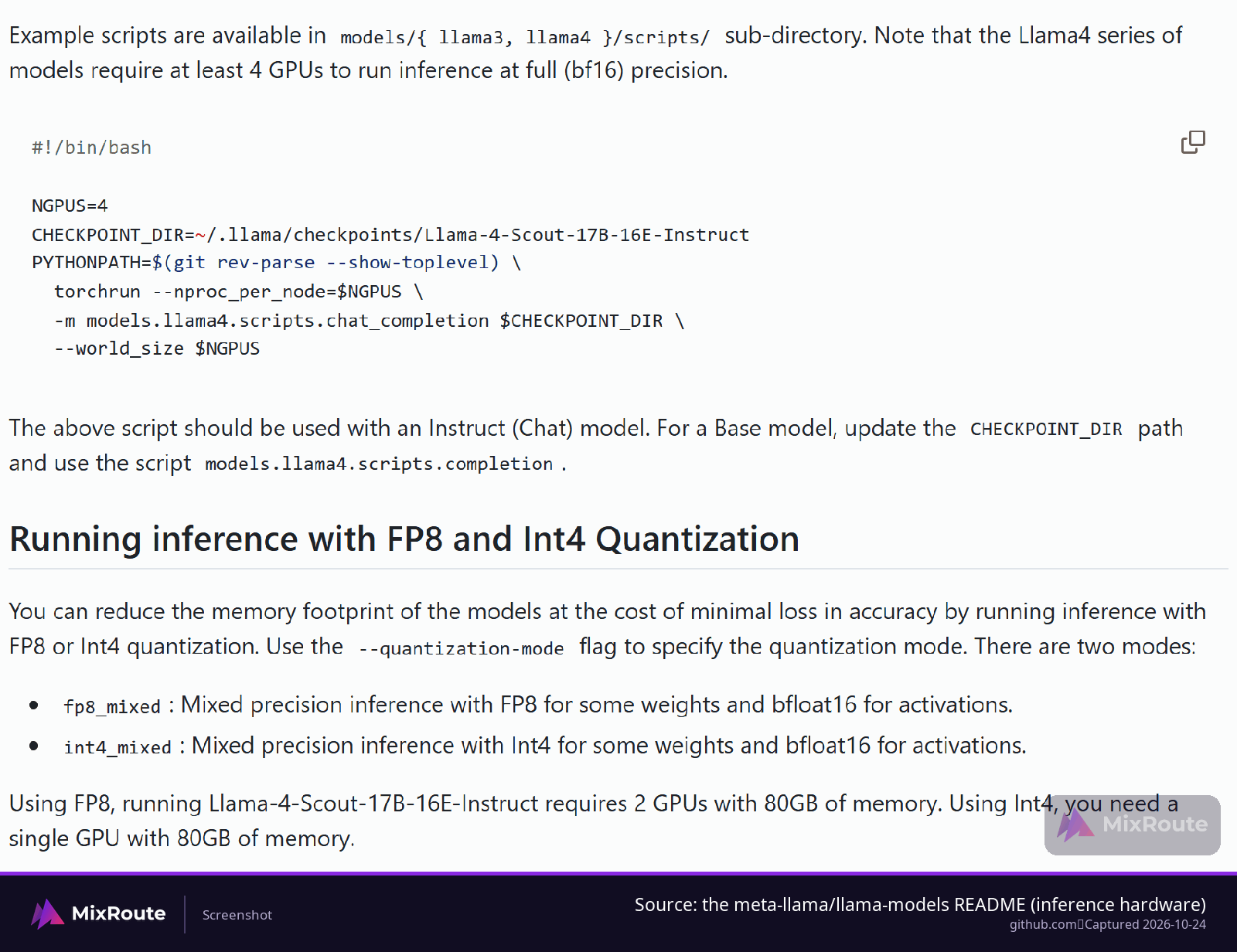
| Precision mode and checkpoint | Minimum hardware in Meta’s repository |
|---|---|
| Full bf16, Llama 4 series | 4 or more GPUs |
| fp8_mixed, Llama 4 Scout Instruct | 2 GPUs with 80GB each |
| int4_mixed, Llama 4 Scout Instruct | 1 GPU with 80GB |
Those two modes are flags you pass to the run script. fp8_mixed keeps some weights in FP8 and the activations in bfloat16, int4_mixed does the same with Int4 weights, and Meta describes the trade as a smaller memory footprint for a minimal loss in accuracy. The memory figure is the one you plan against; the accuracy figure is the one you check on your own evaluation set, because your prompts are not the benchmark.
Below the Llama 4 threshold
Smaller Llama models open the door as you move down the range. Hardware guidance from a third-party explainer puts models in the 7B to 13B band on consumer GPUs with 16GB to 24GB of VRAM, mid-size 30B to 70B models on A100 or H100 class hardware, and the largest checkpoints on multi-GPU or distributed setups. The same explainer makes the quantization trade concrete: a quantized 70B model might fit on a single consumer GPU that could not run the full-precision version. That one sentence is often the difference between a plan and a dead end.
What 405B asks for instead
The top of the family is a different kind of project. Meta’s own launch material calls working at the scale of the 405B challenging for the average developer and notes that it requires significant compute resources and expertise, which is exactly the gap the hosted and partner routes were built to fill. Those routes cover the workflows Meta listed on day one: real-time and batch inference, supervised fine-tuning, evaluation on your own application, continual pre-training, retrieval-augmented generation, function calling and synthetic data generation. When your task needs a model that size, the practical question stops being which GPU and becomes which endpoint.
How does Llama compare with the closed models you might route to instead?
Control and billing separate the two routes more than any leaderboard does. Open weights leave the model in your hands, so hosting decisions, fine-tuning and spend all stay yours, and the bill arrives as compute. A closed model hands you an endpoint and someone else’s capacity planning, and managed hosting puts usage-based pricing back on the table. Neither arrangement wins outright, because they fail at different things, and plenty of production systems run both.
Meta’s framing of the 405B is that it is the first openly available model to rival the top AI models on general knowledge, steerability, math, tool use and multilingual translation. That is Meta’s claim about its own model, and it does not transfer to your workload on its own. The evaluation that decides your case is the one you run on your own prompts, and it stays cheap to run because both routes are reachable from the same client code.
FAQ
Is Llama free to use?
The weights are open for download, so the cost shifts from per-token charges to the compute you run them on, and managed hosting brings usage-based pricing back. Getting them is a license acceptance, not a purchase: you open a repository, accept the license terms and the acceptable use policy, and wait for approval, and nothing in that flow asks for payment. Locally you cover the hardware, the power and the engineering time spent keeping a checkpoint loaded and serving.
Do I need an API key to use Llama?
Not for local use. Ollama, a separate desktop app, runs models on your machine, serves them on localhost behind an OpenAI-compatible endpoint, and asks for no key, because nothing leaves the computer. Keys appear the moment the model lives somewhere other than your own computer, and then it is the provider’s key that authenticates the request. If your code already speaks the OpenAI API, pointing it at a local server is mostly a base URL change.
Can Llama run on a laptop?
Yes at the small end. Meta’s launch material lists a laptop alongside on-premises and cloud deployments, with no data shared with Meta. Size sets the ceiling: the 1B and 3B text models are the smallest entries in the family, while Meta’s repository puts Llama 4 Scout at a single 80GB GPU even in its most compressed Int4 mode.
What are Llama Guard 3 and Prompt Guard?
They are safeguards that ship with the family rather than chat models: Llama Guard 3 classifies inputs and responses against a hazards taxonomy, and Prompt Guard labels input strings benign, injection or jailbreak so it can run as a filter before an LLM call. Prompt Guard is a fine-tuned multi-label classifier rather than a generator, which is what makes running it in front of every call practical.
How do I get the Llama weights?
From any of the three sources that Meta’s Getting the models documentation lists (Meta, the meta-llama organization on Hugging Face, and Kaggle), after you accept the license and the acceptable use policy. Approval on one repository covers the Llama 3.1 models and earlier versions, and the hub hands you both Meta’s native format and the transformers format. If you prefer a script to a browser, huggingface-cli is the separate Hugging Face download path; Meta’s llama-model tool handles the repository-specific download, integrity check and prompt-format output.
Does Llama handle images as well as text?
Yes, in more than one place: Llama 3.2 Vision handles image reasoning in 11B and 90B sizes, and Meta’s hub entry describes Llama 4 as natively multimodal across text and images. Both take text and images in and return text, so vision changes what the model can read rather than what it writes.
Is Llama 3.1 405B realistic to self-host?
For most teams it is not, because Meta’s own launch material calls working at 405B scale challenging and notes it needs significant compute resources and expertise, which is the gap the hosted and partner routes fill. The workflows people run at that size are the ones Meta listed for partners: batch inference, evaluation, continual pre-training and synthetic data generation. Trying those on rented capacity tells you whether the size earns its keep before you price a cluster.