Claude Code Memory: Where It Lives and What Persists
What memory does Claude Code actually keep, and who writes it?
“I told Claude Code last week that tests run with npm test. This morning it asked me again.” Either nothing wrote that note to a file, or it went into a file this session does not load. Claude Code keeps persistent context in two layers. CLAUDE.md files are the instructions you write, in four scopes that run from your organization’s managed path down to ./CLAUDE.local.md. Auto memory is the notes Claude writes for itself, one folder per repository at ~/.claude/projects/<project>/memory/, indexed by MEMORY.md. Both are plain text on your disk and both load when a session starts, with one limit: the first 200 lines or 25KB of MEMORY.md reach the session.
Which layer owns a piece of context decides what you fix. A standing rule that nobody wrote down belongs in a CLAUDE.md file, where you put it. A preference or correction Claude picked up from you belongs in the memory folder, where Claude put it. Debugging fixes and build commands that Claude can work out from the codebase are not saved there, so put the ones that should hold in every session into CLAUDE.md.
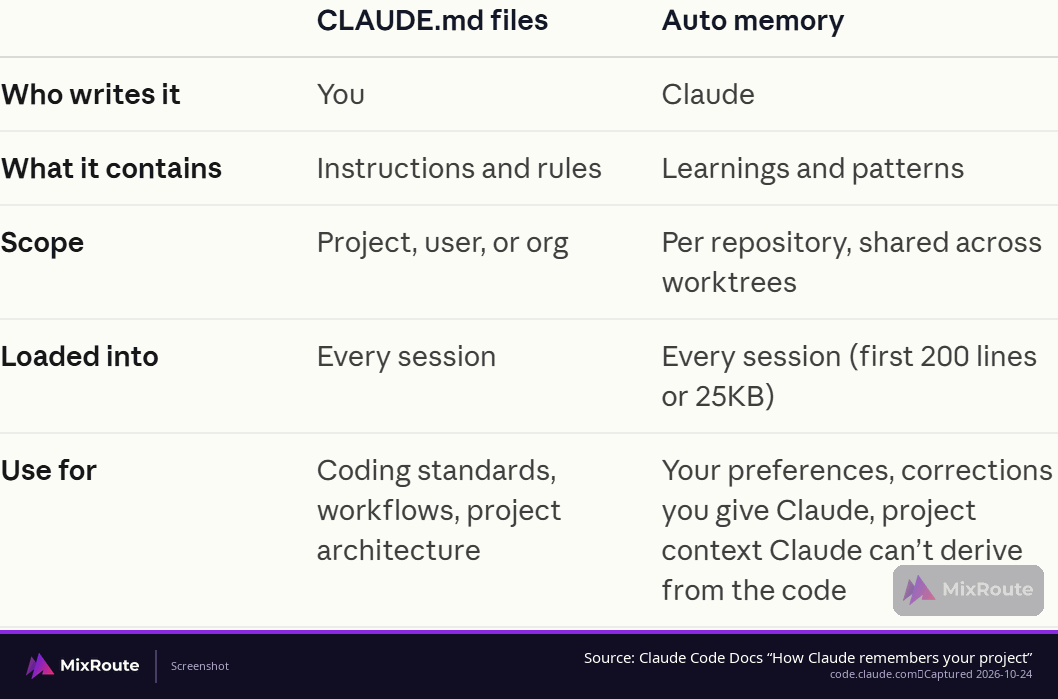
| CLAUDE.md files | Auto memory | |
|---|---|---|
| Who writes it | You | Claude |
| What it holds | Instructions and rules: coding standards, workflows, project architecture | Learnings and patterns: your preferences, your corrections, project context Claude cannot derive from the code |
| Where it lives | Four scopes, from the managed policy path down to ./CLAUDE.local.md |
~/.claude/projects/<project>/memory/, an index plus topic files |
| Loaded into | Every session | Every session, first 200 lines or 25KB of the index |
| Best for | Rules and conventions that should hold on purpose | Facts and corrections Claude has to carry forward on its own |
The two layers load together, so a new session starts with your rules and Claude’s notes side by side. They age differently, too. A rule you wrote keeps loading exactly as written, including after it has gone out of date. A note Claude wrote records what was true when it was written, so treat it as a starting point rather than a description of the code today.
Which file to open when something is missing
Claude repeats a correction you typed last week. That is an instruction problem, and which file you open follows the scope you meant:
./CLAUDE.mdfor a rule the whole team needs, committed with the repository.~/.claude/CLAUDE.mdfor a preference that follows you from project to project..claude/rules/with a path pattern for a rule that only matters for part of the codebase, so it loads when Claude touches matching files instead of in every session.
A second kind of gap looks different. Claude forgets a preference or correction you gave it in an earlier session, and nothing in CLAUDE.md explains that, because you never wrote it. That context lives in the auto memory folder under your home directory.
Where does each memory file live, and how far does its scope reach?
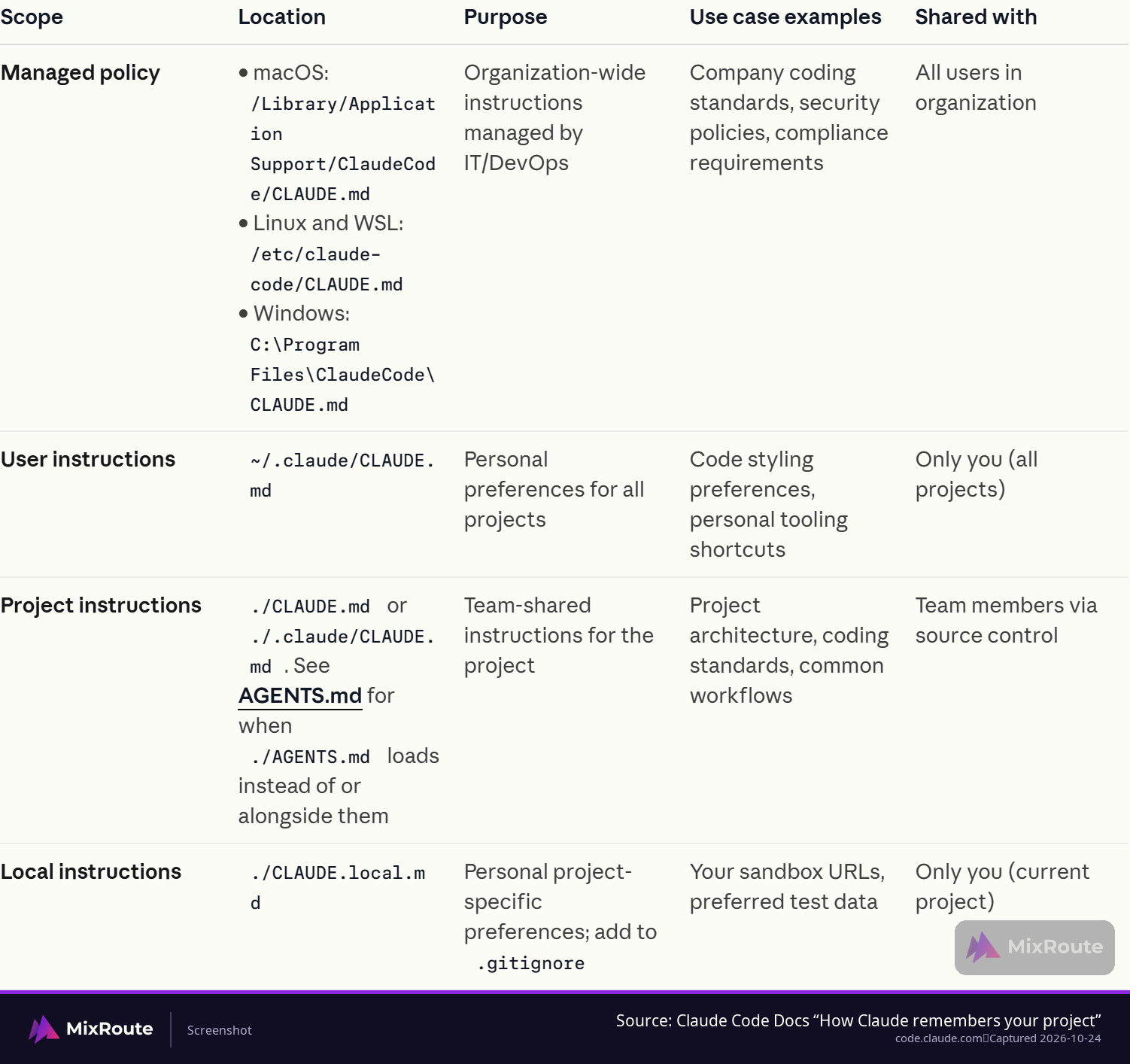
Auto memory lives under your home directory at ~/.claude/projects/<project>/memory/, with MEMORY.md as the index at the top of the folder and the topic files Claude creates beside it. CLAUDE.md files come in four scopes, and the scope you pick decides who else feels the change.
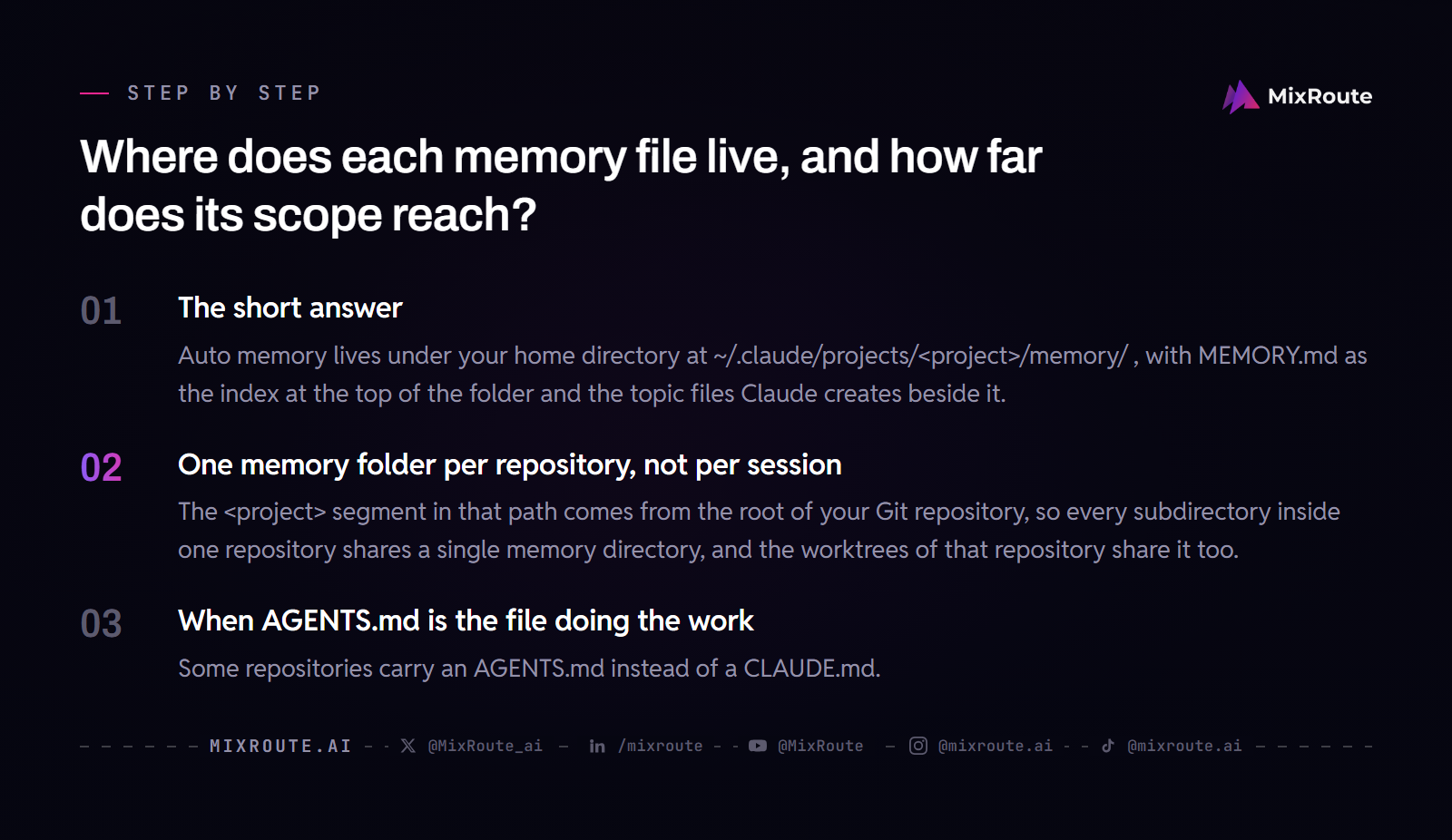
| Scope | Path | Who it reaches |
|---|---|---|
| Managed policy | macOS: /Library/Application Support/ClaudeCode/CLAUDE.md; Linux and WSL: /etc/claude-code/CLAUDE.md; Windows: C:\Program Files\ClaudeCode\CLAUDE.md |
Everyone in the organization |
| User | ~/.claude/CLAUDE.md |
You, in every project |
| Project | ./CLAUDE.md or ./.claude/CLAUDE.md |
Anyone who clones the repository |
| Local | ./CLAUDE.local.md |
You, in this project only |
Project against local is the line that matters most. A rule in ./CLAUDE.md is committed with the repository and reaches every teammate who clones it. A note in ./CLAUDE.local.md is yours alone, which is where sandbox URLs and your own test data belong, so add that file to .gitignore and it never gets committed. Preferences that should follow you everywhere go in ~/.claude/CLAUDE.md, where they stay out of version control and never land in a teammate’s session.
One memory folder per repository, not per session
The <project> segment in that path comes from the root of your Git repository, so every subdirectory inside one repository shares a single memory directory, and the worktrees of that repository share it too. Outside a Git repository, the project root is used instead.
That scoping is what keeps unrelated projects from mixing notes. A preference you state while you work on an API service does not follow you into a front-end repository, and the reason behind a rewrite explained in one repository does not arrive in another as an established fact.
When AGENTS.md is the file doing the work
Some repositories carry an AGENTS.md instead of a CLAUDE.md. Under the default instruction-file behavior, Claude reads AGENTS.md only when there is no CLAUDE.md or CLAUDE.local.md in the working directory or in a directory above it, so putting a CLAUDE.md back in that path wins.
Three sources keep loading alongside AGENTS.md: your own ~/.claude/CLAUDE.md, your organization’s managed CLAUDE.md, and the .claude/rules/ files. AGENTS.md support also has a version gate. It is documented for Claude Code v2.1.277 and later, and the first session after upgrading from v2.1.276 or earlier may still read the older way before it takes effect from the next session.
How do you inspect what a project has saved?
Inspection means opening a folder. Everything Claude saved is a readable file, so start at the memory directory for the repository you are in.

Read the memory folder in three steps
- Open
~/.claude/projects/<project>/memory/and readMEMORY.mdfirst; the topic files beside it hold the longer notes. - Read
MEMORY.mdfrom top to bottom. It is an index: one line per memory, each naming the topic file that holds the detail. - Open the topic files the index points at. A small project often has only
MEMORY.mdand one or two topic files, and a long-running one accumulates a file per subject, so the index is what keeps them findable.
Nothing here is a database. Editing an entry is a text edit, and deleting one is a line you remove.
Know which of the four note types you are looking at
Auto memory entries are grouped into four types, and the type tells you whether the entry is in the right place:
- User notes record your role, expertise and working preferences.
- Feedback notes record corrections you gave and approaches you confirmed.
- Project notes hold ongoing work, deadlines and decisions that are not visible in the code or the git history.
- Reference notes point at systems outside the project, such as an issue tracker or a dashboard.
Audit the instruction files next
The other half of the inspection is the instruction side. Read ./CLAUDE.md and the .claude/rules/ files beside it, then read ~/.claude/CLAUDE.md, and check that no two files disagree on the same point. When two instructions contradict each other, Claude may follow either one, and which one it picks is not something you control.
Keep an individual CLAUDE.md focused. If a rule only matters for one part of the codebase, move it into a path-scoped file under .claude/rules/, and the main instructions stay easier to review.
Correcting an entry is a file edit, and an incorrect entry keeps loading into every new session until someone fixes it. That is the argument for reading a project’s memory folder early, while the wrong line is still easy to spot.
What actually carries over into the next session?
Both layers load at session start, with a size limit on each side. The first 200 lines or 25KB of MEMORY.md load into the session, and entries past that point stay on disk and do not arrive. A CLAUDE.md file loads in full up to 4 MiB, and Claude Code skips a file larger than that.
Why memory grows and then quietly stops arriving
An index that has grown past the cap is easy to miss: Claude Code reports the overflow to Claude after the write instead of showing a banner in your terminal, so you may only notice it in the transcript. The file on disk is longer than what the session received, so entries you can see when you open the folder are simply not there when a new session begins. If a memory you know exists stops showing up, measure the length of MEMORY.md before you look anywhere else.
Keeping the index short is a habit, not a setting. Push detail into the topic files, keep one line per memory in the index, and delete entries that no longer hold. An accurate memory the session never loads helps nobody.
Memory files are not the context window
The context window holds what the current session can see: the conversation, the files Claude has read, the command output it has processed. It can hold far more text than your memory files, and it is gone when the session ends. Memory files are the small, curated set that survives the session boundary and loads again the next time you start.
Treating a full context window as durable storage costs you an afternoon. A correction you type into chat improves the session you are in. If you want it next week, something has to write it to a file, either you in CLAUDE.md or Claude as a memory note.
A worked example
Picture a repository where you tell Claude during a session to stop adding code under the legacy folder, because the team is retiring it. Claude writes that correction into the project’s memory directory. The next morning you open a new session in the same repository, and Claude keeps new code out of the legacy folder without being told again. You changed nothing in between.
Your preference for TypeScript examples over JavaScript lives in ~/.claude/CLAUDE.md, so it comes back in every project you open, not only this one. A one-off instruction you typed yesterday, like checking out a particular branch for a single review, is nowhere in either layer, because it only ever existed in one session’s context.
Two of those three pieces persisted, and the difference comes down to whether anything wrote them into a file. To go further with the workflow itself, see How to vibe code.
How do you turn auto memory off, and how do teams keep the files from drifting?
Auto memory turns off with one setting: autoMemoryEnabled set to false. It is a settings value, so it belongs in the settings file you already manage. With it off, Claude stops reading from and writing to the auto memory directory, and the rules you wrote are untouched; your CLAUDE.md files keep loading.
Background sessions and sessions Claude starts
The /memory toggle behaves differently in two session kinds: a background session, and a session that another Claude Code session started, such as when Claude runs claude through its Bash tool. There the toggle can turn auto memory off but cannot turn it back on. To re-enable it, run claude directly in your terminal and use the /memory toggle in that session.
Organization-wide controls
For a team, the lever that covers everyone is the managed policy CLAUDE.md at the operating-system path in the scope table above. Individual settings cannot exclude it, which makes it the right place for guidance that should reach every project regardless of what any repository’s CLAUDE.md says: code style and quality guidelines, data handling and compliance reminders. It shapes Claude’s behavior without being a hard enforcement layer, so anything that must be blocked outright belongs in managed settings.
Keeping auto memory from drifting
On a team, the layer that travels is the project CLAUDE.md, which reaches teammates through version control. Auto memory is written per repository on the machine you work from, so a teammate who clones the repository gets your rules and none of your notes.
Project notes and reference notes earn their place in that folder, because they describe the repository. A preference about how you like code explained belongs in ~/.claude/CLAUDE.md, where it applies to you in every project you open instead of sitting in one repository’s notes.
What stays on your disk, and what does the request path keep?
The auto memory folder is stored locally, on the machine where you run Claude Code. A project CLAUDE.md sits in the repository, so anyone who clones it gets a copy, and the request Claude Code sends upstream carries the context the session loaded. The folder itself stays on your disk.
When your requests are routed through MixRoute, prompt and response content is not recorded. User input text, AI output responses, conversation content, images and file content, and personal identity information are all listed as not logged. What the system logs hold is operational: timestamps, token counts, model name and response status, kept for 7 days for billing and troubleshooting.
One of those retained fields is the model name, so the log can show which model served a request. If your team needs the logging boundary checked against an internal policy, ask sales about the retention terms for your account.
FAQ
Where does Claude Code store its memory?
In a per-project folder under your home directory: ~/.claude/projects/<project>/memory/, with MEMORY.md at the top as the index and the topic files Claude writes beside it. Every conversation you run in that project can add to the folder, which is why it grows even when you change nothing yourself. Open it first when a session starts from a blank slate: the note you expected is either there and outside what loaded, or it was never written.
Does auto memory work across different projects?
It stays with the project. One memory directory per Git repository root, shared by the worktrees and subdirectories inside that repository, and outside a repository the project root is used instead. Open Claude Code in a different folder and you get a different memory folder. Preferences that should travel with you belong in ~/.claude/CLAUDE.md, which loads in every project you open.
What is the difference between CLAUDE.md and MEMORY.md?
Who writes them. You write the CLAUDE.md files as the instructions you want followed, and Claude writes the auto memory notes that MEMORY.md indexes. Each name also covers several files: CLAUDE.md comes in four scopes, so it spans a personal file in your home directory, a team file committed with the repository, and the managed policy file your organization deploys. MEMORY.md is one index per repository that points at the topic files next to it.
Why did a memory that exists on disk stop showing up in new sessions?
Because MEMORY.md grew past what the session loads. The session takes the first 200 lines or 25KB of the index; entries after that stay in the file but never arrive. Move the detail for those entries into topic files and leave one line per memory in the index, and they come back into the loaded range. Check the file length before you suspect anything else.
Can you turn auto memory off?
Yes. Set autoMemoryEnabled to false in your settings file. In a background session, or a session another Claude Code session started, the /memory toggle can turn auto memory off but not back on, so re-enable it from a session you start directly in your terminal. Your CLAUDE.md files keep loading either way, which means the rules you wrote stay in force.
How do you inspect the memory files Claude Code loaded?
Run /context to see the Memory files that loaded into the current session, and use /memory when you want to open or edit them. The split matters when an entry looks missing: a file can be sitting on disk and still be outside what the session received, and /context is what shows you which one happened.
What happens when something Claude saved is simply wrong?
You edit or delete it. The entry is a plain-text file on disk, so the change takes seconds, and the wrong version keeps arriving in new sessions until you make it. Fix it the first time you notice instead of letting it compound. If the wrong entry is a personal preference that landed in the project folder, ~/.claude/CLAUDE.md is the better home for it.
Does MixRoute keep my prompts?
No. Prompt and response content is not recorded: user input text, AI output responses, conversation content, images and file content, and personal identity information are all listed as not logged. What is kept is the operational log, which holds timestamps, token counts, model name and response status for 7 days, for billing and troubleshooting. The model name sits in that log, so a request can be traced to the model that served it.