Create an Anthropic API Key and Test a Claude Request
“I made a Claude account, so where do I actually get an API key?” In the Claude Console, at platform.claude.com, under Settings → API keys. Click Create key, name it, choose an expiration, and copy the sk-ant- value shown once at creation. That value is the secret your code sends to authenticate Claude API requests. From there, three things decide whether your first /v1/messages call comes back clean: the key type you picked, whether the account that owns the key can pay, and whether the key is scoped to one workspace. A failed call answers with 401, 400, or 404, and each one points at a different fix. A gateway route at the very end is optional and uses its own MixRoute key.
Create an API key in the Claude Console
Sign in at platform.claude.com, then open Settings → API keys. After that, key creation is a short sequence.
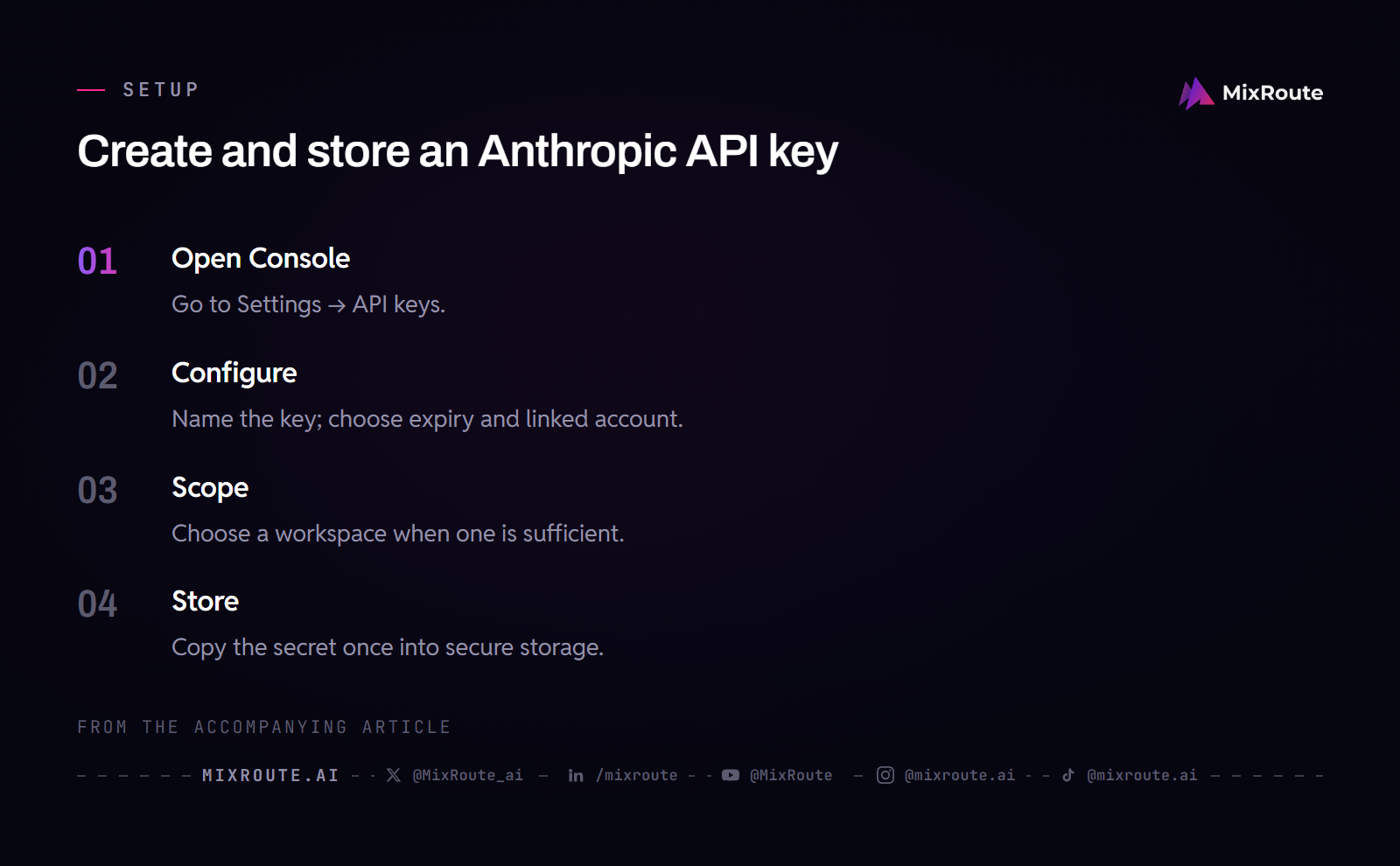
- Sign in to the Console. If you do not have an account yet, create one first.
- Open
Settings → API keys. Your existing keys and theCreate keybutton live on this page. - Click
Create keyand name it. A name such aslocal-devorprod-agentstells you which script or service uses it later. - Choose an expiration. The Console offers 3 hours, 1 day, 7 days, or 30 days, plus a custom duration or
Neverfor keys you rotate yourself. An organization policy may cap the available options. - Set
Linked account. Choose yourself for a personal key or a service account for shared workloads. If the service account does not exist yet, ask an organization admin to create it underSettings → Service accountsand add it to the relevant workspace; you can then scope the new key to that workspace. The authentication guide covers key types and workspace selection. - Copy the key immediately. The Console shows the full value, which starts with
sk-ant-, only once at creation. If you close the window first, you cannot view that key again; create a new one.
If the Create key button is disabled, your Console role does not allow key creation. Ask an organization admin to change your role, or to create a service account key for the workload.
Pick the type of key that matches your workload
Personal, service account, and workspace keys answer three questions differently: who they act as, which workspaces they can reach, and what stops them.
| Key type | Acts as | Works in | Stops working when |
|---|---|---|---|
| Personal key | You, with your roles and permissions | A single workspace chosen at creation, or the workspaces where your role allows API use | You lose access to that workspace or the organization; the key is archived when you are removed |
| Service account key | A service account | One workspace if the key is scoped at creation, otherwise the Default Workspace and any workspace the service account can access | The service account is archived or, for a single-workspace key, is removed from that workspace |
| Workspace key (legacy) | No one; it belongs to the workspace | The workspace where it was created | It expires, is disabled or deleted, or its workspace is archived, even if the creator stays in the organization |
Use a personal key for your own development and scripts. If you are the only person running the script, that is the whole decision. For CI, production services, or agents, have an admin create a service account instead; the credential then belongs to the workload, so a person leaving the organization does not break every script that used the key. Workspace keys still work but are legacy, so leave them out of new integrations.
A service account key can be bound to one workspace at creation, or left unbound. A bound key stops when the service account leaves that workspace. An unbound key works anywhere the service account has access, and stops when the service account is archived.
Store the key and set ANTHROPIC_API_KEY
Decide where the secret will live before you click Create key, because the Console offers no second look at it.
Put the secret in a secrets manager
Copy the key into a secrets manager as soon as it appears. No later path recovers the value: the Admin API returns only a partially redacted hint, never the secret. If the key is lost, delete it on the API keys page and create a replacement.
Set the environment variable for local scripts
On a development machine, export the key rather than pasting it into source code:
export ANTHROPIC_API_KEY="sk-ant-api03-..."
Anthropic SDKs read ANTHROPIC_API_KEY automatically, so Anthropic() takes no api_key argument. That habit matters for every provider you add, not only Anthropic. Set up a routine for organizing and rotating AI API keys across providers before the next credential is created.
Check billing before you send the first paid request
Open Billing in the Console account that owns the key and confirm a payment method or spendable balance before the first paid request. A successful authentication check does not establish that the account can fund the workload. If you are evaluating Claude ahead of a project decision, that is the gap that shows up on the first real job, not on the test call.
After the first request succeeds and you have a workload to estimate, look at what actually lands on the bill. Where Claude Sonnet 5 charges hide beyond the advertised token price covers the costs that are easy to miss when you extrapolate from one test.
Send a minimal request and read the success response
A single request proves that authentication works and that the request shape is right. Install the Python SDK first with pip install anthropic.
Minimal request via the Python SDK
from anthropic import Anthropic

client = Anthropic()  # reads ANTHROPIC_API_KEY

message = client.messages.create(
    model="claude-opus-5",
    max_tokens=1024,
    messages=[{"role": "user", "content": "Hello, Claude"}],
)
print(message.content)
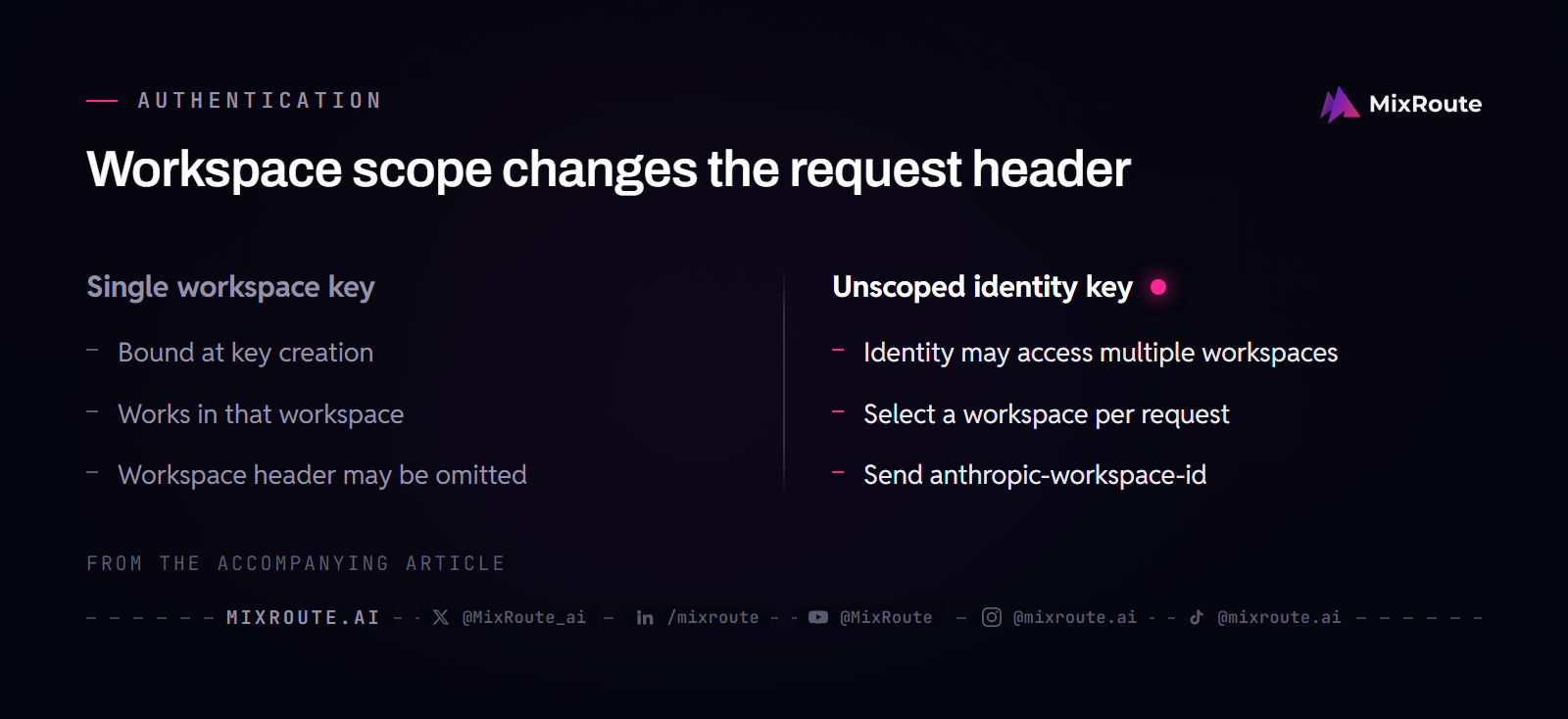
The example uses a key scoped to one workspace and the claude-opus-5 model ID. To test another model, replace that value with an ID available to your account. An unscoped identity-linked key also needs the workspace header shown below.
Success means the call returned a message whose content list carries the assistant text. HTTP failures do not come back as a printable error object: the SDK raises an exception, so an uncaught error stops the script and the failing status and message sit on the exception.
Check the returned text and message.usage before integrating the call. Usage reports tokens for this request; the Console billing view shows the account’s charges and balance.
Direct HTTP request with curl
Direct HTTP requests use Authorization: Bearer <key>, anthropic-version, and content-type headers. The legacy x-api-key header still works in place of Authorization.
curl https://api.anthropic.com/v1/messages \
  -H "Authorization: Bearer $ANTHROPIC_API_KEY" \
  -H "anthropic-version: 2023-06-01" \
  -H "content-type: application/json" \
  -d '{"model":"claude-opus-5","max_tokens":1024,"messages":[{"role":"user","content":"Hello, Claude"}]}'
A successful response is JSON whose content array contains the assistant text block. A single-workspace key can omit the workspace header.
When the key is not scoped to a single workspace
Personal and service account keys that are not scoped to one workspace are the identity-linked case, and they must carry anthropic-workspace-id on every request. With the SDK, pass it through extra_headers:
message = client.messages.create(
    model="claude-opus-5",
    max_tokens=1024,
    messages=[{"role": "user", "content": "Hello, Claude"}],
    extra_headers={"anthropic-workspace-id": "wrkspc_01JwQvzr7rXLA5AGx3HKfFUJ"},
)
The curl equivalent adds one header:
-H "anthropic-workspace-id: wrkspc_01JwQvzr7rXLA5AGx3HKfFUJ"
Find the workspace ID in the ID column of Settings → Workspaces in the Console.
Rotate, disable, or delete a key after testing
Disable is reversible: the Admin API reports the key as inactive, and re-enabling returns it to active. Delete is permanent: the key is archived and no longer authenticates requests. Expired keys can only be deleted, and expiration is set at creation and cannot be changed later, so once a key expires, create a new one.
Anthropic emails the key’s creator as expiration approaches: 7 days before a key created with a lifetime of at least 14 days expires, and 1 day before a key created with a lifetime of at least 7 days expires. Keys with shorter lifetimes expire without a warning email, so a short-lived test key’s expiry belongs somewhere you will actually see it.
Read an authentication failure: 401, 400, and 404
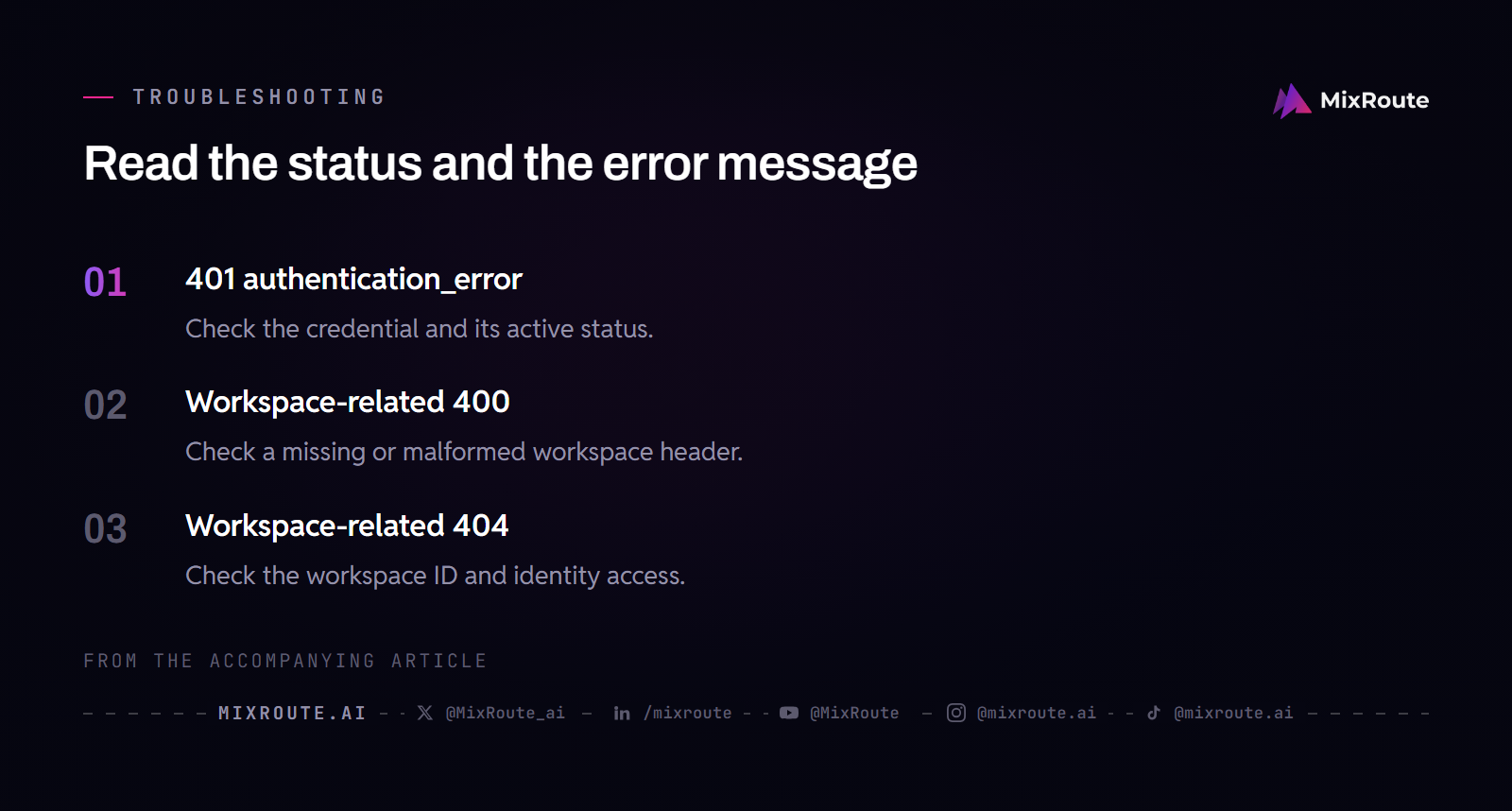
The API uses different status types for different credential problems, and each maps to a distinct fix. Retrying the same request without changing the credential or header reproduces the same failure.
401 authentication_error: inspect the credential and its status
An expired key returns 401 authentication_error, and so do deleted, disabled, or incorrect keys. The status alone does not say which state applies, so check whether ANTHROPIC_API_KEY holds the right value and whether the key is still active on the API keys page. Expired, deleted, or suspected leaked keys need replacement. A deliberately disabled key that was not compromised can be re-enabled by its owner, so do not delete a disabled key you intend to keep.
400 invalid_request_error: the workspace header is missing or malformed
Omit anthropic-workspace-id on an unscoped identity-linked key, and the API returns 400 invalid_request_error with the message anthropic-workspace-id is required when authenticating with an identity-linked API key; send the id of the workspace this request acts in. Send a value that is not a valid workspace ID, and you get the 400 message anthropic-workspace-id header must be a valid workspace ID. Both messages point at workspace selection specifically; other invalid parameters can also produce 400, so read the error message before acting.
404 not_found_error: the workspace is unknown or inaccessible
A workspace ID that does not exist, or one the key’s identity cannot access, returns 404 not_found_error with Workspace <id> not found. The API sends the same response for both cases by design, so verify the ID and confirm the linked identity has access. A 404 can also come from another resource named in the request, so match the message to the fix.
Optional: call Claude through a gateway that uses its own key
The key and steps above are the complete setup for calling Anthropic directly. If you want a gateway in front, MixRoute accepts its own MixRoute API key at https://api.mixroute.ai/v1, and its documentation defines each route’s API mode and the model IDs that route accepts. The gateway never takes your sk-ant- secret, so the Anthropic credential and the MixRoute credential stay independent.
For claude-opus-5, MixRoute documents an Anthropic-compatible Messages API at https://api.mixroute.ai/v1/messages in the native Anthropic request and response format, so the Anthropic SDK code above keeps the same Anthropic client and the same client.messages.create call. The docs example differs from the code above in the key and base URL: the client is created with a MixRoute API key and base_url="https://api.mixroute.ai".
Using the OpenAI SDK, or MixRoute’s OpenAI-compatible Chat Completions API instead, means checking what an OpenAI-compatible endpoint actually covers and which parts of your current code carry over. That path uses a different client, request method, and response shape.
If one prepaid balance across the model providers you call fits how you buy capacity, decide whether that buying model suits your usage before adding a second credential to your setup.
FAQ
Where do I create an Anthropic API key?
In the Claude Console at platform.claude.com, under Settings → API keys. Click Create key, name it, choose an expiration, set the linked account, and copy the sk-ant- value, which is shown only at creation. If the Create key button is disabled, your role does not allow key creation there, so an organization admin has to change your role or create the key for you.
What is the difference between a personal, service account, and workspace key?
A personal key acts as you, with your roles and permissions. A service account key acts as the workload it belongs to, which is why CI pipelines and production services use one. A workspace key is legacy: it belongs to the workspace, has no owner, and keeps working after its creator leaves. Pick a personal key for your own scripts and a service account key for anything shared; both identity-backed types stop automatically when the identity behind them is removed from the organization.
Why does the Console only show the key once?
Because the Console has no second chance to display it. The full value appears at creation, so copy it at that moment; close the window first and nothing recovers the original value, which leaves deleting the key and creating a replacement. The Admin API behaves the same way, returning at most a partially redacted hint, never the secret itself.
Should I set ANTHROPIC_API_KEY or send the key in a header?
Set ANTHROPIC_API_KEY and the Anthropic SDKs pick it up automatically, so Anthropic() needs no api_key argument and the secret stays out of your source tree. For direct HTTP requests, send Authorization: Bearer <key> with the anthropic-version header, and note that x-api-key still works as the legacy form. Use the environment variable on a development machine, and the header form when you are writing the raw HTTP call yourself.
How do I know a request failed because of the key?
Check the supplied credential and its status before anything else. Expired, deleted, disabled, and simply wrong keys all come back as the same 401 authentication_error, so the status alone does not tell you which state you are in. Confirm the value in ANTHROPIC_API_KEY, then open the API keys page to see whether that key is still active. Replace it if it expired, was deleted, or might have leaked. If you disabled it on purpose with no security concern behind it, re-enable it instead of deleting a key you still need.
Do I need an anthropic-workspace-id header?
Only when the key is not scoped to a single workspace. A key created for one workspace can omit it, because the API already knows where the request acts. A personal or service account key that is not scoped must send anthropic-workspace-id on every request; leave it out and the response is 400 invalid_request_error. A header value that is not a valid workspace ID is also a 400, and a workspace the key’s identity cannot reach returns 404, deliberately the same answer as an unknown workspace.
Can I use this Anthropic API key with MixRoute?
No. That route takes a MixRoute key against https://api.mixroute.ai/v1, and MixRoute never asks for your sk-ant- secret, so the Anthropic secret and the gateway secret stay separate. Keep the Anthropic key for direct calls and create a separate MixRoute key for gateway requests. Gateway calls also follow the endpoint’s own documented API mode and model IDs, which is why both the key and the base URL change when you switch.
What should I check after an API request fails?
Read the error type and message first, then confirm the active key and workspace. A 401 is about the credential itself: wrong value, expired, deleted, or disabled. A 400 or 404 that names the workspace points at the header or at workspace access, and a 404 for a workspace your identity cannot reach looks identical to a 404 for a workspace that does not exist. Anything else points at the request or the model, so check the body before you touch the credential.