AI API Key Management: Rotation, Scope, Storage, and Incident Response
Why AI API Key Management Is Different
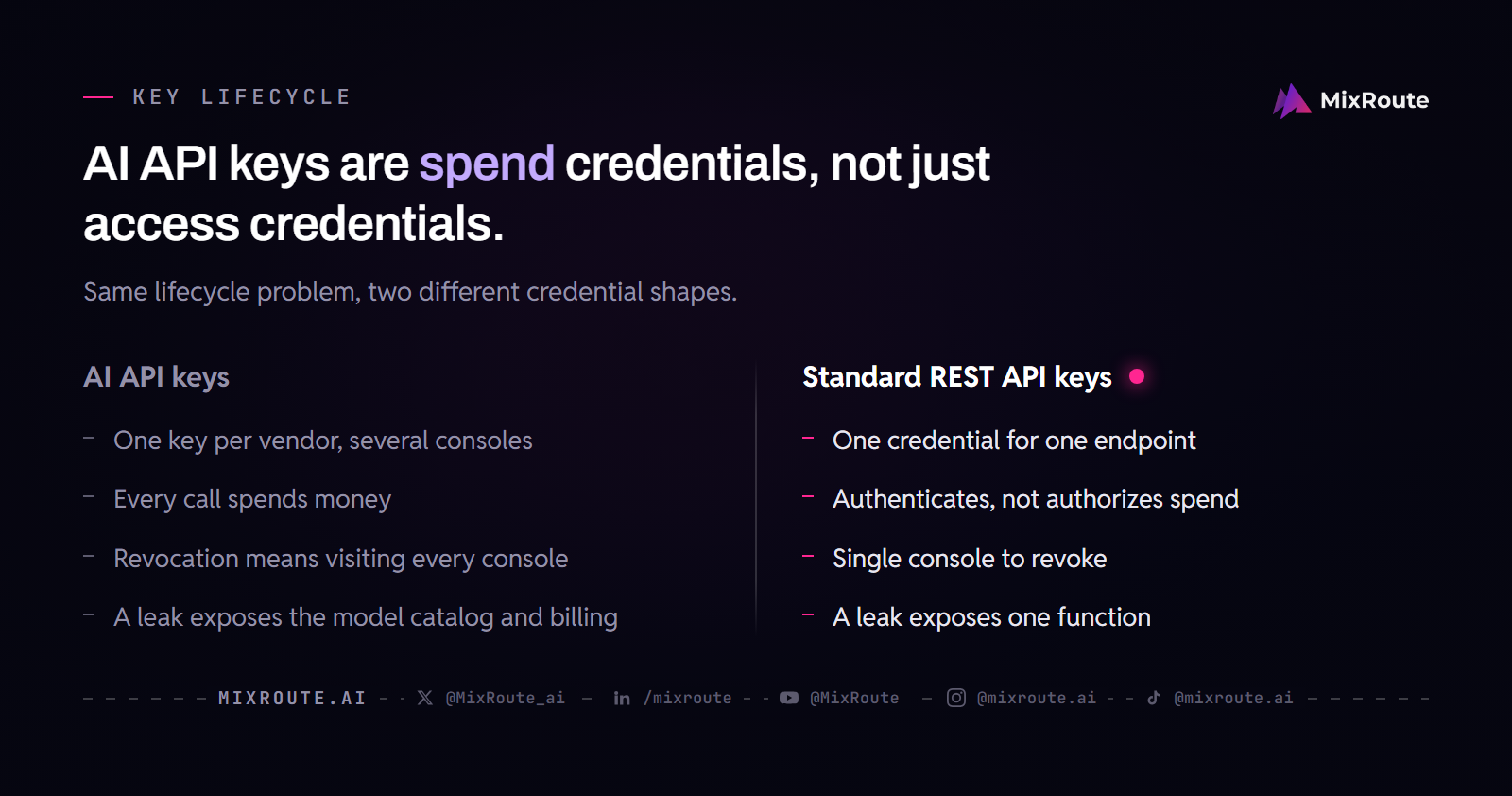
AI API key management differs from standard API key practice because the key is not one credential for one endpoint: every model vendor issues its own key, so a team holds several keys across several consoles, each with its own rotation rhythm and limit scheme. Revoking a compromised key means visiting every one of those consoles, often without knowing which key leaked first. And unlike an ordinary REST key, every call spends money. Generic key hygiene is not enough; the lifecycle must account for model-level scoping, provider routing, and rapid incident response.
Your team should issue, store, rotate, scope, and revoke AI API keys with the same rigor you apply to production database credentials. The blast radius of a compromised key is larger than a typical REST API key because it often grants access to an entire model catalog, not a single function. The key lifecycle is the operational boundary between your application and the cost of a runaway or abusive caller.
What makes AI API keys unique
An AI API key is not tied to one endpoint or one function. It authorizes spend rather than only authenticating. But keys spread across several vendors give you no single place to revoke, no single spending limit, and no single view of usage. Consolidating those keys is not about making one key more powerful; it is about making the risk something you can act on.
The cost of a key leak in AI workloads
If an attacker obtains an AI API key, they can run inference until you notice or your budget is exhausted. Unlike a database where a leak might expose records, an AI key leak exposes your billing account to token consumption that is bounded by the credit balance on the account and by whatever per-key usage limits your team has set. The cost is not a fixed data breach; it is a variable compute bill that can climb quickly, but it is capped by the credit balance and per-key limits. For this reason, the key lifecycle must prioritize speed of revocation and continuous monitoring.
Issuing Keys: Scope, Rotation, and Least Privilege
Issue multiple keys with limited scope per service, rotate regularly, and apply least privilege so that any single key can only reach what its service needs. This is the core principle of AI API key management: reduce the value of each credential to the narrowest possible task.
Scoping keys: what, how much, and from where
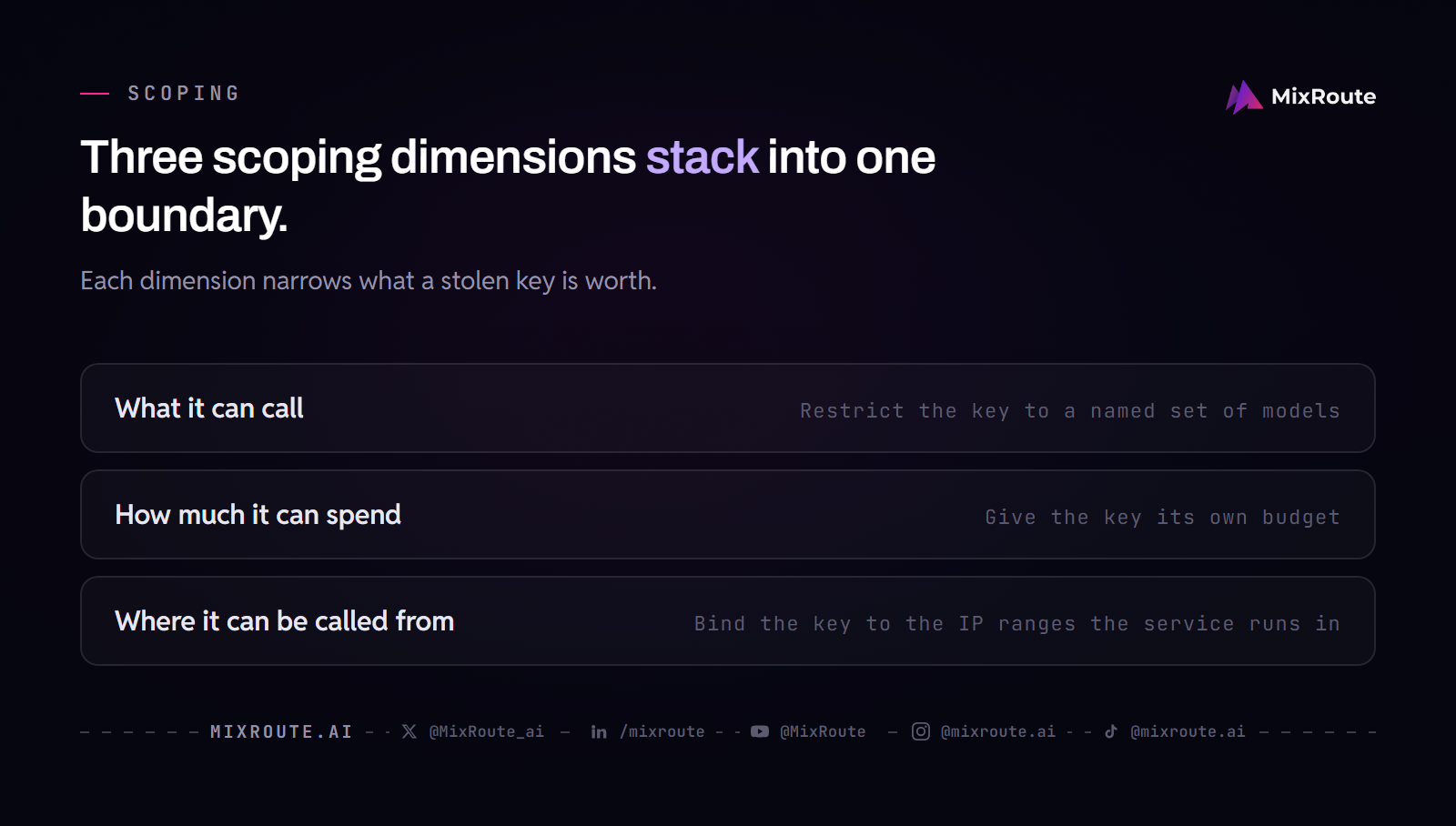
Scope has three dimensions, and most teams set only the first.
What it can call: restrict the key to a named set of models rather than the whole catalog. How much it can spend: give the key its own budget so a leak has a ceiling in money, not only in time. Where it can be called from: bind the key to the IP ranges the service actually runs in.
These three dimensions stack. The first limits what an attacker can reach, the second limits what reaching it costs, the third limits where the key can be called from. A key with all three set is worth much less to whoever steals it, and this is your first line of defense against a key being used to probe models you never intended to expose.
On MixRoute, model restriction is a field on every key: only the selected models can be called with that key, and selecting none leaves it unrestricted. It is independent of Smart Routing and of how requests are routed. The spend budget is a deductible balance, not a cumulative total and not a periodic quota: each request is deducted and the key stops at zero, and the account balance is always the outer hard limit, with the key budget adding an inner ceiling when set. The IP whitelist supports CIDR, and the product’s own caveat applies verbatim: “Do not rely solely on this feature. IPs can be spoofed; use with nginx or CDN.”
An allowlist can hold more than one model, so a fallback stays inside the boundary you drew. A team that does not want to write that selection logic in its own client can use Smart Routing, which is a separate optional layer that does it.
Creating service-specific keys
Do not share one key across your entire application. Create one key for your billing service, another for your chat feature, and a third for your batch processing job. Service-specific keys make audit trails meaningful: when a key is compromised, you know exactly which service the attacker reached. It also lets you rotate one key without forcing a global credential rotation across all environments. Least privilege also means that each key should have the minimum permissions needed for its intended function, such as read-only access for a monitoring service or limited model selection for a testing environment.
Rotation schedules and triggers
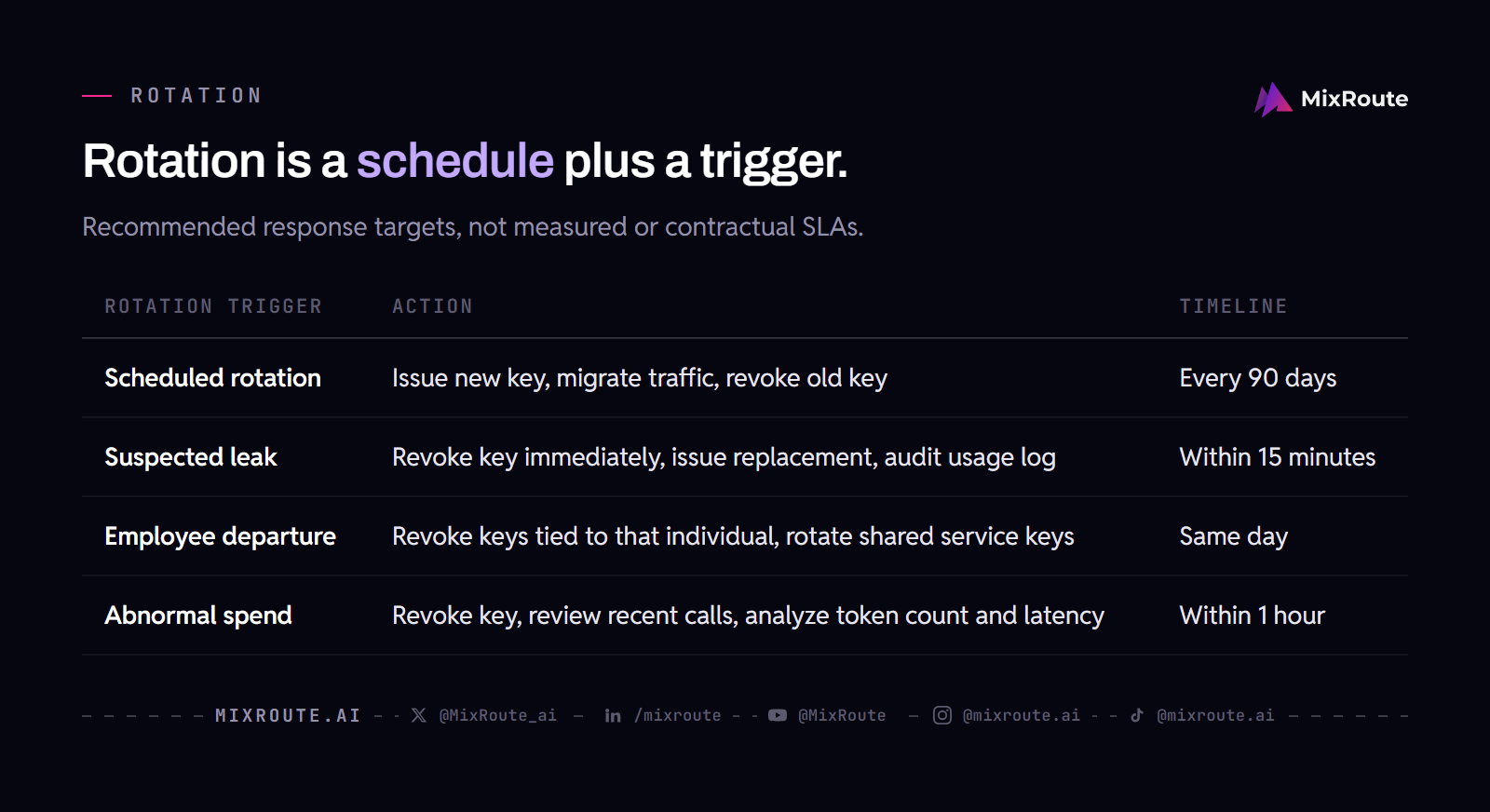
Rotation is not a one-time event; it is a recurring process. Set a regular schedule, such as every 90 days, and trigger an emergency rotation immediately after any suspected or confirmed leak. The schedule is a baseline, and the trigger is your incident response. Do not wait for the schedule if you detect anomalous usage; rotate first, then investigate. The table below outlines a practical rotation model.
| Rotation trigger | Action | Timeline |
|---|---|---|
| Scheduled rotation | Issue new key, migrate traffic, revoke old key | Every 90 days |
| Suspected leak | Revoke key immediately, issue replacement, audit usage log | Within 15 minutes |
| Employee departure | Revoke keys tied to that individual, rotate shared service keys | Same day |
| Abnormal spend | Revoke key, review recent calls, analyze token count and latency | Within 1 hour |
Storing AI API Keys Securely
Use secret managers, avoid hardcoding, and store keys outside source control to prevent exposure at rest and in transit. A key is only as secure as the storage layer that holds it, and the default of pasting keys into code is the fastest path to a public leak on GitHub. Regularly review who has access to the secret manager and revoke access immediately for any employee who changes roles or leaves the company.
Secret management tools
Adopt a dedicated secret manager such as AWS Secrets Manager, HashiCorp Vault, or GCP Secret Manager. These tools provide access control and audit logging, though the degree of built-in rotation varies by tool, and some require manual configuration. Your AI API keys should live there, not in a config file or a deployment script. The secret manager is the system of record, and your application should fetch keys from it at runtime, never at build time.
Environment variables in production
In production, inject keys as environment variables from the secret manager, not as literal strings in the codebase. This keeps the key out of version control and image layers. Many container platforms support secret injection directly, so your code can read AI_API_KEY without ever having the value visible in a build log. This is a baseline practice, not an advanced one.
Handling keys in CI/CD
Continuous integration and deployment pipelines are a common leak source. If you embed a key in a CI/CD configuration file, anyone with read access to that repository can see it. Use the secret management feature of your CI/CD platform, and set access controls so only the pipeline service account can read the key. Do not echo the key in logs, and do not use it in a build step that produces a public artifact.
Monitoring and Detecting Key Misuse
Track usage metrics, set up alerts, and audit logs so that key misuse is visible before it becomes a runaway bill. Monitoring is the early warning system for your key lifecycle; without it, you are flying blind until the invoice arrives. Set up automated monitoring that checks for unusual patterns such as a sudden increase in requests from a new geographic region or a key that previously only called small models suddenly invoking large ones. These anomalies often indicate a compromised key before the cost becomes critical.
Metrics to track
Monitor token counts, latency, and cost for each key. A sudden spike in token consumption is a leading indicator of abuse. You should also track the frequency of requests and the distribution of models accessed. If a key that normally calls a cheap embedding model suddenly starts calling a premium generation model, that is a red flag. Which of these metrics you can alert on depends on what your gateway or provider exposes, so check that before designing your alert.
| Metric | Normal pattern | Anomaly signal |
|---|---|---|
| Token consumption | Steady or predictable growth | Spike in a short window |
| Request frequency | Correlates with user traffic | High volume from one key |
| Model distribution | Fixed set of models | Calls to unexpected models |
| Latency | Consistent with provider | Sudden change due to different routing |
Alerting on anomalies
Set alerts for key-specific thresholds. For example, if a key’s hourly cost exceeds a dollar amount you define, send an alert to the security channel. Do not rely on a single global alert; key-level alerts are more precise. You can also alert on failed authentication attempts, which may indicate someone trying to guess or test a stolen key. Automate the alert response so that the first action is always to revoke the key, then investigate.
Auditing key usage
Maintain an audit log that records which key made which call, to which model, and at what cost. This log is essential for post-incident analysis and for demonstrating compliance. The log data should be separate from the application metrics, and access to it should be restricted. When a leak occurs, the audit log tells you the blast radius: what models were accessed, when, and how much was spent. Without this, you cannot answer the first question in any incident post-mortem.
Incident Response: Revoking and Rotating Compromised Keys
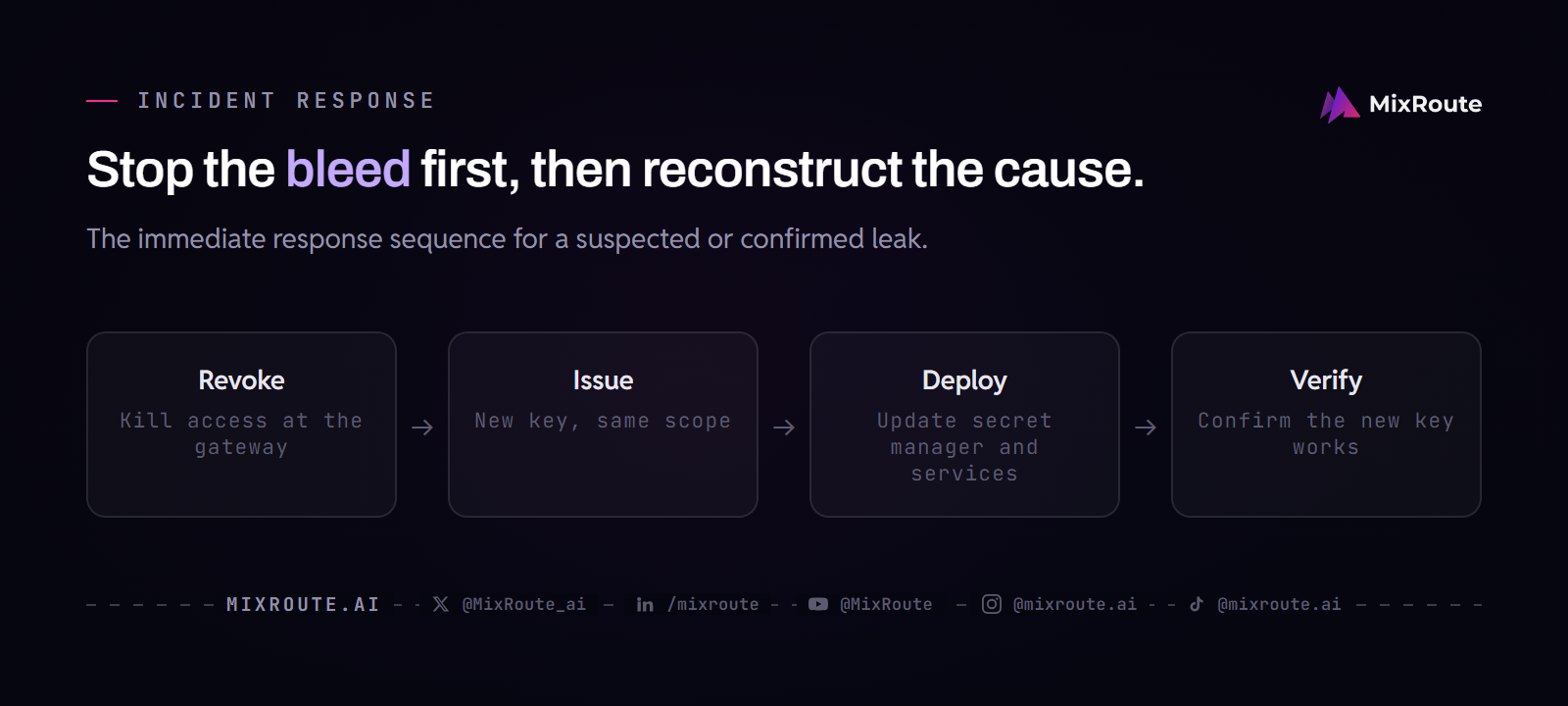
Immediately revoke the key, rotate it, and assess impact to reduce the window of exposure. Speed matters more than analysis; you can investigate after the key is dead. The goal is to stop the bleed first, then reconstruct the cause. After the immediate response, conduct a thorough review of all systems that used the key to identify any secondary exposures.
Immediate revocation steps
When you suspect or confirm a leak, the first step is to revoke the key at the gateway or provider console. This kills access and stops further token consumption. Do not try to monitor the attacker first to gather evidence; the cost of additional calls will likely outweigh the value of that evidence. After revocation, issue a new key with the same scope, update your secret manager, and redeploy any service that uses the old key. The sequence is: revoke, issue, deploy, verify.
Post-incident analysis
Use your audit log to trace the affected calls. Identify the models accessed, the total token cost, and the time window of the leak. Determine the source of the leak: was it a public repository, a compromised employee laptop, or a misconfigured logging pipeline? The answer determines whether you need to rotate a single key or the entire set. Document the findings so the next incident response is faster.
Communication and documentation
Notify the relevant stakeholders: your security team, the owner of the affected service, and your finance team to monitor for unexpected charges. Write a short incident report with the timeline, the root cause, and the corrective action. Do not wait until the incident is fully resolved to communicate; a brief initial notice and a later detailed report are standard practice. The documentation serves as a reference for future incidents and for audit compliance.
Implementing a Key Lifecycle with MixRoute
MixRoute provides a single endpoint, but key management remains the customer’s responsibility; MixRoute’s features can help with scoping and routing. The gateway gives you central control, but it does not remove your duty to issue, rotate, and revoke keys properly. Instead, it makes those tasks easier by consolidating access to 200+ models through one base URL: https://api.mixroute.ai/v1. Your existing OpenAI-compatible client keeps working, so the integration change is minimal. This consolidation also simplifies compliance reporting because you have a single place to review usage and enforce policies. However, you must still manage the lifecycle of each key you issue, including limiting the models each key can access through MixRoute’s authorization settings.
Prepaid credit and per-key budgets
Credit is bought in advance, and each key can hold its own deductible budget, so the worst case of a leak is bounded by an amount rather than by how fast someone notices. The same two-layer ceiling described in the scoping section applies here.
Single endpoint management
Managing one endpoint is simpler than managing keys for many providers. With MixRoute, you point your client at a single base URL, and all the keys your team issues are directed to that endpoint. This reduces the attack surface of your integration: there are fewer places to misconfigure or leak a different provider’s key. It does not reduce the need for separate keys per service; it just means the keys you issue all talk to the same gateway. The consolidation makes audit and incident response more manageable because you have one place to revoke access from, and revocation goes from one action per vendor console to one action.
Understanding data retention
MixRoute does not log request or response content: request text and responses are not stored; conversation content and files, as well as personal identity information, are also not stored. System logs are kept for 7 days and contain timestamps, token counts, model name, and response status, as documented in the data-security policy. This means you can audit the cost and token usage of each key, but you cannot audit the content of the calls through MixRoute’s own systems. For content-level audit, you need your own logging at the client. Because content is not logged, a stolen key cannot be used to read back what was sent before, and the same absence is why your own monitoring has to work from metadata.
If your team needs enterprise-grade key governance and dedicated support, the next step is to decide how much prepaid credit to load and what per-key budget to set. For a service contract and a dedicated manager, talk to sales. The key lifecycle you build should align with the operational model you choose. After you pick a tier, revisit the OpenAI-compatible API integration details to confirm your client configuration, and use the rate limits, outages, and failover guide to refine your reliability runbook. Smart Routing is an adjacent capability, not a key security control. These resources together help you turn the principles in this article into a working practice.
Frequently Asked Questions
FAQ
How often should I rotate AI API keys?
Rotate AI API keys on a regular schedule, such as every 90 days, and immediately after any suspected or confirmed leak. A scheduled rotation is a baseline; an emergency rotation is your incident response trigger.
What are the risks of not scoping AI API keys?
Without scoping, a single key can access all models and providers, increasing the blast radius of a leak. An attacker could use the key to call expensive models across your entire catalog, generating a large bill before you can react.
How can I detect if my AI API key is compromised?
Monitor usage metrics for unusual patterns, such as spikes in token consumption or requests to unexpected models. Set key-level alerts for anomalous cost or request frequency, and audit the key usage log to confirm the breach.
What should I do if an AI API key leaks?
Immediately revoke the key, rotate to a new one, and investigate the source of the leak. Revocation stops the cost; rotation restores service with a clean credential; investigation prevents recurrence.
Can I use the same key for multiple AI services?
Technically possible, but not recommended. Using separate keys per service limits exposure and simplifies audit. If one service is compromised, you only rotate that service’s key, not the key that could reach other services.
How does MixRoute help with AI API key management?
MixRoute provides a single endpoint for multiple models, but key management remains with the customer. Each key can be limited to a named set of models, carry its own deductible spend budget, and be bound to an IP range, while the key lifecycle stays the customer’s responsibility. The feature set keeps changing, so check the documentation for the current details.