Reserved LLM capacity vs pay-per-token: when does commitment cost less?
Reserved capacity costs less when measured utilization is high enough that the per-token charges a unit avoids outweigh its contract cost plus the idle hours you pay for. When traffic is low, irregular, or spiky, pay-per-token wins, because the meter stops when your requests stop. There is no universal crossover point: the break-even moves with your realized throughput, your burst pattern, and how many tokens the unit actually turns out on your model and query mix. Reserved capacity sits in MixRoute’s enterprise plan, a single top-up of $30,000 or more or a plan arranged through sales, quoted per contract.
What do reserved LLM capacity and pay-per-token pricing actually buy?
Both buy the same model service, and the cost structure is the purchase. Reserved LLM capacity is a dedicated compute unit billed at a contracted rate for the term you hold it, whether or not you use it. Pay-per-token API service bills input and output tokens when the model actually generates a response.
Picture the two triggers. A metered request is a taxi ride: the fare starts when the car moves, so an application that never sends a request cannot run up a per-token bill. A reserved unit is a leased car. The rate starts at the top of the hour or the term, independent of your requests, and a unit that never receives one still consumes its rate.
The metered side starts at MixRoute’s current plan tiers.
Reserved capacity bills by the clock
Buy reserved serving and you lease the unit for an hour or a term at a fixed rate. The rate runs whether the unit turns out a handful of tokens or a very large number, so the price carries no utilization assumption inside it. How many tokens it will realize is a property of your workload: realized throughput varies by model and by query shape, and a short-answer model pushes a different volume through the same held hardware than a long-output or reasoning model does. No single tokens-per-hour figure applies across models.
Pay-per-token access bills every real inference
Charges accrue on the input tokens you send and the output tokens the model returns, and only when it actually generates a response. Between calls the fixed cost is zero, so what you buy is one response at its metered price.
Why does utilization decide which purchasing model is cheaper?
Because commitment puts utilization in the denominator of your effective price, and the meter has no denominator. Effective cost per token under commitment is the unit’s contract cost divided by the tokens the unit actually realizes, so a busy unit spreads a fixed cost over a large token count and an idle one spreads the same cost over very little. Under pay-per-token access the rate per token does not move with utilization at all: volume multiplies the bill and never discounts the rate. The comparison runs on realized throughput, not on either list price.
A steady production service and a nightly batch can hold identical hardware and land on opposite answers, which is why the arithmetic belongs to the workload rather than to the rate card.
Commitment divides a fixed cost by realized tokens
The nominal unit rate is not what you pay per token. Divide the unit’s contract cost by the tokens it realizes under your mix of models and queries, and the result falls as the unit stays busy, bounded by the hardware you hold. Since realized throughput varies by model and query shape, measure utilization per workload instead of pulling a default curve.
No quote in the cited material publishes the utilization threshold or the per-unit price at which commitment beats the meter. That threshold is an output of your own arithmetic: estimate the realized tokens over the term, divide the contract cost by that estimate, and set the result against the metered rates you would otherwise pay.
The per-token rate holds still while the total moves
One rate card covers quiet months and busy months. Volume moves the total bill, the per-token price stays where it is, and no volume discount hides in the structure. That constant rate is the easier cost model to forecast, and it is also why the meter looks cheap during a pilot and expensive once the workload matures into steady traffic.
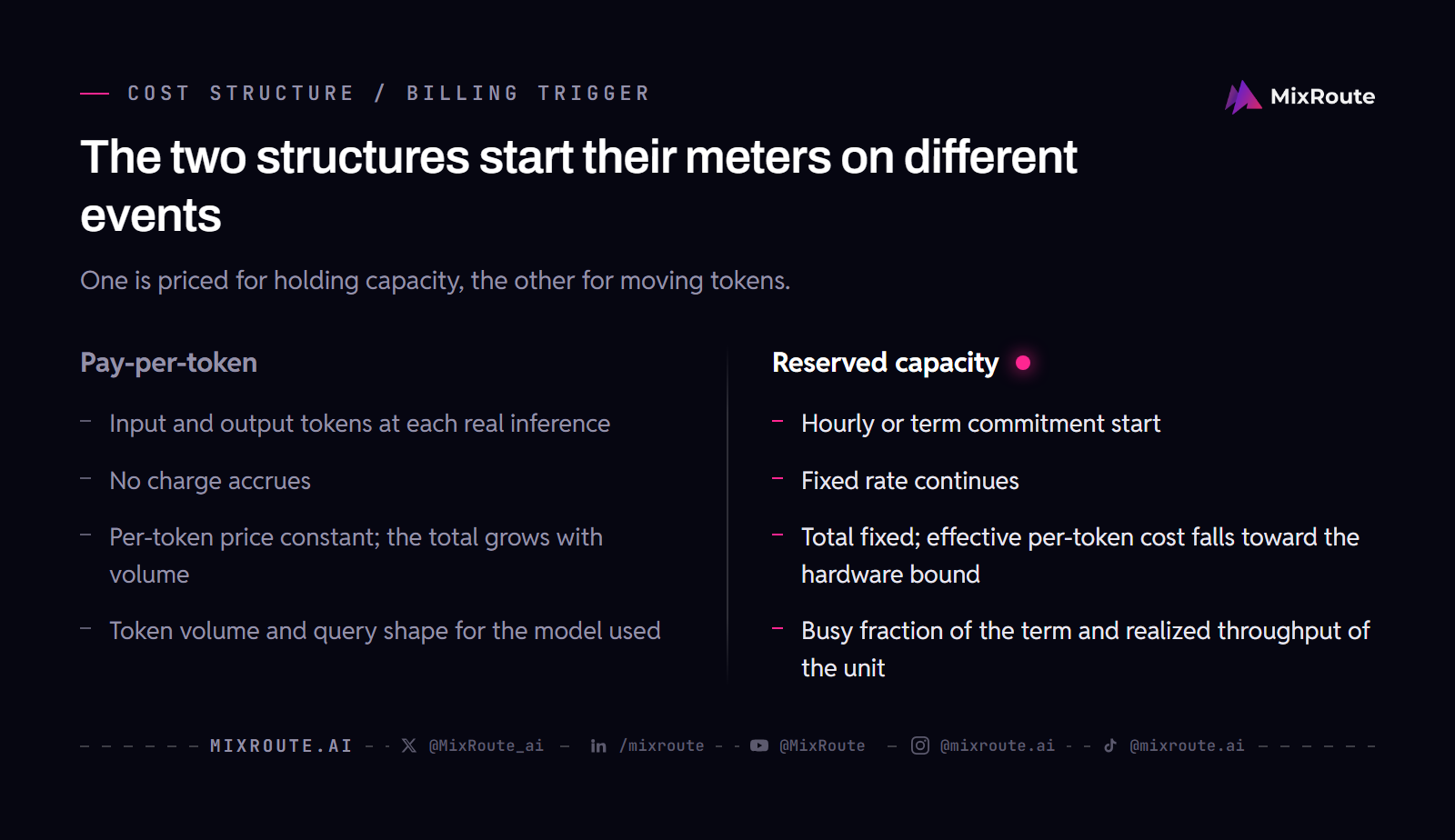
The two cost functions in one view:
| Cost behavior | Pay-per-token | Reserved capacity |
|---|---|---|
| Billing trigger | Input and output tokens at each real inference | Hourly or term commitment start |
| Idle workload | No charge accrues | Fixed rate continues |
| Rising utilization | Per-token price constant; the total grows with volume | Total fixed; effective per-token cost falls toward the hardware bound |
| Main cost driver | Token volume and query shape for the model used | Busy fraction of the term and realized throughput of the unit |
Where does burstiness put cost risk under each model?
On metered pricing the burst lands on you as variable cost. Under commitment the burst draws on capacity you have already paid for, and you carry the idle hours instead. Name the risk owner before anyone signs, because the two structures hand it to different buyers.
On metered pricing, a burst is variable cost
A spike multiplies requests, each request multiplies tokens, and each token carries its rate. Nothing in the pricing structure absorbs the spike, so the metered total rises at the exact moment demand rises. If bursts are rare but real, that is what total flexibility costs: nothing is prepaid, so nothing about a spike is discounted either.
Under commitment, a burst is paid-for capacity
The spike arrives at capacity that has already been paid for, and inside the unit’s realized throughput it adds no per-token charge. The mirror side is that the quiet hours are paid for too, which is why the committed buyer holds the unit through them to have it available at the spike. Count both sides of that trade.
Two limits bind this account.
- MixRoute’s /reserved/ page publishes TPM figures per capacity window, with Nano Banana 2 peaking at 66M TPM and Nano Banana Pro at 15-18M TPM, but neither /reserved/ nor /pricing/ publishes a reservation price or a discount size, so the two burst paths cannot be compared in dollars from published figures.
- /reserved/ does not say what happens to a burst that goes past the TPM allocated to your contract. If your load can exceed a held unit, confirm the overflow behavior before you size a reservation: ask MixRoute’s team directly about bursts beyond a unit.
How do service ceilings and rate limits differ between shared and dedicated capacity?
Shared serving states a best-effort ceiling. Dedicated reserved serving writes a contracted floor into your contract. A published RPM or TPM figure for a shared plan describes what the platform handles under favorable conditions, not what it commits to your request at a given moment. A reserved unit moves the ceiling off the shared pool and sizes it for one customer, with TPM and RPM allocated to your forecast and adjustable quarterly.
Shared RPM and TPM values are best-effort ceilings
T-Systems documents its shared LLM serving this way: per-minute request and token values published for a shared plan are, in its wording, best-effort ceilings (docs.llmhub.t-systems.net, retrieved 2026-09-04). They indicate the volume the shared platform handles when conditions are favorable, and they do not commit your request stream to the full ceiling, because other traffic shares the serving layer. The same documentation commits 99.5 percent API availability and states that the figure does not cover:
- requests per minute
- tokens per minute
- throughput
- latency
- time to first token
An available API is not a guaranteed response time under load, so read whichever provider you compare on that distinction. MixRoute lists a custom SLA under its enterprise service contract instead of a published availability number, so ask for that document when the service level is part of the decision.
MixRoute reserved capacity has a contracted TPM ceiling
On reserved capacity the constraint becomes the capacity written into your contract, with throughput allocated to your forecast and revisited quarterly. The limit is still counted in tokens per minute: /reserved/ calls it a contracted TPM floor and lists figures by capacity window, for example Nano Banana 2 at 48M to 66M TPM and Nano Banana Pro at 12M to 15-18M TPM. What changes against shared serving is that the ceiling is contracted and reserved for you; it does not disappear. T-Systems documentation says its Dedicated LLM Serving has no RPM/TPM ceilings, but that service rents GPU hardware, a different arrangement from MixRoute reserved capacity.
When does reserved capacity reach a break-even against pay-per-token?
Every workload has a break-even, and no single usage point applies to all of them. Reserved capacity breaks even where the per-token charges a workload avoids outweigh the contract cost plus the idle and under-used hours it carries. Utilization, burstiness, and the realized throughput of the specific unit fix that point, so what follows is logic plus a workload-to-arrangement table.
The break-even is workload-specific by construction
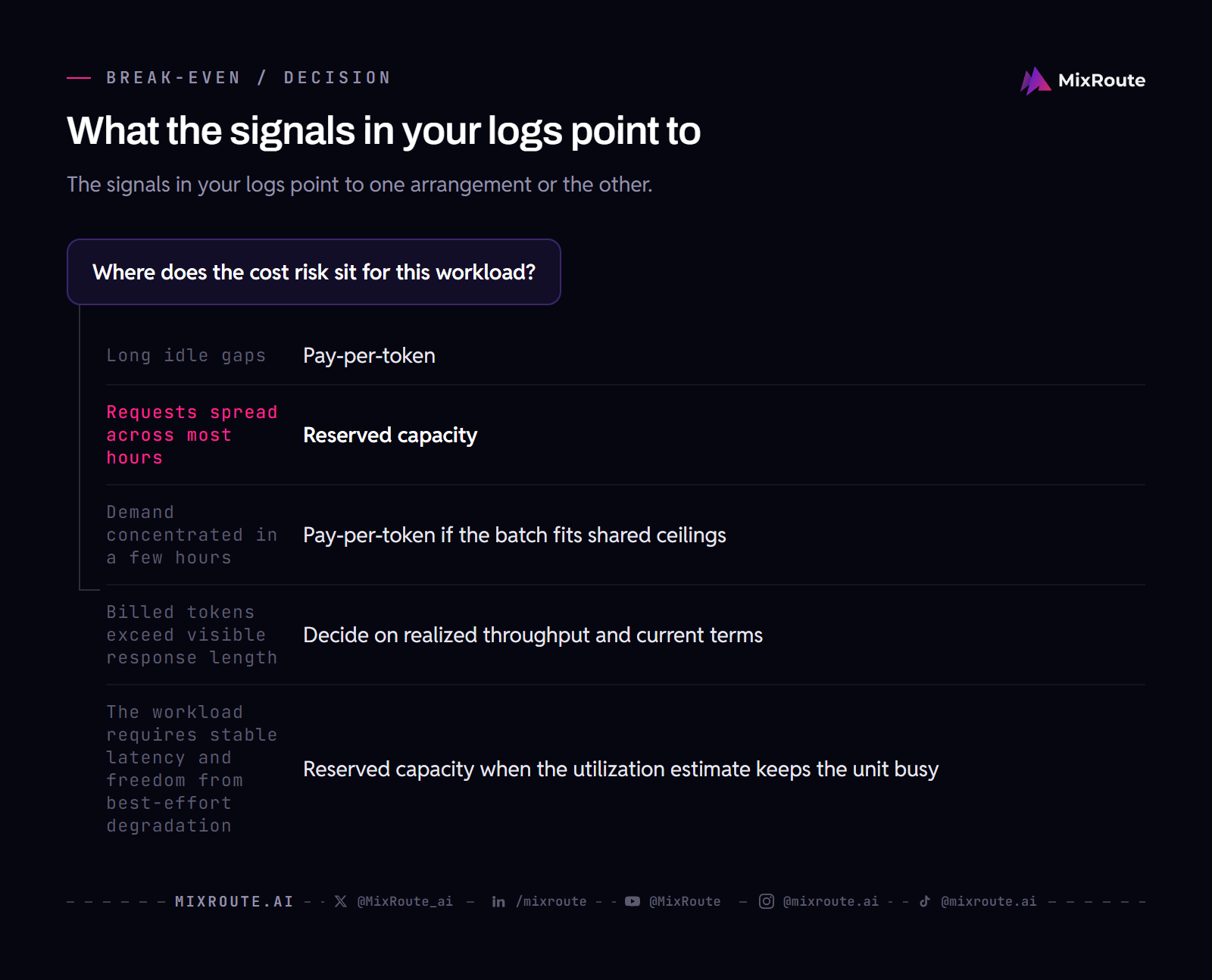
Start with the tokens the unit actually realizes under your model and query shape, and value them at the current per-token rates. Those are the metered charges you avoid. When the avoided charges exceed the unit’s contract cost over the term, the unit is the cheaper arrangement. When paid idle and under-used time make the contract the heavier side, the meter is. Utilization, burstiness, and realized throughput move that comparison, which is why no single break-even range covers all workloads.
Profile table: matching your workload to an arrangement
Your own usage profile belongs in one of these rows:
| Workload profile | Signals to check in your logs | Where the cost risk sits | Arrangement that fits |
|---|---|---|---|
| Very low and irregular | Long idle gaps; small occasional calls; utilization stays far below what one unit realizes | A fixed unit bills through idle gaps; per-token accrual stays near zero | Pay-per-token |
| Steady and predictable | Requests spread across most hours; the unit can stay busy for the full term | The per-token total grows with every busy hour; the idle fraction of a unit stays small | Reserved capacity via MixRoute’s enterprise plan ($30,000 single top-up or sales) |
| Batch-heavy with quiet remainder | Demand concentrated in a few hours; the rest of the day carries near-zero load | Per-token bills only the batch; a reserved unit bills the quiet remainder as unused | Pay-per-token if the batch fits shared ceilings; otherwise compare the unit’s realized throughput |
| Output-heavy or reasoning-heavy | Long final answers or long hidden reasoning chains; billed tokens exceed visible response length | Per-token spend inflates relative to the visible answer; reserved realization depends on how the unit runs that model | Decide on realized throughput and current terms, not on headline response length |
| Latency-sensitive and sustained | The workload requires stable latency and freedom from best-effort degradation | Shared serving cannot commit to throughput; a reserved unit costs money while idle | Reserved capacity when the utilization estimate keeps the unit busy, via MixRoute’s enterprise plan ($30,000 single top-up or sales) |
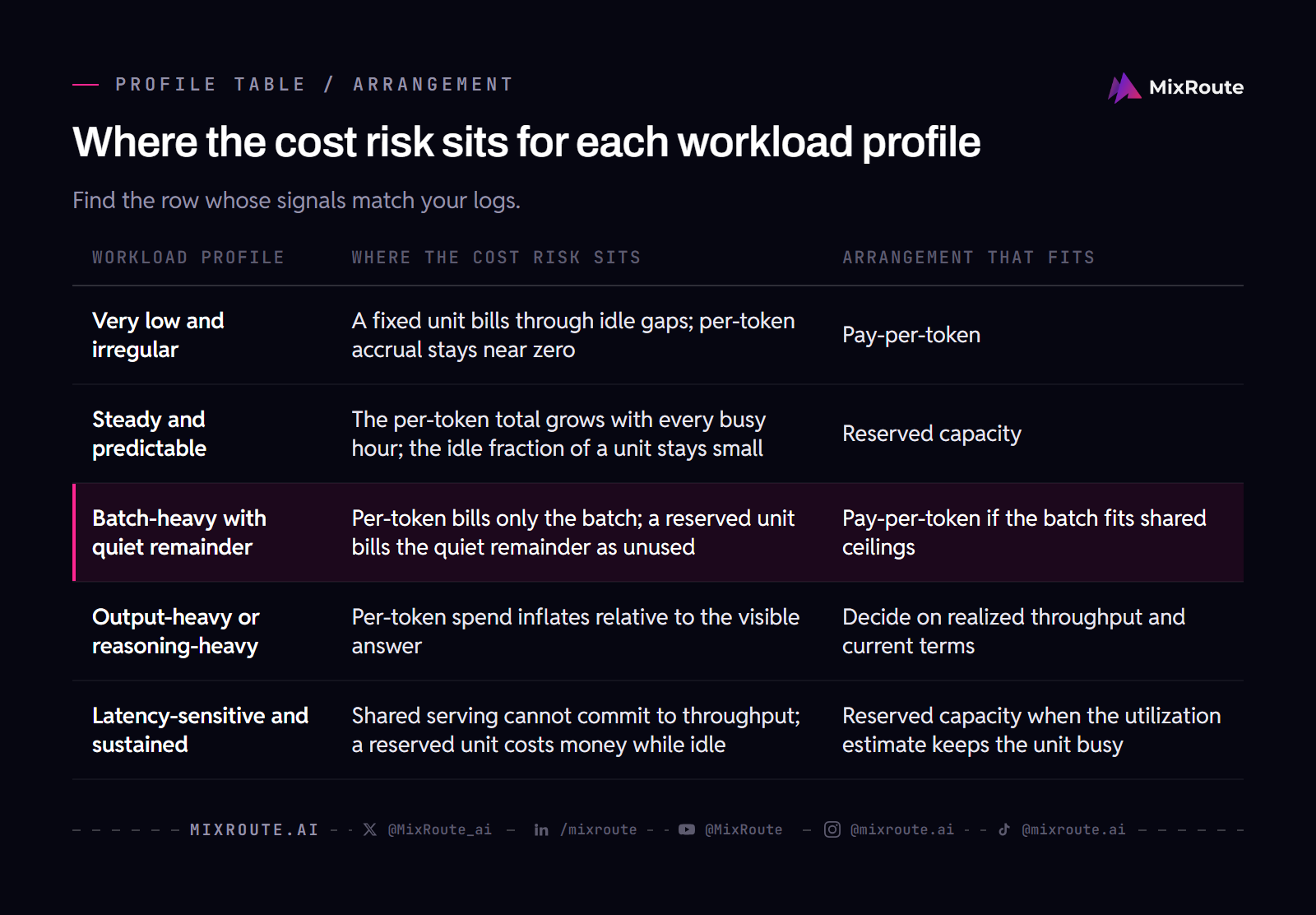
Utilization is measured per workload and never preset, and when a profile straddles two rows, the row that carries the dominant risk decides. If your logs show long idle gaps and small occasional calls, the meter is already pricing that workload well. The dollars come from MixRoute’s current per-token rates and from the quote for a reserved unit.
What can distort a headline per-token comparison?
Several features of the model’s billing shape can distort the multiplication before it starts. OpenAI’s reasoning guide states that reasoning tokens are not visible through the API and are billed as output tokens (platform.openai.com, retrieved 2026-09-04). Output tokens typically price above input tokens on published rate cards, and on reasoning-tier models that gap is usually wider. A workload that is output-heavy or reasoning-heavy therefore accumulates its bill on the expensive side of the card and on the invisible side of the log, which is where a comparison built on one average token price misleads.
Hidden reasoning and scratchpad tokens are billed but invisible
A reasoning model writes an internal chain before it returns a visible answer, and that chain is billed at rates near output-token rates. The chain never surfaces in the final text, so a usage analysis that counts only the response undercounts real consumption. When the workload is reasoning-heavy, most of the metered cost can live in that hidden scratchpad, and a per-token comparison built from final-answer length will be wrong in a predictable direction.
Output-heavy traffic spends on the expensive side of the card
Long completions, reports, and extractions bill mostly on the output line, so the effective price for the workload drifts toward the output rate rather than an average of input and output. A headline comparison that hides that direction overstates the value of moving the workload and understates the cost of the tokens it actually generates.
Model-by-model price lists stay out of scope
Comparing one model product against another, such as a Claude Sonnet number against a Claude Opus number, is an engine-selection question, not a purchasing-structure question. Such a list would introduce commodity prices whose quoted figures carry flagged numeric disagreements, and settling those would still not say whether reservation or metering fits your workload.
Check the metered bill first, because caching and token controls may change the workload profile before any structure decision: the practical levers that reduce LLM API costs.
How do I compare the two arrangements for my own workload?
Measure the workload first, run the arithmetic second, and read MixRoute’s current terms third. Each earlier section supplies one input, and the comparison breaks if an input is preset instead of measured.
Five-step comparison for your own workload
- Measure utilization and realized throughput. Take utilization per workload across a representative window, never from a default curve, and estimate realized throughput for the actual model and query mix. MixRoute’s estimation walkthrough for LLM API costs covers the metered side of that estimate.
- Profile burstiness. Put idle gaps next to spikes, and check whether a spike can exceed the throughput of a unit you would hold. If it can, settle the overflow question with MixRoute before you size a reservation.
- Fix the service requirement. Decide whether the workload can tolerate shared best-effort ceilings and an availability-only SLA, or needs the contracted TPM allocation of reserved capacity, sized to your forecast.
- Place the workload in the profile table and run the break-even logic. Use the realized tokens, the current per-token rates, and the unit’s contract cost over the term, then apply the hidden-token and output-mix corrections from the section above.
- Compare the current numbers on MixRoute’s published pages. Open /pricing/ and /reserved/, then run the savings calculator with your own utilization estimates to see both totals side by side.
Per-token access is self-serve, with tiers on /pricing/. Reserved capacity comes through the enterprise plan: a single top-up of $30,000 or more, or a custom plan arranged with sales, quoted per contract. MixRoute publishes no unit price or utilization threshold for reserved capacity, so that quote, set against your measured token volume at current rates, is the comparison.
If your utilization and burst pattern land in the reserved rows of the table, the next step is that enterprise route. See capacity windows, TPM figures, and the Talk to Sales path.
FAQ
What does reserved LLM capacity actually buy that per-token does not?
A dedicated unit you hold for the term, billed whether or not it produces tokens, with throughput sized to your forecast instead of drawn from a shared pool. The difference shows up when a queue matters. A shared ceiling is best-effort, while a contracted floor is a number you can plan a launch against. The models are the same either way, so if your traffic cannot keep the unit busy, you are buying headroom you never use.
How does pay-per-token billing actually accrue?
Only when a request reaches the model and tokens come back. Input tokens sent and output tokens returned carry the charge, so a service that sits idle over a weekend bills nothing for that weekend. Two things still move the total: reasoning models bill hidden chains as output tokens, and a long-answer workload bills on the output line, which carries the higher rate. Calendar time does not enter the calculation.
Why is the reserved price not the real price per token?
Because the unit rate prices hardware that is held, and your token count is what you divide it by. Divide the contract cost by the tokens the unit realizes under your models and queries, and that result is the number to compare against the meter. Two teams on identical hardware land on different answers here, because the same unit is a bargain at high measured utilization and a poor deal when it idles. That estimate has to come from your own logs across a representative window.
Under which workload profile is pay-per-token cheaper?
Very low, irregular, or minimal-volume usage, where the per-token charges add up to almost nothing. A nightly batch that clears in two hours and leaves the rest of the day quiet fits that shape: the batch bills, the quiet hours do not. If that batch ever outgrows the shared ceilings, the answer can flip, and you would compare the unit’s realized throughput against the metered cost of the same batch.
When should I sign up for reserved capacity instead?
Reserve when measured utilization keeps the unit busy across the term, because commitment rewards a busy unit and charges for the idle hours either way. The route is MixRoute’s enterprise plan, unlocked by a single top-up of $30,000 or more or arranged with the sales team, and the unit is quoted per contract. Bring your realized-token estimate and your burst pattern to that conversation, since the quote only becomes an answer once you set it against your own token volume.
What is the break-even logic between the two models?
It sits where the per-token charges your workload avoids exceed the contract cost of the unit plus the idle and under-used hours it carries. No published threshold exists to read off, because the figure is built from your throughput estimate at current rates. Realized throughput varies by model and query shape, so two teams on the same hardware can land on opposite sides of the same quote.
Does MixRoute offer both arrangements?
Yes. Per-token access is self-serve, with top-up tiers on /pricing/, and reserved capacity is described on /reserved/ as part of the enterprise plan, unlocked by a single top-up of $30,000 or more or arranged through sales. Because reserved capacity is quoted per contract, there is no list rate to check; your comparison is that quote against your measured token volume at current rates.