OpenClaw Operating Checklist: Models, Memory, and Scheduled Jobs
You have OpenClaw running: the gateway is up, the agent answers in your chat channel, and a scheduled job that fired fine last week goes quiet with nothing in the channel to explain it. Operating a connected setup comes down to a short list of settings: which model handles which task, what a fresh session loads into context, whether a scheduled job can report its own failure, which host commands the agent may run, and how you notice a key running low on spend. Match the symptom you can see to the layer that owns it, change one setting, then check the sign that the change worked.
Is the Fix an OpenClaw Setting or a Model-Key Control?
Read the symptom first, because it points at the layer that owns the problem. An answer that comes back wrong, inconsistent, or forgetful is an OpenClaw runtime question: which model handled the task, what memory loaded, which tools ran. A request that is rejected, or a job that stops without a word, is a key and provider question: whether the key may call that model, how much spend it has left, what the provider logged. OpenClaw is the agent runtime that reads memory files, picks from its configured models, invokes tools, and runs scheduled jobs on a machine you control. The key is the credential in front of provider APIs, whether OpenClaw calls a provider directly or reaches it through a gateway such as MixRoute. Confirm the cause in the run history or the provider response before changing anything.
Three diagnostic questions cover most incidents:
- Is the work finishing but the result wrong, inconsistent, or forgetful? Check the model the session actually used, the memory files it loaded, and the tools the task invoked. A bad answer can come from a model that is too weak for the job, from stale or conflicting context, or from the agent reaching for the wrong tool.
- Is a scheduled job not starting, failing mid-run, or failing to notify anyone? Look at the automation schedule, its run history, its delivery destination, and any provider rejection before you change credentials or budgets.
- Is a request being rejected with a model, authentication, or quota error? Inspect the provider response, the key’s model allowlist, its remaining spend, and the account balance. The same error text can also come from an OpenClaw-side model allowlist, so confirm which surface produced the message.
Each row of the table maps what you see to the surface worth inspecting first, the configuration to change, and a sign you can check afterward.
| Symptom you see | First surface to inspect | Configuration to change | Checkable sign the change worked |
|---|---|---|---|
| The same capable model answers simple lookups, reminders, and yes-no checks | OpenClaw model selection, then the key’s model list if it is restricted | Confirm the model actually running, then set a supported provider/model ref as the per-agent default that matches the task tier | Read-only status for a fresh session shows the intended model ref, and a representative job in that session records that model |
| The agent repeats corrections, forgets preferences, or acts on rumored facts | OpenClaw memory files | Keep durable notes in a compact long-term memory file, move running detail to dated notes, supersede stale entries, and correct wrong ones | The corrected note exists in memory, a fresh session loads it, and the agent answers from the corrected version in your next test |
| Scheduled jobs fire at the same time and some fail with no alert | OpenClaw automation scheduler | Verify schedule and timezone, set a delivery destination that reports failure, use bounded retries for transient errors only, and test that a rerun does not duplicate side effects | Run history shows the failure, a failure notice reaches the destination you chose, and a deliberate second run does not create a duplicate email or record |
| A job that ran for weeks stops and every retry fails | Key and provider state | Inspect the provider response, the key’s remaining spend budget, the account balance, credential validity, and the key’s model allowlist | The same request succeeds after you fix the concrete cause, such as restoring spend on the key, rotating a credential, or adding the model to the allowlist |
| The agent can run host commands and read or delete more than the task needs | OpenClaw exec approvals, sandbox and tool policy | Set an exec approval mode, configure filesystem isolation separately, and store credentials outside prompts. For unattended jobs, allow only the required commands; ask mode needs a connected approval surface. | A harmless command outside the allowlist asks for approval or is denied in your own test, and disallowed paths are not readable in a sandbox test |
| You cannot tell which models a key called or whether spend is healthy | Gateway key logs and key budget view | Review per-key logs for timestamps, token counts, model name, and response status, and compare them with the key’s remaining spend | A specific scheduled job maps to log entries with its model name and token count, and the remaining spend decreases with each recorded request |
If you change a setting and the checkable sign never appears, confirm that the running process reloaded the configuration. Some changes need a gateway restart before they take effect, so verify that before you conclude the change failed.
Keep one incident note per failed job
When a job fails, the run history and the provider response already hold the fields worth comparing. Capture them before you touch the schedule, the model, or the key, so the next occurrence has something to line up against.
Job ID:
Last successful run:
First failed run and timestamp:
Observed state: not started / execution failed / delivery failed
Request ID and error (secrets removed):
Model and key alias:
Next change to test:
Expected result:
Result of the next run:
Which Model Should Run Each OpenClaw Task?
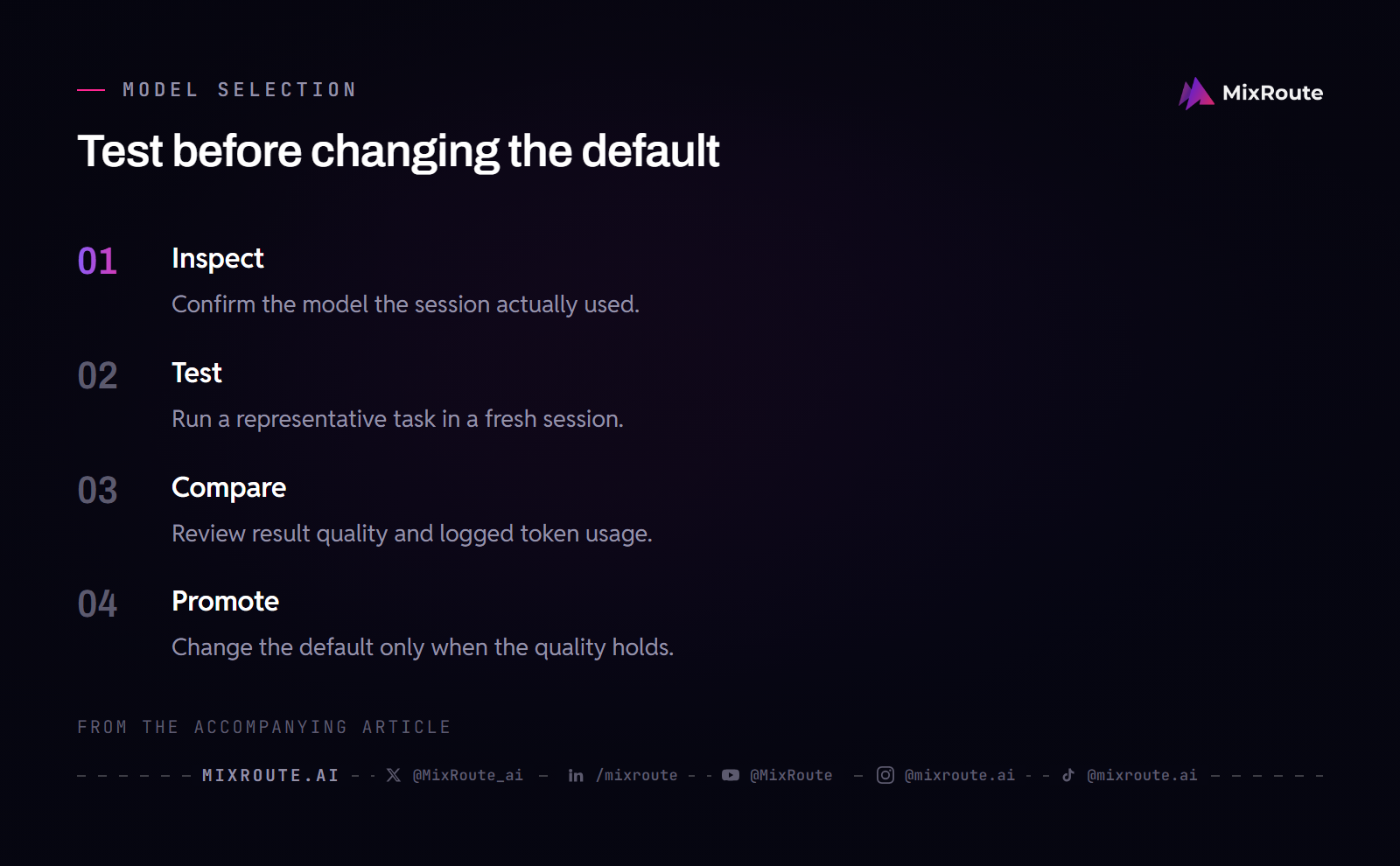
Split the work by difficulty, test the candidate on a real job in a fresh session, and only then change the default inside OpenClaw. Lookups, calendar checks, monitoring, classification, and yes-no decisions fit a fast, lower-cost model. Extraction, summarization, and drafting fit a mid-tier one. Long multi-step reasoning, complex code changes, and nuanced writing justify the strongest model the work allows. Model names and availability move quickly as providers ship releases, so treat the tier rule as the durable part and verify model refs against the catalog you hold today.
Confirm the model that is actually running
Start read-only. The OpenClaw model documentation describes openclaw models list to browse configured models and openclaw models status to show the current selection and per-provider auth candidates. In chat, /model status gives the same detailed view for the active session. Run those in the session where the problem appears, because a session can be pinned to a model that differs from the configured default, and the status output counts for more than what you remember setting.
For the release you run, the default primary is documented under agents.defaults.model.primary, and a per-agent override can replace it. The exact key path can shift between OpenClaw versions, as can the commands that write to it, so confirm the mechanism in the current documentation before acting on an older blog post. A model ref uses the form provider/model, for example mixroute/<model-id> once you have configured a MixRoute provider and confirmed the model ID the API exposes.
Test a candidate, then change a default
Try a candidate in a fresh session. Switching an established session with a long transcript changes context-window behavior, prompt-cache reuse, and continuity all at once, which makes the comparison hard to read. Start a new chat, select the candidate with /model <provider>/<model-id> for that session only, and run one real task end to end. Then compare the result quality and the token usage the provider logs record. If the smaller model meets the task’s quality requirement, promote it to the agent’s configured primary. If it does not, keep the task on the stronger tier and test the next candidate. The test exists to settle whether a cheaper tier is enough for the work.
Know whether the configured string is an explicit model ID or a routing alias. An explicit provider/model ID names one model, and the gateway passes that request through to the model the key is allowed to call. A routing alias such as an auto entry on a gateway endpoint is a different mechanism: the gateway decides which underlying model serves the request, and changing the OpenClaw default will not change how that alias is routed. Check the exact string in status output before deciding which layer to edit. An explicit model ID does not behave like a gateway routing feature, and a routing alias does not behave like an OpenClaw fallback list.
OpenClaw also supports a configured fallback list for the default model. When the primary fails during a run that uses the configured default, the runtime tries fallbacks in order, and auth-profile rotation happens inside the provider before OpenClaw moves to the next fallback. That list belongs to OpenClaw; it is not gateway routing. A user-pinned session model behaves differently in some releases, so check the model failover documentation if you rely on that distinction.
If what you need is a different provider or endpoint rather than a different model within the current one, read how OpenClaw connects to a MixRoute model provider before you replace keys or configuration, because a provider swap changes the OpenClaw provider entry and the key’s model list at the same time. When several unrelated job types run, give each job type an agent whose default matches its work instead of moving one global default back and forth.
How Much Context Should OpenClaw Keep in Memory Files?
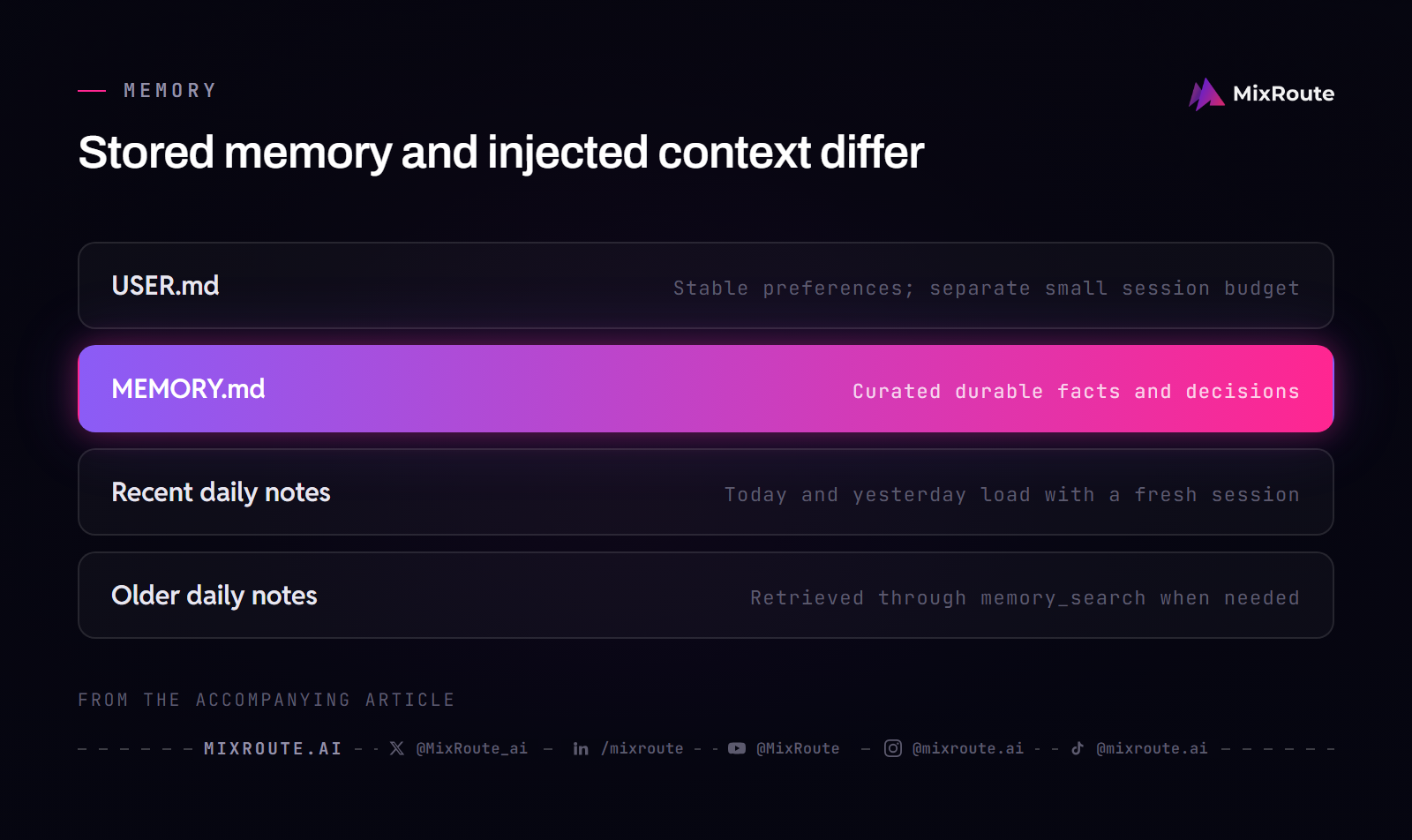
Keep the always-loaded part small and let older detail sit on disk until a task asks for it. Picture the workspace as a desk: USER.md and MEMORY.md sit on top and are read at the start of every session, the dated daily notes for today and yesterday sit beside them, and everything older stays in a drawer until memory_search goes looking. OpenClaw stores memory in plain Markdown files under the agent’s workspace, by default ~/.openclaw/workspace, and the model knows only what is saved to disk. There is no hidden state. A cluttered workspace does not by itself bloat every request. A bloated bootstrap file does, because it is paid for at the start of each session.
Keep durable notes separate from running detail
The OpenClaw documentation is explicit about the split. MEMORY.md is the compact, curated layer for durable facts, standing decisions, and short summaries, not a raw transcript or an exhaustive archive. Detailed daily notes, observations, and session summaries belong in memory/YYYY-MM-DD.md, where they are indexed for search but are not injected on every turn. If MEMORY.md grows past the bootstrap budget, OpenClaw keeps the file on disk intact and truncates the copy injected into context. Treat that as a signal: move detailed material into daily notes, keep only a durable summary in the long-term file, or raise the bootstrap limit if you would rather spend prompt budget on memory.
When a preference changes, supersede the old entry in place, and do not append a contradictory one. A concise way to keep the file honest is to have the agent note the date and the active or superseded status of each preference. For notes that will change future behavior, capture when it is safe to act on them: approval requirements, expiry conditions, handoffs, and source authority. Memory can hold that context, but it does not enforce policy, so hard operational controls still belong in approvals, sandboxing, and scheduled tasks.
Read and correct notes on a schedule
Memory only helps when something reads it back. At the end of a working session, ask the agent to remember what you just settled; the official docs describe exactly that, with the agent writing the note to the appropriate file. Review is the step that goes missing. Read the agent’s recent notes once per week and correct anything it got wrong before the wrong version becomes durable, then adjust the interval when your workload or configuration changes.
If one agent works several unrelated domains and you see context bleeding between them, check whether those jobs genuinely need separate state or separate permissions. If they do, give each domain its own agent and workspace. Do not split agents on principle. Split them when a single shared memory file cannot hold two jobs without one contaminating the other, and you can point to a concrete mistake that came from the shared context.
What Do You Configure Before a Scheduled OpenClaw Job Runs?
The schedule, the run history, and the delivery destination are what you verify before a job gets a chance to fail quietly. OpenClaw’s built-in scheduler is the automations system: it persists jobs, wakes the agent at the right time, and can deliver output to a chat channel, a webhook, or nowhere. openclaw cron remains an alias for the same automation commands, so documentation that says automations and documentation that says cron are describing the same scheduler. A job with delivery to nowhere will not message anyone when it fails, which makes the destination part of the job’s design.
Separate the four failure states before changing anything
When a scheduled job misbehaves, first decide which of these four states you are in:
- The job never fired.
- It fired but execution failed.
- It executed but delivery failed.
- The provider rejected the request.
The read-only automation commands separate the cases. openclaw automations list shows which jobs exist and whether they are enabled, openclaw automations get <job-id> shows one job’s schedule, and openclaw automations runs <job-id> shows its run history. Compare the run timestamps with the schedule to tell a job that never fired from one that fired and failed. If the schedule looks right but the run never appears, check the timezone the job uses, since a schedule timezone is a common source of silent misses.
Once execution has started, a failure can come from the model, a tool, an approval, or the provider. An approval-related failure deserves its own check: approvals raised by a scheduled run are delivered only to connected approval clients such as the Control UI, the mobile apps, or API clients that declare the approvals capability. If a scheduled run needs an approval and no approval surface is connected, the run is denied immediately and the error explains the policy fix. A scheduled job that depends on host execution therefore needs either a connected approval client or a standing grant that matches the job exactly.
Preflight side effects, retries, and the key budget
Before the first run, make the job safe to run more than once. A retried job can send a duplicate email or insert a duplicate database row. Design the workflow with a check-before-write step or a unique run identifier, then test the property directly: run the job twice against a test target and confirm the side effect appears once.
Plan retries only for failures you expect to be transient, such as a temporary network error or a provider outage. A bounded number of attempts with a delay between them is a reasonable operational choice. Do not blind-retry authentication, billing, or permission failures: a rejected credential, a key that cannot call the model, or an exhausted budget will fail again on every attempt, and each retry only delays the real fix.
An exhausted per-key spend budget is one of those non-transient states. On MixRoute, a key can carry a remaining spend budget: you enter the amount the key can still spend, each request is deducted from it, and the key stops when it reaches zero. The account balance is the outer ceiling for every key, and a per-key budget adds an inner ceiling only when you set one. This is a spend control, not a monthly allowance or a rate limit, so shifting the schedule or adding retries will not bring the key back. Restore the remaining amount on the key and keep the account balance positive, or change the workflow so it does not need that key.
Which Permissions Does an OpenClaw Agent Actually Need?
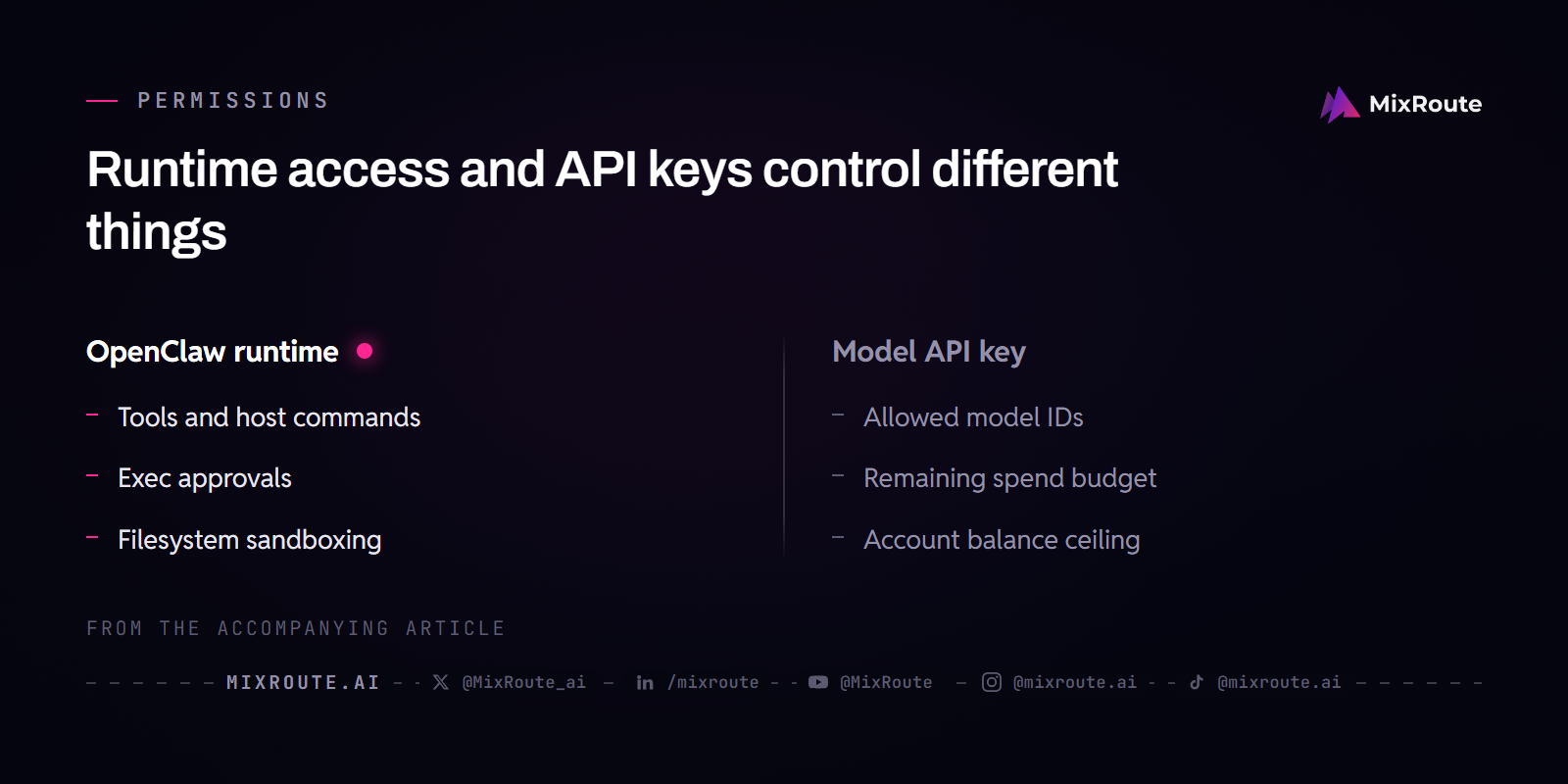
Start with the fewest permissions that let a task complete, and add access only when a real task fails because the access is missing. Restrict tools and host execution to the actions the task requires, configure filesystem isolation separately, and remember that a model-key restriction does none of those things. OpenClaw gains its power from broad access, and that same access is what makes a loose setup risky. Give an agent read-only access where write access is not required, and do not hand a research agent the ability to delete files or send mail.
Use the documented exec approval controls
OpenClaw’s host-execution guardrail is the exec approvals system, not a generic consent toggle. Commands run only when policy, allowlist, and optional user approval all agree, and approvals are enforced locally on the machine that executes the command. The normalized policy surface is tools.exec.mode, with these documented values: deny blocks host execution, allowlist runs only allowlisted commands, ask uses the allowlist and asks on misses, auto sends misses through a reviewer before falling back to a human, and full runs without approval prompts. Host-local approvals on the execution machine can tighten that policy but never loosen it, and an omitted approval field falls back to the exec value. If no approval UI is reachable when a prompt is required, the fallback default is deny.
Set a restrictive mode explicitly instead of assuming the default protects you. The documented default for gateway and node hosts is full, which means no approval prompts, so choose it only when you understand the effect. Applying an existing preset is one way to move to a safer baseline: openclaw exec-policy preset cautious sets gateway-host execution to an allowlist policy that asks on misses and denies when no UI is reachable. deny-all blocks host execution entirely. Do not broadly allowlist interpreters out of convenience. If a workflow needs them, enable the documented strict inline-eval option so forms such as python -c remain approval-gated even when the interpreter binary itself is allowlisted.
Verify the behavior in your own setup with a harmless command that is not on the allowlist, and watch whether it asks for approval or is denied under your fallback. Do not assume every irreversible action will prompt, because approvals are not a semantic safety filter: they answer the allowlist question, and once a command is approved it can mutate files according to the host’s filesystem permissions. Restricting which directories the agent can read and write is a separate sandbox and filesystem configuration, and exec approvals do not provide it.
Split runtime permissions from key restrictions
Agent permissions and key restrictions are different controls. OpenClaw permissions decide which tools, files, and host commands the agent can use. Key-level controls decide which models a key may call and how much it may spend. On MixRoute, each key can be restricted to a selected set of models, and that is an independent field available on every key, not a feature tied to Smart Routing. When no models are selected, the key is unrestricted, so a narrow key means listing the model IDs that agent actually uses. A model restriction will not stop the agent from deleting a file or sending a message, and an exec approval will not stop a key from calling a model that the key’s allowlist permits.
Credentials follow one rule: store them outside prompts and source code. API keys, passwords, OAuth tokens, and webhook secrets belong in environment variables or a supported secret reference, never in a system prompt, a workflow description, or a hardcoded step. A secret written into a prompt can leak through an exported configuration, a shared URL, or the model’s own context window. Reference secrets by variable name so an exported config contains a reference rather than the value, and audit existing workflows for credentials that were added for testing and never removed.
Vet every skill before installing it. A skill is outside code that expands what the agent can do, and a registry listing is not a security review. Read what the skill actually does, remove skills you no longer use, re-check skills that received updates, and watch for publisher or ownership changes. Treat this as ongoing maintenance with a cadence you set, and run the same review whenever your setup changes materially.
What Should You Track in OpenClaw Usage and Spend?
The signals that matter are few: which jobs ran and which failed, which model each run called, how many tokens the run consumed, and how much remaining spend each key carries. Read together, they tell you whether you are looking at a schedule problem, a model-choice problem, or a money problem before you start changing configuration at random.
Read the fields the gateway logs actually keep
MixRoute’s data-security documentation states that system logs retain timestamps, token counts, model name, and response status for seven days, and that request and response content is not stored. You can see which models a key actually called and whether each call succeeded, but you cannot reconstruct what was sent or returned. Use the model-name field to catch a job that should run on a small model but is calling a frontier one: the log will show the mismatch even when the output looks fine. The token counts come from the provider’s own accounting rather than from a guess.
Prompt-cache fields separate one part of that accounting. cacheRead counts tokens the provider reused from an existing cached prefix; cacheWrite counts tokens written into the provider cache after a miss. The provider decides which counters appear: Anthropic reports both when active, while direct OpenAI Chat Completions reports cached_tokens on hits and emits no write counter, so cacheWrite stays 0. Check the shape under your endpoint instead of assuming a universal pattern.
High repeated cacheWrite is a diagnostic clue, not proof, that the prefix is changing between turns. Inspect volatile content at the front of the system prompt, and watch for model or thinking-level changes, which can invalidate reuse depending on the provider. Low cacheRead points to checks rather than one verdict: verify the stable prefix is at the front, meets the provider’s minimum length, and the route supports caching for that model.
Compare the counters under one stable task against the provider’s billed read, write, and input rates. A cache write can carry its own per-token rate where the provider bills writes, so hit rate alone is not cost. A heartbeat keep-warm call adds usage whose monetary cost depends on the route and plan, so weigh the request against the writes it prevents. Anthropic’s prompt caching documentation lists what invalidates an entry.
When a job fails, follow the trail end to end. Check the automation run history for the execution and delivery outcome, then check the key logs for the provider response. If the key’s remaining spend reached zero, the fix is financial and specific to that key, not a change to the workflow. If a credential was rotated or a model was removed from the allowlist, fix that setting before you rerun anything. Read how AI agent costs accumulate across multi-step agent workloads before you set the next budget, so the amount you put on a key reflects the model tiers and retry patterns the workflow actually uses.
Pick a review cadence you will keep. A practical pattern is to check run history and key logs when a job reports a failure, review memory notes when a behavior looks wrong, and audit permissions and skills on a schedule you set, with an extra pass after any configuration, permission, or dependency change. You do not need a daily dashboard. Two or three signals are enough: the run history, the key logs, and the memory note behind a behavior that looks wrong.
FAQ
Which model should OpenClaw use for everyday tasks?
Whichever model your own workload proves sufficient, so the answer comes from a test rather than a recommendation. Pick a task that repeats every week, such as a calendar summary or a status check, and run it in a fresh session on the cheaper candidate. Compare the quality against the stronger model’s output on the same task, and check the token counts in the key logs for both runs. If the cheaper tier holds up over a few tries, promote it to that agent’s default. If you keep correcting the same output, the correction is the cost.
Do long context or memory files make OpenClaw worse?
Not by themselves. The question is which part of the workspace a session injects at the start, and that set stays small: the stable preference file, the curated long-term file, and the daily notes for today and yesterday. Material that memory_search pulls in later never enters the prompt at all. The failure worth watching for is a long-term file that crosses the bootstrap budget, because OpenClaw then truncates the injected copy and the agent keeps working from an incomplete memory without saying so.
Why did my scheduled OpenClaw job stop with no error?
Start by asking whether the job fired at all, because the fix differs after that. A job that burned through its per-key spend budget stops at zero, and retries cannot buy it back: the key is what stopped, not the network. Run openclaw automations runs <job-id> and compare the last successful run with the first failure. If the run completed and delivery failed, the work happened and the destination is the problem. If the run shows a provider rejection, inspect the key’s remaining spend, the account balance, credential validity, and the model allowlist before you change the schedule.
Can I keep API keys inside an OpenClaw prompt?
No. A key written into a system prompt is copied into every request that session sends, so it reaches the provider, any configuration you export, and any URL that carries that config with it. Put credentials in environment variables or a supported secret reference, and call them by variable name so an export holds a reference instead of the value. Then sweep the workflows you built while testing, because credentials added quickly and never removed are the ones that survive into production.
Do OpenClaw permissions and key restrictions do the same job?
No. They answer different questions. Exec approvals ask whether the agent may run a particular command on that host, a sandbox asks which files it can reach, and a key’s model allowlist asks which models that key may call and how much it may spend. A narrow key still lets a confused agent send a message it should not have sent, and a tight sandbox still lets a key spend on a model it was not cleared for. On MixRoute, set each key’s model list to the IDs that agent actually uses.
How often should a healthy OpenClaw setup be reviewed?
Pick a cadence you will keep, and let events override it. Reading the agent’s recent memory notes weekly and auditing permissions and installed skills quarterly is a workable starting point, since that catches a wrong note or a skill whose publisher changed hands before either becomes durable. A configuration change, a provider update, or a new skill deserves an immediate pass instead of waiting for the scheduled date. If reviews keep finding problems, shorten the interval. If they keep finding nothing, lengthen it.