Cursor vs VS Code in 2026: The Honest Comparison for Developers Running AI Agents
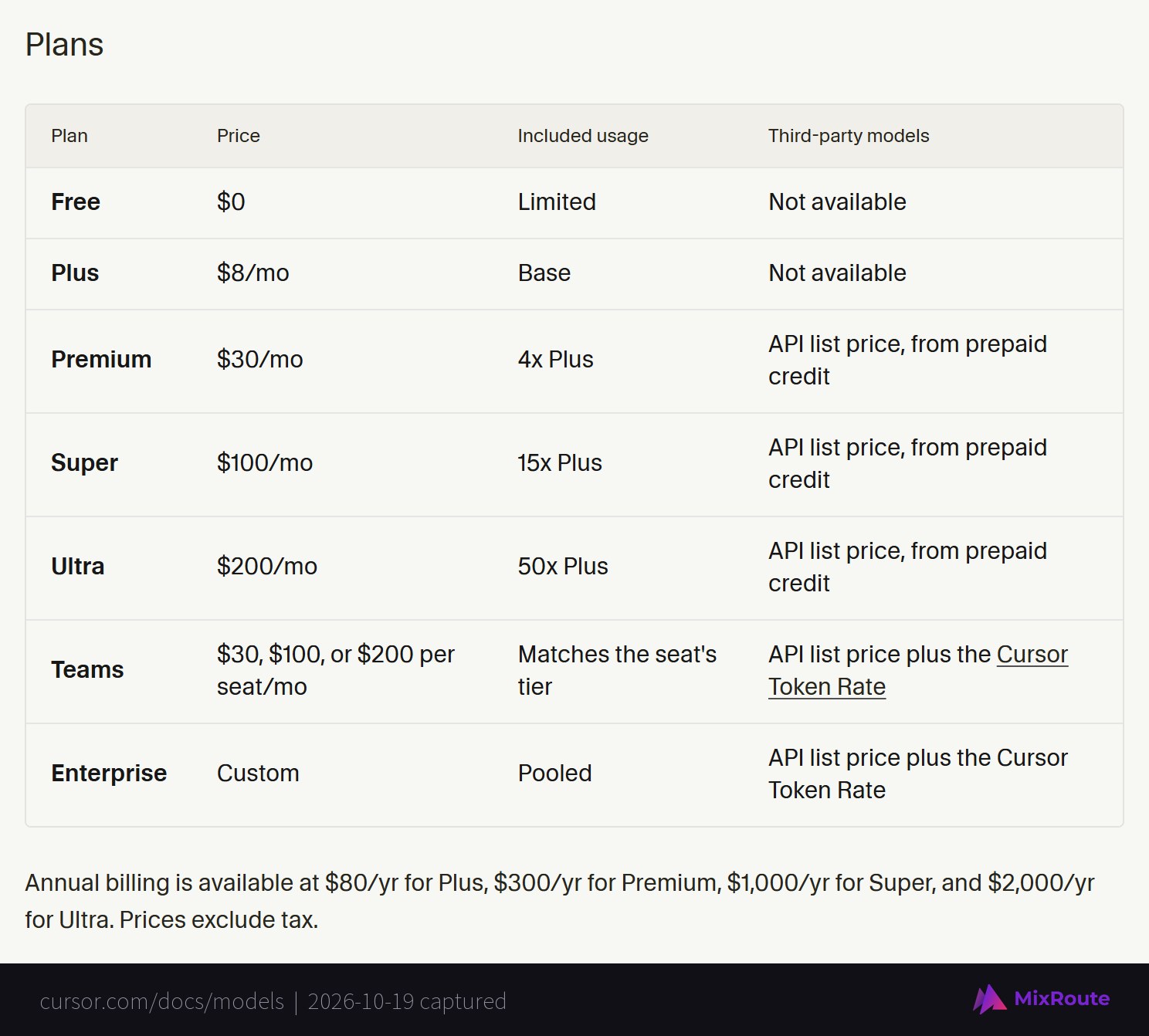
Cursor is a fork of VS Code built around its own AI agent. VS Code is a free editor that gets its AI from GitHub Copilot or from agents you plug in. As of October 19, 2026, Cursor runs from a free plan to $200 a month, and its included usage covers only Cursor’s own models. Claude, GPT and Gemini are billed at API list price from prepaid credit on Premium ($30) and above. VS Code with Copilot starts at $0, and Copilot Pro is $10. Pick Cursor for Tab and its cloud agents. Pick VS Code if your agents already run through Claude Code, Codex or your own API key.
Cursor vs VS Code at a glance
The two editors differ most in what the monthly price pays for, how autocomplete works, and how much of the AI stack you can swap out.
| VS Code | Cursor | |
|---|---|---|
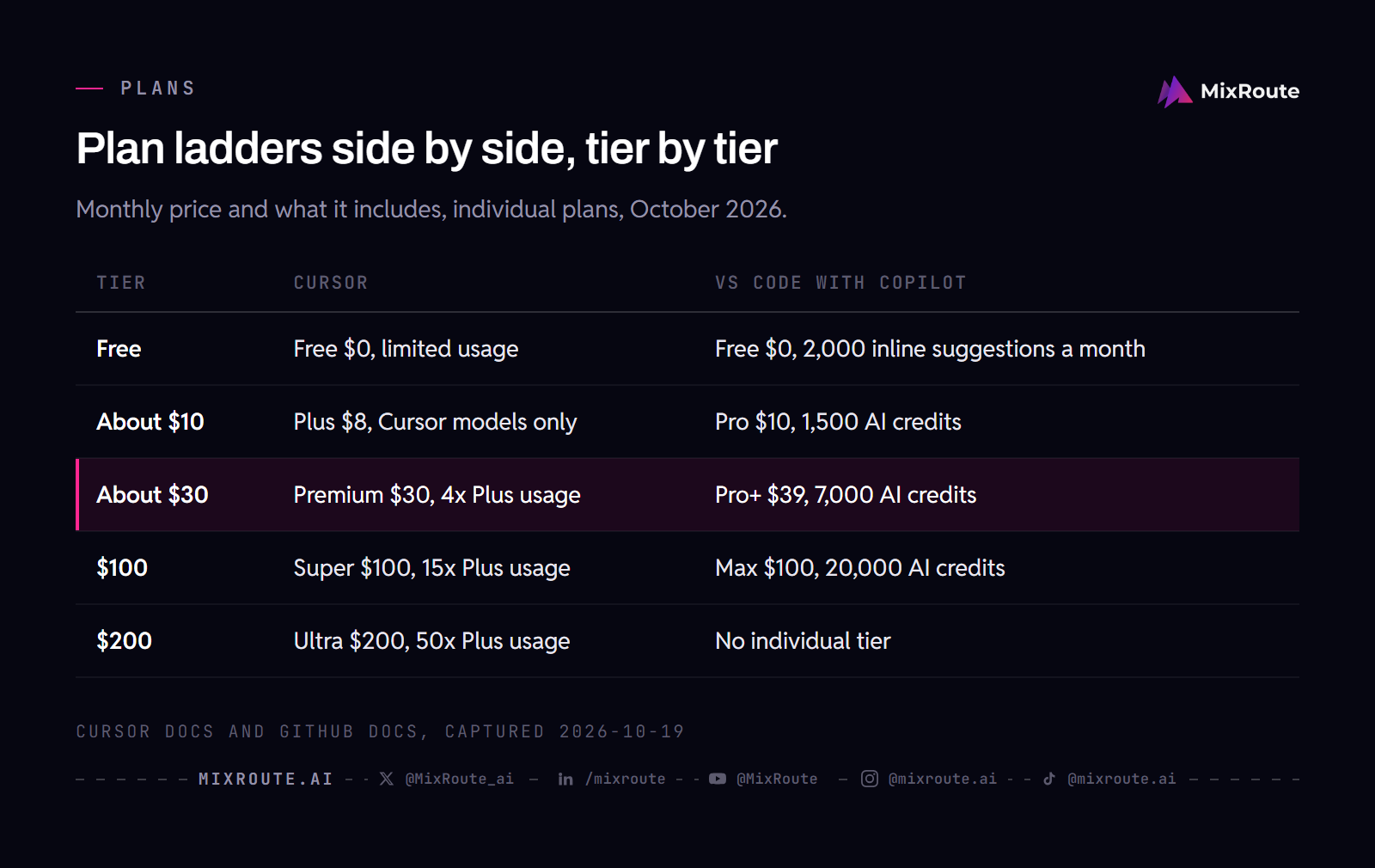
| Price | Editor free. Copilot Free $0, Pro $10/mo, Pro+ $39/mo, Max $100/mo | Free $0, Plus $8/mo, Premium $30/mo, Super $100/mo, Ultra $200/mo |
| AI philosophy | AI as an extension (Copilot, Claude, Codex, your own models) | AI as the core product |
| Autocomplete | Copilot inline suggestions and next edit suggestions | Cursor Tab: multi-line edits, jumps to the next edit location, suggests edits in other files |
| Agent | Copilot harness sessions that keep running in the background, plus Claude, Codex and cloud sessions (VS Code 1.142) | Cursor Agent, Cloud Agents, Projects, Automations, Bugbot |
| In house model | None | Composer 2.5, plus Grok 4.7, 4.6 and 4.5 in the included usage pool |
| Extensions | Visual Studio Marketplace | Open VSX through Cursor’s marketplace proxy |
| Your own API key or endpoint | Custom endpoint for any Chat Completions, Responses or Messages API; works without a Copilot plan; completions still need Copilot | Keys for OpenAI, Anthropic, Google, Azure and AWS Bedrock; chat models only; Tab stays on Cursor’s models |
| Sold by | Microsoft and GitHub | Cursor, as part of The X Subscription |
Now the detail behind each row.
What Cursor actually is
Cursor is not a competitor to VS Code in the usual sense. Its docs say it is based on the VS Code codebase, and one click under Settings, General, Account, VS Code Import brings over your extensions, themes, settings and keybindings.
The difference is where the AI lives. In VS Code, AI is a passenger you install. In Cursor, AI is the driver. Two features pull people across. Tab predicts your next edit: it can change several lines, add missing imports, suggest coordinated edits in other files, and jump to the next edit location when you press Tab again. The Agent plans, edits files, runs terminal commands and can drive a browser to check its own work. Cloud Agents do the same on a remote machine, Projects hand larger jobs to a coordinator that delegates to other agents, and since October 6 the Cursor iOS app can reply to agents running on your computer.
VS Code has not stood still. Version 1.142, released October 14, 2026, is rolling out the Copilot harness as the default for new agent sessions. Those sessions run in an Agent Host, so they keep going in the background after you close the editor window, and the same Agents window can run Claude or Codex sessions or send a task to a cloud agent that returns a pull request. Both editors now ship background and cloud agents. What still separates them is billing, openness and which autocomplete you prefer.
The model landscape in October 2026
Both editors list the same top Claude and Gemini models. They differ in what the subscription pays for.
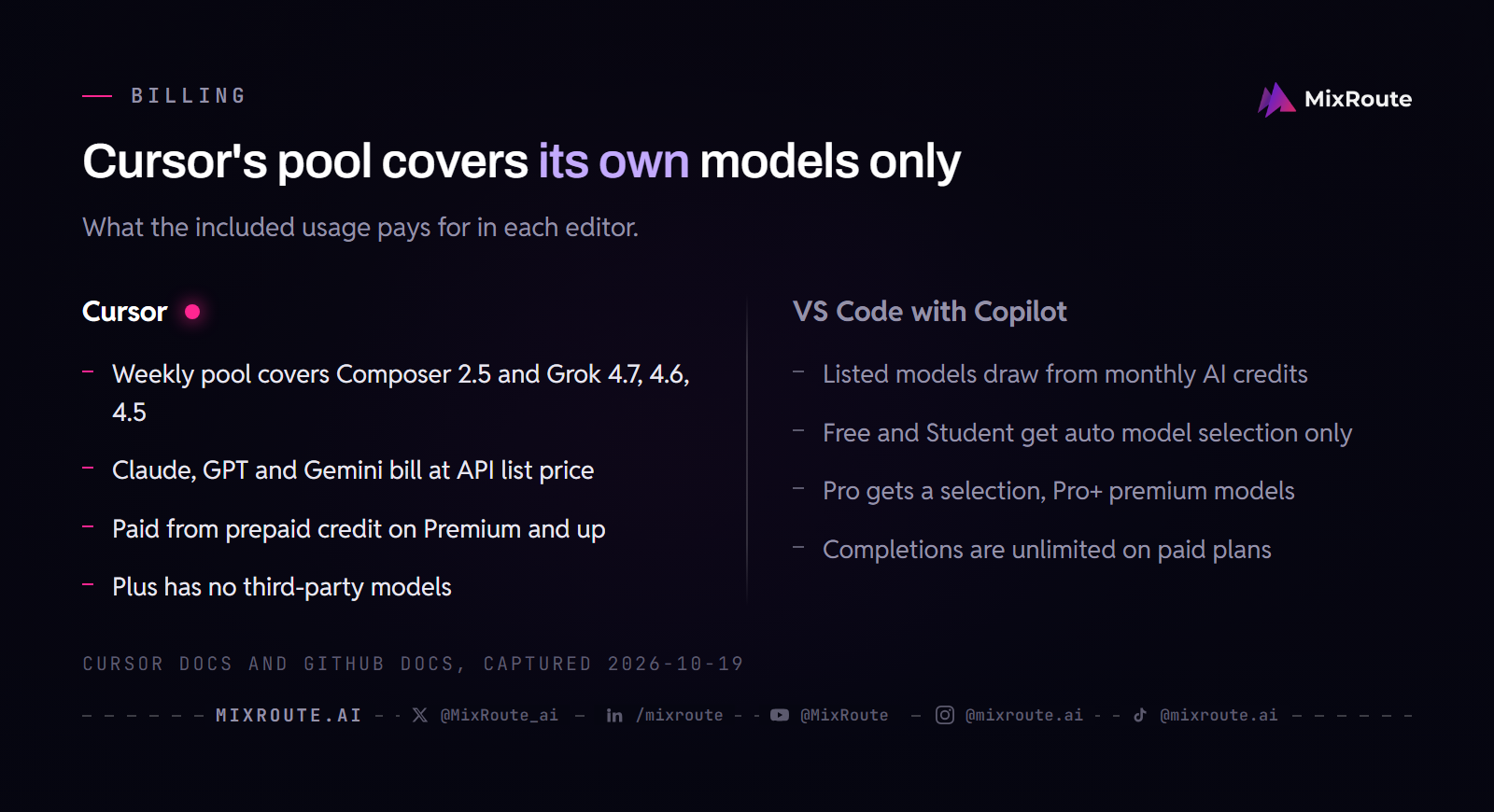
Inside Cursor: the included weekly usage pool covers only Cursor’s own models, which are Composer 2.5, Grok 4.7, Grok 4.6 and Grok 4.5. Composer 2.5 is Cursor’s own agentic model, and beyond the pool it costs $0.50 per million input tokens and $2.50 per million output tokens ($3 and $15 in Fast mode). Everything else in the picker is a third-party model billed at the vendor’s API list price from prepaid credit: Claude Fable 5.1 ($10 input, $50 output), Claude Opus 5.5 ($4 and $20), Claude Sonnet 5.5 ($2 and $10), Claude Haiku 5.5 ($0.10 and $0.50), Gemini 4 Argon, Gemini 3.8 Flash, Gemini 3.1 Pro and GPT-5.6 Sol, Terra and Luna. Say you run Opus 5.5 all day in the Cursor Agent: none of it touches the weekly pool, and every token comes out of prepaid credit.
Inside VS Code with Copilot: the Copilot docs list Claude Fable 5.1, Opus 5.5, Sonnet 5.5 and Haiku 5.5, Gemini 4 Argon and 3.8 Flash, GPT-5.6, GPT-6 Sol, Astra and Luna, GPT-6.1 Sol, Grok 4.7 and Kimi K3. Models draw from the plan’s monthly GitHub AI Credits: 1,500 on Pro (1,000 base plus 500 flex), 7,000 on Pro+ and 20,000 on Max. Copilot Free and Student get auto model selection only, and Pro gets a selection of models, so check the docs table for the model you want before you pay. Composer 2.5 appears in neither Copilot’s list nor MixRoute’s catalog.
The best coding model changes often enough that the picker you have today will look different in two months. That is the main reason to keep the model layer separate from the editor.
Can you use your Claude or ChatGPT subscription inside Cursor?
Yes for Claude Code and Codex, and no for Cursor’s own features.
Claude Max and the other paid Claude plans work with Claude Code in both editors. Anthropic’s VS Code page offers an install link for VS Code and one for Cursor, and says any paid Claude subscription (Pro, Max, Team or Enterprise) or a Claude Console account works without an API key. Install the extension, sign in with that account, and your plan covers the usage in either editor.
ChatGPT works through Codex. OpenAI’s IDE page lists VS Code, Cursor and Windsurf as editors that use the Codex extension. VS Code also has an experimental Agent Host integration for Codex, where you sign in with a ChatGPT account or use Copilot Pro+.
The asterisk: neither subscription pays for Cursor’s native layer. Tab runs on Cursor’s built-in models, and a Claude or GPT model you pick in the Cursor Agent bills from prepaid credit at API list price. If your workflow is Claude Code plus Codex, both extensions run the same way in free VS Code, and Cursor adds nothing until you pay for its native features.
How to use your own API key or gateway in each editor
VS Code takes any compatible endpoint for chat, and Cursor takes keys for five named providers.
Cursor keeps keys under Settings, then Models. Its docs list OpenAI, Anthropic, Google, Azure OpenAI and AWS Bedrock, and say custom keys work only with chat models while Tab keeps using Cursor’s built-in models. On individual plans, requests made with your own key do not draw from included usage or prepaid credit. On Teams and Enterprise, each third-party request still carries a $0.25 per million token Cursor Token Rate. Cursor’s Zero Data Retention policy does not apply to your own keys.
To send that chat traffic to a gateway, MixRoute’s Cursor guide pastes the gateway key into the OpenAI field, checks Override OpenAI Base URL, and clicks Verify:
OpenAI API Key:            your MixRoute key
Override OpenAI Base URL:  https://api.mixroute.ai/v1
Add model:                 an exact model ID, such as claude-sonnet-5-5
Cursor’s own docs do not describe the base URL override, so confirm the toggle exists in your version. MixRoute’s guide also says third-party keys need a paid Cursor plan.
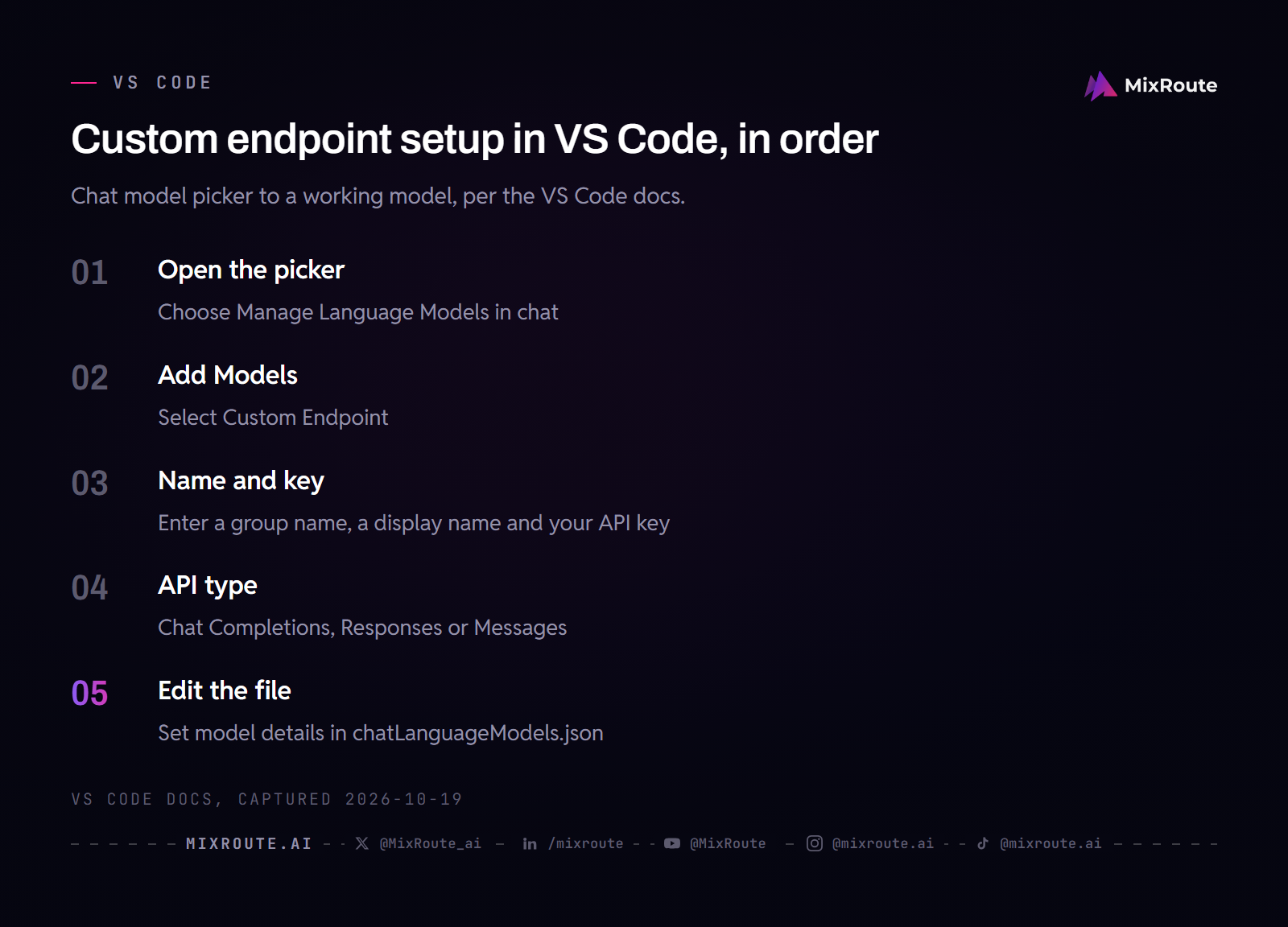
VS Code has a built-in Custom Endpoint provider. Open the model picker, choose Manage Language Models, select Add Models, pick Custom Endpoint, then enter a display name, your API key and the API type (Chat Completions, Responses or Messages). VS Code opens chatLanguageModels.json for the model details:
[
  {
    "name": "MixRoute",
    "vendor": "customendpoint",
    "apiKey": "${input:mixrouteApiKey}",
    "apiType": "chat-completions",
    "models": [
      {
        "id": "claude-sonnet-5-5",
        "name": "Claude Sonnet 5.5",
        "url": "https://api.mixroute.ai/v1",
        "toolCalling": true,
        "vision": true,
        "contextWindow": 1000000,
        "maxOutputTokens": 128000
      }
    ]
  }
]
After you save, the model appears in the chat model picker. A model must support tool calling to show up for agents, and if it does not appear, restart VS Code. These models work without a Copilot plan, but inline suggestions, semantic search and embeddings still need the GitHub Copilot service. Using custom models in Copilot harness agent sessions needs the experimental chat.agentHost.byokModels.enabled setting.
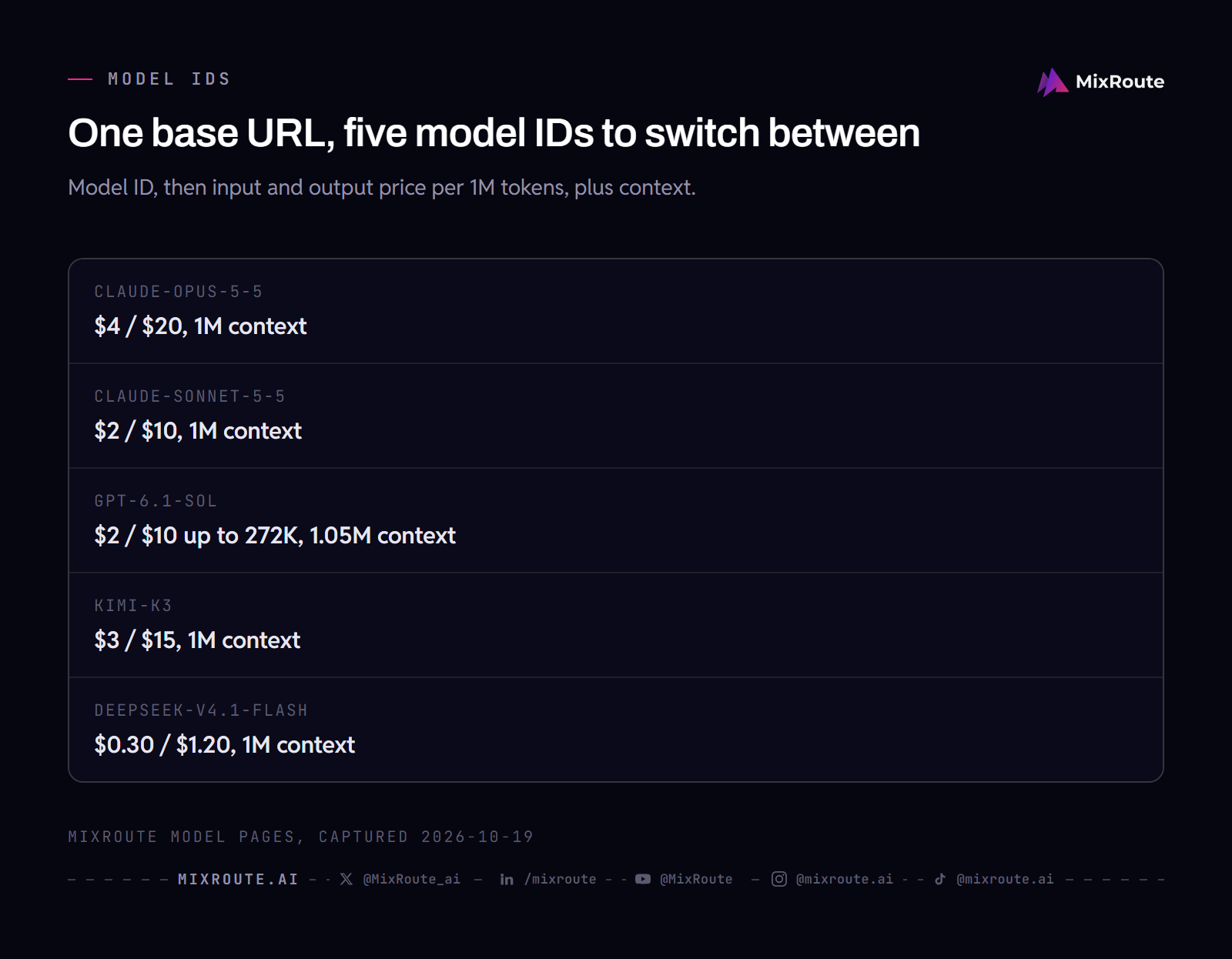
Because one MixRoute endpoint serves the catalog, switching models means changing the model ID. These IDs and prices come from MixRoute’s model pages:
So Cursor is the better closed product, and VS Code is the more open platform.
Which editor is faster?
Reviews describe VS Code as the lighter editor, but neither vendor’s documentation gives startup or memory figures, so treat every speed claim as a report rather than a benchmark.
DataCamp’s comparison says VS Code starts faster, idles with less memory and holds up better on very large monorepos, while Cursor’s indexing and AI overhead can strain a machine with little RAM. It adds that memory growth in long Cursor sessions often eases once unused AI extensions are disabled. Cursor’s own docs add one relevant detail: it rebases onto VS Code regularly and often stays on a slightly older VS Code version for stability.
Agent work is where the load can leave your laptop. Cursor Cloud Agents run on a remote machine, and VS Code’s Cloud target runs the Copilot cloud agent, or Claude and Codex in preview, on the provider’s infrastructure and returns a pull request. For answer quality the model matters more than the editor, and both editors list Claude Opus 5.5 and Gemini 4 Argon. If speed is the deciding factor, open the same repository in both and watch the task manager while an agent works.
So which one should you use?
Choose Cursor if you write a lot of new code, work across many files, and want Tab’s cross-file edit prediction. Premium at $30 per month gives 4x the Plus usage and adds Cloud Agents, Bugbot and third-party models. Super at $100 gives 15x with priority model access at peak times, and Ultra at $200 gives 50x. Plus at $8 is limited to Cursor’s own models. Start on the Free plan and judge Tab on a real project before you pay.
Stay on VS Code if your AI workflow already runs through Claude Code, Codex or an agent with your own keys. Copilot Free costs nothing and allows 2,000 inline suggestions a month plus an allowance of AI credits, Pro is $10, and completions are unlimited on paid plans. You also avoid a subscription that funds features your existing plans cannot touch. One check before you leave: Cursor uses Open VSX, and not every Microsoft Marketplace extension is listed there.
Either way, the model layer matters more than the editor layer. Editors are converging, and the model list shifts every few weeks. The developers who move fastest are the ones who can swap models the day a better one ships, without rebuilding their setup.
MixRoute is built for that. One OpenAI-compatible API reaches 250+ models, including the Claude, GPT, DeepSeek and Kimi models in the table above, with no markup on provider pricing. You top up with Visa, Mastercard or JCB, or with USDT or USDC, and credits never expire. Drop the base URL into Cursor’s chat panel, into VS Code’s Custom Endpoint provider, or into both.
FAQ
Is Cursor better than VS Code in 2026?
It depends on what you want the subscription to pay for. Cursor’s Tab and Agent are built into the editor, which makes them deeper than an extension. VS Code with Copilot costs less to start ($0 or $10), takes any compatible endpoint for chat, and is the lighter editor in reviews. Try Cursor’s Free plan on a real project before deciding.
Can I use Claude Code inside Cursor?
Yes. Anthropic’s extension page has an install link for Cursor, and any paid Claude subscription or a Console account works without an API key. Install the extension, sign in, and your plan covers it. It does not power Cursor’s Tab or Agent.
Does my ChatGPT subscription work in Cursor?
Yes, through Codex. OpenAI lists Cursor among the editors that use the Codex extension, and you sign in from the extension. It does not pay for GPT models you pick in Cursor’s own Agent, which bill from prepaid credit at API list price.
Do all VS Code extensions work in Cursor?
No, most do. Cursor installs extensions from Open VSX through its own proxy, and not every Microsoft Marketplace extension is listed there. The same extension ID can also point to a different publisher, so check who published it. Cursor ships its own Anysphere builds of some widely used extensions. DataCamp’s review names Pylance, Remote SSH and Live Share as ones that do not carry over.
Can I use my own API key or an AI gateway in Cursor?
Partially. Cursor accepts keys for OpenAI, Anthropic, Google, Azure and AWS Bedrock for chat models, and Tab stays on Cursor’s built-in models. MixRoute’s guide covers the Override OpenAI Base URL route for a gateway. For custom endpoints in VS Code, use the Custom Endpoint provider, or run Claude Code and Codex in either editor.
Is Composer 2.5 available outside Cursor?
No. Cursor documents Composer 2.5 as its own model, priced inside Cursor, and it is missing from GitHub Copilot’s model list and from MixRoute’s catalog as of October 19, 2026. For a comparable job outside Cursor, use Claude Opus 5.5, Claude Sonnet 5.5 or GPT-6.1 Sol through their providers or an API gateway.
How much does Cursor cost in 2026?
Free is $0 with limited usage, Plus is $8 per month, Premium is $30, Super is $100 and Ultra is $200, with annual billing at $80, $300, $1,000 and $2,000 for Plus through Ultra. Premium, Super and Ultra give 4x, 15x and 50x the Plus usage. Teams seats cost $30, $100 or $200 per month, matching the individual tiers. Third-party models are extra, billed from prepaid credit, and prices exclude tax. Existing customers on the older Pro ($20), Pro+ ($60) and Ultra ($200) plans keep them.
Is Cursor faster than VS Code?
It depends on your machine and repository. No benchmark from either vendor settles it. DataCamp’s review reports that VS Code starts faster and idles lighter, and that Cursor’s indexing can strain a low-RAM machine. Cursor’s Cloud Agents and VS Code’s cloud sessions both move agent work off your computer.
The bottom line
Cursor and VS Code share a codebase and split on philosophy. Cursor sells the deeper built-in agent and autocomplete, and charges separately for the Claude, GPT and Gemini models inside it. VS Code is the free chassis that runs Claude Code, Codex and any compatible endpoint you point it at. The model you run matters more than the window you run it in, and MixRoute keeps that part to one base URL and one key. Start building on MixRoute