> ## Documentation Index
> Fetch the complete documentation index at: https://mixroute.ai/docs/llms.txt
> Use this file to discover all available pages before exploring further.
# OpenCode
> OpenCode 整合指南:透過 MixRoute 使用多模型程式設計助手
## 一、產品簡介
OpenCode 是一款開源 AI 程式設計助手,支援 75+ 模型與本地部署。透過 **MixRoute**,可在 OpenCode 中統一使用各類主流與最新模型(如 GPT、Claude、Gemini 等),並支援自訂提供商與模型配置。
**下載地址**:[https://opencode.ai/](https://opencode.ai/)
## 二、快速配置(MixRoute)
### 1. 取得 API 金鑰
在 [MixRoute 控制台](https://api.mixroute.ai/) 建立並複製 API 金鑰。
### 2. 在 OpenCode 中配置自訂提供商
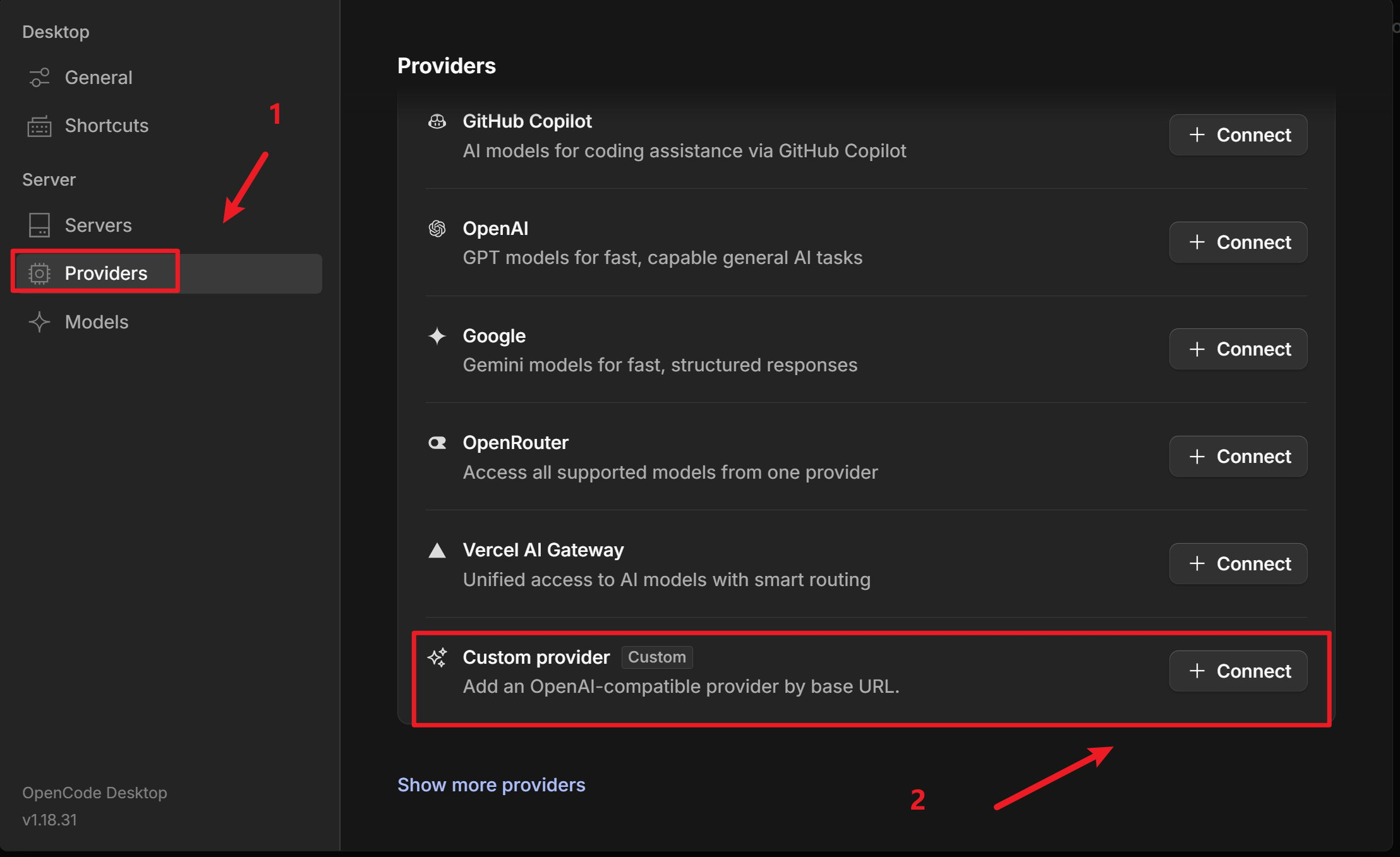
開啟 OpenCode,進入 **伺服器 / 提供商** 設定
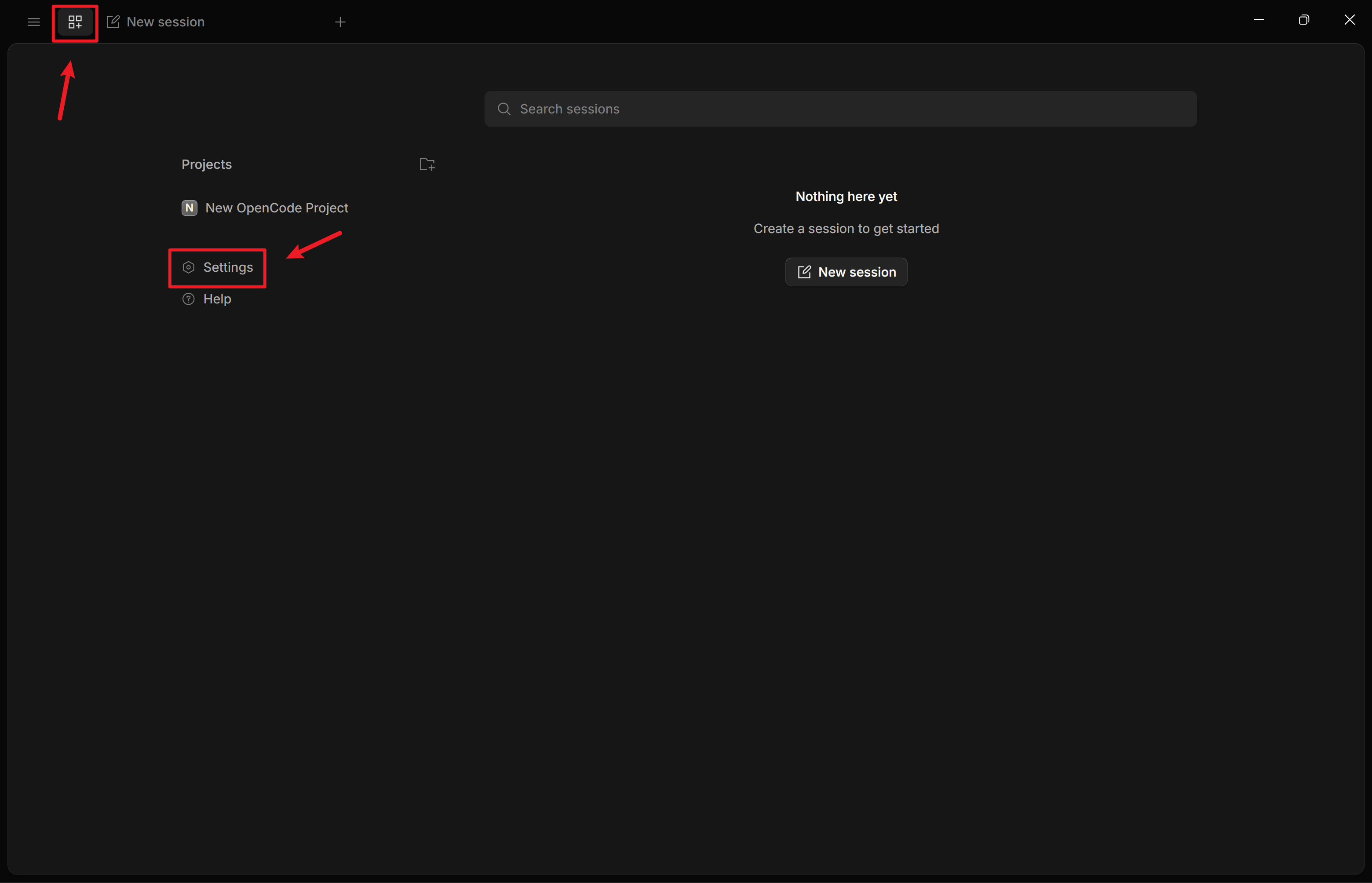 新增 **自訂提供商**(Configure an OpenAI compatible provider)
 [Smart Routing](https://console.mixroute.ai/smart-route) 是一項智能模型路由能力,能夠根據輸入任務的複雜程度,自動將請求分配至最合適的模型,最終起到降低API開銷增強效率的目的。
約束和使用指南見[此處](/docs/zh-hant/smart-routing)。
* **提供商 ID**:如 `mixroute-route`(小寫、數字、連字符或底線)
* **顯示名稱**:如 `Mixroute Api Route`
* **基礎 URL**:`https://api.mixroute.ai/v1`(必須以 `/v1` 結尾)
* **API 金鑰**:貼上 Mixroute Api 智能路由節點金鑰
請注意智能路由節點的金鑰是相對獨立,不與傳統API金鑰共用
* **提供商 ID**:如 `mixroute`(小寫、數字、連字符或底線)
* **顯示名稱**:如 `MixRoute API`
* **基礎 URL**:`https://api.mixroute.ai/v1`(必須以 `/v1` 結尾)
* **API 金鑰**:貼上 Mixroute Api 金鑰
在 **模型** 中新增需要使用的模型(如 `gpt-5.5`、`claude-opus-4-8` 等)
[Smart Routing](https://console.mixroute.ai/smart-route) 是一項智能模型路由能力,能夠根據輸入任務的複雜程度,自動將請求分配至最合適的模型,最終起到降低API開銷增強效率的目的。
約束和使用指南見[此處](/docs/zh-hant/smart-routing)。
* **提供商 ID**:如 `mixroute-route`(小寫、數字、連字符或底線)
* **顯示名稱**:如 `Mixroute Api Route`
* **基礎 URL**:`https://api.mixroute.ai/v1`(必須以 `/v1` 結尾)
* **API 金鑰**:貼上 Mixroute Api 智能路由節點金鑰
請注意智能路由節點的金鑰是相對獨立,不與傳統API金鑰共用
* **提供商 ID**:如 `mixroute`(小寫、數字、連字符或底線)
* **顯示名稱**:如 `MixRoute API`
* **基礎 URL**:`https://api.mixroute.ai/v1`(必須以 `/v1` 結尾)
* **API 金鑰**:貼上 Mixroute Api 金鑰
在 **模型** 中新增需要使用的模型(如 `gpt-5.5`、`claude-opus-4-8` 等)
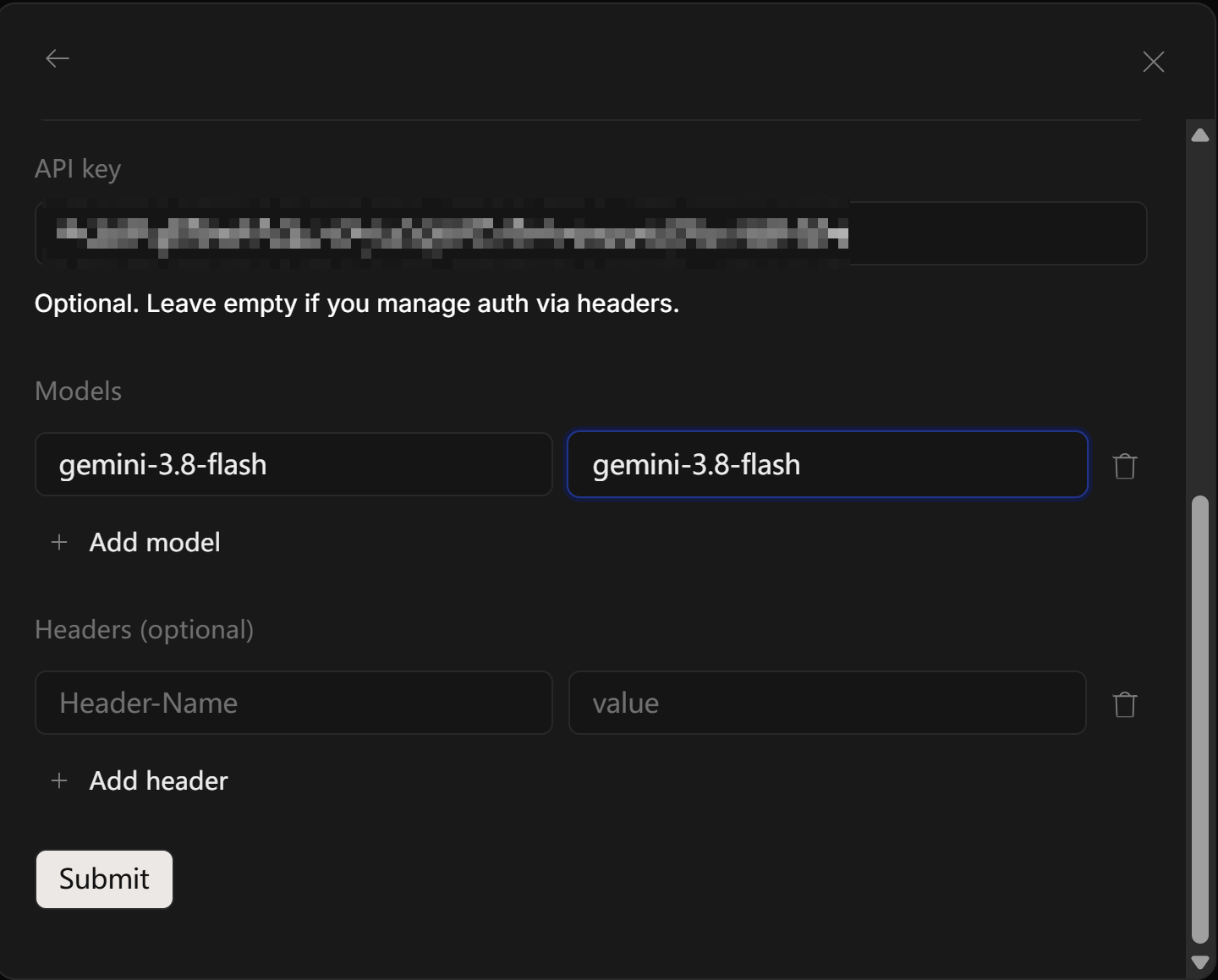 儲存後,在模型選擇中使用 **提供商ID/模型ID**(如 `mixroute/gpt-5.5`)
### 3. 切換模型
在對話或設定中選擇已配置的提供商與模型(如 `mixroute/gpt-5.5`)即可切換。
* 若使用自建或備用服務,將 **基礎 URL** 改為對應位址,例如 `http://your-server:3003/v1`。
* 預設模型可在專案或全域 `opencode.json` 中設定 `"model": "mixroute/模型ID"`。
## 三、部分模型需使用 Responses API(重要)
部分模型的存取介面與常規 Chat Completions 不同,需使用 **Responses API**。若在 OpenCode 中選用這類模型時出現類似錯誤:
> The chatCompletion operation does not work with the specified model
說明當前請求走了 **Chat Completions**,而該模型在伺服端只開放 **Responses API**,需透過配置改為使用正確介面。
### 配置方式
對需要走 Responses API 的模型增加:
```jsonc theme={null}
{
"$schema": "https://opencode.ai/config.json",
"disabled_providers": [],
"provider": {
"mixroute": {
"name": "mixroute",
"npm": "@ai-sdk/openai-compatible",
"options": {
"baseURL": "https://api.mixroute.ai/v1"
},
"models": {
"gemini-3.8-flash": {
"name": "gemini-3.8-flash"
}
}
},
"mixroute-responses": {
"name": "mixroute-responses",
"npm": "@ai-sdk/openai",
"options": {
"baseURL": "https://api.mixroute.ai/v1",
"apiKey": "mixroute-key"
},
"models": {
"gpt-5.6-luna": {
"name": "gpt-5.6-luna"
},
"gpt-5.6-terra": {
"name": "gpt-5.6-terra"
},
"gpt-5.6-sol": {
"name": "gpt-5.6-sol"
}
}
}
}
}
```
## 四、設定成功示例
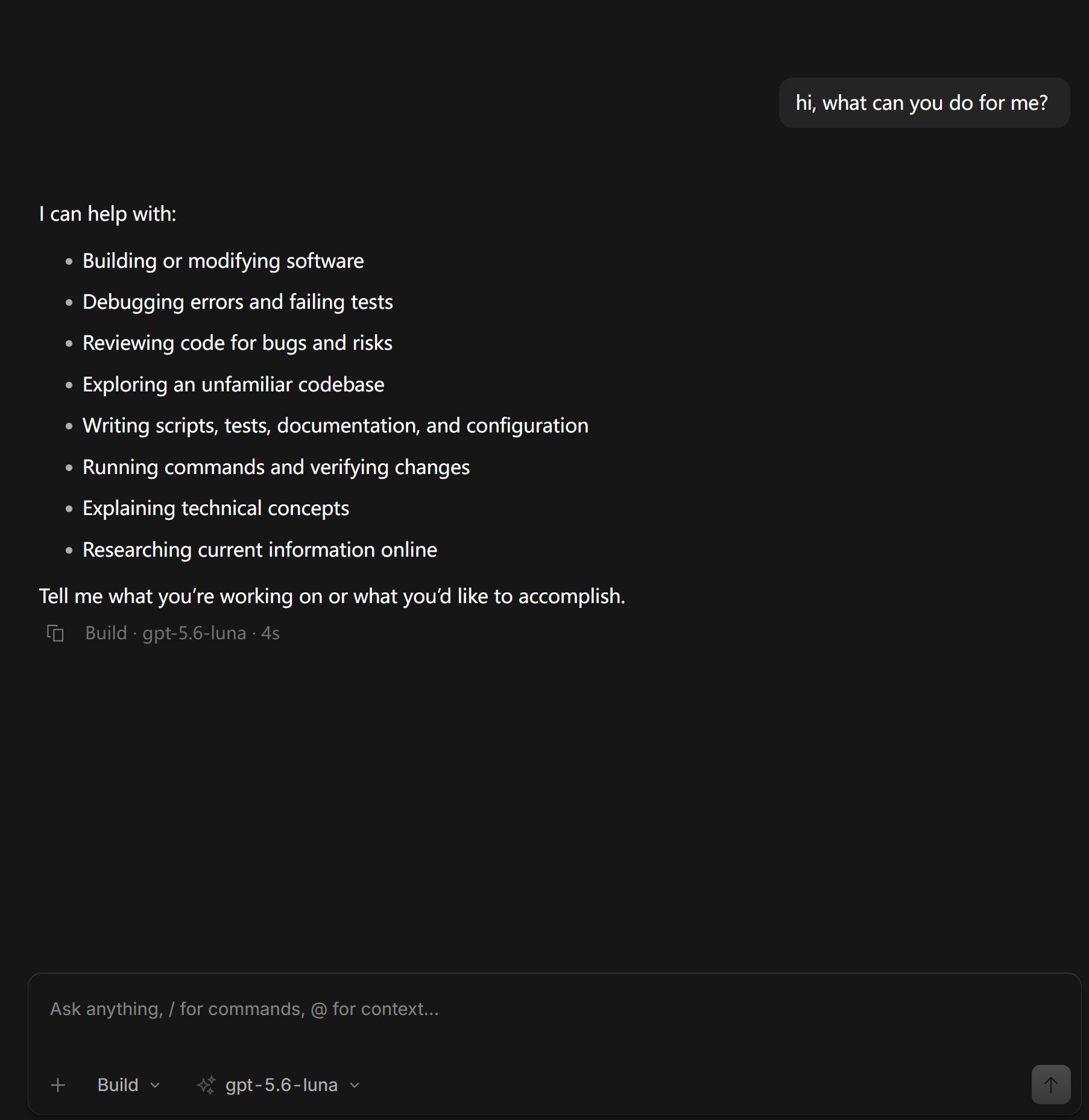
下圖為使用 MixRoute API 在 OpenCode 中正常對話的示例:
儲存後,在模型選擇中使用 **提供商ID/模型ID**(如 `mixroute/gpt-5.5`)
### 3. 切換模型
在對話或設定中選擇已配置的提供商與模型(如 `mixroute/gpt-5.5`)即可切換。
* 若使用自建或備用服務,將 **基礎 URL** 改為對應位址,例如 `http://your-server:3003/v1`。
* 預設模型可在專案或全域 `opencode.json` 中設定 `"model": "mixroute/模型ID"`。
## 三、部分模型需使用 Responses API(重要)
部分模型的存取介面與常規 Chat Completions 不同,需使用 **Responses API**。若在 OpenCode 中選用這類模型時出現類似錯誤:
> The chatCompletion operation does not work with the specified model
說明當前請求走了 **Chat Completions**,而該模型在伺服端只開放 **Responses API**,需透過配置改為使用正確介面。
### 配置方式
對需要走 Responses API 的模型增加:
```jsonc theme={null}
{
"$schema": "https://opencode.ai/config.json",
"disabled_providers": [],
"provider": {
"mixroute": {
"name": "mixroute",
"npm": "@ai-sdk/openai-compatible",
"options": {
"baseURL": "https://api.mixroute.ai/v1"
},
"models": {
"gemini-3.8-flash": {
"name": "gemini-3.8-flash"
}
}
},
"mixroute-responses": {
"name": "mixroute-responses",
"npm": "@ai-sdk/openai",
"options": {
"baseURL": "https://api.mixroute.ai/v1",
"apiKey": "mixroute-key"
},
"models": {
"gpt-5.6-luna": {
"name": "gpt-5.6-luna"
},
"gpt-5.6-terra": {
"name": "gpt-5.6-terra"
},
"gpt-5.6-sol": {
"name": "gpt-5.6-sol"
}
}
}
}
}
```
## 四、設定成功示例
下圖為使用 MixRoute API 在 OpenCode 中正常對話的示例:
 This documentation is built and hosted on [Mintlify](https://mintlify.com), a developer documentation platform.