> ## Documentation Index
> Fetch the complete documentation index at: https://mixroute.ai/docs/llms.txt
> Use this file to discover all available pages before exploring further.

# Dify

<link rel="alternate" hrefLang="en" href="https://mixroute.ai/docs/integrations/dify" />

<link rel="alternate" hrefLang="zh-Hans" href="https://mixroute.ai/docs/zh-hans/integrations/dify" />

<link rel="alternate" hrefLang="zh-Hant" href="https://mixroute.ai/docs/zh-hant/integrations/dify" />

<link rel="alternate" hrefLang="ja" href="https://mixroute.ai/docs/ja/integrations/dify" />

<link rel="alternate" hrefLang="x-default" href="https://mixroute.ai/docs/integrations/dify" />

## 一、產品簡介

Dify 是「視覺化 + 外掛化」的 AI 應用搭建平台，零程式碼基礎也能輕鬆用大模型，快速搭建專屬 AI 工具（比如對話機器人、文字處理工具等）。

透過整合 **MixRoute**，您可以在 Dify 中使用成本更低的大模型服務，使用效果卻幾乎無差。

## 二、整合步驟

### 第一步：準備 API 帳號

先註冊一個 MixRoute 帳號，步驟請參考 [快速開始](/docs/zh-hant/quickstart)。

### 第二步：進入 Dify 模型供應商設定

1. 開啟 Dify 平台，登入後找到「設定」頁面
2. 左側選單中選中「模型供應商」

<Frame>
  <img src="https://mintcdn.com/personal-a5418d9f/iZ6FhpT4JV2kTLlz/images/dify-en-1.png?fit=max&auto=format&n=iZ6FhpT4JV2kTLlz&q=85&s=b0ca81e0c52f8b18aa25d4bc02ad6bb8" alt="Dify En 1" width="3118" height="1732" data-path="images/dify-en-1.png" />
</Frame>

<Frame>
  <img src="https://mintcdn.com/personal-a5418d9f/iZ6FhpT4JV2kTLlz/images/dify-en-2.png?fit=max&auto=format&n=iZ6FhpT4JV2kTLlz&q=85&s=7ecb0bb376f20a233ea6e9eab37e0d90" alt="Dify En 2" width="3120" height="1735" data-path="images/dify-en-2.png" />
</Frame>

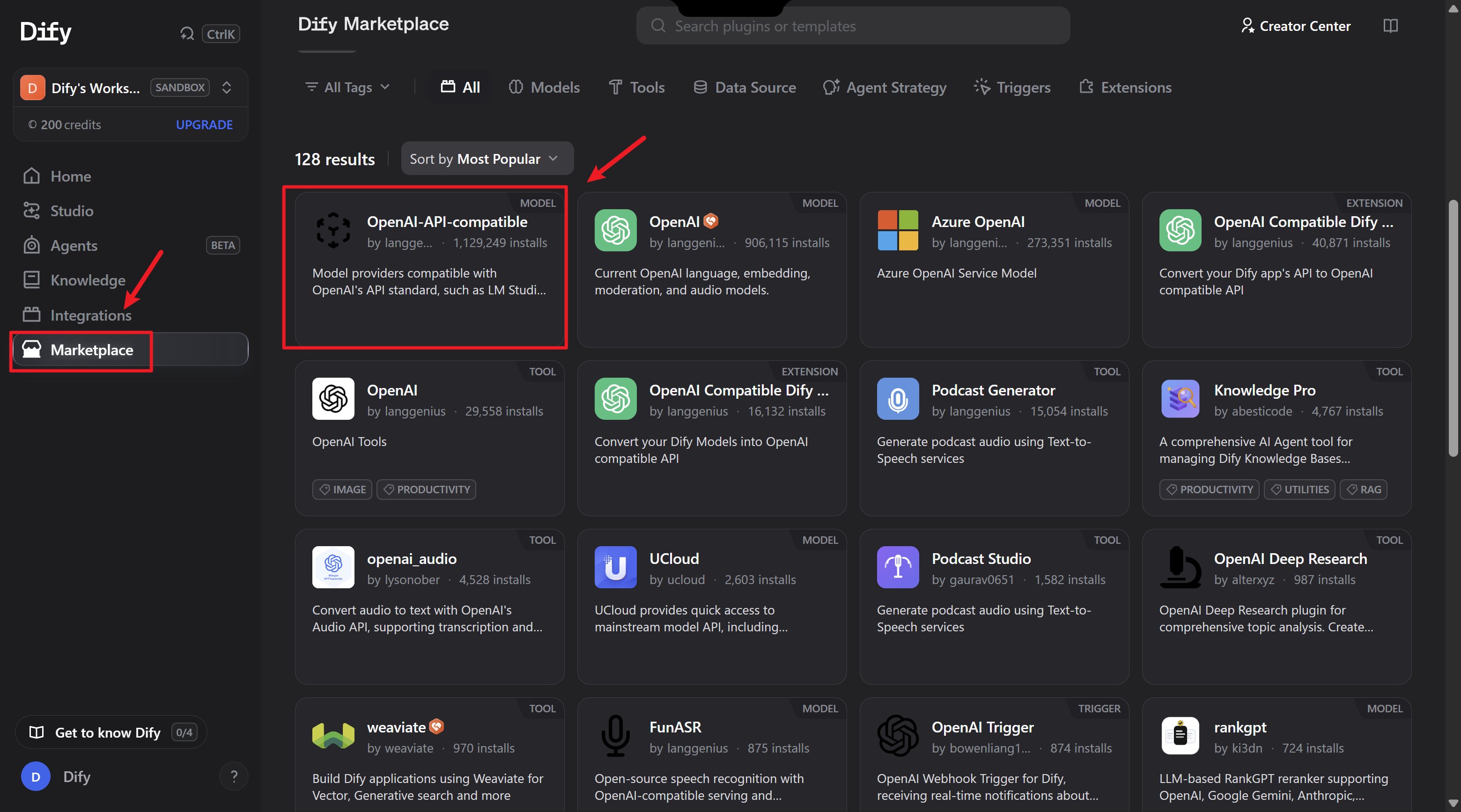
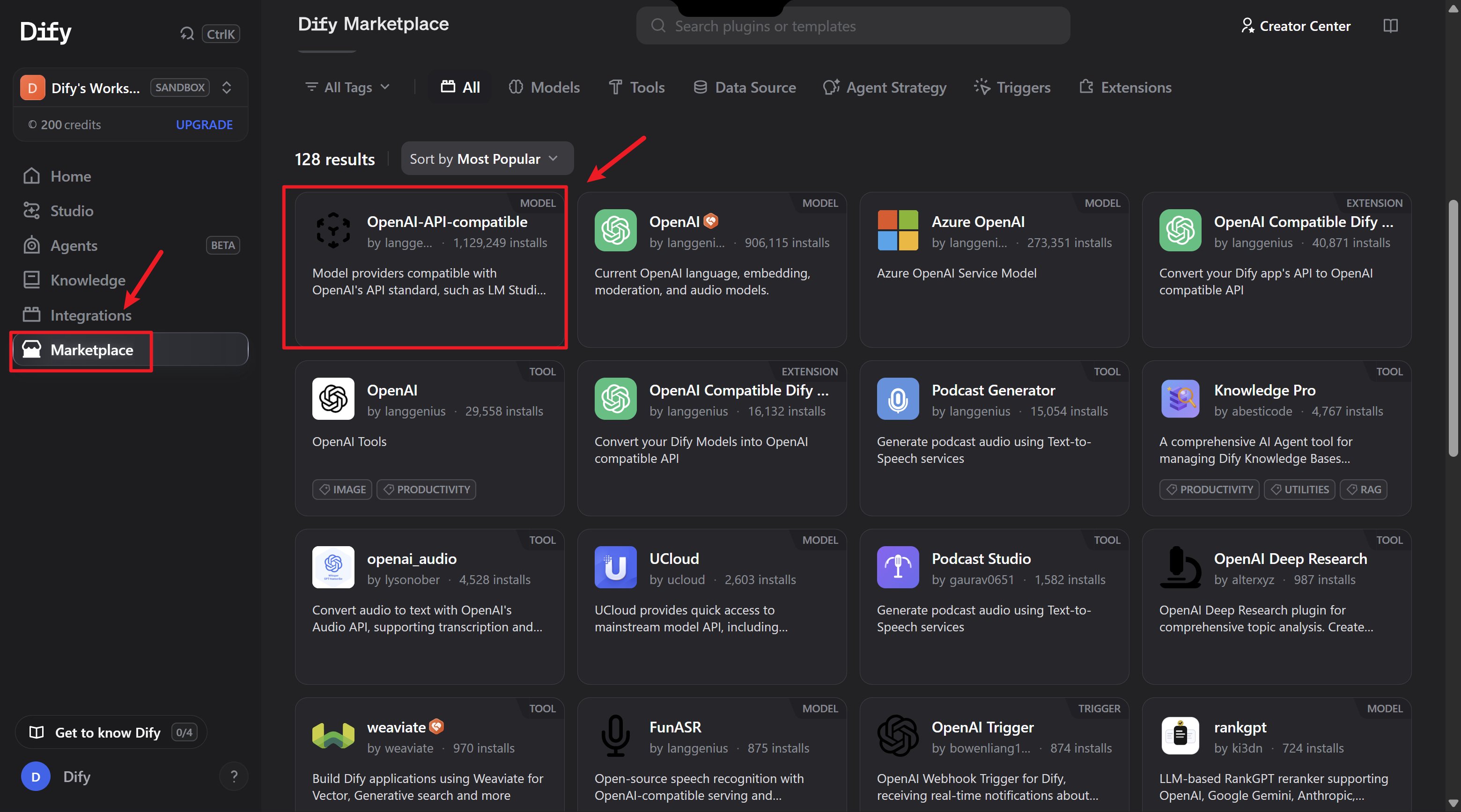
### 第三步：安裝相容外掛

1. 下滑頁面，找到「OpenAI-API-compatible」外掛
2. 點擊「安裝」

<Frame>
  <img src="https://mintcdn.com/personal-a5418d9f/iZ6FhpT4JV2kTLlz/images/dify-en-2-1.png?fit=max&auto=format&n=iZ6FhpT4JV2kTLlz&q=85&s=7db6ad3e8803e8c36ef9db7e2503d818" alt="Dify En 2 1" width="3120" height="1735" data-path="images/dify-en-2-1.png" />
</Frame>

### 第四步：配置關鍵參數

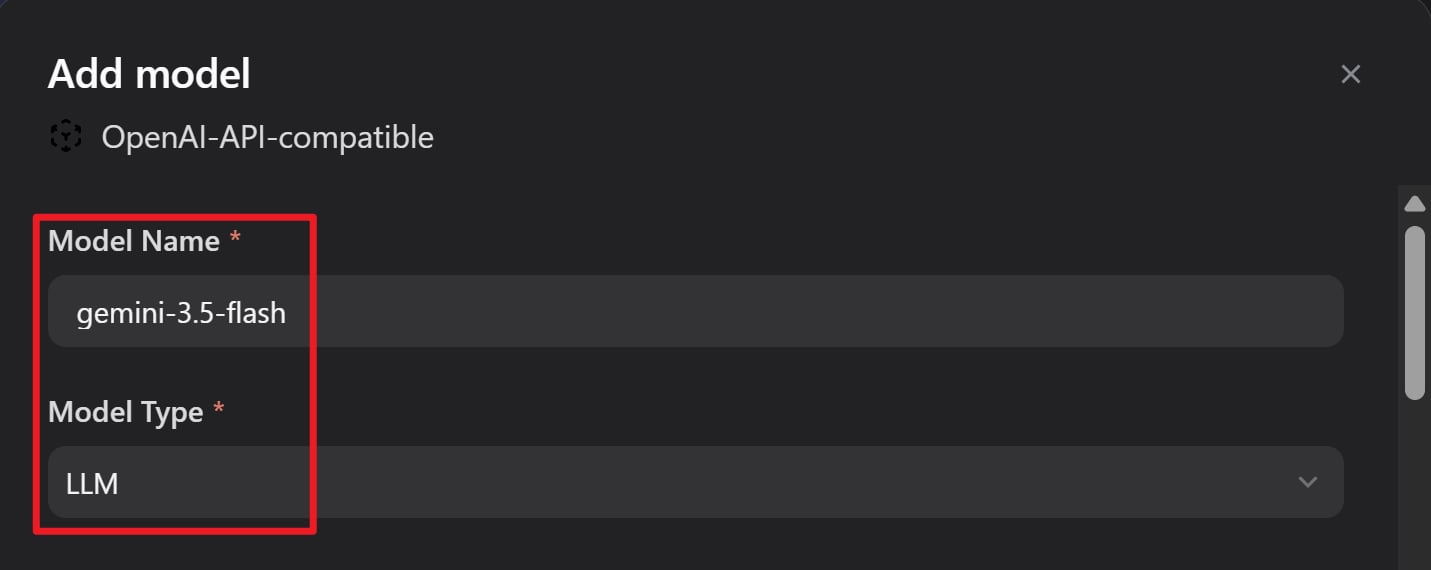
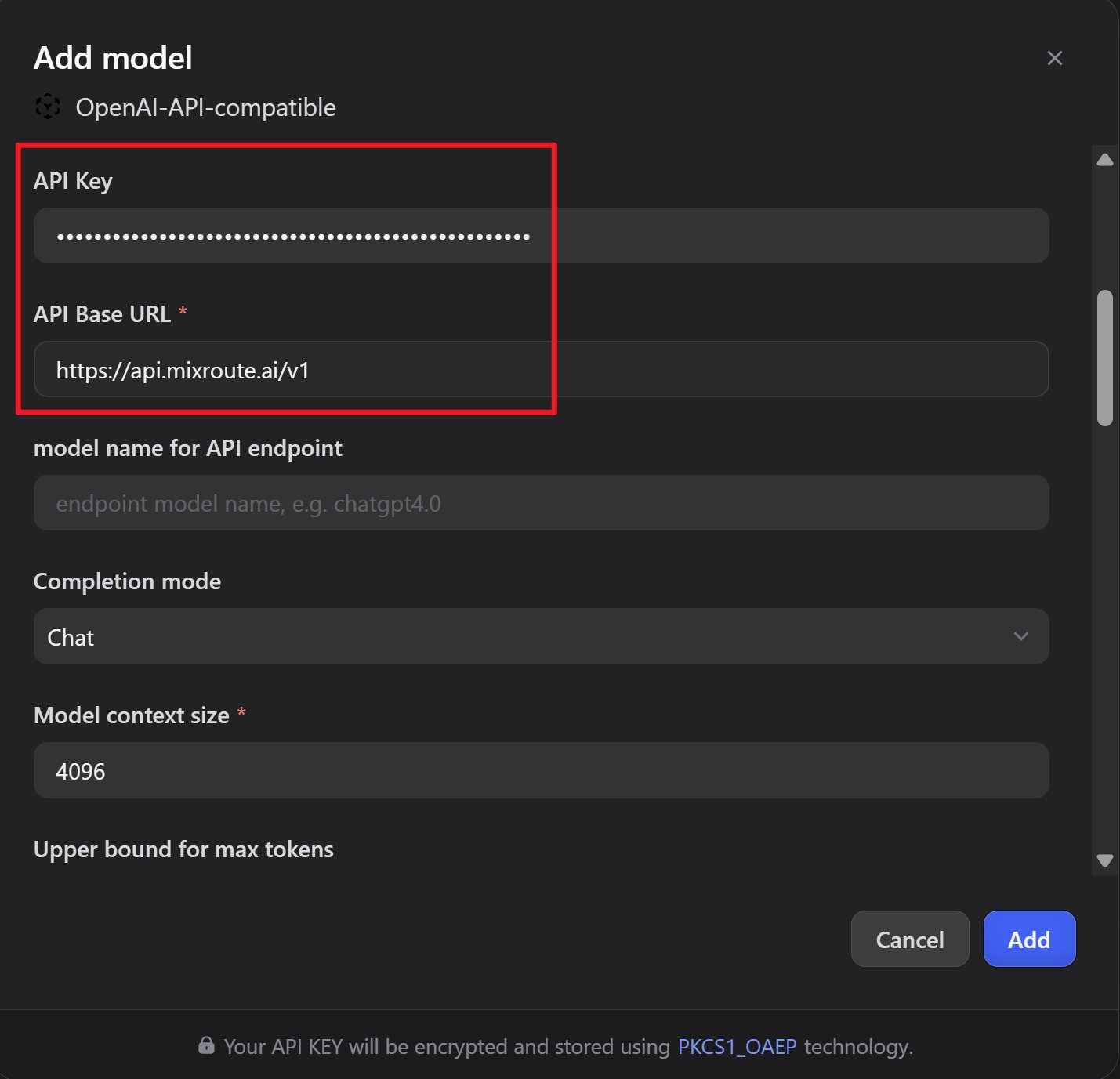
點擊「增加模型」，配置以下參數：

| 配置項 | 值 |
| - | - |
| API Key | 從 MixRoute 控制台取得 |
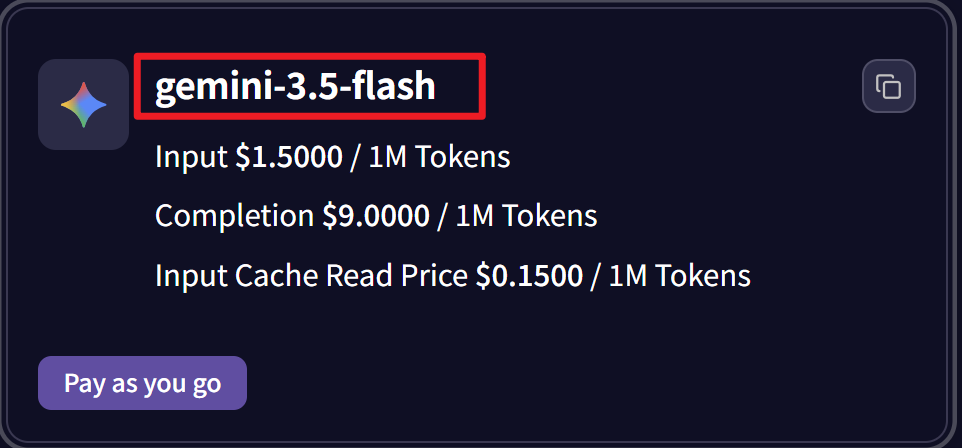
| 模型名稱 | 如 `gpt-5.5`、`gemini-3.5-flash` |
| API endpoint | `https://api.mixroute.ai/v1` |
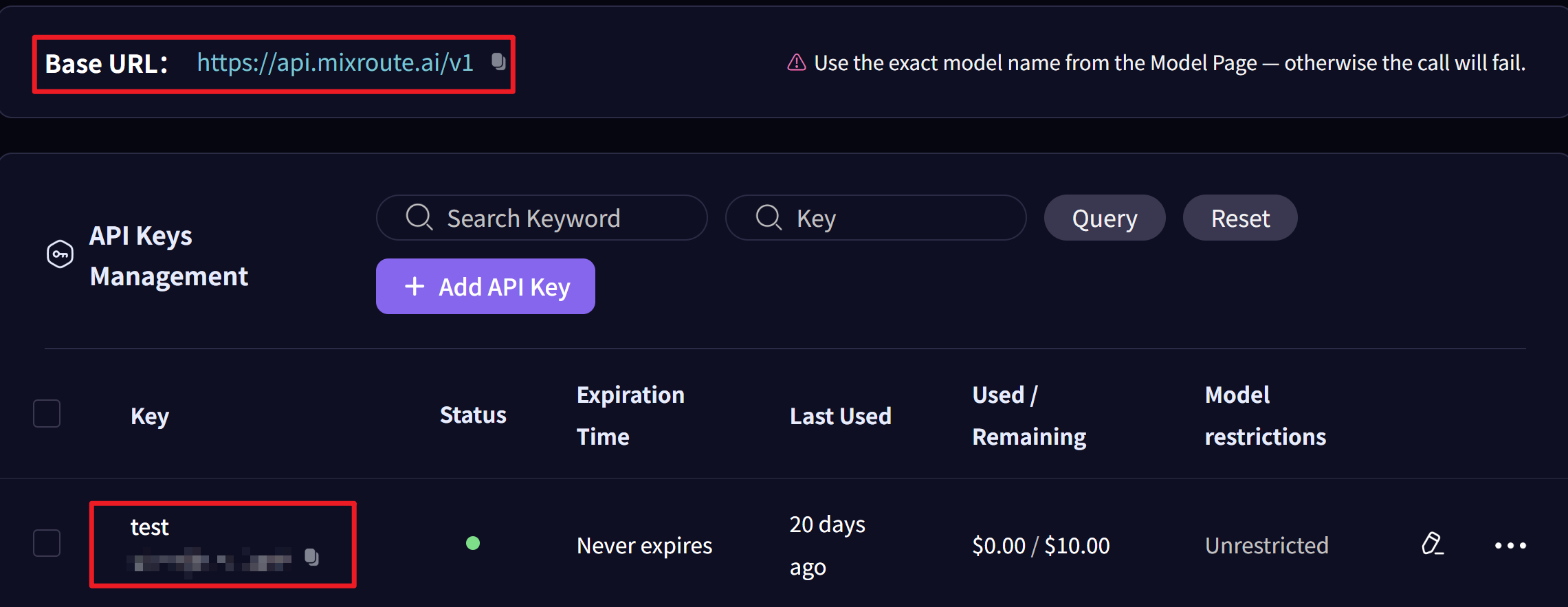
<Frame>
  <img src="https://mintcdn.com/personal-a5418d9f/iZ6FhpT4JV2kTLlz/images/dify-en-get-key.png?fit=max&auto=format&n=iZ6FhpT4JV2kTLlz&q=85&s=29517f723398ca9647ac5e16e57e1481" alt="Dify En Get Key" width="2281" height="883" data-path="images/dify-en-get-key.png" />
</Frame>

<Warning>
  確保「模型名稱」和「API endpoint 中的模型名稱」兩個欄位保持一致！
</Warning>

<Frame>
  <img src="https://mintcdn.com/personal-a5418d9f/iZ6FhpT4JV2kTLlz/images/dify-en-model-2.png?fit=max&auto=format&n=iZ6FhpT4JV2kTLlz&q=85&s=5cde19213993256860e5596e08bf8582" alt="Dify En Model 2" width="962" height="448" data-path="images/dify-en-model-2.png" />
</Frame>

<Frame>
  <img src="https://mintcdn.com/personal-a5418d9f/iZ6FhpT4JV2kTLlz/images/dify-en-4-1.png?fit=max&auto=format&n=iZ6FhpT4JV2kTLlz&q=85&s=0500850febee2e43494350a56a30cae8" alt="Dify En 4 1" width="1431" height="570" data-path="images/dify-en-4-1.png" />
</Frame>

<Frame>
  <img src="https://mintcdn.com/personal-a5418d9f/iZ6FhpT4JV2kTLlz/images/dify-en-5-1.png?fit=max&auto=format&n=iZ6FhpT4JV2kTLlz&q=85&s=4bc580c83a53d021f908773dbf23ec83" alt="Dify En 5 1" width="1429" height="1377" data-path="images/dify-en-5-1.png" />
</Frame>

### 第五步：儲存配置

點擊「儲存」完成設定。

### 第六步：測試整合

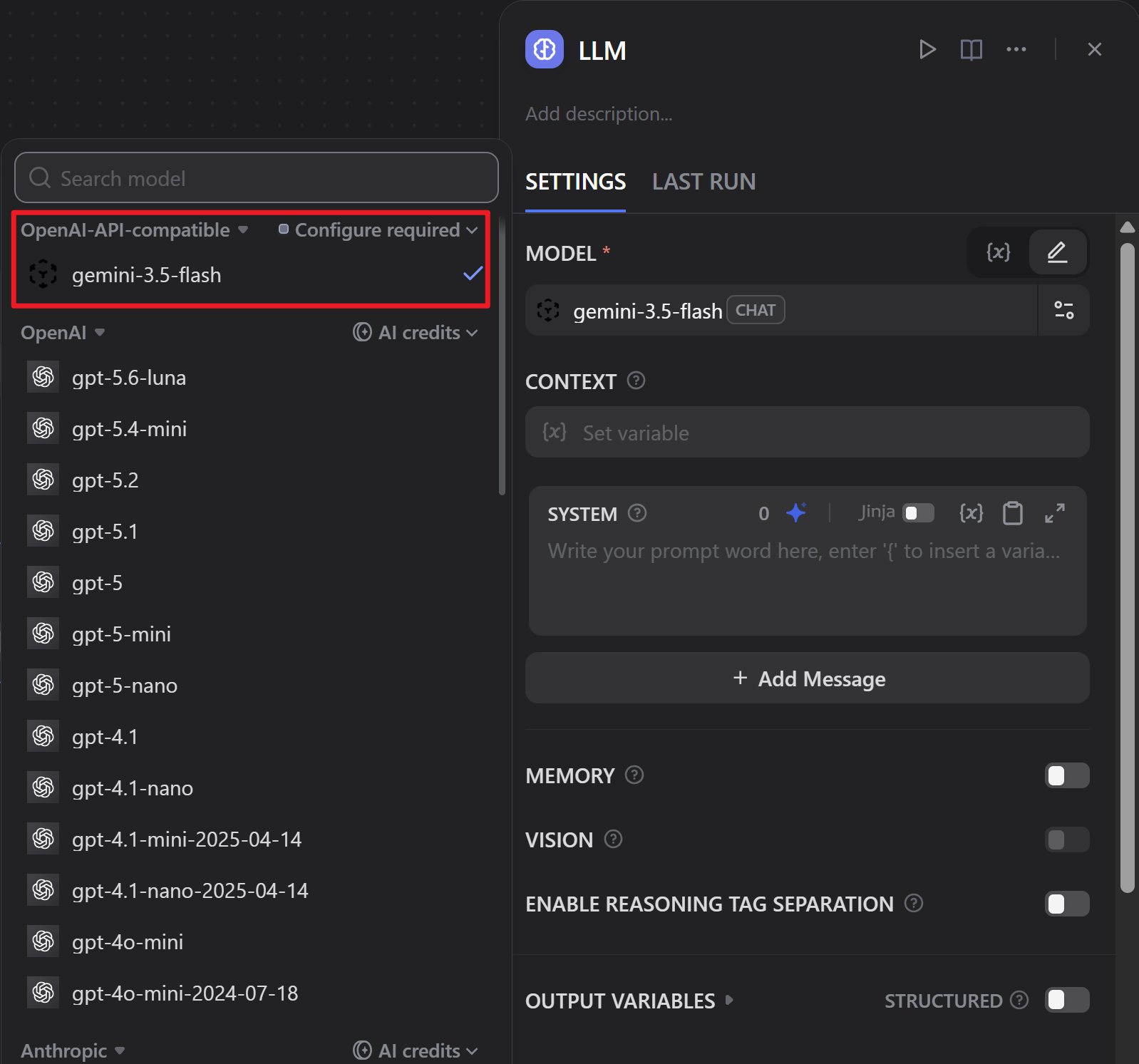
1. 建立新的工作流程或聊天機器人
2. 選擇剛剛配置的模型
3. 執行測試以驗證一切正常
<Frame>
  <img src="https://mintcdn.com/personal-a5418d9f/iZ6FhpT4JV2kTLlz/images/dify-en-6.png?fit=max&auto=format&n=iZ6FhpT4JV2kTLlz&q=85&s=67e53b7bcb392684d867ad6b02282cee" alt="Dify En 6" width="1598" height="1493" data-path="images/dify-en-6.png" />
</Frame>

## 三、優勢總結

<CardGroup cols={2}>
  <Card title="成本優勢" icon="coins">
    價格更有競爭力
  </Card>

  <Card title="效能穩定" icon="gauge">
    回應速度和官方無差
  </Card>

  <Card title="易於整合" icon="plug">
    透過 OpenAI-API-compatible 外掛輕鬆接入
  </Card>

  <Card title="功能完整" icon="check">
    支援對話、文字嵌入、語音轉文字等
  </Card>
</CardGroup>

## 四、注意事項

<Tip>
  * 確保「模型名稱」和「API endpoint 中的模型名稱」兩個欄位保持一致
  * API 位址統一使用：`https://api.mixroute.ai/v1`
  * 建議先在測試環境驗證配置，確認無誤後再用於生產環境
</Tip>


This documentation is built and hosted on [Mintlify](https://mintlify.com), a developer documentation platform.